You're tracking views, impressions, and clicks. But none of those metrics tell you whether anyone actually finished what you wanted them to finish.
Completion rate fills that gap. It measures the percentage of users who complete a specific action. Examples include watching a video to the end, clicking through every step of a demo, or submitting a form they started.
This guide covers how to calculate it, what benchmarks to expect, and seven practical ways to track completion rates across your content and campaigns.
TL;DR
- Completion rate: Percentage of users who finish a specific action, calculated as (completions ÷ starts) × 100.
- Views vs. completion rate: Views signal a start; completion rate signals a finish, indicating genuine engagement and buyer intent.
- Seven best tracking methods: Interactive demo platforms, product analytics tools, video hosting analytics, marketing automation platforms, LMS reporting, custom event tracking, and CRM integrations.
- Low completion causes: Content that's too long, weak early value, poor UX, or targeting the wrong audience.
- Pair with related metrics: Drop-off analysis, time-to-complete, and downstream conversion for the full picture.
What is completion rate
Completion rate is the percentage of users who finish a specific action out of everyone who started. You calculate it by dividing completions by starts, then multiplying by 100. The formula works whether you're measuring video views, form submissions, demo walkthroughs, or training modules.
What counts as "complete" varies by context. For a video, it might mean watching to the end or reaching a threshold like 75%.
For an interactive demo, it means clicking through all steps. For a form, it means hitting submit.
Here's how completion rate applies across common content types:
- Video completion rate: Viewer watched to the end or a defined threshold
- Demo completion rate: Prospect clicked through all steps
- Form completion rate: User submitted after starting
- Task completion rate: Assignee marked the task done on time
- Course completion rate: Learner finished all modules
The key is defining "complete" clearly before you start measuring. Without that definition, your data becomes meaningless.
Why completion rate matters more than views
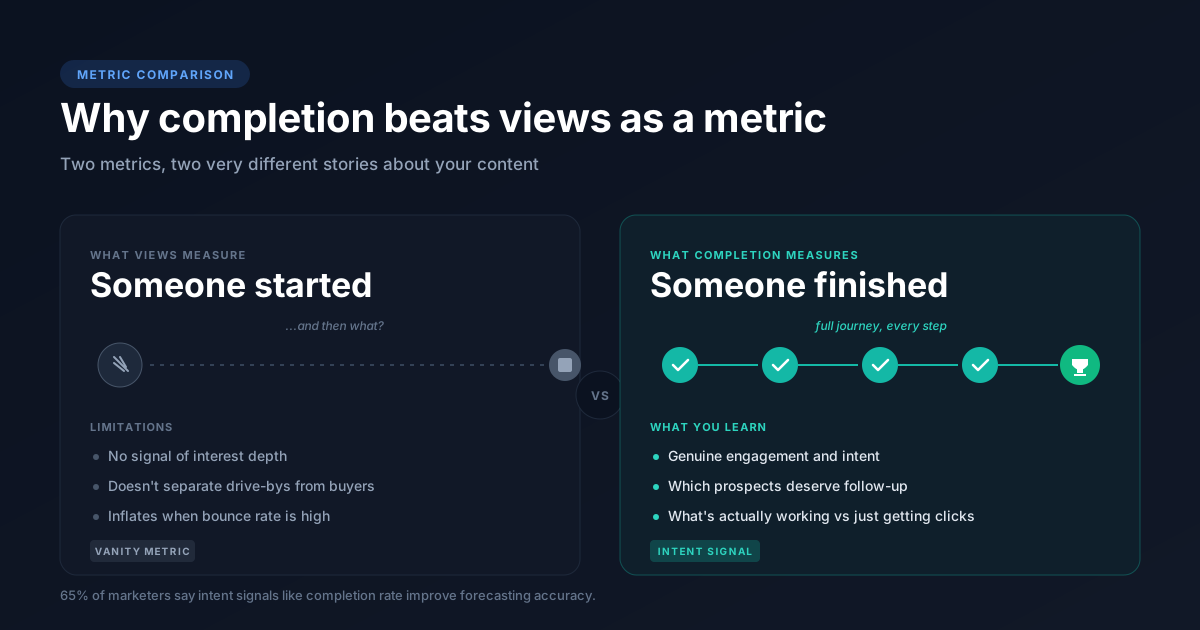
Views and impressions only tell you someone started. They don't tell you whether that person found value, stayed engaged, or took the action you wanted.
Completion rate tells you someone finished. That distinction matters because finished experiences generate actionable data. A prospect who completes your product demo signals stronger intent than one who bounced after ten seconds.
Live demos for sales teams create even stronger engagement signals through real-time interaction.
| Metric | What it measures | Limitation |
|---|---|---|
| Views/Impressions | Someone started | No signal of interest depth |
| Completion rate | Someone finished | Requires defining "complete" |
For marketing teams and sales, completion rate works as a buyer intent signal and 65% of marketers say intent signals improve forecasting accuracy. It helps you prioritize follow-up, refine content, and understand what's actually working versus what's just getting clicks.
How to calculate completion rate
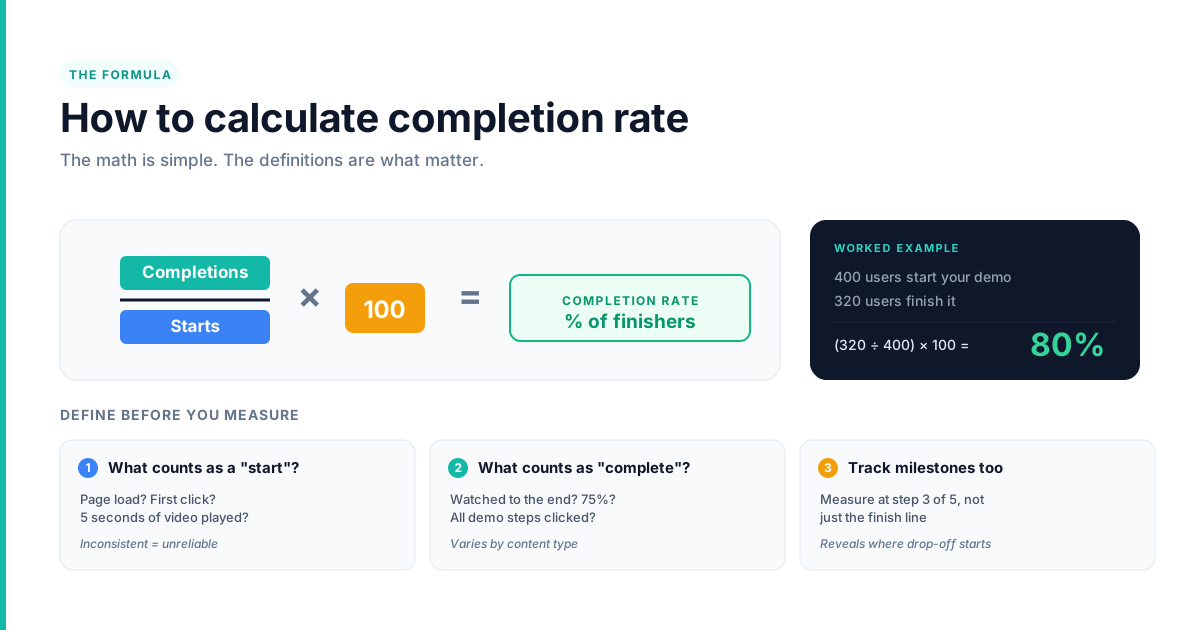
The formula is straightforward: (Number of completions ÷ Number of starts) × 100.
If 400 users start your demo and 320 finish it, your completion rate is 80%. The math is simple, but the definitions matter.
- Numerator: Users who completed the defined goal
- Denominator: Users who started or activated
- Result: Percentage expressing finish rate
Some teams also track partial completion at key milestones. If your demo has five steps, you might measure completion at step three to identify where drop-off happens. This gives you more diagnostic power than a binary complete/incomplete metric.
Define what constitutes a valid "start" before you begin. Is it loading the page? Clicking the first element?
Watching the first five seconds? Inconsistent definitions make your data unreliable.
Completion rate benchmarks by content type
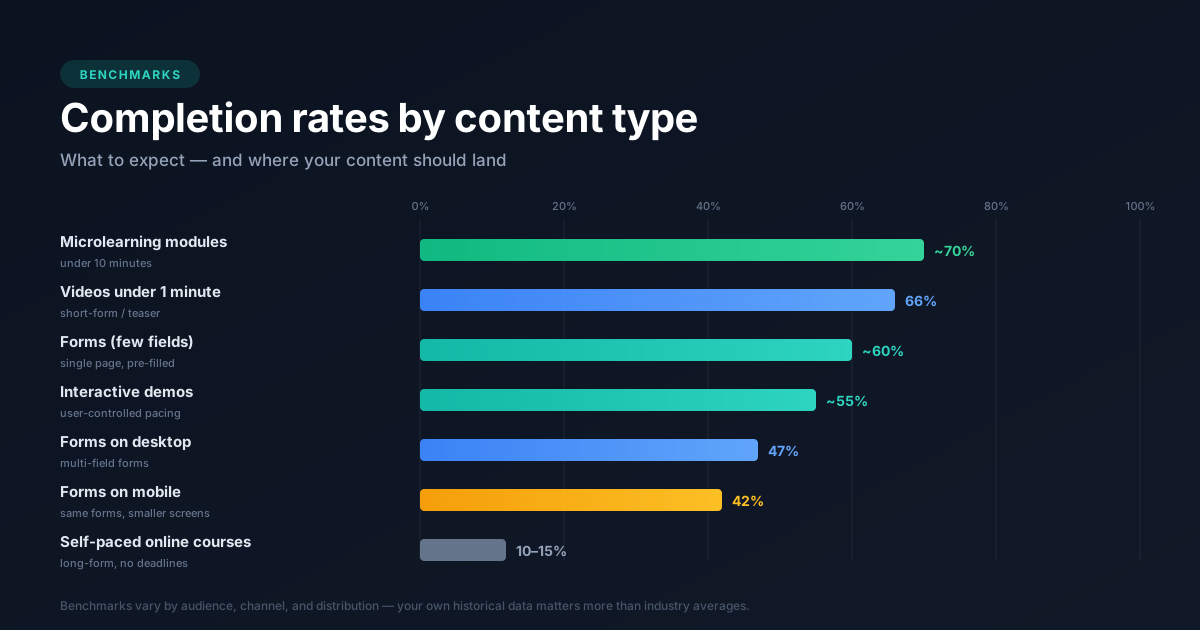
Benchmarks vary significantly by content type, audience, and distribution channel. A 60% completion rate might be excellent for a 10-minute training video but concerning for a 30-second product teaser.
Your own historical data matters more than industry averages. Track your baseline, then measure improvement over time.
Video completion benchmarks
Shorter videos complete at higher rates and often reach 66% under 1 minute. Completion drops sharply after the first few seconds, especially on social platforms where users scroll quickly. A video embedded on a landing page typically outperforms the same video in a feed because the viewer arrived with intent.
Form and survey completion benchmarks
Fewer fields correlate with higher completion. Multi-page forms have different dynamics than single-page forms, and pre-filled fields improve rates. If you're asking for information you already have, you're adding friction for no reason.
Interactive demo completion benchmarks
Interactive demos tend to outperform passive video because users control the pace. Demo centers for sales teams leverage this control to achieve 3.2x higher closure rates. They can skip sections they don't care about and spend more time on features that matter to them.
Tools like Guideflow track completion at the step level, revealing exactly where prospects drop off. That granularity helps you diagnose problems instead of guessing.
Training and course completion benchmarks
Long-form courses naturally have lower completion rates. Self-paced content without deadlines tends to stall and often sees 10 to 15% completion. Microlearning modules, typically under 10 minutes, complete at higher rates than multi-hour courses because they fit into busy schedules.
Best ways to track completion rates effectively
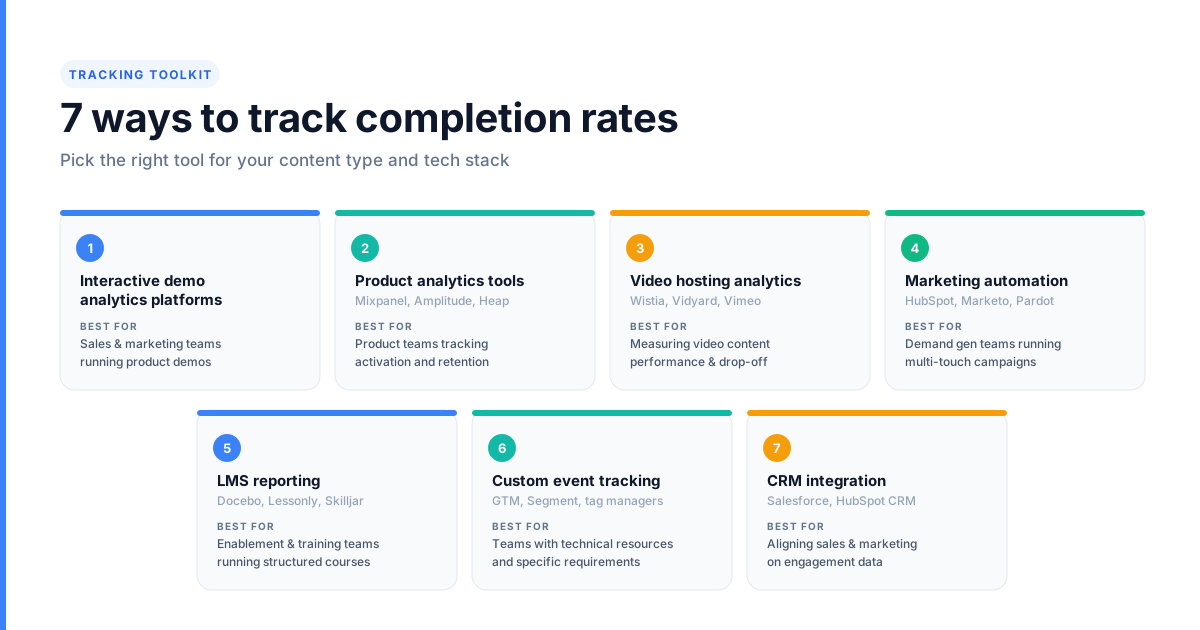
The right tracking method depends on your content type and tech stack. Use these seven practical options to track completion rates across your content and campaigns.
1. Interactive demo analytics platforms
Platforms built specifically for demo engagement track step-by-step completion, drop-off points, and time spent per step. A demo center centralizes these interactive experiences while capturing detailed engagement metrics.
Guideflow, for example, tracks which features prospects explored, where they dropped, and whether they completed the full journey. That data syncs to your CRM so sales reps see engagement signals before their next call.
Best for: Sales and marketing teams running product demos
Limitation: Specific to demo content
2. Product analytics tools
Tools like Mixpanel, Amplitude, or Heap track user events and can measure completion of defined funnels. They're powerful for product teams measuring onboarding or feature adoption.
Best for: Product teams tracking activation and retention
Limitation: Requires engineering to instrument events
3. Video hosting platform analytics
Platforms like Wistia, Vidyard, or Vimeo provide native completion tracking for hosted videos. You can see exactly where viewers drop off and which sections they rewatch.
Best for: Marketing teams measuring video content performance
Limitation: Data stays siloed unless integrated with CRM or MAP
4. Marketing automation platforms
Tools like HubSpot, Marketo, or Pardot track completion of email sequences, form submissions, and landing page interactions. They're already in most marketing automation stacks.
Best for: Demand gen teams running multi-touch campaigns
Limitation: Completion tracking is often limited to form submissions
5. Learning management system reporting
LMS platforms like Docebo, Lessonly, or Skilljar have built-in course completion tracking. They're standard for enablement and training teams.
Best for: Enablement and training teams
Limitation: Data may not sync easily to sales or marketing systems
6. Custom event tracking with tag managers
Google Tag Manager or Segment can fire completion events based on defined triggers like scroll depth, button clicks, or page exits. This approach offers flexibility for teams with specific tracking needs.
Best for: Teams with technical resources and custom requirements
Limitation: Requires setup and ongoing maintenance
7. CRM integration for completion signals
Push completion data from any source into Salesforce, HubSpot, or another CRM so sales reps see which content prospects finished. Guideflow integrates with major CRMs to sync demo completion as a lead qualification signal.
Best for: Aligning marketing and sales on engagement data
Limitation: Depends on quality of source data
| Method | Best for | Key limitation |
|---|---|---|
| Interactive demo platforms | Sales, marketing | Specific to demo content |
| Product analytics | Product teams | Requires engineering |
| Video hosting analytics | Video content | Siloed data |
| Marketing automation | Email, forms | Limited content types |
| LMS reporting | Training | Poor system integration |
| Custom event tracking | Flexible needs | Technical setup |
| CRM integration | Sales alignment | Depends on source data |
Common mistakes when measuring completion rate
Even with the right tools, teams make errors that undermine their data. Learning to track completion rates accurately helps you avoid the four most frequent mistakes.
Counting opens as completions
Opening an email, loading a page, or starting a video is not completion. Define completion as the final intended action, not the first interaction. If you're counting opens as completions, you're inflating your numbers and missing the real story.
Ignoring partial completion data
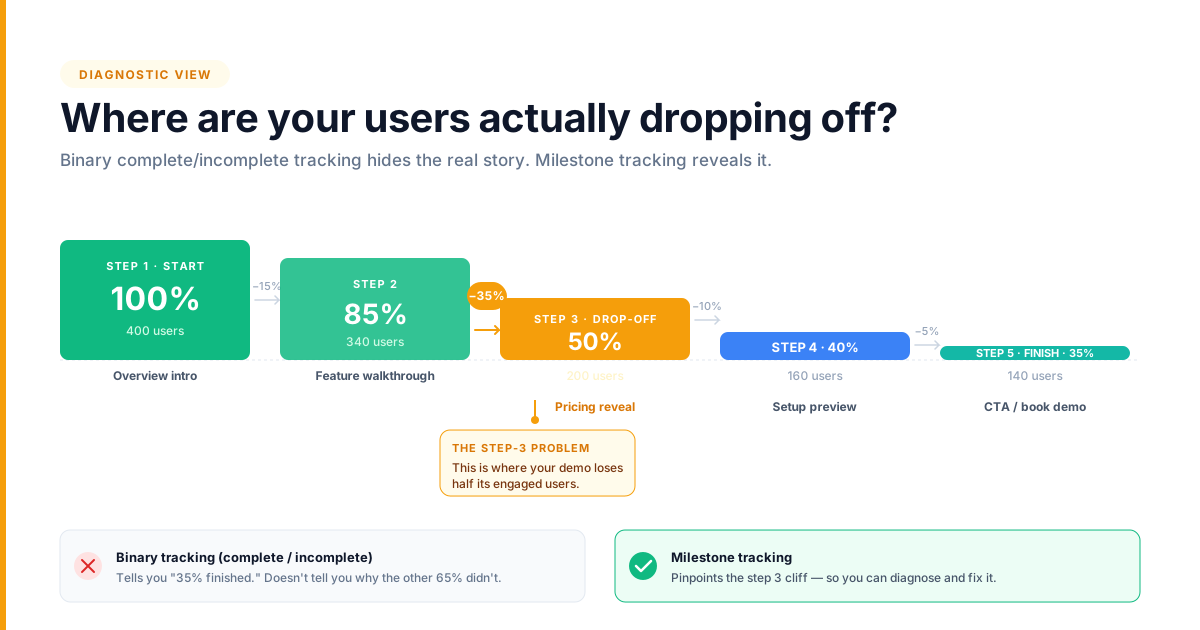
Binary complete/incomplete tracking misses where users drop off. If 80% of users abandon at step three of five, you have a step-three problem. Track milestone-level completion to diagnose issues instead of guessing.
Using aggregate numbers without segmentation
Overall completion rate hides differences between segments because 47% desktop and 42% mobile complete forms. Your completion rate might be 60% overall, but 80% for enterprise prospects and 40% for SMB. Segment by persona, source, device, and content type to find patterns worth acting on.
Setting benchmarks without context
Comparing your completion rate to generic industry benchmarks can mislead. A 50% completion rate might be excellent for your content type and audience, or it might be terrible. Your own historical data and content context matter more than external averages.
How to improve completion rates
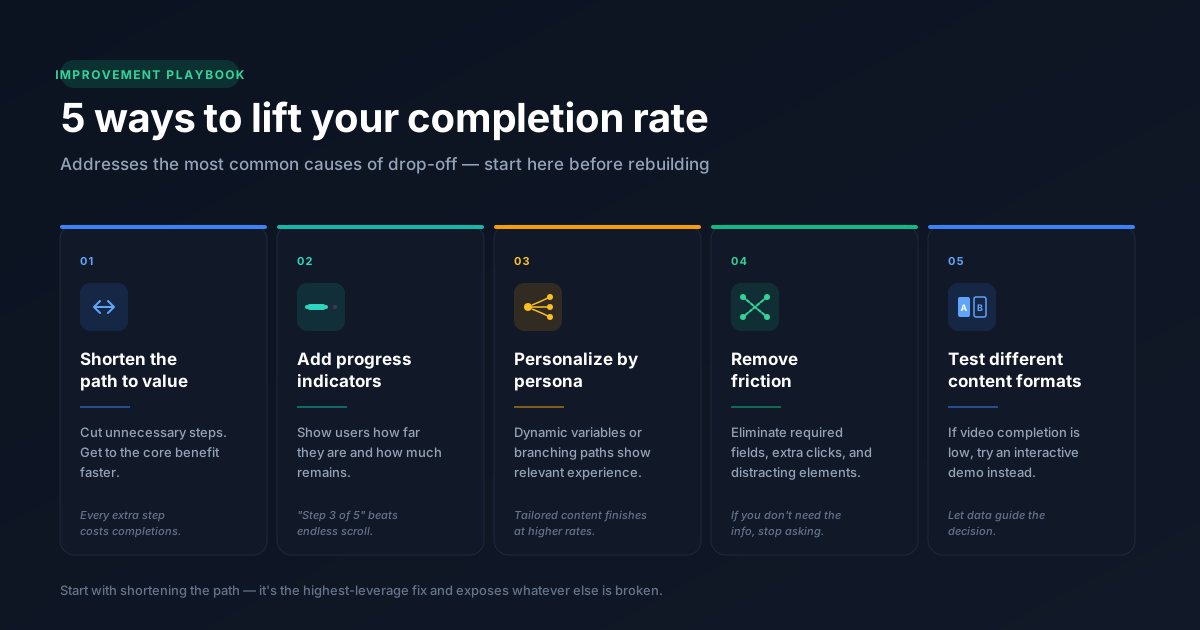
If your completion rate is lower than you'd like, five approaches address the most common causes.
1. Shorten the path to value
Cut unnecessary steps. Get to the core benefit faster. Every additional step costs completions.
Guideflow lets teams edit and trim demo flows without re-recording, so you can test shorter versions quickly.
2. Add progress indicators
Show users how far they are and how much remains. Progress bars reduce perceived effort and give users a reason to keep going. "Step 3 of 5" is more motivating than an endless scroll.
3. Personalize by persona or use case
Tailored content completes at higher rates than generic content. Use dynamic variables or branching paths to show each user the most relevant experience. A healthcare prospect doesn't need to see retail examples.
4. Remove unnecessary friction
Eliminate required fields, extra clicks, and distracting elements. Every friction point costs completions. If you're asking for information you don't need, stop asking.
5. Test different content formats
If video completion is low, try an interactive demo or explore sandbox demos for hands-on product experiences. If a long demo underperforms, try a shorter version. Experiment systematically and let the data guide your decisions.
Metrics to track alongside completion rate
Completion rate alone doesn't tell the full story. Track completion rates alongside related metrics for deeper insight.
- Drop-off rate by step: Identify exactly where users abandon. Focus improvement efforts on the highest drop-off points.
- Time to complete: How long users take to finish reveals engagement quality. Fast completion may indicate skipping; slow completion may indicate confusion.
- Engagement depth score: A composite metric combining steps viewed, interactions, and time. Useful for comparing relative engagement across content pieces.
- Conversion rate after completion: The real goal is often what happens next. Track completion alongside downstream conversion to measure true impact.
How to use completion data to drive pipeline
Completion rate works as a buyer intent signal and 65% of marketers say intent signals improve forecasting accuracy. Prospects who finish product demos or key content signal stronger interest than those who only view headlines.
Here's how to turn completion data into pipeline:
- Lead scoring: Weight completed demos higher than opened emails
- Sales follow-up: Reference specific features the prospect explored
- Content optimization: Double down on high-completion content, revise low performers
- Campaign targeting: Retarget completers with next-step offers
Guideflow surfaces this data in CRM so reps know exactly what prospects explored before a call. That context makes follow-up conversations more relevant and more likely to convert.
FAQs about tracking completion rates
A "good" completion rate depends on demo length, audience, and distribution channel. Compare against your own historical data rather than generic benchmarks.
Use no-code tools like Guideflow, video hosting platforms with built-in analytics, or marketing automation platforms that track form and email completions natively.
Cumulative completion rate measures the total percentage of users who have ever completed a goal. This is aggregated over time rather than within a single session or cohort.
Yes. Prospects who complete product demos or key content signal stronger intent than those who only view headlines. Use completion as a lead qualification input.
Review weekly for active campaigns or content. Modern demand generation tools can automate how you track completion rates and alert you to significant changes.
Review monthly for evergreen assets. Set alerts for sudden drops that may indicate technical issues.