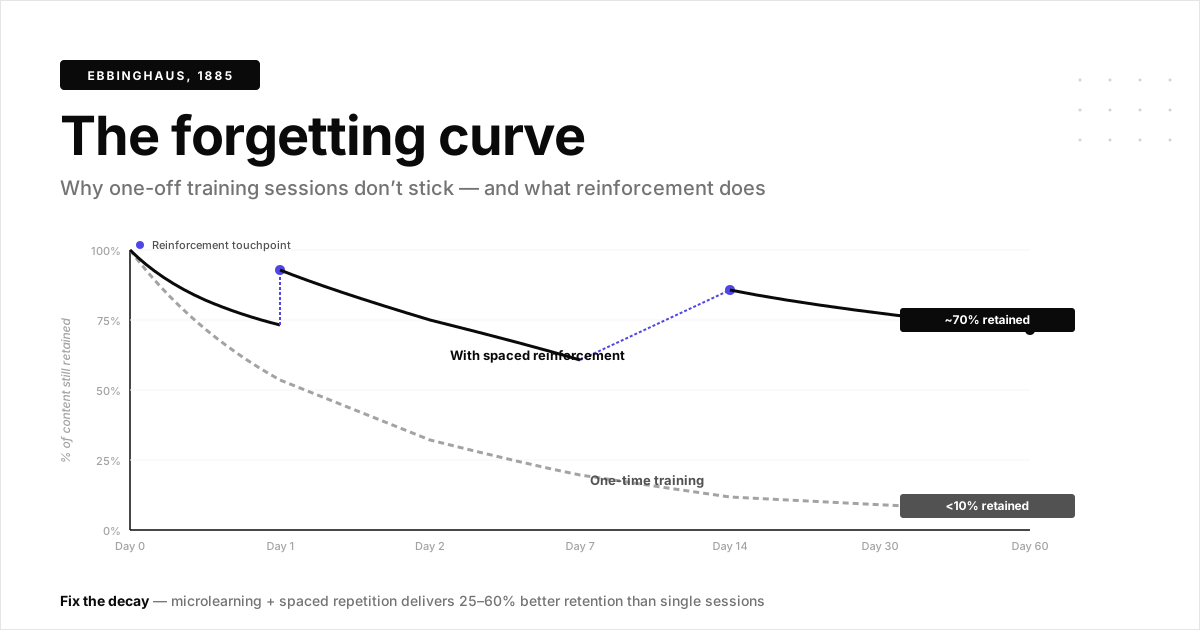
Most user training fails not because the content is bad. It arrives at the wrong time, in the wrong format, for the wrong audience. Users sit through generic sessions, forget 80% within a week, and then flood your support queue with the same questions the training supposedly answered.
A structured user training process fixes this by matching the right content to the right user at the right moment. Training and enablement teams increasingly use interactive demos to achieve this personalized, scalable approach. This guide covers the eight steps that actually drive adoption and reduce support tickets, from needs assessment through measurement and iteration.
What is user training
An effective user training process starts with assessing skill gaps and setting clear goals. It then moves to creating tailored materials and using hands-on methods for better adoption. The key components include identifying user needs, scheduling training sessions, delivering content in multiple formats, and gathering feedback for continuous improvement.
End user training is the structured process of teaching customers or internal users how to use a product or software effectively. Unlike employee onboarding, which can be accelerated with interactive guides that cover company culture and policies, end user training focuses specifically on product proficiency.
The goal is straightforward: help users accomplish their tasks confidently and independently. When done well, training transforms confused users into power users who rarely contact support.
Why user training matters for product adoption
Most SaaS companies lose users not because the product lacks features, but because users never learn to use the features that exist. The gap between "signed up" and "getting value" is where adoption dies and 20% of voluntary churn is linked to poor onboarding.
A formal training process directly impacts your bottom line in four ways:
- Reduces support burden: Users who understand the product submit fewer tickets. Interactive guides for customer support provide self-service resources that resolve issues before they become tickets
- Accelerates time-to-value: Trained users reach their first success milestone faster
- Improves retention: Confident users are less likely to churn
- Enables expansion: Users who master core features are more likely to adopt advanced capabilities
Every user who self-serves through training is one fewer ticket in your queue and one more advocate for your product.
Types of user training methods
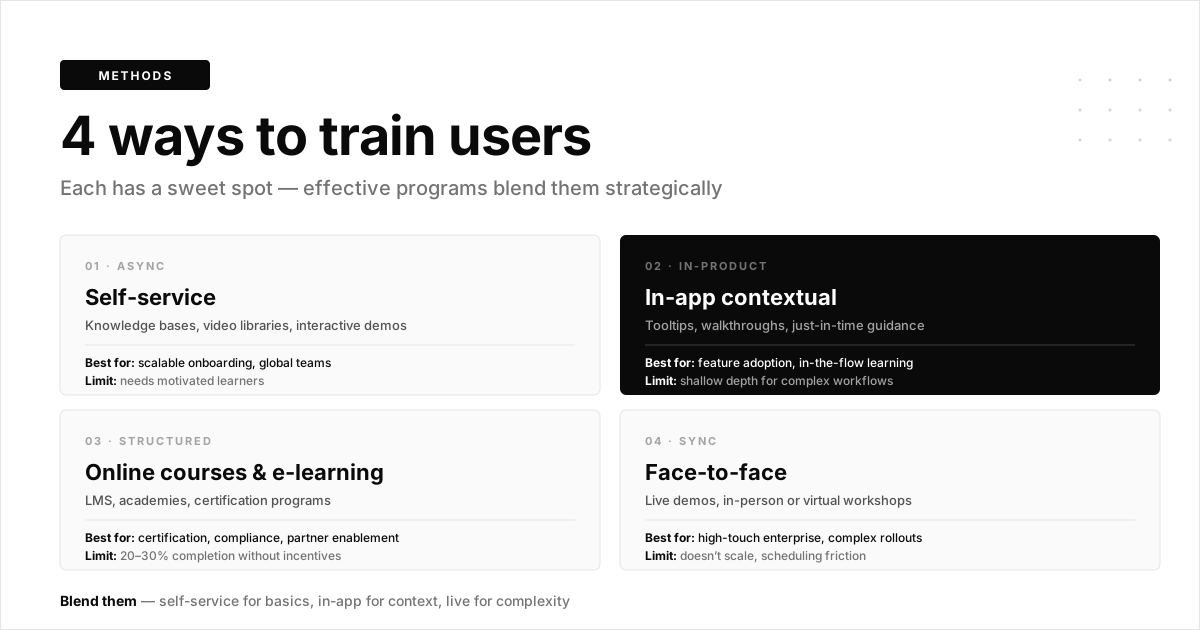
Effective training programs typically combine multiple methods based on content complexity and user preferences. No single user training process works for every situation, so understanding the tradeoffs helps you pick the right mix.
Self-service training
Self-service training includes on-demand resources users access independently: knowledge bases, video libraries, and interactive demos. This method scales well for high-volume user bases with simple to moderate product complexity.
The tradeoff? It requires motivated learners who will seek out resources proactively.
In-app contextual training
Contextual training appears inside the product at the moment of need. Think tooltips, guided walkthroughs, and contextual help that surfaces when users encounter specific features.
This approach delivers learning in the flow of work. Users don't leave the product to learn; they learn while doing.
Online courses and e-learning
Structured curriculum delivered through an LMS or academy works best for certification programs, compliance training, and partner enablement. Online courses provide depth but often suffer from 20-30% completion rates without incentives.
Face-to-face training
Live demos and interactive sessions, whether in-person or virtual, remain valuable for complex implementations or strategic accounts. The resource investment is significant, but the personalized attention can accelerate adoption for high-value customers.
| Training method | Best for | Limitations |
|---|---|---|
| Self-service training | Scalable onboarding, global teams | Requires motivated learners |
| In-app contextual training | Just-in-time learning, feature adoption | Limited depth for complex workflows |
| Online courses and e-learning | Comprehensive certification programs | Low completion rates without incentives |
| Face-to-face training | High-touch enterprise accounts | Does not scale, scheduling friction |
8 steps to build a user training process that scales
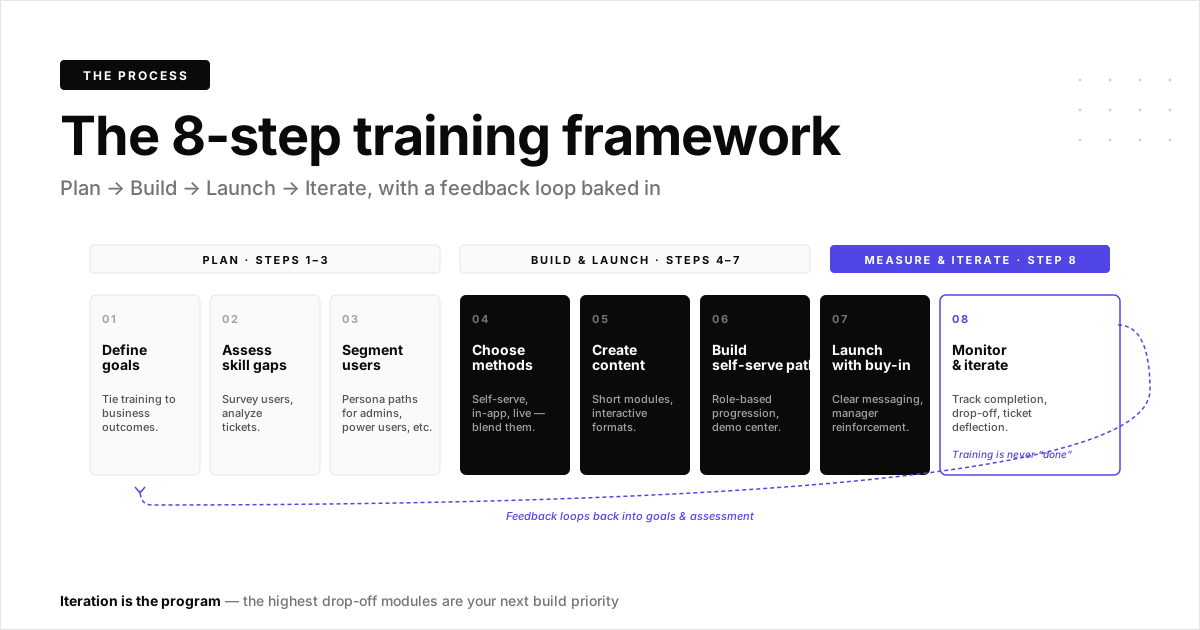
1. Define training goals tied to business outcomes
Start with what success looks like. Vague goals like "improve user knowledge" don't help anyone measure progress.
Instead, connect training objectives to measurable outcomes. For example: reduce ticket volume by 25%, decrease onboarding time from 14 days to 7, or increase feature adoption from 30% to 50%. Clear targets give your program direction and make ROI visible to stakeholders.
2. Assess end user needs and skill gaps
A user training process built on assumptions misses the mark. Before you build anything, gather input from multiple sources.
Survey users about their confidence levels. Analyze support tickets for common questions. Interview your customer success managers about where users struggle.
Many CS teams now use interactive guides to proactively address common friction points before they escalate. The gap between current proficiency and required proficiency defines your curriculum.
3. Segment users by role and use case
Different users need different training paths. An admin configuring integrations needs different content than an end user running daily reports.
Create persona-based training tracks. A power user track might cover advanced features and shortcuts.
A casual user track might focus only on core workflows. One-size-fits-all training wastes everyone's time.
4. Choose your training delivery methods
Match your delivery method to content complexity and user preference. A blended approach typically works best.
- Self-service for basics: Let users learn independently through documentation and videos
- In-app guidance for context: Deploy tooltips and walkthroughs at the moment of need
- Live sessions for complexity: Reserve synchronous time for topics that benefit from Q&A
5. Create training content users will actually complete

Long training modules don't get finished because users are 58% more likely to engage in shorter segments. Keep modules short, ideally under 10 minutes each.
Use interactive formats over passive video. Hands-on practice beats instruction every time. Sandbox environments let users learn by doing in a safe space where mistakes don't matter.
Tip: Track completion rates by module length. You'll likely find a clear dropoff point that tells you exactly how long is too long for your audience.
6. Build self-serve training paths
Organize content into logical sequences that users can navigate independently. Create role-based learning paths with clear progression from beginner to advanced. Some organizations build comprehensive interactive demo libraries that empower teams with ready-to-use training materials tailored to different skill levels.
A demo center or resource hub makes it easy to find answers without submitting a ticket. The goal is to make self-service the path of least resistance.
7. Launch with clear communication and stakeholder buy-in
Announce your training program with clear messaging about what's available and why it matters. Get managers and champions to reinforce participation.
Surprise rollouts fail. Users ignore training they don't understand the purpose of. Explain the "what's in it for me" upfront.
8. Monitor adoption metrics and iterate
Track completion rates, time-to-completion, and downstream outcomes like support ticket reduction and feature adoption. Use analytics to identify where users drop off.
Training is never "done." The modules with the highest drop-off rates are your improvement priorities.
Best practices for user training during software rollout
Software implementations create unique user training process challenges. Users face a new system while still doing their jobs, and the pressure to get it right is high.
Start training planning before implementation begins
Training cannot be an afterthought. Build training timelines into your implementation project plan from day one.
Identify training owners early. Determine who creates content, who delivers live sessions, and who measures success. Waiting until go-live to figure this out guarantees chaos.
Use safe product environments for hands-on practice
Users learn better by doing, but fear of breaking production data creates hesitation. Provide sandbox environments where users can practice without consequences.
Interactive demos let users walk through workflows step-by-step in a controlled environment. This reduces anxiety and builds confidence before they touch the live system.
Personalize training paths by user segment
Tailor content to each user group's role and workflow. Forcing a finance user to sit through marketing workflows wastes time and breeds resentment.
Personalize demos for every prospect and user segment with dynamic variables that show relevant examples and use cases.
Make training available on demand
Not everyone can attend live sessions. Time zones, schedules, and workloads vary across your user base.
Provide async alternatives for every synchronous session. Users who miss the live training or need a refresher later will thank you.
Connect training directly to support resources
Link training content to relevant help articles and support channels. When users finish a module, make it easy to get help if they get stuck applying what they learned.
The handoff from training to support determines whether learning translates to action.
How to measure user training effectiveness
Engagement metrics tell you whether users interact with the user training process. Outcome metrics tell you whether training works. You want both.
- Completion rate: What percentage of users finish the training program
- Time-to-completion: How long it takes users to work through training
- Knowledge retention: Quiz scores or certification pass rates
- Behavioral outcomes: Feature adoption rates, support ticket volume, time-to-first-value
- User feedback: NPS or satisfaction surveys on the training experience
Connect training engagement to product usage data. If users complete training but don't change behavior, the training content needs work.
Common user training mistakes to avoid
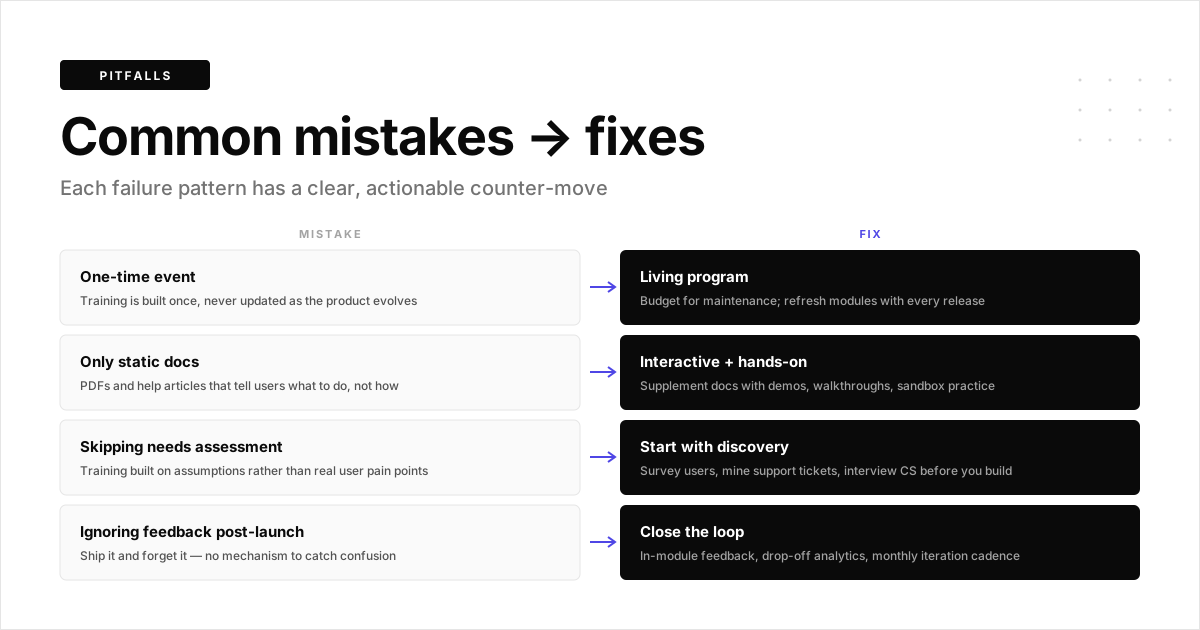
Treating training as a one-time event
Products evolve, so training evolves too. Build a plan for ongoing updates, not just launch-day content.
New features, UI changes, and workflow improvements all require training refreshes. Budget for maintenance from the start.
Relying only on static documentation
PDFs and help articles have their place, but users learn faster through interactive, hands-on experiences. Supplement docs with video, demos, and guided walkthroughs.
Static content tells users what to do. Interactive content shows them how.
Skipping the needs assessment
Training built on assumptions about what users struggle with rarely addresses actual pain points. Invest time upfront to understand real knowledge gaps.
The 30 minutes you spend interviewing users saves hours of creating content nobody uses.
Ignoring user feedback after launch
Collect feedback continuously. If users report confusion or frustration, address it quickly.
A feedback loop turns your training program into a living system that improves over time.
How interactive demos accelerate user training
Interactive demos solve common user training process challenges by letting users learn through doing rather than watching. They scale without requiring live trainers and provide engagement data that reveals knowledge gaps.
Common use cases include:
- Onboarding: Guide new users through core workflows step by step
- Feature education: Introduce new features with hands-on walkthroughs
- Just-in-time help: Embed demos in help centers for self-service support
- Rollout training: Let users practice in a safe, controlled environment during software implementations
Marketing teams use interactive demos to educate prospects. Customer success teams use them to reduce support tickets. The same asset serves multiple purposes across the customer lifecycle.
Start building interactive training demos with Guideflow
FAQs about the user training process
The 70-20-10 model suggests learning happens through three channels: 70% from on-the-job experience, 20% from coaching and mentoring, and 10% from formal training courses. This framework reminds us that formal training alone rarely creates lasting behavior change.
Training duration depends on product complexity and user role. Most effective programs break content into short modules of 5-15 minutes each.
Users complete modules over days or weeks rather than in a single marathon session. Microlearning delivers 25-60% retention gains and fits into busy schedules.
Customer onboarding is the broader process of helping new customers get started and reach their first success milestone. End user training focuses specifically on teaching product skills. Training can continue throughout the customer lifecycle, while onboarding typically covers the first 30-90 days.
Make training optional but valuable by connecting it to outcomes users care about. Offer self-paced alternatives to live sessions.
Embed learning directly into the product through in-app guidance so users learn while they work. Resistance often signals that training feels like a burden rather than a benefit.