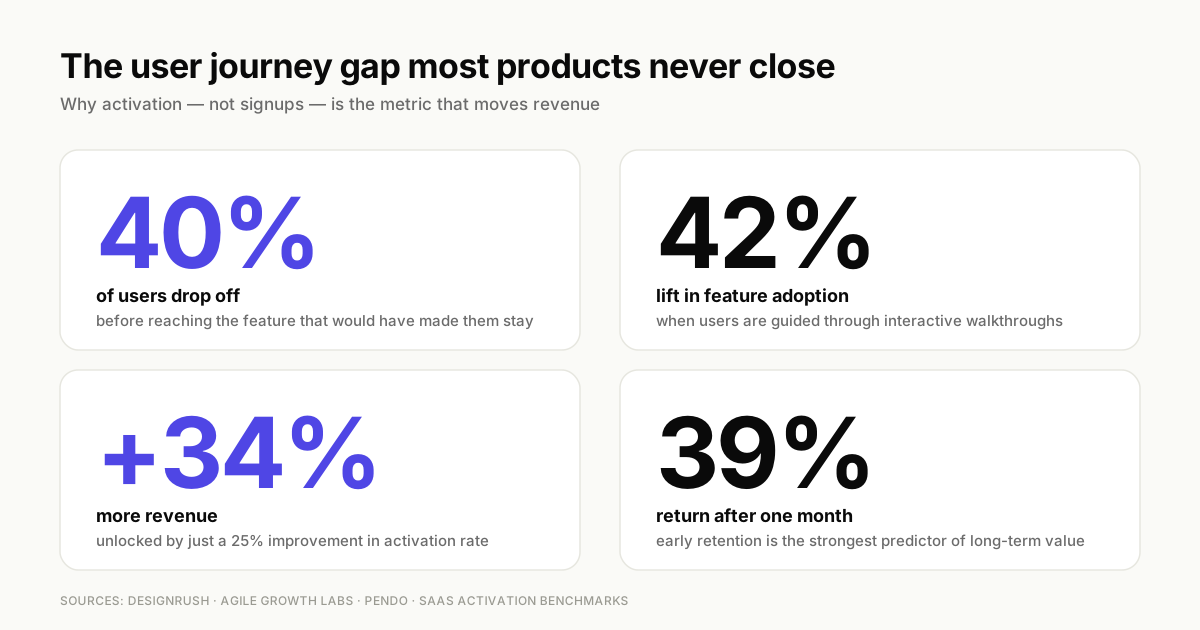
Users sign up, click around, and disappear. You check the analytics: 40% drop-off before they even reach the feature that would have made them stay.
The problem usually isn't your product. It's the path to value.
This guide covers how to diagnose where your user journey breaks and map it properly. It also covers the 12 strategies that actually move activation and retention metrics.
TL;DR
- A user journey is the complete path from first interaction to goal achievement. Improving it requires mapping actions, emotions, and friction points at each stage.
- Diagnose problems first by tracking navigation patterns, identifying drop-off points, and measuring time to first value before making changes.
- The 12 strategies that drive the biggest impact focus on reducing friction, personalizing paths by segment, and using interactive guidance instead of static documentation.
- Measure success through activation rate, funnel conversion, feature adoption, and early retention rather than vanity metrics like page views.
- User journeys break when products change, so build continuous improvement into your process rather than treating mapping as a one-time project.
What is a user journey and why improving it matters
A user journey is the complete sequence of steps someone takes from their first interaction with your product to achieving their goal. This path includes every touchpoint: the signup flow, the first login, the features explored, and the moments where users either succeed or give up.
The user journey differs from the broader customer journey in scope. A customer journey spans all interactions across marketing, sales, and support throughout the entire relationship. A user journey focuses specifically on in-product experiences and the path to value.
When user journeys break, the consequences show up fast:
- Low activation rates: Users sign up but never reach the moment where your product delivers value.
- High support load: Confusion at key steps generates tickets that drain customer success resources.
- Early churn: Users leave before experiencing the benefit they signed up for.
How to diagnose and improve user journey problems
Before fixing anything, you need to know where the journey breaks. Guessing leads to wasted effort on problems that don't exist while real friction points go unaddressed.
Track user navigation patterns across touchpoints
Path analysis shows you how users actually move through your product versus how you designed them to move. A touchpoint is any interaction: a page view, a button click, a feature used, or a form submitted.
Look for unexpected detours. If users consistently visit the help center before completing setup, that's a signal. If they skip your onboarding flow entirely, that tells you something about its perceived value.
Identify drop-off points with funnel analysis
Funnel analysis tracks conversion between defined stages. Set up funnels around your critical user journey: signup to first login, first login to setup complete, setup complete to first meaningful action.
The stages with the steepest drop-offs are your highest-priority problems. A 60% drop between signup and first login points to friction in your welcome experience. A 40% drop after setup suggests users don't know what to do next.
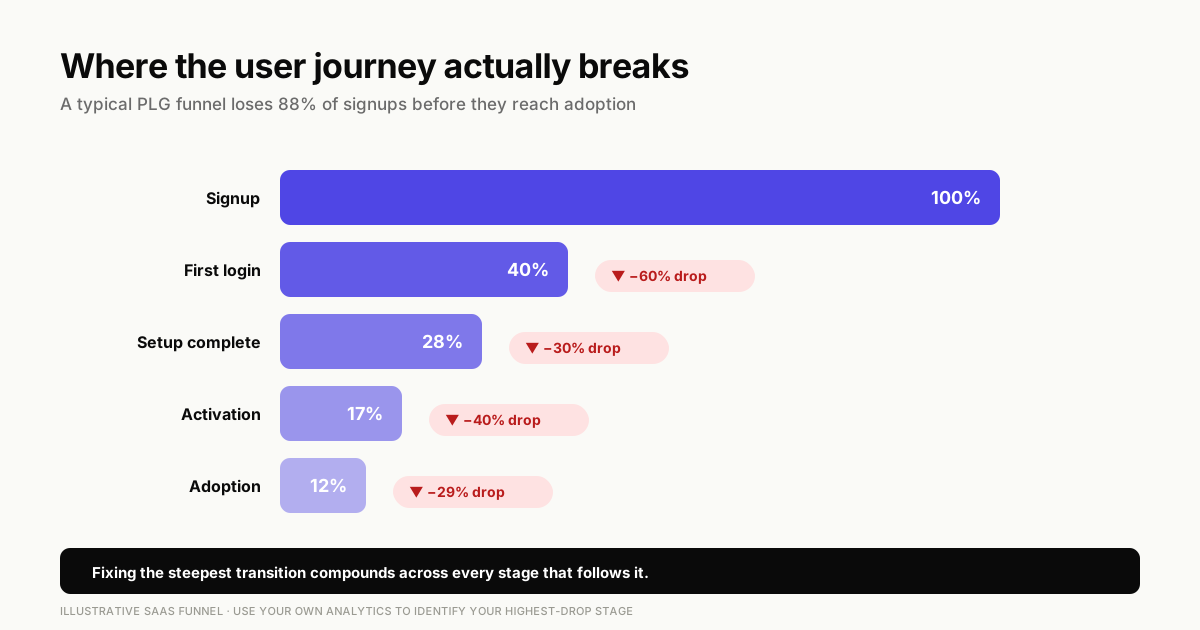
You can analyze user behavior at each step to understand not just where users drop, but what they explored before leaving.
Measure time to first value
Time to first value (TTFV) is the duration from signup to the moment a user experiences your product's core benefit. For a project management tool, that might be creating their first task. For an analytics platform, it might be seeing their first dashboard with real data.
Shorter TTFV correlates strongly with higher retention. Users who reach value quickly are more likely to return, upgrade, and recommend your product.
Collect qualitative feedback at friction points
Numbers tell you where users struggle. Qualitative feedback tells you why.
Add micro-surveys at moments where analytics show drop-off. Keep them short: one question, triggered at the right moment. Combine quantitative data (where users drop) with qualitative insight (why they drop) to prioritize fixes that address root causes rather than symptoms.
How to map a user journey step by step
A user journey map visualizes the path users take, including their actions, emotions, and friction points at each stage. Here's how to build one that actually informs decisions.
1. Define the actor and scenario
Every useful map starts with a specific user persona and their goal. The "actor" is who you're mapping for: a new user, an admin, a power user. The "scenario" is the specific task they want to complete.
Avoid mapping for "all users." Generic maps produce generic insights. A map for "marketing manager setting up their first campaign" will reveal different friction points than one for "IT admin configuring SSO."
2. Identify journey phases and customer touchpoints
Break the journey into phases that match your product's natural progression. Common phases include awareness, onboarding, activation, adoption, and expansion.
Within each phase, list the customer touchpoints: the specific interactions where users engage with your product. Touchpoints might include landing pages, signup forms, welcome emails, in-app tutorials, or feature discovery moments.
3. Document user actions and emotions
For each touchpoint, capture three things:
- Actions: What the user clicks, reads, or completes.
- Mindset: What the user expects or assumes at this moment.
- Emotions: Frustration, confusion, confidence, or delight.
Emotions reveal friction even when analytics look fine. A user might complete a step but feel frustrated doing it, which predicts future churn.
4. Mark friction points and opportunities
Identify where users struggle (friction) and where you can add value (opportunities). Friction points become your prioritized improvement list. Opportunities are moments where guidance, personalization, or feature discovery could accelerate the journey.
5. Validate with real user data
Maps based on assumptions fail. Validate every assumption with analytics, session recordings, or user interviews. If you think users struggle at step three, confirm it with data before investing in a fix.
Sample user journey map for SaaS onboarding
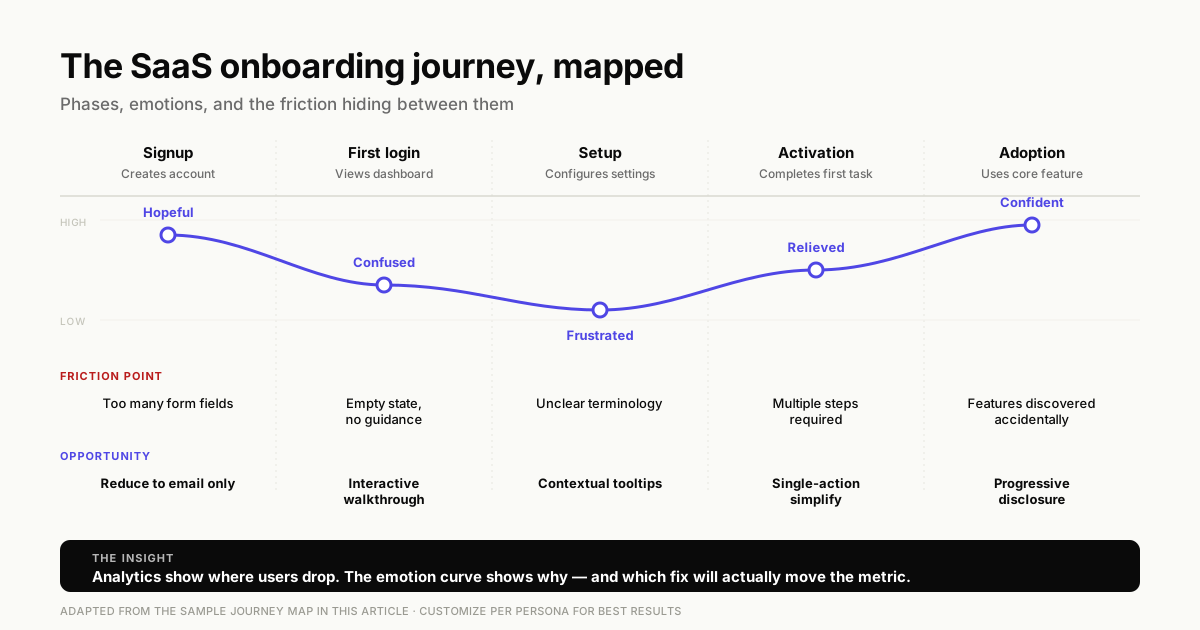
Here's what a practical user journey map looks like for a B2B SaaS onboarding flow:
| Phase | User action | Emotion | Friction point | Opportunity |
|---|---|---|---|---|
| Signup | Creates account | Hopeful | Too many form fields | Reduce to email only |
| First login | Views dashboard | Confused | Empty state, no guidance | Add interactive walkthrough |
| Setup | Configures settings | Frustrated | Unclear terminology | Add contextual tooltips |
| Activation | Completes first task | Relieved | Multiple steps required | Simplify to single action |
| Adoption | Uses core feature | Confident | Discovers advanced features accidentally | Surface features progressively |
This format makes friction visible and connects each problem to a specific improvement opportunity.
12 strategies to improve user journey
The following strategies address the most common journey problems and help you improve user journey outcomes. Each one focuses on a specific friction point and provides a clear path to improvement.
1. Reduce time to first value
Every step between signup and first success is a potential drop-off. Audit your activation path and remove anything that doesn't directly contribute to the user reaching value.
If users can experience your core benefit without completing profile setup, let them. Defer non-essential steps until after they've seen what your product can do.
2. Personalize the journey by user segment
Different users need different paths. An admin configuring team settings has different goals than an end user completing daily tasks. A technical buyer cares about integrations while a business buyer cares about outcomes.
Segment by role, use case, or experience level. Then personalize the journey for each segment so users see only what's relevant to their goals.
3. Use interactive walkthroughs to guide users
Static help documentation requires users to leave their workflow, find the right article, and translate instructions back to their context. Interactive walkthroughs show users exactly what to do, in context, as they work.
Interactive demos let users click through guided experiences at their own pace. They're more engaging than videos and can drive 42% feature adoption.
4. Eliminate unnecessary steps in critical paths
Every click is a potential drop-off. Audit your critical paths and question each step: Does this directly contribute to user success? If not, remove it or defer it.
Common culprits include mandatory profile fields, unnecessary confirmation screens, and setup steps that could be automated or skipped.
5. Optimize empty states with clear next actions
An empty state is what users see before they have data or content. A blank dashboard with no guidance is a dead end. A blank dashboard with a clear call to action is an invitation.
Transform empty states from "nothing here yet" to "here's exactly what to do next." Include a single, obvious action that moves users toward value.
6. Provide self-service support at friction points
When users hit confusion, they either figure it out, contact support, or leave. Self-service support at friction points gives them a fourth option: get help without leaving their workflow. Interactive guides for customer support can resolve issues before they become tickets.
Add contextual tooltips, in-app guides, and resource centers at the moments where users commonly struggle. This reduces support load while improving the user experience.
7. Create onboarding checklists for complex products
For products with multiple setup steps, checklists create momentum and show progress. Users can see what they've completed and what remains, which reduces the feeling of being overwhelmed. Effective user onboarding with interactive guides can significantly boost completion rates by providing step-by-step guidance.
Keep checklists short. Five to seven items works well. More than that, and the checklist itself becomes a source of friction.
8. A/B test different user journey flows
Test variations of your onboarding flows, not just button colors. Compare different step sequences, content approaches, or guidance styles.
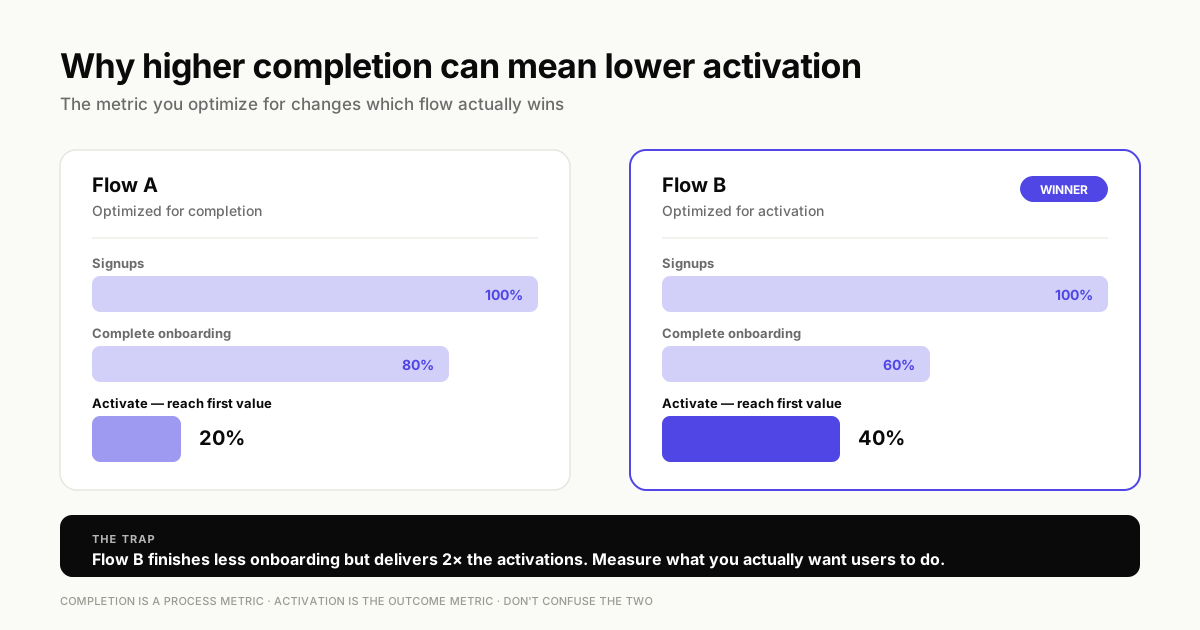
Measure activation rate, not just completion rate. A flow that 80% of users complete but only 20% activate from is worse than a flow with 60% completion and 40% activation. Consider testing sandbox demos as an alternative approach to traditional onboarding flows.
9. Use analytics to prioritize high-impact fixes
Focus on fixing journey problems that affect the most users or block the most value. A friction point that causes 5% of users to drop is less urgent than one that causes 30% to drop.
Prioritize by impact, not by ease of fix. The easy wins matter, but not at the expense of ignoring the problems that actually drive churn.
10. Align journey stages with user goals
Map your journey to what users want to achieve, not what you want them to do. Each stage answers the question: "What does the user need right now?"
If your onboarding pushes users to invite teammates before they've experienced value themselves, you're optimizing for your goals, not theirs.
11. Build contextual in-app guidance
Trigger guidance based on user behavior, not just time. Show help when users need it, not on a schedule.
A user who's been stuck on the same screen for two minutes needs different guidance than a user who just completed their first task. Behavior-based triggers make guidance feel helpful rather than intrusive.
12. Maintain user journey quality as your product evolves
User journeys break when products change. A new feature might add steps to a previously smooth flow. A UI update might move buttons users relied on.
Build processes to audit and update journeys with each release. Assign ownership to prevent journey decay. The teams that treat journey maintenance as ongoing work outperform those who treat it as a one-time project.
Common mistakes when improving user journeys
Avoiding the following pitfalls saves time and helps you improve user journey quality without making things worse.
Optimizing for completion instead of value
High completion rates mean nothing if users don't reach meaningful value. A user who finishes your onboarding checklist but never returns hasn't activated.
Focus metrics on activation and retention, not just finishing onboarding, because 25% better activation can drive 34% more revenue.
The goal is users who get value, not users who check boxes.
Ignoring multi-persona complexity
One-size-fits-all fails when admins and end users have different goals. Marketing teams need different paths than product teams. Teams looking to improve engagement should explore interactive marketing approaches that personalize the journey.
Build segmented paths that acknowledge the differences between user types. The extra effort pays off in higher activation across all user types.
Relying on assumptions instead of user data
Journey maps based on team assumptions miss real friction. What you think users struggle with often differs from what they actually struggle with.
Always validate with analytics and user feedback before making changes. Data-informed decisions outperform intuition-based ones.
Treating user journey mapping as a one-time project
Products evolve, user expectations shift, and competitors raise the bar. A journey map from six months ago may not reflect current reality.
Build continuous improvement into your process. Quarterly audits catch problems before they compound.
Overloading users with too much guidance
More tooltips and walkthroughs aren't always better. Excessive guidance frustrates experienced users and hides the actual product.
Find the right balance. New users need more guidance. Returning users need less.
Behavior-based targeting helps you serve both.
How to measure user journey success
Track the following metrics to understand whether your efforts to improve user journey performance are working and where to focus next.
Activation rate and time to activate
Activation rate is the percentage of users who reach a specific milestone that indicates value. Time to activate is how long it takes them to get there.
Track both. A high activation rate with slow time to activate suggests friction in the path. A fast time to activate with low activation rate suggests the milestone itself may not represent real value.
Funnel conversion and drop-off rates
Measure conversion between each journey stage. Identify which transitions lose the most users.
Compare before and after changes to understand impact. A 10% improvement in one stage compounds across the entire funnel.
Feature adoption and engagement depth
Track which features users discover and use regularly. Breadth (features tried) and depth (features used repeatedly) both matter.
Low feature adoption often indicates discovery problems rather than feature problems. Users can't adopt what they don't know exists. Modern demand generation tools can help surface features at the right moment in the user journey.
Early retention and churn signals
Measure day-7, day-14, and day-30 retention. Early retention windows predict long-term retention better than any other metric because only 39% of users still return after one month.
Identify early warning signals that predict churn. Users who don't return within the first week rarely return at all.
Turn user journey insights into action
Mapping and measuring user journeys only matters if you act on what you learn. Start with the highest-impact friction points: the stages where the most users drop off or where time to value stalls.
Tools like Guideflow help teams create interactive walkthroughs and guided experiences that improve user journeys without engineering resources. You can capture any workflow directly from your browser, customize it for different user segments, and track engagement to see what's working.
FAQs about improving user journey
The five stages are awareness, consideration, decision, retention, and advocacy. The stages represent the full path from discovering a product to recommending it to others.
A user journey focuses on in-product interactions and experiences, while a customer journey includes all touchpoints across marketing, sales, and support throughout the entire relationship.
Update your user journey map whenever you release significant product changes. Conduct a full audit quarterly to ensure it reflects current user behavior and expectations.
Yes. No-code tools let product and marketing teams create interactive walkthroughs, onboarding checklists, and in-app guidance without developer involvement.
Prioritize by impact on activation and retention. Focus on problems that affect the most users or block access to your product’s core value.