
You just wrapped a discovery call. You asked the standard BANT questions. The prospect gave polite, vague answers about "exploring options" and "improving efficiency." You scheduled a follow-up with no clear next step and a gut feeling that this deal is going nowhere.
Meanwhile, that same prospect spent 11 minutes clicking through an interactive demo you sent last week. They explored the integration settings page three times. They skipped the pricing section entirely. They forwarded the demo to two colleagues.
You had the intelligence. You just didn't use it.
This is the pattern most AEs live in. Sales discovery calls get treated identically whether the prospect has already engaged with product content or not. The demo engagement data sits in a dashboard nobody checks before calls. And the result is generic discovery that sounds like every other vendor conversation the buyer sat through this week.
Here's the thing: B2B buyers now complete the majority of their evaluation before they ever talk to a salesperson. According to Gartner, up to 70% of the buying journey happens before a prospect engages with sales. If your prospects are self-educating through interactive demos, the engagement data from those demos is the most honest signal you have about what they care about. It's behavioral, not self-reported. It shows what they did, not what they said. Understanding buyer enablement is key to leveraging these signals effectively.
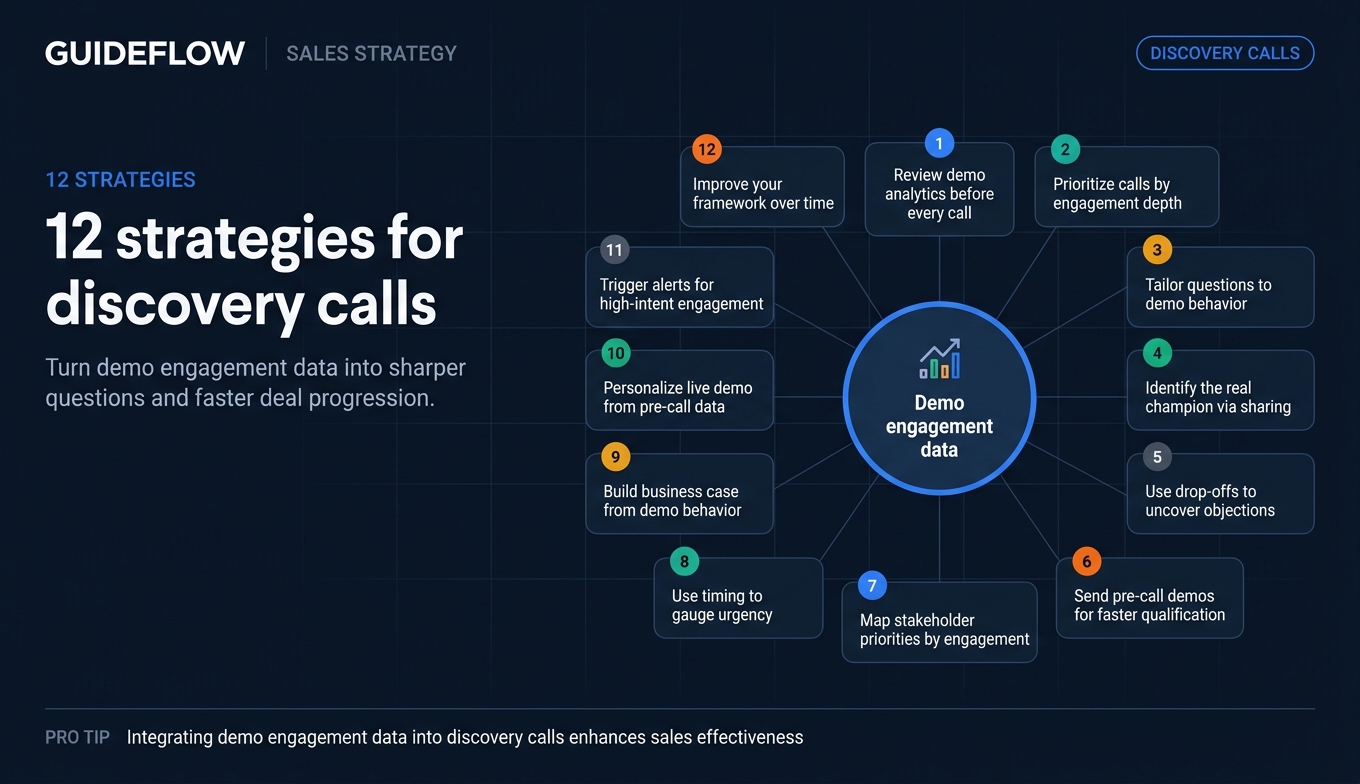
These 12 strategies show you how to turn demo engagement data into sharper discovery call questions, better qualification, and faster deal progression.
What's inside
This guide covers 12 data-driven strategies for using demo engagement analytics to prepare for, conduct, and follow up on sales discovery calls. Strategies are organized roughly by when they apply: before the call, during the call, and after the call.
Each strategy includes what to do, why it works, and a specific example of the data signal that triggers it. These were selected based on patterns from SaaS sales teams that use interactive demo analytics as part of their deal workflow, not generic b2b sales discovery advice you've read in a dozen other places.
TL;DR
- Demo engagement data tells you what the prospect cares about before they tell you. Use it to skip generic discovery call questions and go straight to what matters.
- Prospects who spend 8+ minutes in an interactive demo and return multiple times are signaling high intent. Prioritize them.
- The features a prospect explores (and skips) in a demo reveal their real pain points more honestly than any qualifying question.
- Multi-stakeholder demo sharing patterns (one person sends the demo to four colleagues) are early buying committee signals you can use for stakeholder mapping.
- Personalized follow-up based on demo engagement signals outperforms generic recaps by a wide margin.
- Guideflow generates session-level engagement analytics that plug directly into your CRM for pre-call intelligence.
Background: What is demo engagement data (and why AEs should care)
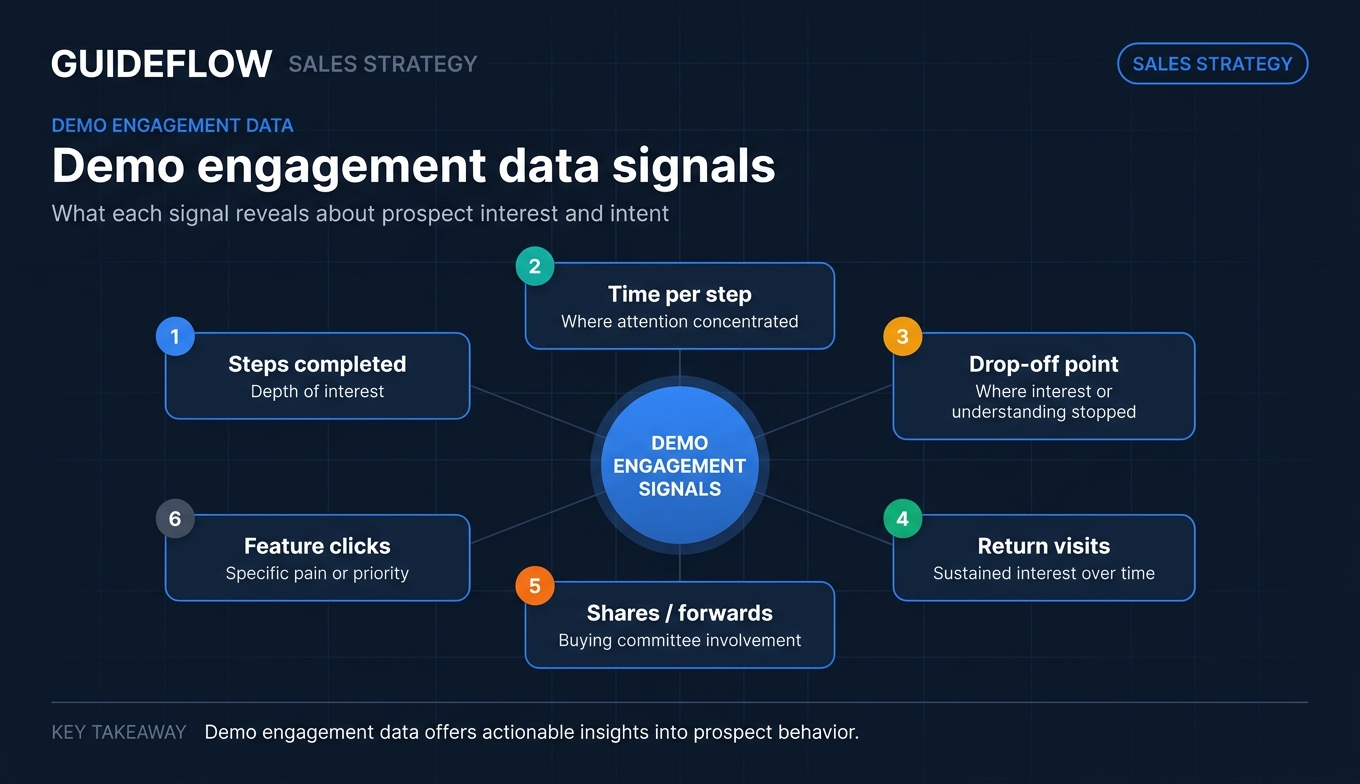
Demo engagement data is the set of behavioral signals generated when a prospect interacts with an interactive product demo, including which features they explored, how long they spent on each step, where they dropped off, what they clicked, and whether they shared the demo with colleagues.
Contrast that with the data AEs typically have before a discovery call: company size, job title, maybe a form fill with a generic "looking to improve efficiency" note. That's self-reported. It tells you what the prospect wanted you to know. Demo engagement data is fundamentally different because it shows what the prospect actually did when nobody was watching.
This matters now more than ever. Buying committees in B2B average 6 to 10 stakeholders. More research happens before the first call than after it. And interactive demos are increasingly used as pre-call qualification tools, giving prospects a way to explore the product on their own schedule while generating rich behavioral data for the sales team. The right presales software tools make this workflow seamless.
The AE who reviews demo analytics before a sales discovery call has a structural advantage over the one who doesn't. Here's what those signals look like:
For a deeper look at combining discovery and demos, see Guideflow's guide to sales discovery demos.
12 strategies to improve discovery calls using demo engagement data
1. Review demo analytics before every discovery call
The most basic and most overlooked strategy. Most AEs who send interactive demos before discovery never check the analytics before the call. The data is there. They just don't look.
Before every discovery call where the prospect has accessed an interactive demo, pull up the session analytics. Note which steps they completed, where they spent the most time, where they dropped off, and whether they returned. Guideflow's analyze feature surfaces this data in real time with session-level detail, so the AE sees exactly which steps the prospect explored, for how long, and in what order.
You walk into the call knowing what the prospect has already explored. Instead of asking "what are you looking for?" you can ask "I noticed your team has been evaluating how this connects to your current stack. Are integrations a key part of this evaluation?" That question signals you've done your homework and immediately moves the conversation past surface-level sales discovery.
Here's a concrete example: a prospect completes 10 of 12 demo steps but spends 4x the average time on the "team permissions" screen. Before the call, the AE notes this and opens discovery with a question about their team structure and access control needs. The prospect is surprised (positively) and immediately opens up about a specific pain point around role-based access that would have taken 20 minutes of generic questioning to uncover.
The 2-minute pre-call check: Open the demo analytics dashboard, note the top 3 engagement signals, and write one specific question based on each. That's it.
2. Prioritize discovery calls by demo engagement depth
Not all discovery calls deserve the same prep time. Demo engagement data helps you triage.
Score incoming discovery calls based on demo engagement signals. Prospects who completed 80%+ of the demo, returned multiple times, or spent above-average time should get your A-tier preparation. Prospects who opened the demo but bounced after 30 seconds get a lighter-touch approach.
AEs have finite time. Spending 45 minutes prepping for a call with someone who barely glanced at the demo is a poor investment. Spending that same time on a high-engagement prospect who clearly has intent is a better bet. Buyer intent data providers can supplement demo signals, but first-party engagement data from your own demos is often more reliable.
Here's a concrete framework:
- High engagement (80%+ completion, return visits, 5+ minutes): Full prep. Custom discovery questions. SE involvement if warranted.
- Medium engagement (40 to 79% completion, 2 to 5 minutes): Standard prep. Focus on where they dropped off.
- Low engagement (under 40%, under 2 minutes): Quick qualification. Determine if they're a real opportunity before investing more time.
Teams that prioritize discovery prep based on demo engagement signals report spending roughly 30% less time on calls that go nowhere, because they're concentrating effort where the behavioral data says it matters.
Guideflow's engagement analytics sync directly to CRM records via its integrations, so the AE sees the engagement score without opening a separate dashboard. The prioritization becomes automatic, not manual.
3. Tailor your discovery questions to demo behavior
Generic discovery questions ("What are your biggest challenges?") waste time when you already have behavioral data showing what the prospect cares about.
Map demo engagement patterns to specific discovery call questions. If the prospect spent time on Feature X, ask about the pain Feature X solves. If they skipped the pricing section, ask about budget process and timing. If they replayed a specific workflow three times, ask what about that workflow resonated.
| Demo behavior | Discovery question |
|---|---|
| Spent 3x average time on reporting | "How are you handling reporting today? What's missing?" |
| Skipped the integrations section | "Are integrations a priority, or is this a standalone evaluation?" |
| Replayed the onboarding workflow | "Is onboarding speed a key criterion for your team?" |
| Dropped off at the admin settings | "Who on your team would manage the admin setup?" |
| Completed 100% of the demo | "You explored the full product. What stood out most?" |
The prospect feels understood. You're not asking them to repeat information they've already demonstrated through behavior. This builds trust and compresses the discovery phase because you skip the generic warm-up.
If you use SPIN questions, demo data lets you jump straight to Situation and Problem questions that are specific to the prospect's observed behavior, rather than starting from scratch with broad openers. The data gives you the "situation" before the call even starts.
4. Identify the real champion through sharing patterns
When a prospect shares an interactive demo with colleagues, the sharing pattern reveals the buying committee structure.
Monitor who the original demo viewer shares with. If Person A (your initial contact) sends the demo to Person B (VP of Engineering) and Person C (Head of Security), you now know two things: Person A is acting as an internal champion by actively distributing product information, and the buying committee likely includes engineering and security stakeholders. Guideflow's share feature makes it easy for prospects to forward demos, and every share generates trackable data for your team.
In mid-market and enterprise deals, the person who books the discovery call is often not the decision-maker. Demo sharing patterns reveal who the real champion is (the person actively evangelizing) and who else needs to be convinced. This intelligence is gold for stakeholder mapping and multi-threading.
Here's a specific scenario: an SDR books a discovery call with a Director of Operations. Before the call, the AE sees that the Director forwarded the interactive demo to the CFO and a Team Lead. The AE now knows: budget authority is involved (CFO engagement), end-user validation matters (Team Lead), and the Director is actively championing. The AE can tailor discovery to address financial justification and end-user workflow concerns, not just operational pain.
If only one person viewed the demo and didn't share it, that's also a signal. It may indicate early-stage exploration without organizational buy-in yet. Adjust discovery accordingly: probe for internal alignment and whether other stakeholders need to be involved.
Guideflow's multi-stakeholder tracking and visitor identity tracking surface these sharing patterns automatically, so the AE sees exactly who accessed the demo and when.
5. Use drop-off points to uncover hidden objections
Where a prospect stops engaging with a demo is as informative as where they spend time.
Before the discovery call, check where the prospect dropped off in the demo. If they abandoned the demo at the pricing step, they may have sticker shock or budget concerns. If they dropped off at the integration configuration, they may be worried about technical complexity. If they stopped at the admin/permissions section, they may not be the right persona to evaluate this.
Drop-off points reveal objections the prospect hasn't verbalized yet. Addressing these proactively in discovery (without calling out the drop-off directly) shows the prospect you understand their concerns and prevents those objections from surfacing later in the deal as blockers.
How to bring it up naturally: don't say "I saw you stopped at the pricing page." Instead, ask: "How are you thinking about budget and timeline for this evaluation?" or "What does the approval process look like on your side?" The prospect will often surface the concern themselves, and you're ready for it.
Common drop-off patterns and the discovery questions they suggest:
- Dropped at pricing: Budget, approval process, competitive alternatives
- Dropped at integrations: Technical stack concerns, IT involvement, implementation timeline
- Dropped at admin/setup: Persona mismatch, internal ownership questions
- Dropped early (step 2 to 3): Low intent, misaligned expectations, or wrong ICP
6. Send pre-call interactive demos for faster qualification
This strategy is about using interactive demos as a pre-qualification tool before the discovery call even happens.
After an SDR books a meeting, send the prospect a personalized interactive demo with a note: "Before our call on Thursday, here's a quick walkthrough of [specific feature relevant to their role]. Take 5 minutes to explore, and I'll tailor our conversation to what matters most to you."
Two things happen. First, the prospect self-educates before the call, which means discovery can start at a higher level. Second, you get engagement data that tells you exactly what to focus on. The call becomes significantly more productive because both sides have done their homework. If you're looking to build a presales process that scales, pre-call demos are a foundational element.
Teams that send pre-call interactive demos report that discovery calls are roughly 40% shorter on average because the prospect arrives with context and the AE arrives with behavioral intelligence.
A common concern from AEs: "Won't sending a demo before discovery give away too much?" No. The prospect is going to research your product anyway. An interactive demo gives you control over what they see and generates data you can use. A Google search gives you nothing.
Guideflow's personalization and sharing capabilities make this workflow fast. Personalized demos take minutes to create and can be shared via link or embedded in email. Analytics track engagement in real time so the AE has data before the call.
7. Map stakeholder priorities by tracking individual engagement
In multi-stakeholder deals, different people care about different things. Demo engagement data reveals each stakeholder's priorities without you having to ask.
When multiple stakeholders from the same account access the demo, compare their engagement patterns. The CFO spent time on ROI metrics and pricing. The VP of Engineering focused on API documentation and integrations. The end user explored the daily workflow features. Each pattern maps to a different set of discovery questions and a different value proposition.
In a buying committee of 6 to 12 people, you can't run separate discovery calls with everyone. But if you can see what each person explored in the demo, you can address their specific concerns in group meetings or targeted follow-ups.
Here's a concrete example. Three stakeholders from the same account access the interactive demo in the same week:
- Stakeholder A (VP Sales): Completed the full demo, spent extra time on reporting and analytics
- Stakeholder B (IT Director): Only viewed the security and integration sections
- Stakeholder C (Sales Manager): Focused on the daily workflow and team collaboration features
The AE now has a stakeholder priority map without a single call. Discovery can be structured to address reporting ROI (for the VP), security and compliance (for IT), and daily usability (for the Manager).
Guideflow's session-level analytics and visitor identity tracking enable per-stakeholder engagement visibility, so you see each individual's path through the demo separately. For accounts with multiple stakeholders exploring different product areas, a Demo Center can organize demos by persona and use case.
8. Use engagement timing to gauge urgency
When a prospect engages with a demo matters as much as how they engage.
Track the timing patterns of demo engagement. A prospect who views the demo at 10pm on a Sunday is signaling something different from one who clicks through during a 2pm Tuesday meeting. A prospect who returns to the demo three times in 48 hours is showing urgency. A prospect who viewed it once, two weeks ago, and hasn't returned may have deprioritized the evaluation.
Urgency is the hardest thing to assess in discovery. Prospects rarely tell you honestly how urgent their need is. But their behavior tells you. Frequent, recent engagement equals active evaluation. Single view, weeks ago, equals low priority.
How to use this in discovery: if the data shows high urgency (multiple views in a short window), move faster. Ask about timeline, budget cycle, and decision process. If the data shows low urgency, probe for what would make this a priority and whether there's a triggering event coming.
Quick framework:
- 3+ views in 7 days: High urgency. Accelerate.
- 1 view, 7 to 14 days ago: Moderate. Probe for timeline.
- 1 view, 14+ days ago: Low. Qualify harder before investing time.
9. Build the business case using the prospect's own demo behavior
The best business cases are built with the buyer's own data. Demo engagement provides that data.
Use demo engagement patterns to anchor the ROI conversation in discovery. If the prospect spent significant time on the "time saved" or "automation" sections of the demo, the business case should center on efficiency gains. If they focused on reporting and analytics, the case should emphasize visibility and decision-making speed. If they explored team collaboration features, the case is about scaling without adding headcount.
Generic ROI decks don't land because they don't reflect what the specific buyer cares about. When you say "I noticed your team explored the automation workflow extensively, so I built a quick model around the time savings for a team your size," the prospect feels like the business case was built for them. Because it was. Pairing this approach with sales analytics software can help you quantify the impact even further.
Here's a specific example: a prospect's demo engagement shows 6 minutes on the "automated reporting" feature and 4 minutes on "team dashboards." The AE opens the business case conversation with: "Based on what your team has been evaluating, it looks like reporting and visibility are priorities. If your team currently spends X hours per week on manual reporting, here's what the math looks like..."
This is credible because it's grounded in observed behavior, not assumptions.
Co-create, don't present. Use the demo data as a starting point, then ask the prospect to validate and refine. "Does this match what you're seeing internally?" turns a pitch into a collaboration.
10. Personalize the live demo based on pre-call engagement
If the prospect has already explored an interactive demo before the discovery call, the live demo should pick up where they left off, not start from scratch.
Review the prospect's demo engagement data and structure the live demo to focus on the areas they explored most, skip the areas they already understand, and address the areas where they dropped off. If they spent 5 minutes on integrations and skipped onboarding, the live demo should lead with integration depth, not a product overview.
Prospects hate sitting through features they've already seen. When you say "I know you've already explored the basics, so let me dive straight into the integration architecture you were looking at," you signal respect for their time and demonstrate that you're paying attention.
This also compresses the evaluation phase. Instead of two or three demos to cover everything, you need one targeted session that addresses the gaps.
Concrete framework:
- High engagement areas: Skip the overview. Go deeper. Show advanced use cases.
- Medium engagement areas: Brief recap, then expand with context relevant to their use case.
- Low engagement / drop-off areas: Address proactively. These may be objections or areas of confusion.
- Unexplored areas: Mention briefly only if relevant to their stated priorities.
Guideflow's analytics provide the session-level detail needed to structure a targeted live demo. Personalization of follow-up demos takes minutes.
11. Trigger real-time alerts for high-intent engagement
Don't wait for the scheduled discovery call if the data tells you to act now.
Set up real-time alerts for high-intent demo engagement signals. When a prospect completes 100% of the demo, returns for a third visit, or shares the demo with multiple colleagues, the AE gets an immediate notification (via Slack, email, or CRM alert). This enables the AE to reach out while the prospect's interest is at its peak, not three days later when the scheduled call happens.
Timing matters. A prospect who just spent 12 minutes exploring your product is more receptive to a conversation right now than they will be on Thursday. Real-time alerts let you capitalize on that window. The best sales engagement tools complement this by helping you orchestrate the outreach that follows.
How to use this: don't call and say "I saw you were looking at our demo." Instead, send a quick, relevant message: "Hey [Name], I put together a quick summary of how [specific feature they explored] works for teams like yours. Want to jump on a quick call this afternoon?" The outreach feels helpful, not surveillance-like.
Define the alert thresholds:
- Immediate outreach: 100% completion plus return visit within 24 hours
- Same-day follow-up: Demo shared with 2+ colleagues
- Priority bump: Engagement from a new stakeholder at a target account
Guideflow's CRM and Slack integration and alert system automates these notifications. Alerts are built in and route to the right rep automatically.
12. Use demo data to improve your discovery framework over time
This is the measurement and iteration strategy. It should be the final piece because it's about continuous improvement, not a one-time tactic.
Aggregate demo engagement data across all your deals and look for patterns. Which demo sections correlate with deals that close? Which drop-off points correlate with deals that stall? Which engagement patterns predict shorter sales cycles? Combining demo analytics with product analytics software gives you a fuller picture of how prospects engage across the entire product experience.
Over time, demo engagement data becomes a predictive tool, not just a descriptive one. If you discover that prospects who explore the "team collaboration" section close at 2x the rate of those who don't, you can proactively steer discovery toward collaboration use cases.
Specific patterns to track:
- Completion rate vs. win rate: Do prospects who complete 80%+ of the demo close more often?
- Feature engagement vs. deal size: Do prospects who explore advanced features close larger deals?
- Time-to-first-view vs. cycle length: Do prospects who view the demo within 24 hours of receiving it close faster?
- Sharing behavior vs. multi-threading success: Do deals where the demo is shared to 3+ people have higher win rates?
Build a simple tracking table:
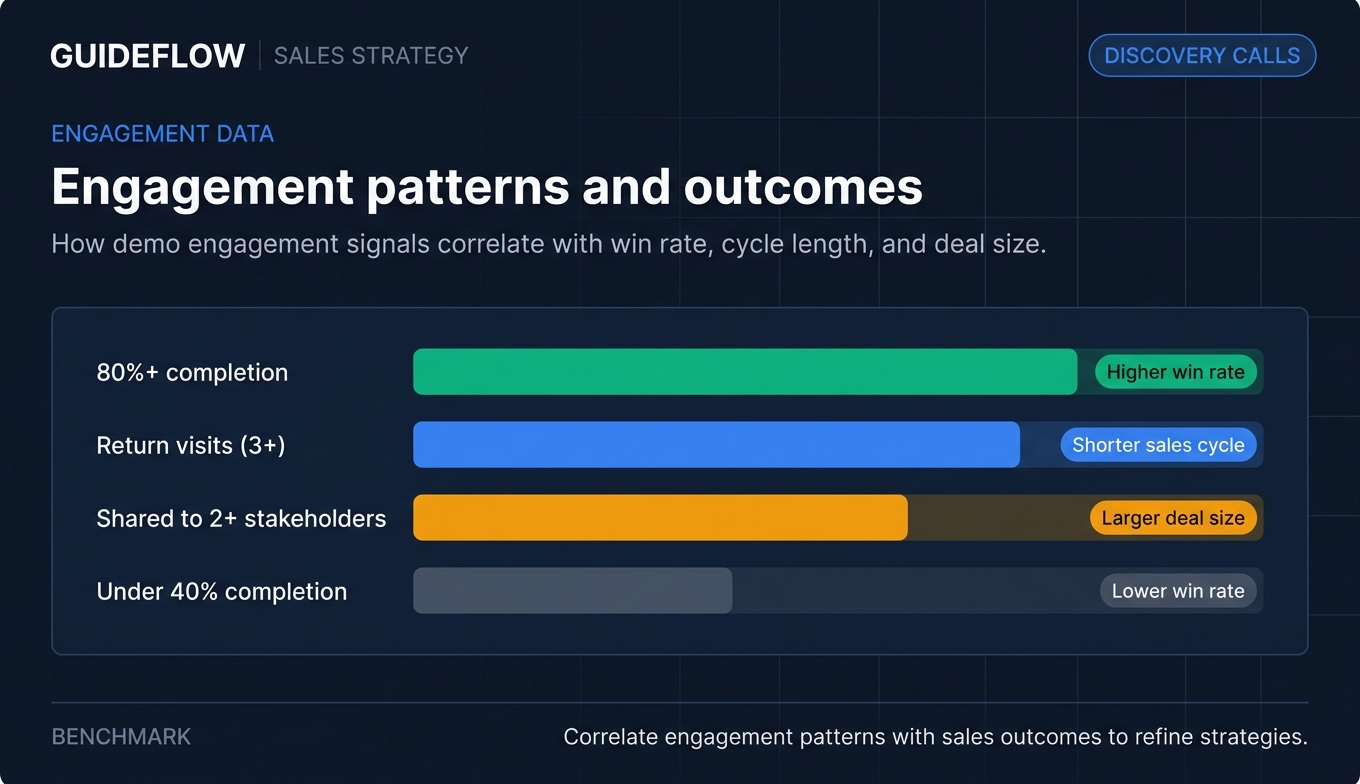
| Engagement pattern | Win rate | Avg cycle length | Avg deal size |
|---|---|---|---|
| 80%+ completion | ___% | ___ days | $___ |
| Return visits (3+) | ___% | ___ days | $___ |
| Shared to 2+ stakeholders | ___% | ___ days | $___ |
| Under 40% completion | ___% | ___ days | $___ |
Review monthly. Adjust your discovery framework based on what the data shows.
Guideflow's advanced analytics and reporting provide the data source for this ongoing analysis. Analytics are real-time and accessible without analyst support, so any AE or sales manager can pull these patterns on their own.
Common mistakes that waste demo engagement data
These patterns show up across sales teams that have the data but aren't getting value from it. Each mistake is immediately paired with what works instead.
1. Checking demo analytics after the call, not before. The data is only useful as pre-call intelligence. Reviewing it post-call is a retrospective exercise, not a competitive advantage. What works instead: build a 2-minute analytics review into your pre-call routine. Open the dashboard, note three signals, write three questions. Done.
2. Treating all demo viewers the same. A prospect who completed 100% of the demo and one who bounced after 15 seconds are not the same lead. What works instead: use engagement depth to tier your prep time and discovery approach (see Strategy 2 above). High engagement gets full preparation. Low engagement gets quick qualification. Lead scoring software can help automate this tiering.
3. Mentioning the tracking directly to the prospect. "I saw you spent 6 minutes on the pricing page" feels invasive. What works instead: use the data to inform your questions, not to narrate the prospect's behavior. Ask about pricing concerns naturally. The prospect doesn't need to know how you knew to ask.
4. Ignoring multi-stakeholder engagement patterns. When three people from the same account view the demo, that's a buying signal most AEs miss entirely. What works instead: map the stakeholders, note their individual engagement patterns, and multi-threading accordingly (see Strategies 4 and 7 above). Each stakeholder's demo behavior tells you what they care about.
5. Sending the same follow-up regardless of engagement. A generic "thanks for checking out our demo" email wastes the intelligence you have. What works instead: personalize follow-up based on the specific features and sections each prospect engaged with. Reference what they explored. Address what they skipped. Make the follow-up feel like it was written for them, because it should be.
Conclusion
Discovery calls improve when you stop treating them as information-gathering exercises and start treating them as data-informed conversations. The 12 strategies above share a common thread: they use behavioral signals from interactive demos to replace guesswork with evidence.
The AE who reviews demo analytics before every call, tailors questions to observed behavior, and personalizes follow-up based on engagement data has a structural advantage. Not a marginal one. A structural one.
You don't need to implement all 12 at once. Pick 2 to 3 strategies that match your current workflow. Apply them to your next 5 discovery calls. Measure the difference in call quality, next-step clarity, and deal progression. The data will tell you what's working. Adjust from there.
Start your journey with Guideflow today
FAQs
Demo engagement data is the behavioral signals generated when a prospect interacts with an interactive product demo: which features they clicked, how long they spent on each step, where they dropped off, whether they returned, and who they shared it with. It's the digital equivalent of watching someone test-drive a car and noting which features they checked first.
Demo automation platforms like Guideflow provide session-level analytics dashboards and CRM integrations that surface engagement data directly in the prospect's CRM record. The AE doesn't need to open a separate tool. The data appears where you already work, ready to inform your pre-call prep in minutes.
Teams that use pre-call engagement intelligence report more productive discovery conversations, higher next-step conversion rates, and shorter sales cycles. The improvement comes from asking better questions, not more questions. When you walk into a call already knowing what the prospect explored, you skip 10 minutes of generic warm-up and get straight to what matters.
No. Use the data to inform your questions, not to narrate their behavior. Saying "I saw you clicked on X" feels like surveillance. Asking "How are you thinking about X?" based on the data feels like preparation. The prospect should feel like you did your homework, not like you were watching over their shoulder.
Two minutes. Check completion rate, top engaged features, drop-off point, and sharing activity. Write one specific question per signal. That's the full routine. This isn't a research project. It's a quick scan that gives you three to four data-informed conversation starters.
No. It supplements them. Demo data tells you what the prospect explored. Discovery tells you why. The combination is what makes the conversation productive. You still need to confirm pain, urgency, stakeholders, and budget process. But you start from a much more informed position.
The key signals are: 80%+ completion rate, return visits within 7 days, sharing with multiple colleagues, and above-average time on pricing or integration sections. Any combination of two or more signals suggests active evaluation. A single signal is worth noting. Multiple signals together are worth prioritizing.
Start by capturing one product flow as an interactive demo and sending it to prospects before discovery calls. Measure the difference in call quality after 10 calls. Most teams see the value within the first week. The engagement data from even a single demo gives you more pre-call intelligence than a form fill and a LinkedIn profile combined. Get started with Guideflow here.