

You ran a webinar last month. 500 people registered. 180 showed up. Twelve asked a question. Three clicked your CTA. The recording is sitting in a shared drive somewhere, and your VP just asked what pipeline the webinar generated. You have nothing to show them.
This is the reality of most B2B webinars in 2026. Not a reach problem. Not a registration problem. An engagement problem. According to Univid's 2025 Webinar Engagement Report, webinars that use two or more interaction elements achieve up to 60% active participation and 50% higher conversion rates compared to those with only one or no interaction points. Most webinars don't come close because they're designed as broadcasts, not conversations.
The issue isn't that webinars don't work. It's that passive webinars generate passive data, and passive data doesn't move pipeline. This guide covers 12 strategies to make your webinars interactive, a measurement framework to track what matters, and specific tactics you can apply to your next event.
TL;DR
- Passive webinars generate one data point: "attended." That's not enough to qualify leads, score intent, or give sales anything useful for follow-up.
- The single highest-impact tactic is distributing interaction throughout the session, not stacking it at the end. Engagement should start in the first two minutes and recur every five to seven minutes.
- Interactive product experiences close the gap between "watched" and "converted." Sharing clickable demos during or after webinars generates intent data that recordings cannot.
- Measure interactivity, not just attendance. Track engagement rate, interaction depth, CTA click-through, and post-webinar content engagement to connect webinars to pipeline.
- Use a before, during, and after framework. The best interactive webinars are designed in three phases: prime engagement before the event, sustain it during, and personalize follow-up after.
What is an interactive webinar (and why most webinars are not one)
An interactive webinar is a live or on-demand virtual event designed so attendees actively participate through polls, Q&A, chat, product demos, collaborative exercises, and real-time feedback, rather than passively watching a presentation.
Here's the most common misconception: adding a poll slide at minute 25 does not make a webinar interactive. True interactivity means the attendee's behavior shapes the experience. Their poll response changes the next topic. Their question redirects the presenter. Their engagement with a shared interactive demo generates data that informs your follow-up.
Most webinars are broadcasts with a comment section. The distinction matters.
DimensionTraditional webinarInteractive webinarAttendee rolePassive viewerActive participantEngagement modelOne-way presentation with end-of-session Q&ATwo-way interaction every 5 to 7 minutesData capturedAttended (yes/no)Poll responses, chat activity, CTA clicks, demo engagement, Q&A topicsConversion path"Book a demo" CTA at the endMultiple CTAs tied to specific engagement moments throughout
This distinction matters more now than it did three years ago. Buyer attention is harder to earn and easier to lose in 2026. Only 15% of webinars currently use polls, which means the vast majority of webinar hosts are leaving engagement (and data) on the table. When your attendees are multitasking through a passive presentation, you're generating zero usable intent signal for your marketing or sales teams.
The question isn't whether your webinars should be interactive. It's how to make webinars more engaging in a way that generates data you can actually use.
Why webinar interactivity directly impacts your pipeline
Every other guide on how to make a webinar interactive treats engagement as the goal. More polls. More chat. More Q&A. But engagement isn't the goal. Pipeline is.
Here's the mechanism: interactive webinars generate behavioral data that becomes lead scoring signal. Passive webinars generate only "attended" as a data point, which tells your sales team almost nothing about who's ready to buy.
Data pointPassive webinarInteractive webinarAttendanceYesYesTopic interestNoYes (via polls and chat topics)Product interestNoYes (via demo engagement and CTA clicks)Buying intent signalsNoYes (via CTA behavior and follow-up engagement)Lead score enrichmentMinimalSignificant
When an attendee responds to a poll saying "reporting is our biggest challenge," clicks an interactive demo of your reporting feature during the session, and then spends four minutes exploring the dashboard in your follow-up email, you have three layers of intent data. Compare that to "attended the webinar" as your only signal.
The difference between a webinar that generates 200 MQLs and one that generates 200 qualified leads is interactivity. Not more registrants. More signal per registrant.
This connects directly to the metrics you report on: MQL-to-SQL conversion improves because you have better qualification data. CAC drops because you're routing higher-intent leads to sales. Pipeline velocity increases because the SDR calling a webinar attendee can reference specific interests instead of opening with "Did you enjoy the webinar?"
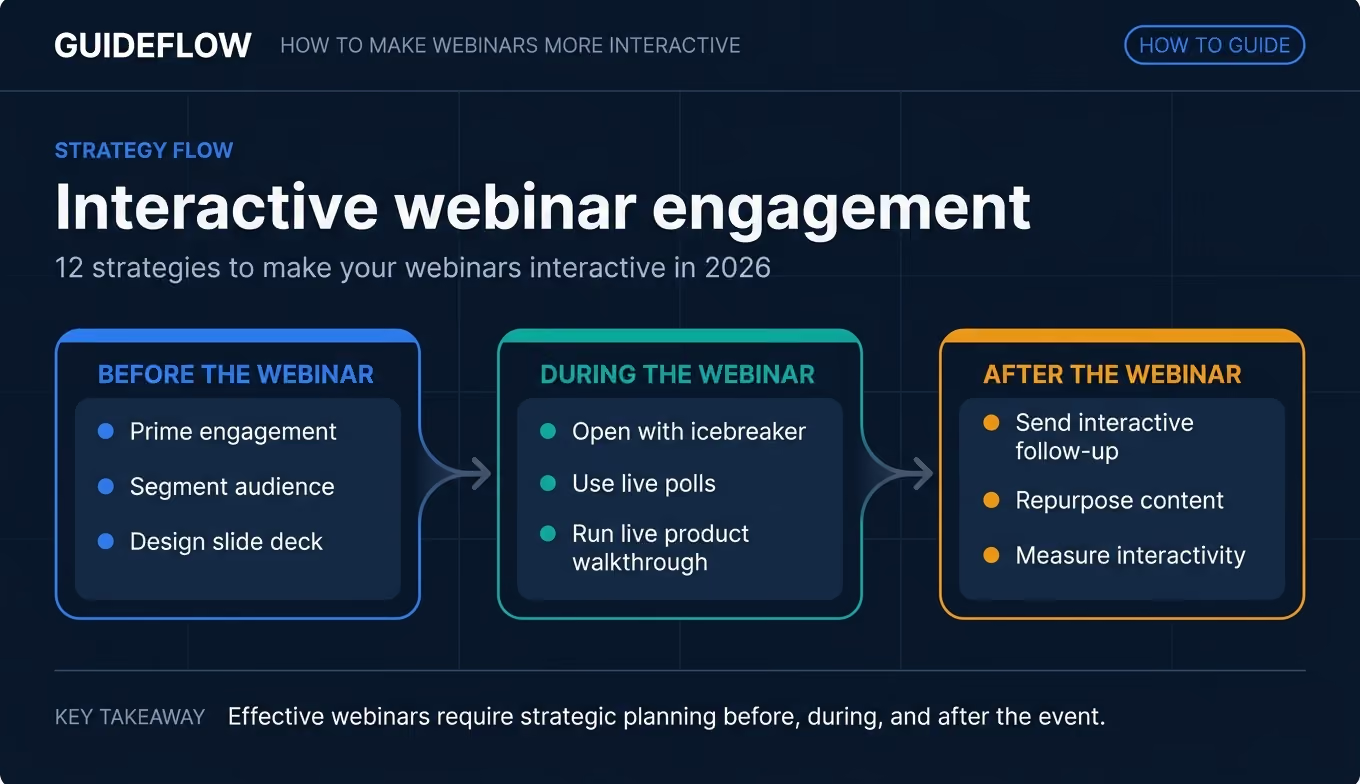
12 strategies to make your webinars interactive in 2026
These strategies are organized into three phases: before the webinar (strategies 1 to 3), during the webinar (strategies 4 to 9), and after the webinar (strategies 10 to 12). They're ordered by when they apply, not by importance. Jump to the phase most relevant to your next event.
Strategy 1. Prime engagement before the event starts
Pre-webinar engagement sets the expectation of participation before anyone joins the call. When attendees arrive having already invested thought, they're primed to contribute. The psychological principle is commitment consistency: people who take a small action are more likely to take a bigger one.
Start with a one-question survey in the confirmation email. Something like: "What's your biggest challenge with [topic]?" Use the top three responses to shape your agenda. When you open the webinar by saying "You told us X was your biggest challenge, so we're starting there," the session feels personalized from the first sentence.
Share teaser content on social or via email that poses a question attendees will answer live. Add a "bring your own question" prompt in the calendar invite. These small touches create a psychological contract: this is going to be a conversation, not a lecture.
For the growth marketer, this also gives you pre-event data you can use for segmentation and follow-up. If 40% of your registrants say their biggest challenge is "measuring ROI," you already know which follow-up content to prioritize before the webinar even starts.
Strategy 2. Segment your audience and tailor interaction types
A webinar with 50 attendees and one with 500 need different interaction strategies. Small audiences can do open-mic Q&A and live discussion. Large audiences need structured polls, chat prompts, and async interaction.
Also address persona-based segmentation. If your webinar attracts both technical evaluators and business decision-makers, plan interaction moments for each. A technical poll ("Which integration matters most to you?") and a business poll ("What's your biggest bottleneck this quarter?") serve different purposes and generate different lead scoring data.
If you treat all attendees the same, you get generic data. Segmented interaction gives you data you can actually route to sales. The SDR who knows that an attendee self-identified as "mostly manual process" in a poll has a fundamentally different opening for their follow-up call than one working from a generic attendee list.
Strategy 3. Design your slide deck for interaction, not presentation
Most slide decks are built for the presenter. Interactive webinar decks are built for the audience.
Build "interaction slides" into the deck every five to seven minutes. These are dedicated moments for a poll, a question, or a chat prompt. Use a different background color or a visible prompt icon so the audience recognizes "this is your turn." Reduce text density on all slides so the presenter can talk and the audience can think, rather than read.
One specific tactic: the "blank slide" technique. Insert a blank or minimal slide at a key moment and say "Before I show you the answer, type your guess in the chat." This creates a micro-moment of active participation that resets attention.
Include clear CTAs throughout the deck, not just at the end. Each CTA should be specific: "Click this link to explore the product yourself" performs better than "Learn more."
Designing for interaction upfront takes 30 extra minutes of prep. That investment changes the entire engagement curve of the session.
Strategy 4. Open with an icebreaker that generates data
The first 90 seconds set the tone. Most webinars open with "Let me share my screen... can everyone see this?" which trains the audience to be passive from the start.
Instead, open with a poll or chat prompt that is relevant to the topic and generates useful data. Example: "Before we start, quick poll: how many webinars did you run last quarter? (a) 0 to 2, (b) 3 to 5, (c) 6+, (d) I lost count."
Share the results live and use them to frame the content: "Looks like most of you are running 3 to 5 per quarter. That's the range where engagement optimization has the highest ROI, so we'll focus there."
This accomplishes three things simultaneously. First, it sets the participation norm: everyone just interacted, so continuing to interact feels natural. Second, it gives you audience composition data. Third, it makes the content feel personalized because you're responding to real-time input. These are the kinds of interactive webinar ideas that generate signal, not just activity.
Strategy 5. Use live polls strategically (not decoratively)
Polls are the most common interactive element in webinars, and most marketers use them poorly.
The distinction: decorative polls ("Are you excited to be here? Yes/Absolutely!") generate zero useful information. Strategic polls generate lead intelligence. Every poll should serve at least one of three purposes:
- Segment the audience in real time. "Which best describes your current process? (a) Fully manual, (b) Partially automated, (c) Mostly automated, (d) We don't have one." Response (a) or (b) signals higher intent for an automation product.
- Generate data you can use in follow-up. Poll responses become CRM fields and lead scoring inputs.
- Create a content pivot point. The presenter adjusts the next section based on results.
Limit to three to four polls per 45-minute webinar. More than that creates fatigue. Place them at natural transition points between topics, roughly every 10 to 12 minutes. Fewer than two makes the webinar feel passive.
Strategy 6. Run a live product walkthrough instead of talking about features
The "feature slides" section of most webinars is where webinar engagement drops. Static screenshots of a product don't create understanding or excitement. Attendees check email. They open another tab. They leave.
The fix: instead of showing slides about your product, show the product itself. Share an interactive demo link in the chat so attendees can click through the product experience in real time while the presenter narrates.
This approach works because attendees move from passive watching to active clicking. The presenter guides the narrative while each attendee explores at their own pace. Engagement data from the interactive demo (which steps they completed, where they spent time, what they skipped) becomes rich intent signal for post-webinar follow-up. You can analyze demo engagement at the individual level to understand exactly what each attendee explored.
Tools like Guideflow let you capture a product walkthrough in minutes and share it as a clickable link during the webinar. Attendees click through the experience themselves, and you get session-level analytics on what each person explored.
Instead of "attended the webinar" as your only data point, you now know that Attendee A spent four minutes on the reporting dashboard and Attendee B explored the integration settings. That's qualification data, not just attendance data.
This tactic performs best when you want attendees to experience the product, not just hear about it. It doesn't replace other interaction methods. It adds a layer of hands-on engagement that slides and screen shares can't match.
Strategy 7. Moderate chat with intention (assign a chat captain)
Chat is the highest-volume interaction channel in webinars, but unmoderated chat is noise. A "chat captain" is a team member (not the presenter) who monitors chat, surfaces the best questions, responds to simple ones in real time, and drops relevant links or resources.
The chat captain also seeds engagement. They post the first comment, ask follow-up questions, and create conversational threads that other attendees join. Nobody wants to be the first person to type in an empty chat window. The chat captain removes that friction.
Specific tactic: the chat captain drops a link to an interactive product demo or resource at the exact moment the presenter mentions a feature. This turns a passive mention into an active click. You can share demos via direct link, making it easy for the chat captain to drop the right experience at the right moment.
The chat captain role can be filled by an SDR, a CSM, or a marketing coordinator. It does not require a senior person, but it does require preparation: a list of links, FAQs, and prompts ready to go before the session starts. Fifteen minutes of pre-event briefing makes the difference between a chat captain who adds value and one who just watches.
Strategy 8. Replace the Q&A monologue with structured audience input
Traditional Q&A at the end of a webinar is the least effective interaction format. By minute 40, half the audience has dropped off. The remaining attendees ask niche questions irrelevant to most viewers. The presenter gives long answers to individual questions while everyone else waits.
The fix: distribute Q&A throughout the session. After each major section, take two to three questions. Use a Q&A tool with upvoting so the audience surfaces the most popular questions. Address the top-voted question live and promise to answer the rest in a follow-up email (which creates a reason for post-webinar outreach).
An alternative format: "Ask me anything" segments of three to five minutes between content blocks, rather than a 10-minute block at the end.
Distributed Q&A keeps engagement metrics higher throughout the session. Chat activity stays consistent, attendee count holds, and your overall engagement rate improves. More importantly, the questions people ask during the session become qualification data. Someone asking "How does this integrate with Salesforce?" is further along than someone asking "What does your company do?"
Strategy 9. Add a collaborative exercise or live challenge
The highest-engagement webinar moments are when attendees do something, not just watch something. Here are three exercise formats that generate both engagement and data:
- The audit exercise. "Open your [tool/dashboard/process] right now. I'll give you 60 seconds to find [specific metric or issue]. Drop what you found in the chat." This works for product-focused webinars where the audience uses a similar tool.
- The "build with me" exercise. Walk through a specific workflow live and have attendees replicate it in their own environment or in a shared sandbox environment. This is especially effective for SaaS product webinars where attendees want to explore a product hands-on during the session.
- The scorecard exercise. Share a simple scoring framework (five to seven criteria) and have attendees rate their own current state. "Score yourself 1 to 5 on each. Drop your total in the chat." This generates self-assessment data that is gold for follow-up segmentation.
These exercises require more preparation, but they generate the highest engagement and the best post-webinar data. A scorecard exercise that reveals 70% of attendees scored themselves below 15 out of 35 tells you exactly what pain points to address in your follow-up sequence. These are the webinar engagement ideas that connect to pipeline, not just participation.
Strategy 10. Send interactive follow-up, not just a recording
The post-webinar follow-up is where most marketers leave conversion on the table.
The standard follow-up: "Thanks for attending. Here's the recording. Book a demo if you're interested." This converts at 1 to 3% because it asks for a high-commitment action (scheduling a live demo) from someone who just passively watched a webinar.
The fix: replace the recording link (or supplement it) with an interactive product experience personalized to what the attendee engaged with during the session. If they responded to the poll about "reporting challenges," send them an interactive demo of the reporting feature. If they asked a question about integrations, send them a product experience where they can explore the integration setup themselves.
With a platform like Guideflow, you can create a demo center that organizes multiple interactive experiences by topic, so each attendee can explore the features most relevant to their stated interests. You can even personalize each demo with the attendee's name and company to make the experience feel tailored.
Interactive follow-up generates engagement data that passive recordings cannot. You see who clicked, what they explored, and how deep they went. That's the difference between "attended" and "interested."
This follow-up data feeds directly into lead scoring and sales handoff. The SDR who calls a webinar attendee and says "I saw you spent five minutes exploring our reporting dashboard" has a fundamentally different conversation than one who says "Did you enjoy the webinar?"
Strategy 11. Repurpose webinar content into interactive assets
A single webinar should produce multiple interactive assets, not just a recording. Here's how to make that happen:
- Turn the product walkthrough into a standalone interactive demo that lives on your demo page and continues generating engagement data long after the live event.
- Extract poll results and turn them into a data-driven social post or blog asset. "We polled 200 marketers and 68% said X" is content that earns clicks.
- Convert the Q&A into an FAQ page or knowledge base article. The questions your audience asked are the questions your prospects are searching for.
- Create a short interactive demo from the most-engaged segment of the webinar (based on your engagement analytics) and use it in email nurture sequences.
One 45-minute webinar produces four to six assets that continue generating engagement and intent data for weeks after the live event. For the growth marketer on a small team with a limited budget, this is how you maximize the ROI of the time you've already invested.
Strategy 12. Measure interactivity, not just attendance
The metrics that matter for interactive webinars are different from traditional webinar metrics. If you only track registrants and attendees, you're measuring effort, not impact.
The 40 to 60% engagement rate benchmark comes from Univid's research showing webinars with multiple interaction elements reach 60% active participation. If your webinars are below 40%, the issue is structural, not promotional.
Interactive webinar metrics measure what actually matters: did the audience engage, and did that engagement move them closer to buying? Pairing these metrics with marketing analytics software helps you build a dashboard that tracks these six metrics, review it after every webinar, and use the data to improve the next one.
Common mistakes that kill webinar interactivity (and how to fix them)
Treating polls as filler instead of data collection
What it looks like: "Fun" polls that generate no useful information. "What's your favorite coffee?" gets a laugh but tells you nothing about buying intent.
Why it happens: the presenter wants to lighten the mood, or the marketing team added polls as a checkbox item without thinking about what data they'd produce.
Fix: Every poll should map to a lead scoring variable or content personalization trigger. If the poll response can't inform your follow-up, cut it. Replace "What's your favorite coffee?" with "Which of these challenges is costing you the most pipeline right now?" Same engagement, infinitely more useful data.
Front-loading content and back-loading interaction
What it looks like: 35 minutes of slides, then "OK, let's do some polls and Q&A." By then, half the audience is gone and the other half is checked out.
Why it happens: presenters default to their conference talk format, which is designed for a captive in-room audience, not a distracted remote one.
Fix: Interaction should start in the first two minutes and recur every five to seven minutes throughout. Design your deck with interaction slides built in (see Strategy 3). The audience's attention is highest at the beginning. Use it.
Sending the same follow-up to every attendee
What it looks like: one email, one recording link, one CTA. No segmentation based on engagement behavior.
Why it happens: the marketing team treats "attended" as a single segment because they don't have engagement data to segment with. Passive webinars create this problem by design.
Fix: Segment follow-up by engagement level and interaction data. High-engagement attendees (multiple poll responses, CTA clicks, chat participation) get a personalized interactive demo. Low-engagement attendees get a shorter recap with a different CTA. The data from strategies 4 through 9 makes this segmentation possible. Pairing your webinar data with a marketing automation platform makes this segmentation scalable.
Ignoring no-shows entirely
What it looks like: 500 registrants, 200 attended, 300 no-shows get nothing or get the same recording email.
Why it happens: no-shows feel like lost causes. They're not. They registered, which means they're interested. They just couldn't make the time.
Fix: Send no-shows a curated version: a three-minute highlight clip, the most popular poll results, and an interactive product experience they can explore on their own time. This is often more effective than the full recording because it respects their time constraint while still delivering value and generating engagement data.
Not assigning someone to drive engagement during the session
What it looks like: the presenter is also moderating chat, running polls, and watching the clock. Interaction quality suffers because no one is dedicated to it.
Why it happens: small teams assume the presenter can handle everything. They can't. Presenting and moderating are two different cognitive tasks that compete for the same mental resources.
Fix: Assign a chat captain (see Strategy 7). Even a one-person marketing team can recruit an SDR or CSM for 45 minutes. Brief them for 15 minutes before the session with a list of links, prompts, and FAQs. The ROI on that 60 minutes of borrowed time is significant.
Conclusion
Interactive webinars generate better data, better leads, and better pipeline than passive ones. That's not an opinion. It's a measurable outcome: 50% higher conversion rates when you use multiple interaction elements versus one or none.
The highest-leverage shift is simple: stop measuring "attended" and start measuring "engaged." When engagement becomes your primary webinar metric, everything downstream improves. Your polls generate lead scoring data. Your follow-up is personalized. Your sales team has something specific to say when they call.
Interactive product experiences, whether embedded during the webinar or sent as personalized follow-up, close the gap between "I watched your webinar" and "I understand your product." That's where pipeline starts.
Start your journey with Guideflow today