You spent an hour customizing that demo. The prospect canceled fifteen minutes before the call. When they finally reschedule, they bring three colleagues who weren't part of the original conversation, and now you're starting from scratch.
Most demo presentations fail not because the product is wrong, but because the format is. Static slides don't convey how software actually works, and live walkthroughs disappear the moment the call ends.
This guide covers what separates demos that convert from demos that stall. It includes the five elements every high-converting demo shares, a step-by-step structure for building yours, and how to measure whether it's working.
TL;DR
- A software demo presentation is a hands-on walkthrough that shows prospects how your product solves their specific problem.
- The demo presentations that convert share five traits: personalization that matches the buyer's context, a shareable format for internal champions, interactivity that holds attention, a value-focused narrative over feature lists, and clear calls to action at decision points. Each trait addresses a specific reason demos fail.
- Build your demo presentation by researching your audience first, opening with their problem, and demonstrating only the most relevant features. Then create space for questions and close with a specific next step.
What is a software demo presentation
A software demo presentation is a hands-on demonstration of your product's features and functionality. Unlike a slide deck that describes what your product does, a demo puts the product front and center. It shows prospects exactly how the software addresses their specific challenges.
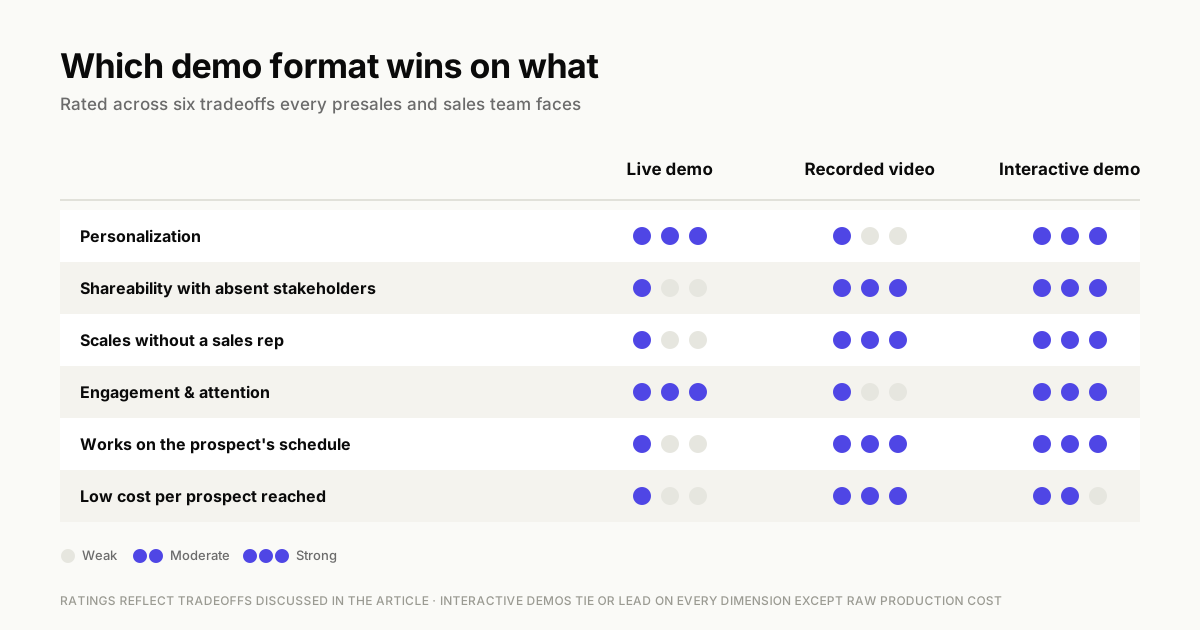
You can deliver a demo presentation in three main formats:
- Live demo: A real-time walkthrough where a sales rep guides the prospect through the product. Best for qualified prospects in active evaluation, but requires calendar coordination and can't be easily shared with absent stakeholders.
- Recorded demo: A pre-recorded video prospects watch on their own schedule, useful for early-stage nurturing. However, it's one-way - viewers can't ask questions or see personalized content.
- Interactive demo: A self-guided, clickable experience where prospects explore the product at their own pace without a login. It combines recorded convenience with live engagement and can be personalized at scale.
Sales engineers, solutions consultants, and account executives typically deliver demos during the evaluation stage of the buyer journey. The goal is always the same: prove that your product works for their situation, not just in theory.
Software demo presentation vs product presentation vs pitch deck
These three formats often get confused, but they serve different purposes.
A demo presentation shows the product working. A product presentation explains features and benefits conceptually, often through slides and screenshots. A pitch deck sells the company vision and opportunity, typically to investors or executive sponsors.
| Format | Purpose | Audience | Shows product working? |
|---|---|---|---|
| Demo presentation | Prove product solves buyer's problem | Prospects evaluating solutions | Yes |
| Product presentation | Explain features and positioning | Broader audiences, early-stage buyers | Sometimes (screenshots) |
| Pitch deck | Sell company vision and opportunity | Investors, executives | Rarely |
When a prospect asks to "see the product," they want a demo presentation. When they ask "what does your product do," a product presentation might work. Knowing which format fits the moment prevents wasted effort on both sides.
Why most software demo presentations fail to convert
Before diving into what works, it helps to understand what kills conversion. Most failed demos share a few recognizable patterns:
Feature dumping without context
Showing every feature overwhelms buyers and dilutes relevance. Your prospect came with a specific problem - maybe they need faster reporting or better team collaboration. When you walk through capabilities they don't care about, you lose their attention.
Examples include advanced admin controls for end users, or mobile features for desktop-only workers. This makes it harder for them to remember what actually matters. The cognitive load increases with each irrelevant feature, and by the time you reach the functionality they need, they've mentally checked out.
Generic or fake demo environments
Demo environments filled with placeholder data like "Acme Corp" and "John Doe" make it difficult for prospects to imagine the product in their context. When a healthcare prospect sees retail examples, or a 500-person company sees data scaled for enterprises, the disconnect is immediate. The more realistic your demo data, the easier it is for buyers to see themselves using the product. Use industry terminology, typical data volumes, and recognizable workflows. Generic environments force prospects to do translation work in their heads, adding friction to an already complex evaluation process.
No clear next step
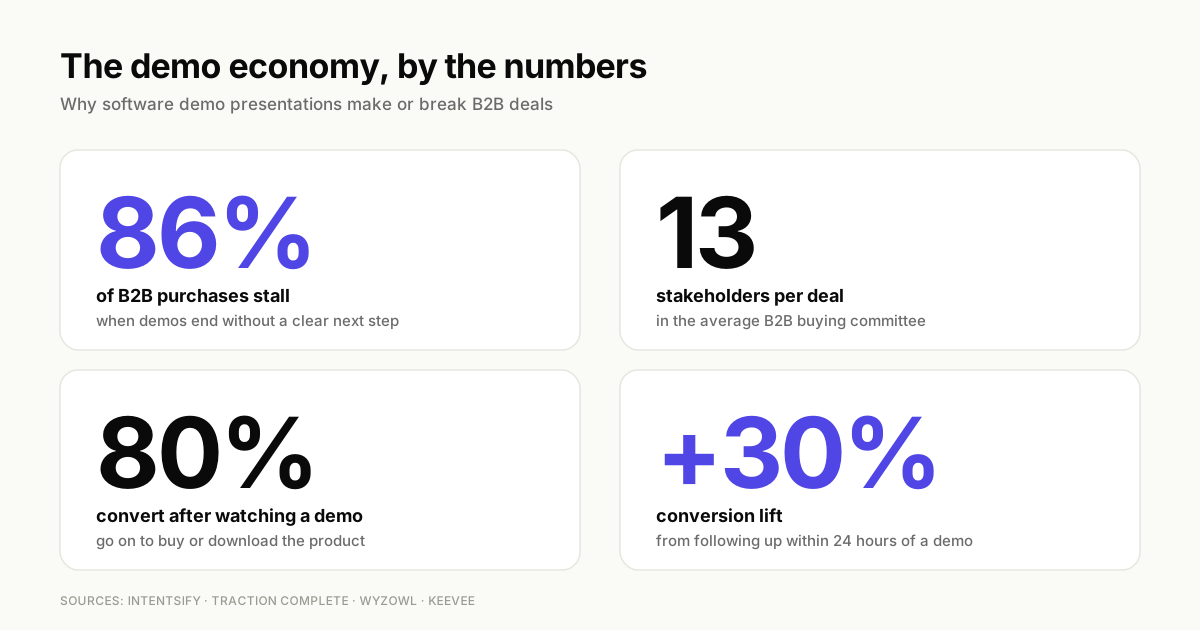
Demos without a specific call to action leave buyers unsure what to do. The conversation ends with "We'll be in touch" or "Let me know if you have questions," momentum dies, and 86% of B2B purchases stall.
Without a concrete next step, the deal enters limbo. This includes scheduling a technical review, starting a trial, or sharing the demo with their team. Prospects get pulled into other priorities, your champion loses urgency, and what felt like a promising opportunity quietly goes cold.
One-size-fits-all delivery
Showing the same demo to a technical buyer and an executive fails both. An end user wants to see daily workflows: how they'll complete tasks faster, where features live, and what their typical day looks like with your product.
A CTO wants to understand integrations and security. That means which systems connect, how data flows between platforms, what compliance standards you meet, and how the product scales.
A CFO wants ROI framing - implementation costs, time to value, efficiency gains translated to dollars, and how the investment compares to their current solution. When you ignore these different lenses, each stakeholder leaves the demo unconvinced because you never addressed what they actually care about.
Prospects cannot re-experience the demo
Your buyer often needs to sell internally to stakeholders who weren't on the call. If they can't share the demo, they share a summary from memory. Details get lost, enthusiasm fades, and the deal loses momentum before it reaches the decision-maker.
Five key elements of a high-converting software demo presentation
The five elements below address the specific failure modes that kill conversions. These include feature dumping, generic environments, missing calls to action, one-size-fits-all delivery, and demos that disappear after the call ends.
1. Personalization that matches buyer reality
Effective demos use the prospect's industry, role, or actual data to show relevance. When a prospect sees their terminology, their workflows, and their challenges reflected in the demo, they stop evaluating abstractly and start imagining implementation.
You can personalize demos at scale using dynamic variables that pull from your CRM, so each prospect sees a tailored experience without manual rebuilding.
2. Shareable format for internal champions
Buyers share demos internally. The average B2B purchase involves 13 stakeholders, and most of them won't be on your call. Give your champion something they can forward, whether that's a link to an interactive demo or a recorded walkthrough, rather than relying on their memory.
3. Interactivity that holds attention
Letting prospects click through the product themselves increases engagement compared to passive watching. Interactive formats keep attention because the viewer is doing something, not just observing.
4. Value-focused narrative over feature lists
Structure the demo around the prospect's problem and desired outcome. Features are supporting evidence, not the story. Lead with the challenge they described in discovery, show how your product addresses it, and connect back to the business impact they care about.
For more on structuring effective demos, see how to write a demo script that converts prospects.
5. Clear calls to action at decision points
Effective demos include prompts at natural decision moments, not just at the end. Ask for the next step when interest is high. Try: "Would it help to see how this integrates with your CRM?" or "Ready to start a trial with your own data?"
How to structure a software demo presentation
A clear structure keeps your demo focused on solving the prospect's problem and prevents you from wandering into irrelevant features that lose their attention. The five-step framework below ensures every minute of your demo earns engagement and moves the deal forward.
Step 1. Research your audience before building
Before you open your demo environment, understand who you're presenting to. Research company size to gauge complexity needs - a 50-person startup has different requirements than a 5,000-person enterprise. Identify the industry to use relevant terminology and examples - healthcare buyers expect HIPAA discussions, while fintech prospects care about SOC 2 compliance.
Map the role of each attendee so you know whether to emphasize workflows for end users, integrations for IT, or ROI for executives. Review known pain points from discovery calls, support tickets, or sales notes to anchor your demo in their actual challenges. Determine where they are in the buying process - early exploration requires broader education, while late-stage evaluation demands specific proof points and competitive differentiation.
Presales teams often coordinate with account executives on this research, pulling data from CRM records, previous conversations, and publicly available information like LinkedIn profiles or company websites. The more you know going in, the more relevant your demo will be. Relevance is what separates demos that convert from demos that get forgotten.
Step 2. Open with their problem not your product
The first minute of your demo earns or loses attention. Start by confirming you understand their challenge rather than launching into product features. Reference specific pain points from discovery calls: "Based on our last conversation, it sounds like your team spends hours each week manually updating reports. Is that still the main pain point?"
Wait for confirmation before proceeding.
This opening accomplishes three things. It proves you listened during discovery, gives the prospect a chance to clarify or add context, and creates a narrative thread connecting every feature back to their stated problem.
When you skip this step and jump straight to "Let me show you our dashboard," prospects wonder whether you understand their situation at all. The framing transforms your demo from a generic product tour into a targeted solution presentation.
Step 3. Demonstrate one to three features that solve it
Less is more. Identify the one to three features that directly address their stated problem and demonstrate only those. If they asked about reporting, show your reporting dashboard.
Walk through how they'd generate the specific reports they mentioned and demonstrate relevant customization options. Skip unrelated capabilities like user management, integrations they don't use, or advanced features they won't need immediately.
Each additional feature you show dilutes the impact of the ones that matter. Save the comprehensive product tour for later stages - after they've seen proof that you solve their core problem and explicitly ask for broader context.
Step 4. Create space for questions and interaction
Pausing for questions mid-demo keeps the buyer engaged and surfaces objections early, rather than discovering deal-breakers at the end when you've already invested thirty minutes. Build in natural stopping points after each major feature or workflow
- "Does this match how your team would use it?"
- "Any questions before we move on?"
These pauses serve two purposes: they confirm understanding before you move forward, and they give quieter stakeholders permission to speak up without interrupting.
Watch for non-verbal cues during live demos. If someone looks confused or starts typing notes, stop and ask what they're thinking. The objection they're forming silently will come up later anyway, often in an internal meeting where you're not present to address it.
In interactive demos, branching paths let prospects self-direct to the areas they care about most. Instead of forcing a linear walkthrough, give viewers choices at key decision points: "Explore reporting features" or "See integration options." This autonomy increases engagement.
Prospects spend time on what matters to them, skip what doesn't, and feel in control. You can track which paths they choose to understand their priorities before your next conversation.
Step 5. Close with a specific next step
End every demo with a concrete ask tied to the next logical step in their buying process. The specific ask depends on what you learned during the demo and where they are in evaluation.
For technical products, propose: "Based on what you've seen, would it make sense to schedule a technical deep-dive with your IT team to cover security and integrations?" For prospects ready to test, suggest: "Ready to start a trial so you can test this with your own data?"
If multiple stakeholders need alignment, try: "Should we schedule a follow-up with your finance team to walk through ROI?" The key is specificity - name the action, the participants, and ideally propose a timeframe.
Avoid vague endings like "Let us know if you have questions" or "We'll send over some information." These passive closes put the burden on the prospect to figure out next steps. Most won't.
Without a clear path forward, deals stall in the gap between interest and action. Your champion loses momentum, competing priorities take over, and what felt like a strong demo quietly goes cold.
Software demo presentation best practices that increase conversion
These tactical tips apply across demo formats and directly impact whether prospects move forward or go silent.
Keep your demo under fifteen minutes
Attention drops sharply after fifteen minutes. Prospects start checking email, lose track of key points, and struggle to recall what they saw. If your product requires more time, break the demo into multiple focused sessions.
Cover core workflows, integrations, and advanced features separately. This approach respects their time, improves retention, and gives you multiple touchpoints to maintain momentum throughout the evaluation.
Use real or realistic data
Populate your demo environment with data that mirrors what the prospect would see: their industry terminology, realistic volume, and recognizable scenarios. A marketing platform should show actual campaign names and metrics, not "Campaign 1" and "Campaign 2." A project management tool should display realistic task lists with deadlines, not placeholder text.
When prospects see familiar data patterns, they immediately understand how the product fits their workflow. Avoid "lorem ipsum," cartoon placeholders like "Acme Corp," and sample data that doesn't reflect their scale. Showing 10 records when they manage 10,000 creates doubt about whether your product can handle their needs.
Prepare backup plans for technical issues
Live demos can fail. Bugs happen, connections drop, and staging environments break at the worst moments. Keep a recorded backup or interactive demo ready as a fallback so you can pivot immediately without rescheduling.
Test your demo environment an hour before the call, have a backup browser open, and know exactly where to find your fallback link. When something breaks, acknowledge it quickly - "Looks like we're hitting a technical issue. Let me pull up the interactive version so we don't lose time" - and move on.
How you handle failures signals how you'll handle issues as a vendor.
Match demo depth to stakeholder type
Adjust your approach based on who's in the room:
- Executives: Focus on business outcomes and ROI projections. Skip granular feature details and keep it to 10 minutes maximum.
- End users: Show daily workflows and ease of use. Walk through key tasks and time-savers, and allow questions about edge cases.
- Technical buyers: Cover integrations, security, and implementation details. Be prepared for detailed questions about scalability and compliance frameworks.
When multiple stakeholder types join the same call, acknowledge each perspective upfront: "I know we have both technical and business stakeholders here. I'll cover workflows first, then dive into integrations and security." This signals you understand their different priorities and plan to address each one.
Follow up within twenty-four hours
Momentum matters - conversions increase 30% after a twenty-four-hour follow-up. Review sales demo best practices to strengthen your follow-up process. Send a recap that includes the interactive demo link and answers to any questions raised during the call.
Also confirm the next steps you agreed on. Reference specific moments from the conversation - "You mentioned your team struggles with monthly reporting. Here's the exact workflow we showed that automates that process" - to prove you were listening and make the follow-up feel personal rather than templated. The faster you follow up, the less time competitors have to fill the gap.
What to do after your software demo presentation
Post-software demo presentation actions often determine whether a deal moves forward or stalls. The hours immediately following your demo are critical. This is when interest is highest, details are fresh, and your prospect is most likely to act or share internally.
1. Send an interactive demo recap
Within 24 hours, send a shareable interactive demo that lets the prospect revisit key moments and share with colleagues who missed the call. Include a personalized message referencing specific points from your conversation. For example: "Here's the reporting workflow we discussed that would save your team 10 hours per week."
This replaces static PDFs that get buried in inboxes and keeps your product top of mind. The interactive format means stakeholders who weren't on the call can explore the product themselves. They won't need to rely on secondhand descriptions, and your champion doesn't have to recreate your demo from memory.
2. Track engagement to prioritize outreach
Analytics show which prospects are actively reviewing the demo and how many times they've returned. They also reveal which sections prospects spend time on and who they've shared it with internally. A prospect who revisits the demo three times and shares it with five colleagues signals strong buying intent and deserves immediate follow-up.
Someone who opened it once for 30 seconds may need re-engagement or wasn't the right fit. Use these engagement signals to prioritize your outreach and tailor your next conversation to the features they explored most. They also help you identify when deals are gaining or losing momentum.
3. Address unanswered questions within a day
Questions that go unanswered become objections that kill deals in internal meetings where you're not present to address them. Review your demo notes immediately after the call. Send answers to any questions you couldn't address live, along with documentation or resources that provide additional context.
If a prospect asked about a specific integration, send them the technical documentation and offer to connect them with a solutions engineer. If they questioned implementation time, provide a detailed timeline based on similar customers in their industry. Prompt follow-up demonstrates responsiveness and prevents small uncertainties from becoming deal-blockers.
4. Equip your champion to sell internally
Your champion is the internal advocate pushing for your product. But they're not a sales professional, and they're presenting to stakeholders with different priorities than their own. Learn how interactive demos for sales teams can help equip your champion with the right assets.
Provide them with shareable assets they can use in internal discussions: a one-page ROI summary with metrics specific to their use case, a comparison sheet addressing alternatives they're evaluating, and security and compliance documentation for IT stakeholders. Also include talking points that address common objections.
Make it easy for them to answer "Why this product?" and "Why now?" without needing to loop you into every conversation. The easier you make their internal selling process, the faster deals close.
How to measure software demo presentation performance
Track these metrics to understand whether your demos are working, identify where prospects lose interest, and optimize the elements that drive conversion. See how demo automation for SaaS can help you scale measurement across your pipeline.
Completion rate
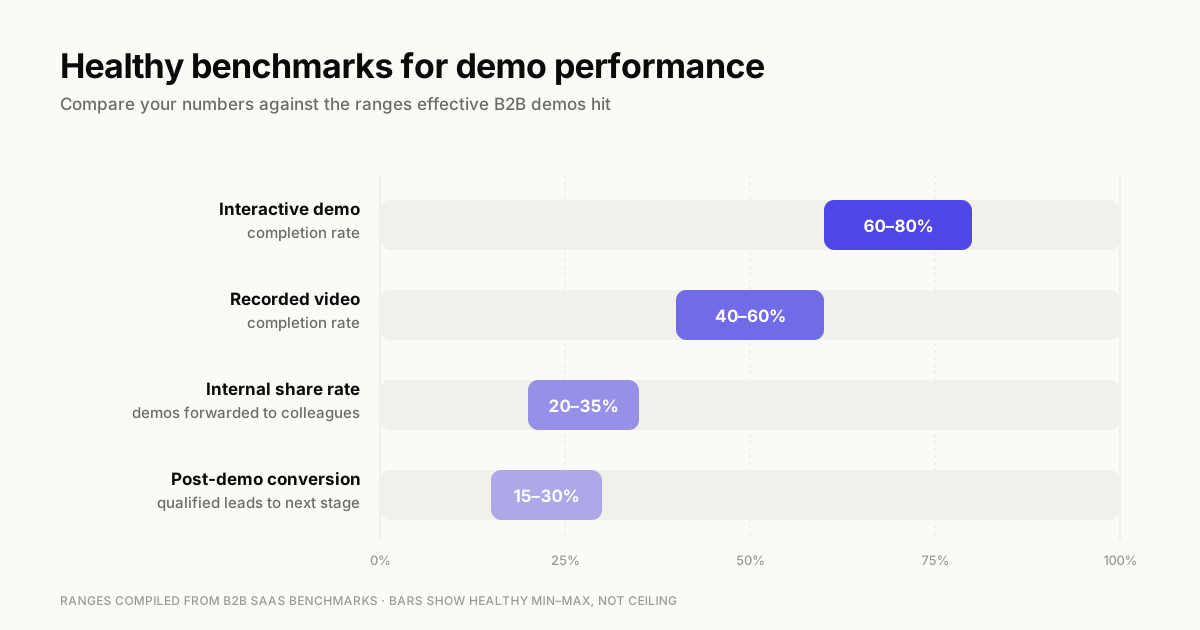
The percentage of viewers who finish the demo from start to end. A healthy completion rate typically falls between 60-80% for interactive demos and 40-60% for recorded videos. Low completion suggests the demo is too long, loses relevance midway, or includes too many features that don't apply to your audience.
If you notice drop-off at specific steps, that's where you're losing attention. The content may not be relevant, the explanation unclear, or the value proposition weak. Use completion data to trim unnecessary sections and front-load your most compelling features.
Time spent per step
This shows where prospects engage deeply or skip through quickly. When viewers spend 2-3 times longer on a feature than average, that signals strong interest. They may be reading tooltips, exploring options, or mentally mapping it to their workflow.
Conversely, steps with unusually short time spent indicate low relevance or confusion. Use this data to identify which features resonate most with your audience, then lead with those in future demos.
If a feature you consider critical gets skipped consistently, it may not be solving a real problem. Alternatively, you may not be framing its value clearly enough.
Post-demo conversion rate
The percentage of demo viewers who take the next step in your sales process, whether that's booking a call, starting a trial, or requesting pricing. Benchmark this against your overall funnel conversion rates. If 30% of qualified leads typically move to the next stage but only 15% do after viewing your demo, the demo may be creating friction rather than removing it.
Track conversion by demo type (live vs. interactive vs. recorded) and by audience segment (industry, company size, role). This helps identify which formats and personalizations drive the strongest results. A drop in conversion after implementing demo changes tells you exactly what's not working.
Internal share rate
Tracking how often prospects share the demo internally signals deal momentum and buying committee involvement. When a prospect forwards your demo to colleagues, they're actively championing your solution - the average share rate for effective B2B demos ranges from 20-35%. Low share rates suggest the demo isn't compelling enough to forward or isn't in a shareable format.
It may also mean your champion doesn't feel confident presenting it to stakeholders. High share rates combined with low conversion may mean the demo generates interest but fails to address concerns. Economic buyers or technical evaluators who see it secondhand may remain unconvinced.
Track who receives shared demos when possible - if your champion is sharing with IT but not finance, you may need to add ROI-focused content.
Build software demo presentations that convert in minutes
Effective demos are personalized, shareable, interactive, value-focused, and measurable. With Guideflow, teams create, personalize, and share interactive demos in minutes without technical resources. Capture your product flow directly from your browser, customize it for each prospect, and track engagement to prioritize follow-up.
FAQs about software demo presentations
Most effective demos run under fifteen minutes. For complex products, break the demo into multiple focused sessions rather than one extended walkthrough.
Showing the actual product is more persuasive than slides. 80% of people who watched a demo video went on to buy or download the product. However, slides can frame context at the start or summarize key points at the end.
Structure the demo in segments that address each stakeholder's concerns, or send personalized follow-up demos tailored to each role after the main presentation.
An interactive demo lets viewers click through the product themselves and control the pace. A recorded video is passive viewing where the viewer watches but doesn't interact.
Yes. Interactive demos can be embedded on websites or sent via email to let prospects self-serve before or instead of booking a live call.