
It's Tuesday. The AE pings you: "Can you do a quick demo for their VP of Engineering? She needs to see the product before they'll move forward." You check your calendar. Nothing open until next Thursday. The deal sits for nine days because of a scheduling gap.
Now multiply that by every stakeholder on the buying committee. According to Gartner, the average B2B purchase now involves 6 to 10 decision-makers, each gathering information independently. Scheduling live demos for every one of them adds weeks to the sales cycle.
A self-serve demo center solves this by giving every stakeholder on the buying committee a way to explore the product on their own time, through interactive demos organized by persona and use case. But here's the pattern we see: teams launch a demo center with six demos, get 40 views in the first month, and then nobody touches it again.
The difference between a demo center that accelerates deals and one that collects dust comes down to specific decisions made during planning and execution. This guide covers those decisions.
What's inside
This guide covers the do's and don'ts of building a self-serve demo center that prospects actually use and that moves deals forward. It's written for SEs and presales managers at B2B SaaS companies. Each recommendation comes from patterns observed across teams that have shipped demo centers, including what worked, what to prioritize first, and which mistakes to avoid. If you're still building your presales process, this guide will help you integrate demo centers into it from the start.
TL;DR
- A self-serve demo center is a centralized, branded hub where prospects explore your product through interactive demos, organized by persona, use case, or product line.
- The biggest mistake is building it around your product's feature hierarchy instead of the buyer's decision process.
- Personalization by segment drives materially higher engagement and completion rates compared to one-size-fits-all demo libraries.
- Demo center analytics are some of the strongest buying signals your sales team can get: who viewed what, for how long, and which stakeholders from the same account are engaging.
- Start with 3 to 5 demos covering your top use cases. Expand based on engagement data, not assumptions.
- Guideflow lets you build a demo center in minutes with built-in analytics, personalization, and CRM sync.
What is a self-serve demo center (and why it matters for presales in 2026)
A self-serve demo center is a branded, centralized destination where prospects and customers can explore interactive product demos, videos, and supporting assets on their own, without scheduling a live call or waiting for an SE. It organizes multiple demo experiences by product line, buyer persona, use case, or funnel stage, and lets visitors choose their own path through the product.
That definition sounds straightforward. But the concept gets confused with adjacent formats constantly, and the confusion leads to poor implementation decisions. Here's how they differ:
Each format performs best in specific contexts. The demo center's unique value is that it serves as the organizing layer across all of them, giving every stakeholder a single destination to find the experience most relevant to their role.
Why it matters now
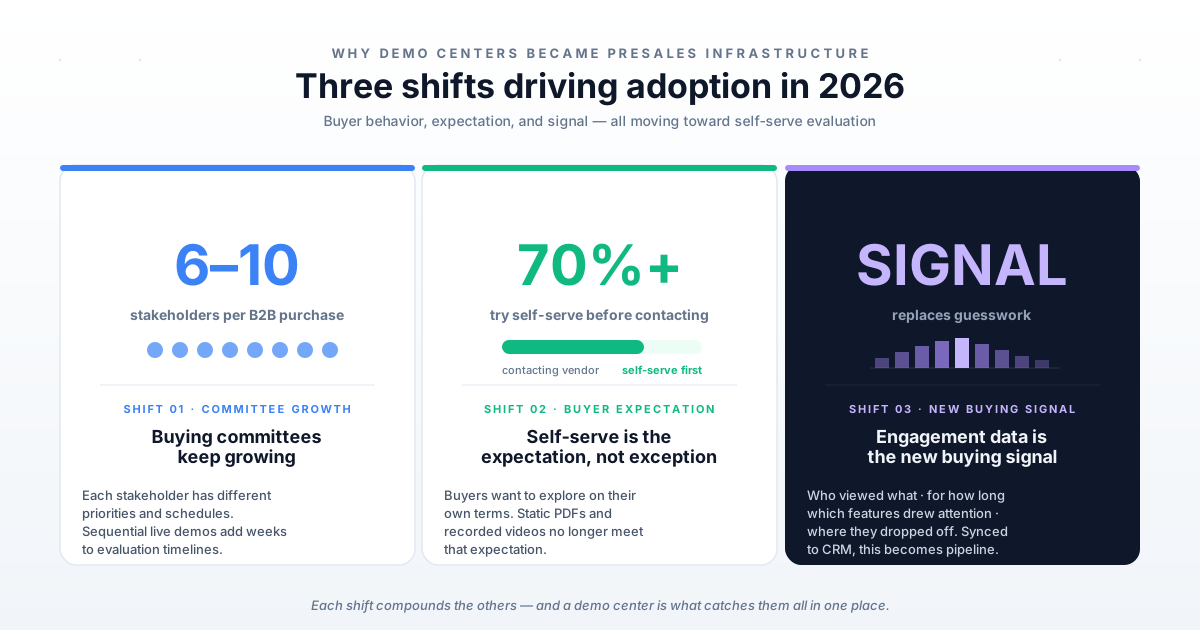
Three shifts make demo centers a presales priority in 2026:
Buying committees keep growing. The average B2B SaaS purchase involves 6 to 10 stakeholders (Gartner). Each person brings different priorities, different concerns, and different schedules. Scheduling live demos for each one adds weeks to the evaluation timeline.
Self-service experiences are the expectation, not the exception. Over 70% of customers attempt self-service before contacting a vendor (Kustomer, 2024). Buyers want to explore on their own terms. A demo center meets that expectation while generating engagement data that static PDFs and recorded videos cannot.
Engagement data is the new buying signal. Demo centers track who viewed what, for how long, which features drew the most attention, and where visitors dropped off. This data, synced to your CRM, gives SEs specific intelligence for follow-up conversations. It's a fundamentally different engagement model compared to sending a PDF and hoping someone reads it.
For presales teams specifically, a well-built demo center for presales reduces the volume of repetitive "show me how it works" requests, freeing SE time for high-value, deal-progressing conversations. The right presales software tools make this even more effective by connecting demo engagement to your broader sales workflow.
The do's: What to get right when building your demo center
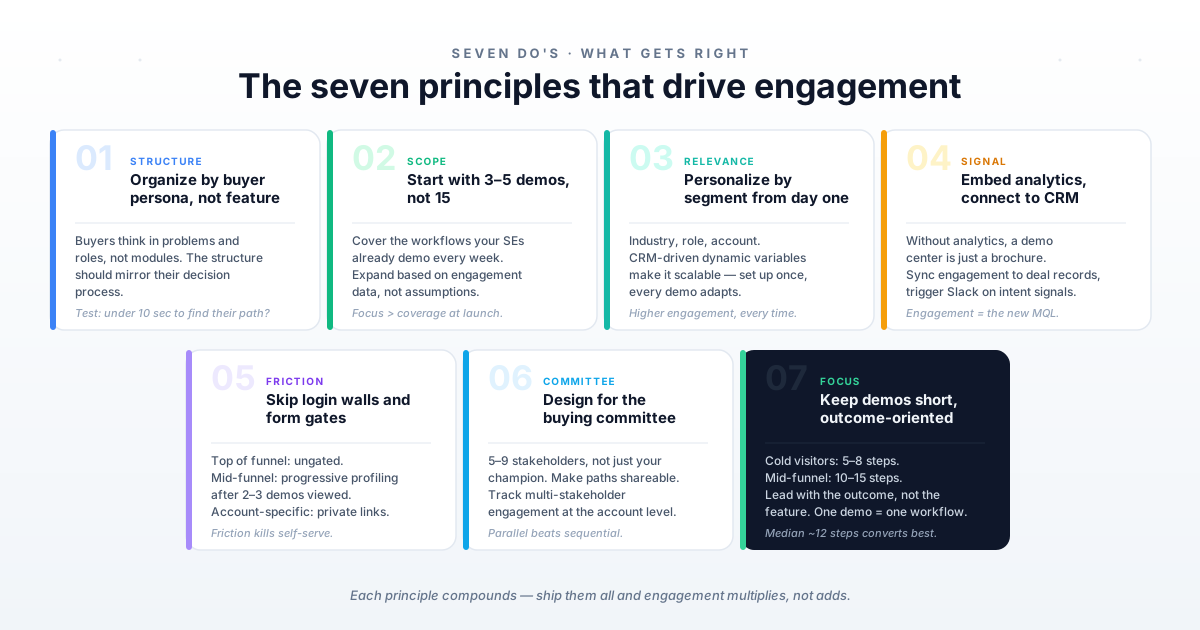
These seven recommendations are the demo center best practices that separate demo centers driving pipeline from ones generating polite nods. Each one includes specific implementation detail, not just the principle.
Do: Organize by buyer persona and use case, not by product feature
The most common structural mistake is mirroring your product's feature hierarchy. Prospects don't think in terms of "Module A, Module B, Module C." They think in terms of "I'm the VP of Finance and I need to understand how this handles revenue recognition."
When you organize by feature, you're asking the visitor to do the translation work: "Which of these modules is relevant to my problem?" Most won't bother. They'll click one thing, not find what they need, and leave.
Instead, structure your demo center around how buyers think:
- Buyer personas: "For Finance Leaders," "For IT Admins," "For End Users"
- Use cases: "Automate Reporting," "Manage Compliance," "Onboard New Customers"
- Industry verticals: "For Healthcare," "For Financial Services," "For Manufacturing" (if your product serves distinct verticals)
Here's what this looks like in practice. A Series C infrastructure SaaS company organized their demo center into three paths: "For DevOps Engineers," "For Platform Teams," and "For Engineering Leaders." Each path contained 2 to 3 interactive demos tailored to that persona's workflow. Completion rates averaged 58% across paths, which aligns with industry benchmarks for well-structured interactive demos.
The test: show your demo center to a prospect and ask them to find the demo most relevant to their role. If they can't do it in under 10 seconds, the structure needs work.
Do: Start with 3 to 5 demos covering your highest-value use cases
Resist the urge to launch with 15 demos. Start with the 3 to 5 use cases that come up most often in discovery calls. These are the flows your SEs already demo live every week.
How to identify the right starting set:
- Ask your SE team: "What are the three things every prospect asks to see?" Your SEs know this instantly. The answers will cluster around 3 to 5 core workflows.
- Check your CRM: Which features or use cases appear most in closed-won deal notes? This tells you what buyers cared about enough to mention. The best CRM software makes this data easy to pull.
- Talk to CS: Which onboarding flows generate the most support questions? These are also strong candidates for self-serve demos that reduce support tickets.
Build those first. Measure engagement. Then expand based on data, not guesses. Teams that start focused and iterate based on demo center analytics consistently outperform teams that try to cover everything at launch.
Do: Personalize by segment from day one
Personalization is what separates a demo center that drives pipeline from one that gets polite nods. At minimum, tailor the self-service experiences by:
CRM-driven dynamic variables make this scalable. Instead of building a separate demo for every prospect, you use variables that pull the prospect's company name, industry, and role from your CRM and populate the demo automatically.
Teams that personalize demo center content by segment report materially higher engagement and completion rates compared to generic demo libraries. The reason is straightforward: a personalized demo answers "how does this apply to my situation?" immediately, while a generic demo forces the prospect to do that translation themselves.
Guideflow supports deep personalization through dynamic variables from CRM, tailored text, visuals, charts, and steps, all editable in a no-code editor. You set up the variables once, and every demo in the center adapts automatically based on who's viewing it.
Do: Embed analytics and connect them to your CRM
A demo center without analytics is a brochure. The real value isn't just that prospects can self-serve. It's that you can see exactly what they explored, how long they spent, where they dropped off, and which stakeholders from the same account are engaging.
What to track:
- Session-level engagement: Steps viewed, time per step, completion rate
- Account-level signals: How many people from the same company are exploring? Which personas?
- Feature interest mapping: Which product areas get the most attention?
- Drop-off points: Where do prospects stop engaging? This tells you where the demo's value proposition needs strengthening in the first 2 to 3 steps.
This data becomes powerful when it flows into your CRM (Salesforce, HubSpot) and Slack for real-time alerts. Guideflow's analytics and integration capabilities make this automatic: engagement events sync to deal records and trigger Slack notifications for high-intent patterns.
Here's a concrete scenario. Your CISO prospect spent 12 minutes in the security configuration demo and viewed every step. Your CFO prospect opened the ROI calculator demo but dropped off at step 3. You now know exactly what to address in your next call, without asking. That's buyer enablement data you can't get from a PDF or a recorded video.
Do: Make the demo center accessible without a login or form gate
If a prospect needs to create an account, fill out a 6-field form, or wait for an approval email before they can explore your demo center, most of them won't. Research consistently shows that removing friction from self-service access increases engagement significantly. The whole point of self-serve is removing barriers from the evaluation process, not adding new ones.
Gating strategies by funnel stage:
- Top of funnel: Default to ungated access. Let visitors explore freely. The demo center's analytics will tell you who they are based on engagement patterns.
- Mid-funnel: Use progressive profiling. Collect an email after the prospect has engaged with 2 to 3 demos, not before they've seen anything. By that point, they've demonstrated genuine interest.
- Account-specific: For enterprise or named-account demo centers, use private links with access controls rather than login walls. Your champion can share the link internally without forcing colleagues through a registration process.
Guideflow supports both public links and gated access with granular sharing controls, so you can match the access model to the context without building separate demo centers for each scenario.
Do: Design for the buying committee, not just the champion
Your champion already likes the product. The demo center's job is to help the other 5 to 9 people on the buying committee get to "yes" without requiring 5 to 9 separate live demos.
How to structure for multi-stakeholder evaluation:
Make it shareable. Your champion should be able to send a link to the demo center with a note like "Check out the security section before our call Thursday." Track multi-stakeholder engagement at the account level so you can see when the buying committee is actively evaluating.
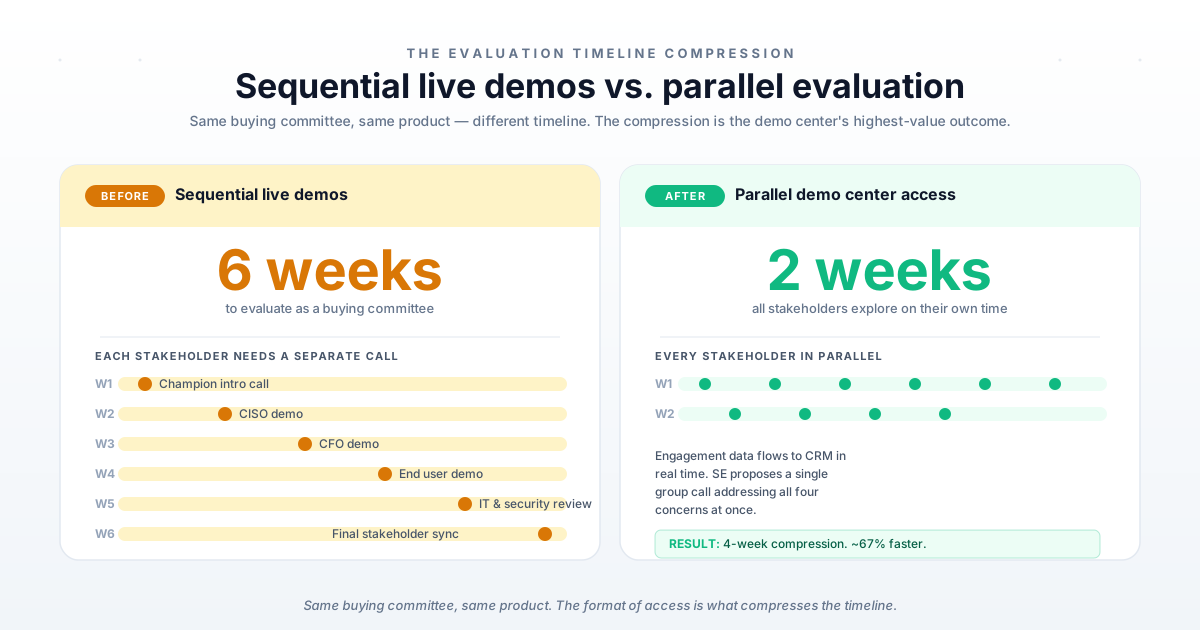
A mid-market SaaS company saw that 4 different stakeholders from one enterprise account explored their demo center in the same week, each viewing different persona paths. The SE used that engagement data to propose a group call that addressed all four concerns in one meeting, compressing the evaluation from 6 weeks to 2.
That compression is the demo center's highest-value outcome: parallel evaluation instead of sequential scheduling.
Do: Keep demos short, focused, and outcome-oriented
Each demo in the center should cover one specific workflow or use case, not the entire product. Industry benchmarks show that the optimal interactive demo length is around 12 steps, and the highest-performing demos tend to have fewer steps than the median.
Guidance by audience and funnel stage:
Lead with the outcome, not the feature. "See how to close your books in 3 days instead of 10" outperforms "Explore our Financial Close Module" every time. Use clear, action-oriented step labels. End each demo with a CTA that matches the visitor's stage: book a call, explore another demo, or share with a colleague.
The don'ts: What to avoid when building your demo center
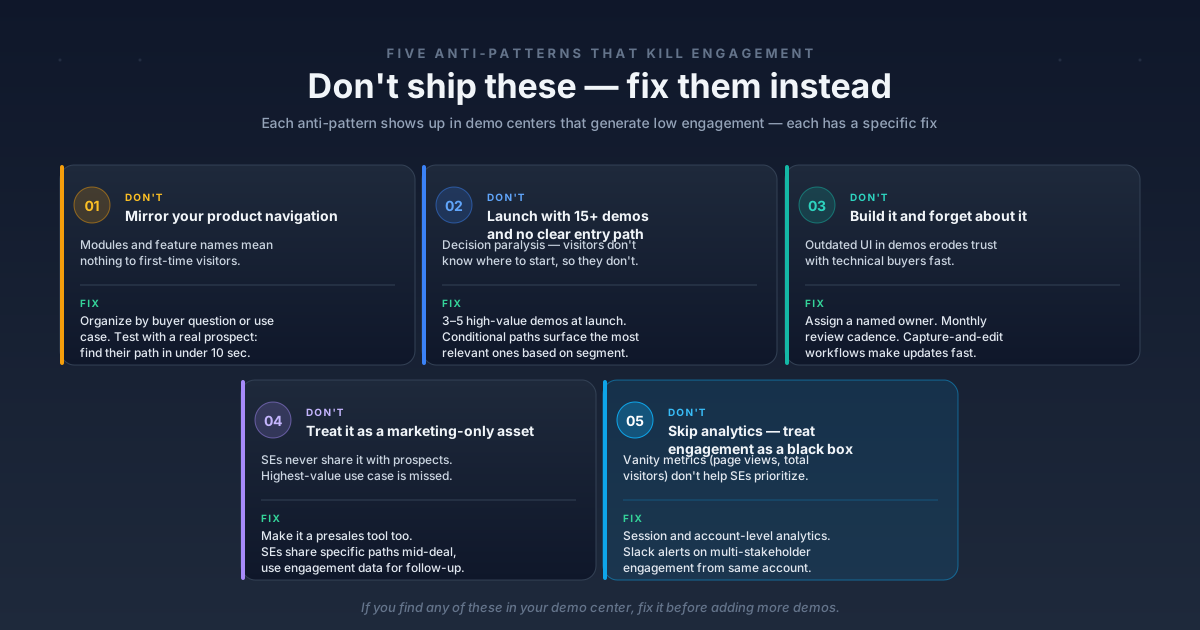
These five anti-patterns show up repeatedly in demo centers that generate low engagement. Each one includes the specific optimization that fixes it.
Don't: Mirror your product's navigation as the demo center structure
This is the most common anti-pattern. Teams default to organizing the demo center by product module ("Dashboard," "Reports," "Settings," "Integrations") because that's how they think about the product internally.
Prospects don't navigate this way. They're looking for answers to their problems, not a tour of your information architecture. A demo center structured by module forces visitors to guess which module contains the capability they care about. Most won't guess.
The optimization: Organize by buyer question or use case (covered in the do's section above). Before launching, test with 2 to 3 prospects: ask them to find the demo most relevant to their role. If they can't in under 10 seconds, restructure around personas and use cases.
Don't: Launch with 15+ demos and no clear entry path
More demos does not mean more engagement. A demo center with 15 undifferentiated demos creates decision paralysis. Visitors don't know where to start, so they don't start at all.
The data supports this. Completion rates and engagement depth are highest when visitors have a clear, curated path rather than an overwhelming catalog.
The optimization: Launch with 3 to 5 high-value demos. Use conditional paths or segment-based personalization to surface the most relevant demos based on visitor data. Expand the library based on engagement analytics, not internal assumptions. Guideflow's conditional paths and curated demo playlists make this straightforward: you set the rules once, and the demo center adapts automatically.
Don't: Build a demo center and forget about it
A demo center that shows last quarter's UI or references a feature that's been renamed erodes trust with technical buyers. SEs and prospects notice when the demo doesn't match the product. For presales teams, credibility is everything, and an outdated demo center works against you.
The optimization: Assign a demo center owner (typically the SE lead or a PMM). Set a monthly review cadence. With Guideflow's capture-and-edit workflow, updating demos takes minutes. You capture the new flow, swap it in, and the demo center stays current automatically. No engineering involvement, no production cycles.
Don't: Treat the demo center as a marketing-only asset
Some teams build a demo center, embed it on the website, and hand it to marketing. The presales team never touches it. This misses the highest-value use case: SEs sharing specific demo center paths with prospects mid-deal to accelerate multi-stakeholder evaluation.
The optimization: Make the demo center a presales tool, not just a marketing page. SEs should be able to:
- Share direct links to specific demo paths with prospects via email
- Personalize content for individual accounts using dynamic variables
- Track engagement from their prospects in real time via CRM and Slack alerts
- Use engagement data to prepare for follow-up calls with specific talking points
The demo center should integrate with the tools SEs already use: CRM, Slack, email. When it does, it becomes part of the SE workflow instead of a separate marketing asset they never visit. See the full list of available integrations to understand how this fits into your existing stack.
Don't: skip the analytics and treat engagement as a black box
If you can't see who's engaging with the demo center, which demos they're viewing, and where they're dropping off, you're missing the entire signal layer that makes a demo center valuable. Vanity metrics (total page views, total visitors) don't help SEs prioritize follow-up.
The optimization: Implement session-level and account-level analytics from day one. Connect engagement data to your CRM so it appears alongside deal records. Set up Slack alerts for high-intent engagement patterns (for example, 3+ stakeholders from the same account viewing demos in the same week). These are the demo center analytics that turn a passive content hub into an active pipeline intelligence tool.
Demo center content architecture: a framework for SEs
Most demo centers are organized as flat lists of demos. The ones that drive pipeline use a layered content architecture that adapts to the visitor.
The key is that these layers work together through conditional paths and segment-based personalization. A visitor from a healthcare company who identifies as a compliance officer sees a different entry path, different demo sequence, and different supporting assets than a fintech CTO, all from the same demo center.
Guideflow's Demo Center product supports this architecture out of the box: curated demo playlists, conditional paths, segment-based personalization, and multi-asset support (interactive demos, videos, PDFs, forms). You set up the architecture once, and the demo center adapts to each visitor automatically.
This is also where the concept of self-service experiences extends beyond marketing. When the content architecture is built around the buyer's decision process, the demo center becomes buyer enablement infrastructure, not just a product showcase.
Measuring demo center performance: what to track and what the numbers mean
You can't improve what you don't measure. But measuring the wrong things (total page views, total visitors) gives you false confidence. Here are the metrics that matter, with benchmarks based on industry data.
Set up measurement from day one. Review monthly. The most important trend to watch is multi-stakeholder engagement per account: when multiple people from the same company start exploring, that account is in active evaluation mode. Your SE should know about it immediately.
A monthly review cadence works well: check the metrics, identify the demo with the lowest completion rate, look at where visitors drop off, and optimize those specific steps. With the right tooling, this review takes 30 minutes and the updates take even less.
What to do next: your first 30 days
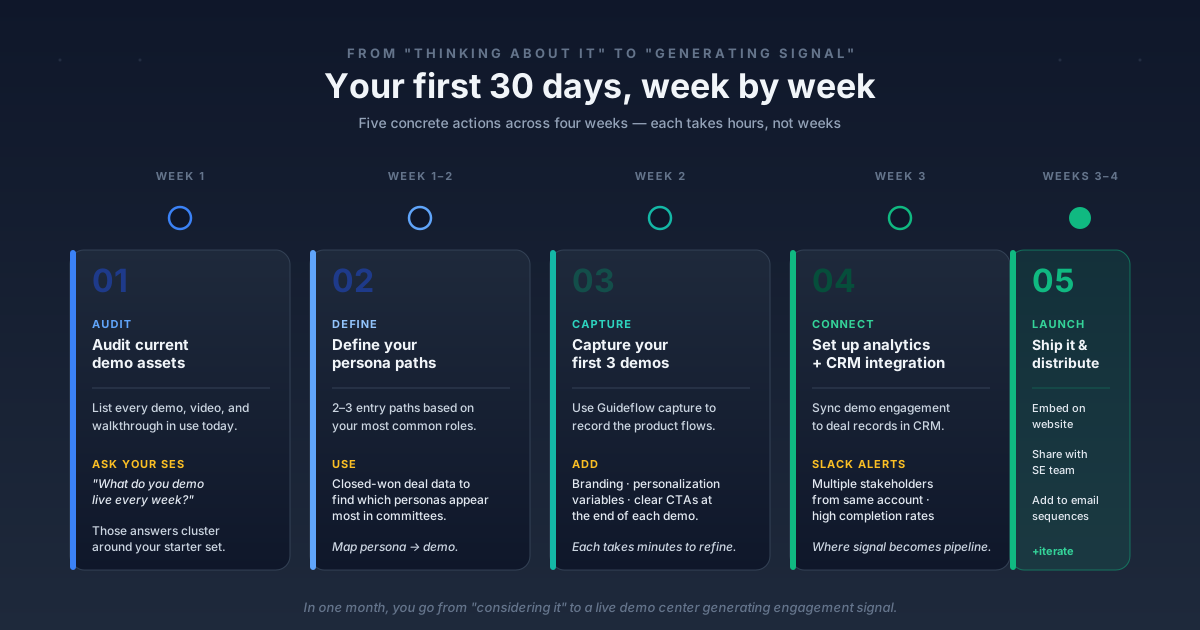
Five specific actions to go from "thinking about a demo center" to "live and generating engagement data."
- Week 1: Audit your current demo assets. List every demo, video, and product walkthrough your team currently uses. Identify the 3 to 5 most-requested flows. Ask your SEs: "What do you demo live every single week?" Those are your starting demos.
- Week 1 to 2: Define your persona paths. Based on your most common buyer roles, create 2 to 3 entry paths for the demo center. Use your closed-won deal data to identify which personas appear most often in buying committees. Map each persona to their primary concern and the demo that addresses it.
- Week 2: Capture your first 3 demos. Use Guideflow to capture the product flows you identified. Customize with branding, personalization variables, and clear CTAs. Each demo takes minutes to capture and refine.
- Week 3: Set up analytics and CRM integration. Connect demo center engagement to your CRM. Set up Slack alerts for high-intent signals (multiple stakeholders from the same account, high completion rates on technical demos). This is where the demo center starts generating sales intelligence, not just impressions.
- Week 3 to 4: Launch and distribute. Embed on your website, share with your SE team for mid-deal use, and add to your email sequences. Review engagement data after 2 weeks and adjust. The data will tell you which demos need more steps, which need fewer, and which personas you're missing.
Conclusion
A self-serve demo center isn't a marketing project. It's a presales infrastructure decision that changes how your buying committee evaluates your product. The do's and don'ts in this guide are patterns from teams that have shipped demo centers and measured the results.
The biggest lever is starting small (3 to 5 demos), organizing by buyer persona, connecting analytics to your CRM, and iterating based on data. Every other optimization, personalization, multi-stakeholder tracking, conditional paths, builds on that foundation.
The teams that get this right see shorter evaluation cycles, better-informed buying committees, and SEs spending their time on high-value conversations instead of repetitive "show me how it works" calls.
Start your journey with Guideflow today!