Your staging environment crashed mid-demo. Again. The prospect watched you fumble through error messages while their enthusiasm evaporated in real time.
Sandbox demos solve this by giving prospects a stable, interactive copy of your product. Prospects can explore freely without logins, live data, or the risk of something breaking at the worst moment.
This guide covers how to build, personalize, and distribute sandbox demos that actually convert. It also covers the mistakes that kill deals and the metrics that matter.
What's inside
This guide covers what sales teams actually need to run effective sandbox demos:
- What sandbox demos are and how they differ from live demos and interactive demos
- Why sandboxes improve sales performance and pipeline velocity
- Step-by-step best practices for building, personalizing, and distributing sandboxes
- Common mistakes that kill deals and how to avoid them
- How to measure sandbox demo performance and connect insights to your CRM
TL;DR
- Research before you build: Customize sandbox content to match each prospect's use case, industry, and pain points rather than sending generic environments.
- Design for self-guided exploration: Build sandboxes that work without a presenter, with optional guided pathways so prospects don't get lost.
- Personalize key screens: Edit text, images, and data to reflect the prospect's company name and relevant workflows.
- Follow up based on engagement data: Use analytics to see which sections prospects explored and craft targeted follow-up messages.
- Iterate on completion metrics: Monitor drop-off points and improve sandbox content over time based on real usage patterns.
Guideflow helps teams create stable, personalized sandbox environments in minutes without engineering involvement.
What is a sandbox demo
Sandbox demo best practices for sales teams start with personalizing the environment and tailoring the narrative to specific pain points. Guide the prospect through a story rather than a feature dump.
The most effective sandboxes address the customer's biggest challenge immediately by showing the most valuable feature first. Then let buyers explore freely on their own schedule.
A sandbox is a secure, interactive copy of your product that prospects can explore without logins, staging environments, or production data. Unlike fragile demo instances that break when your product updates, sandboxes remain stable throughout the sales cycle.
- Stable environment: Does not break when production changes
- No login required: Prospects access instantly via link
- Safe exploration: No production data exposed
- Always available: Works across time zones, 24/7
Think of a sandbox as a "test drive" experience. Prospects can click anywhere, explore workflows that matter to them, and evaluate your product on their own terms.
Sandbox demos vs live demos vs interactive demos
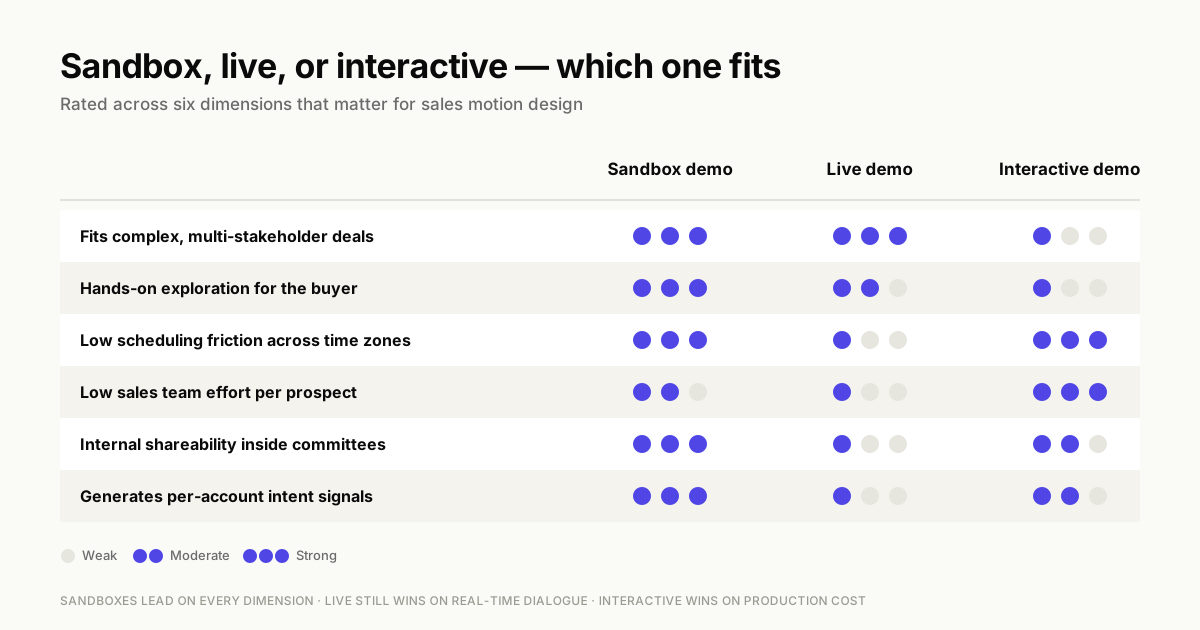
Sales teams often wonder which demo format fits which situation. The answer depends on deal complexity, buyer stage, and how much hands-on exploration the prospect wants.
| Demo type | Best for | Buyer experience | Sales team effort |
|---|---|---|---|
| Sandbox demos | Complex products, multi-stakeholder deals, technical validation | Free exploration with optional guidance | Medium (setup once, reuse many times) |
| Live demos | High-value enterprise deals, relationship building | Real-time Q&A, customized walkthrough | High (requires scheduling, preparation) |
| Interactive demos | Top-of-funnel awareness, marketing campaigns | Linear guided tour | Low (create once, distribute widely) |
When to use sandbox demos
Sandbox demos work best when prospects want hands-on exploration before committing to a live call. They're particularly effective for complex products where buyers want to poke around. They also suit multi-stakeholder deals where committee members evaluate different features, and technical validation scenarios where prospects compare competitors.
Sandboxes also help when your sales engineering team is stretched thin. Instead of scheduling repetitive "show me how it works" calls, send a sandbox link and let prospects explore independently.
When to use live demos
Live demos remain the right choice for high-value enterprise deals where relationship building matters as much as product evaluation. When prospects have complex questions requiring real-time dialogue, live demos give you that flexibility. They're also ideal when you're deep in a competitive displacement and want to control the narrative.
The tradeoff is scheduling friction. International prospects in different time zones often struggle to find convenient times, and no-shows waste valuable SE bandwidth.
When to use interactive demos
Interactive demos shine at the top of the funnel. When you want to embed a product experience on your website or include it in outbound emails, interactive demos work well. They provide a consistent, linear walkthrough that works for everyone.
hey're optimized for awareness and top-of-funnel engagement, guiding users through a predetermined path that delivers a consistent, focused experience.
Why sandbox demos improve sales team performance
Before diving into best practices, it helps to understand why sandboxes matter for sales operations.
Eliminate demo environment failures
Every sales team has horror stories about staging environments breaking during critical demos. A prospect is ready to buy, you're sharing your screen, and suddenly the demo instance throws an error because someone pushed a code update.
Sandboxes eliminate this failure mode entirely. Because they're captured copies of your product rather than live instances, they remain stable regardless of what happens in production.
Scale demo capacity without adding headcount
Presales teams often become bottlenecks when demo volume spikes. Sandboxes let you offload routine "show me how it works" requests to self-service, freeing SEs to focus on complex technical validation and high-value deals.
Enable buyer self-service across time zones
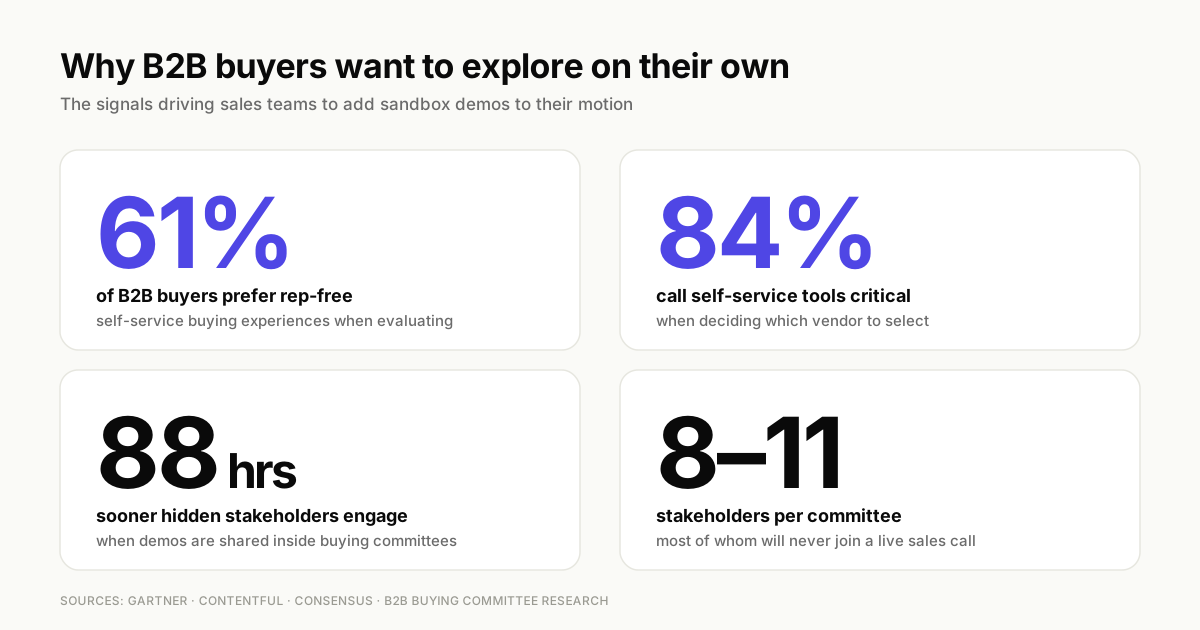
B2B buying committees now average 8-11 stakeholders. Not all of them can attend a live demo. A Gartner survey found 61% of buyers prefer rep-free experiences, and many evaluate products on their own schedule.
Sandboxes let international prospects and buying committee members explore at 2am their time if that's when they have bandwidth. The experience remains consistent whether someone accesses it during your business hours or not.
Generate intent signals for smarter follow-up
When you send a PDF or slide deck, you have no idea what the prospect actually looked at. Sandboxes change this dynamic completely.
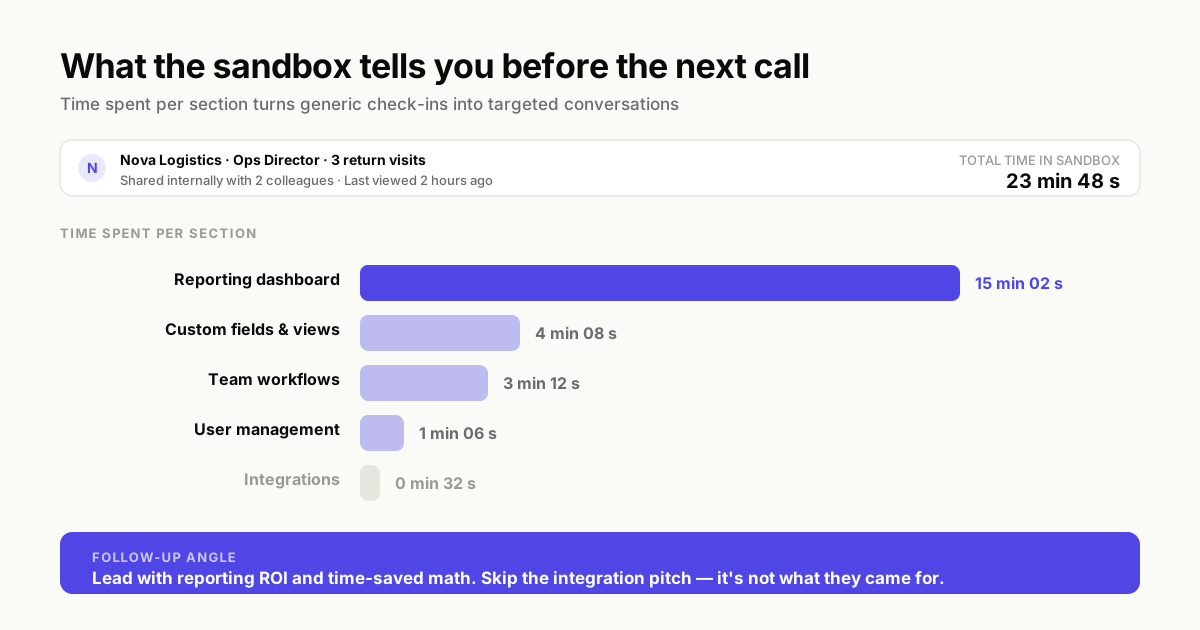
With engagement tracking, you can see which features prospects explored, how long they spent in different sections, and whether they returned for multiple sessions. This data transforms follow-up conversations from generic check-ins to targeted discussions about the specific capabilities that caught their attention.
What makes a sandbox demo effective
Not all sandboxes perform equally. The difference between a sandbox that converts and one that gets ignored often comes down to a few structural elements.
Clear navigation and guided pathways
Free exploration sounds great in theory, but prospects can get lost in complex products. The best sandboxes balance autonomy with direction by offering optional guided paths.
Think of it like a museum. Visitors can wander freely, but there's also a suggested route for those who want structure. Add contextual hints, recommended starting points, and clear navigation so prospects always know where they are and what they can explore next.
Personalized content for each prospect
Generic sandboxes feel impersonal. When a prospect sees "Acme Corp" placeholder text and sample data that doesn't match their industry, the experience feels like a template. It doesn't feel like a solution to their specific problem.
Personalizing text, images, logos, and graphs to match the prospect's context dramatically increases engagement. Even small touches like using their company name and industry-relevant terminology signal that you understand their situation.
Built-in data protection and security
Sandboxes often get shared internally within buying committees, which means they can reach people you've never spoken with. This makes data protection critical.
Blur, hide, or remove any sensitive information before publishing. Set up access controls and link permissions so you maintain visibility into who's viewing your sandbox and when.
Real-time analytics and engagement tracking
"You can't improve what you don't measure." Effective sandboxes track views, navigation depth, time spent in different sections, and key interactions.
This data serves two purposes. It helps you follow up more effectively with individual prospects, and it reveals patterns across all your sandboxes that inform future demo structure.
Sandbox demo best practices for sales teams
Here are seven sandbox demo best practices for sales teams that separate high-performing demos from ones that get ignored.
1. Research the prospect before you build
The biggest mistake sales teams make is sending the same sandbox to every prospect. Before creating or customizing a sandbox, invest time in discovery.
What's the prospect's primary use case? Which pain points came up in earlier conversations? Who else on the buying committee will likely view this sandbox?
Match your sandbox content to their specific situation rather than showing everything your product can do.
2. Design for self-guided exploration
Build sandboxes that work without you present. Remove unnecessary flows that don't relate to the prospect's use case. Simplify navigation so the most relevant workflows are easy to find.
Add contextual guidance within the experience itself. Beacons, tooltips, and suggested next steps help prospects navigate without feeling lost.
3. Personalize key screens for each account
At minimum, customize the screens prospects will see first and the workflows most relevant to their use case. Edit text to use their company name and industry terminology. Swap in data that reflects their typical scenarios.
This doesn't mean rebuilding the entire sandbox for every prospect. Focus personalization on high-impact moments: the first screen, the key workflow, and any proof points that demonstrate value.
4. Prepare talk tracks and presenter notes
Even though sandboxes work for self-service, your team will sometimes present them live. Add internal notes visible only to sales reps that include talk tracks, objection handling guidance, and technical details.
Presenter guides ensure consistent messaging across your team and help newer reps deliver the same quality experience as your top performers.
5. Choose the right distribution channel
How you share a sandbox matters as much as what's in it. Public links work for broad distribution, while private links with access controls suit sensitive deals.
Consider embedding sandboxes on your website for inbound prospects, linking them in outbound emails for targeted accounts, or sharing via LinkedIn for social selling. Match the channel to the buyer stage and security requirements.
6. Follow up based on engagement data
This is where sandboxes create real competitive advantage. When you see that a prospect spent 15 minutes exploring your reporting features but only 30 seconds on integrations, your follow-up conversation changes completely.
Reference specific sections they explored. Ask questions about the features that caught their attention. This level of specificity positions you as a partner rather than just another vendor.
7. Review completion metrics and iterate
Track completion rates and identify where prospects drop off. If 80% of viewers abandon the sandbox at the same point, that's a signal to simplify or restructure that section.
Treat your sandboxes as living assets that improve over time based on real usage data rather than assumptions about what prospects want to see.
Sales demo cases where sandboxes win
Certain sales scenarios favor sandbox demos over other formats.
High-volume demo request management
When demo requests spike during peak periods, sandboxes prevent your SE team from burning out. Instead of scheduling back-to-back calls, send sandbox links to qualified prospects and reserve live time for complex technical discussions.
Multi-stakeholder enterprise evaluations
In enterprise deals, you rarely have access to every decision-maker. The CFO evaluating ROI and the IT director assessing security requirements may never join a live call. This makes a centralized demo experience valuable for buying committees.
Sandboxes let buying committee members explore independently and share internally. Your champion can forward the sandbox link to stakeholders you'll never meet directly. Research on B2B buying behavior shows that shared demos help hidden stakeholders engage significantly sooner, extending your reach within the account.
RFP and competitive displacement
Formal evaluation processes often require prospects to compare products side-by-side on their own time. Sandboxes give evaluators a hands-on experience they can revisit multiple times, which beats static documentation or recorded videos.
International and remote sales cycles
Time zone differences make live demos logistically painful. A prospect in Singapore shouldn't have to join a call at midnight to see your product.
Sandboxes eliminate scheduling friction entirely. Prospects evaluate on their schedule, and you follow up based on engagement data rather than hoping they remember what they saw during an inconvenient call.
Partner and channel enablement programs
Partners and resellers often struggle to demo products they don't own. Providing stable sandbox environments they can customize and share with their own prospects extends your sales capacity without adding headcount.
How to create your first sandbox demo
Getting started with sandbox demos is more straightforward than most teams expect.
Step 1. Identify your most common demo scenario
Start with the workflow you demonstrate most frequently. Don't try to capture your entire product on day one. Focus on one use case that resonates with your primary buyer persona.
Step 2. Capture your product flow
Record your product directly from the browser by following the flow as you normally would during a demo. Capture tools let you click through the experience and automatically generate an interactive version.
Step 3. Edit and remove unnecessary steps
Use the editor to delete irrelevant screens, simplify navigation, and streamline the experience. Remove anything that doesn't directly support the use case you're demonstrating.
Step 4. Add personalization and branding
Customize logos, colors, text, and images to match your brand and target account. Even if you're creating a template, make sure it looks polished and professional.
Step 5. Integrate with your CRM and set up alerts
Connect sandbox analytics to your CRM so engagement data enriches contact records automatically. Set up notifications for high-intent activity like return visits or deep exploration of pricing-related features.
Integrate your sandbox platform with your existing GTM stack to ensure engagement signals flow into the tools your team already uses.
How to train your sales team on sandbox demos
Adoption depends on enablement. Even the best sandbox platform fails if reps don't know when or how to use it.
Build a sandbox demo certification program
Create training paths that certify reps on sandbox best practices. Cover when to use sandboxes versus live demos, how to personalize effectively, and how to interpret engagement data for follow-up.
Create presenter guides for consistent messaging
Develop internal documentation with talk tracks, objection handling, and best practices for sandbox delivery. Make presenter guides accessible within the sandbox platform itself so reps can reference them during live presentations.
Establish version control and update workflows
Products change, and sandboxes need to keep pace. Assign ownership for each sandbox template and establish a review cadence tied to your product release cycle. When major UI changes ship, update affected sandboxes before they confuse prospects.
Common sandbox demo mistakes that kill deals
Knowing what not to do is as valuable as knowing best practices.
Showing too many features at once
The temptation to demonstrate everything your product can do leads to cognitive overload. Prospects don't need to see every feature. They need to see the specific workflows that solve their problem.
Focus on the three to five capabilities most relevant to each prospect's use case. Save the comprehensive tour for later in the sales cycle when they've already decided you're a serious contender.
Skipping account personalization
Generic sandboxes signal that you didn't invest time in understanding the prospect's situation. Even basic personalization like using their company name and industry-relevant data dramatically increases engagement.
Ignoring engagement analytics after sending
Sending a sandbox and waiting for the prospect to reply is a missed opportunity. Engagement data tells you exactly what they care about and when they're actively evaluating.
Set up alerts for key activities and use engagement patterns to time your follow-up. A prospect who just spent 20 minutes in your sandbox is far more receptive than one you're cold-calling a week later.
Forgetting offline and conference mode prep
Trade shows and on-site meetings often have unreliable WiFi. If your sandbox requires a stable internet connection and you're presenting in a convention center basement, you're in trouble.
Test offline functionality before any in-person presentation. Many sandbox platforms offer conference modes specifically designed for low-connectivity environments.
How to measure sandbox demo performance
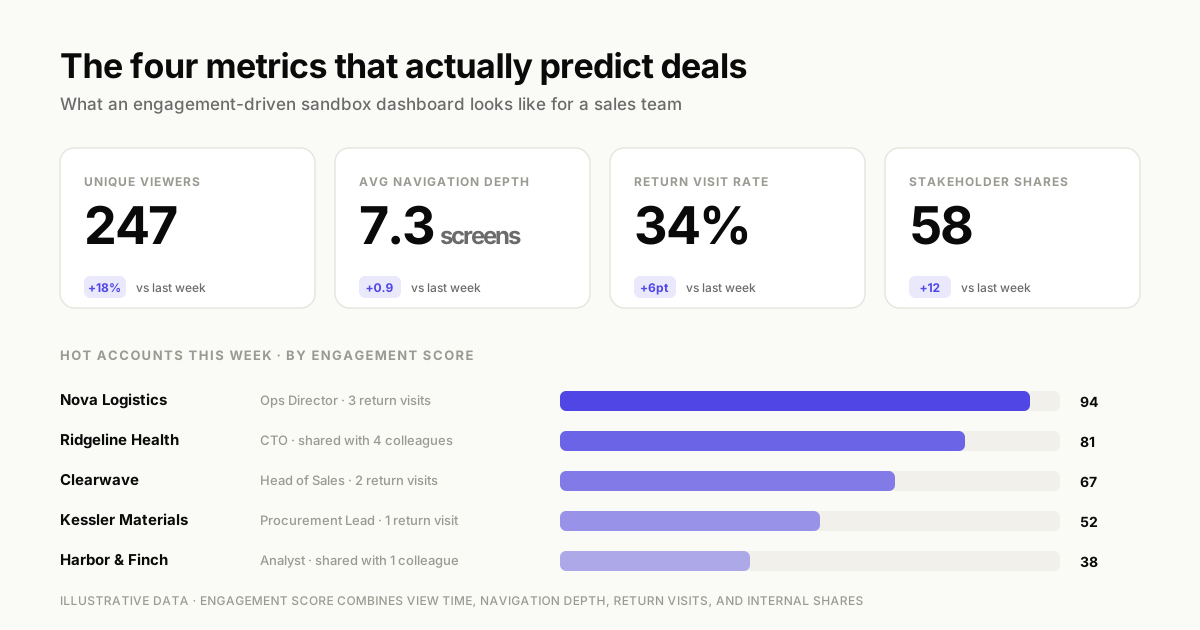
Measurement connects sandbox activity to business outcomes.
Engagement metrics that actually matter
Not all metrics are equally useful. Focus on indicators that correlate with deal progression:
- Unique viewers: How many distinct people accessed the sandbox
- Navigation depth: How many screens or flows they explored
- Return visits: Prospects coming back indicates high interest
- Stakeholder shares: Internal distribution signals deal momentum
Pipeline impact and conversion tracking
Connect sandbox engagement to pipeline metrics. Measure meeting conversion rates after sandbox views. Compare sales cycle velocity for sandbox deals versus those without, and track win-rate differences where measurable.
Connecting sandbox insights to your CRM
Enrich CRM records with engagement data so reps see sandbox activity alongside other prospect information. When a rep opens a contact record, they can immediately see which sandboxes that prospect viewed, how deeply they explored, and when they last engaged.
Start closing more deals with sandbox demos
Sandbox demos reduce dependency on fragile staging environments, scale presales capacity without adding headcount, and provide intent signals that make follow-up conversations more effective.
84% of B2B buyers cite self-service tools as critical in vendor selection. The teams seeing the best results treat sandboxes as a core part of their sales motion rather than an occasional supplement to live demos. They personalize for each account, follow up based on engagement data, and iterate based on completion metrics.
Start your journey with Guideflow today!
FAQs about sandbox demo best practices
Early-stage sandboxes work best when they cover one focused workflow in under five minutes. Prospects at this stage want to understand core value quickly without committing significant time. Late-stage sandboxes for technical validation can include multiple workflows for deeper exploration, sometimes spanning 15–20 minutes of content.
Yes, sandbox demos can showcase integration workflows and API capabilities by capturing flows directly from your product. You don’t need live backend connections because the sandbox recreates the visual and interactive experience. For particularly complex integrations, consider creating separate sandbox modules that focus on specific integration scenarios.
Offer the sandbox as pre-meeting preparation rather than a replacement for the live demo. Frame it as a way for the prospect to explore independently before using live demo time for deeper questions and customization. This approach often results in more productive live conversations because prospects arrive with specific questions rather than needing a general overview.
Look for data masking, blur and hide capabilities, access controls, link expiration, and compliance certifications. Also consider whether the platform offers viewer identification so you know who accessed each sandbox and when.
Update sandboxes whenever major UI changes or new features ship that affect the workflows you demonstrate. Establish a regular review cadence tied to your product release cycle, typically monthly or quarterly depending on how frequently your product evolves. Assign clear ownership for each sandbox template to prevent outdated content from reaching prospects.
Yes, customer success teams can use sandboxes to showcase new features or adjacent products to existing customers. This enables self-service evaluation without scheduling additional calls. Expansion sandboxes often perform well because existing customers already understand your product’s core value and can quickly grasp how new capabilities extend it.