

You just finished the same product walkthrough for the fourth time this week. Three of those accounts have gone dark since the kickoff call. The fourth asked a question you answered in the help center article you sent last Tuesday, which they clearly did not open.
This is the pattern. Manual onboarding works when you have 15 accounts. It collapses at 40. The quality of the customer experience degrades, time-to-value varies wildly, and you feel it personally every time an account churns three months in because they never got past the setup phase.
According to a 2025 Enboarder study on onboarding handoff processes, only 36% of leaders describe their handoff process as smooth, with nearly 50% calling it merely "adequate with occasional gaps." That gap between adequate and effective is where customers quietly disengage. This guide gives you a step-by-step framework for building a customer onboarding flow that delivers consistent results across 50+ accounts without requiring a CSM on every call.
TL;DR
- Manual onboarding breaks at scale. The fix is a system, not more effort.
- The highest-impact onboarding flows combine async self-serve content with targeted live touchpoints, not one or the other.
- Time-to-value is the metric that predicts everything else: retention, expansion, satisfaction.
- Interactive product walkthroughs let customers learn by doing, which drives higher completion rates and better information retention than static documentation or recorded videos.
- Measure onboarding at the step level, not just the outcome. Drop-off data tells you exactly where the flow breaks.
What is a seamless onboarding flow
A seamless onboarding flow is a structured, repeatable sequence of steps that guides new customers from signup to their first meaningful product outcome with minimal friction, confusion, or manual intervention. It is the system that turns a signed contract into an active, successful customer.
What makes it "smooth" (and what most teams get wrong)
"Smooth" does not mean "no human involvement." It means no unnecessary friction, no dead time, no moments where the customer does not know what to do next. The customer always has a clear next step, and the CSM is not the bottleneck for progress.
Contrast this with the common failure mode: an onboarding "process" that is actually a series of ad hoc emails, a kickoff call, and a hope that the customer reads the help docs. The CSM tracks progress in a spreadsheet (or their head). Every account gets a slightly different experience depending on which CSM runs it, what day it is, and how many other accounts are competing for attention that week.
That is not a flow. That is a prayer.
A real onboarding flow has defined steps, clear owners, automated triggers, and measurement at every stage. The customer knows where they are. The CSM knows where every account is. And the system keeps things moving even when the CSM is in back-to-back calls.
Customer onboarding vs. employee onboarding vs. user onboarding
Most content on this topic conflates three different types of onboarding. They share a name but differ in almost every other dimension.
| Dimension | Customer onboarding | Employee onboarding | User onboarding |
|---|---|---|---|
| Owner | CSM / CS team | HR / People Ops | Product / Growth |
| Goal | Time-to-value, adoption | Productivity, retention | Activation, feature usage |
| Typical duration | 14 to 90 days | 30 to 90 days | Minutes to days |
| Key metric | Onboarding completion rate, TTV | Ramp time, 90-day retention | Activation rate, day-7 retention |
This guide focuses on customer onboarding in SaaS: the kind CSMs own and are measured on. If you are looking for employee onboarding or in-product user onboarding guidance, the frameworks here will still apply conceptually, but the specifics target client onboarding at scale.
The components of a seamless onboarding flow
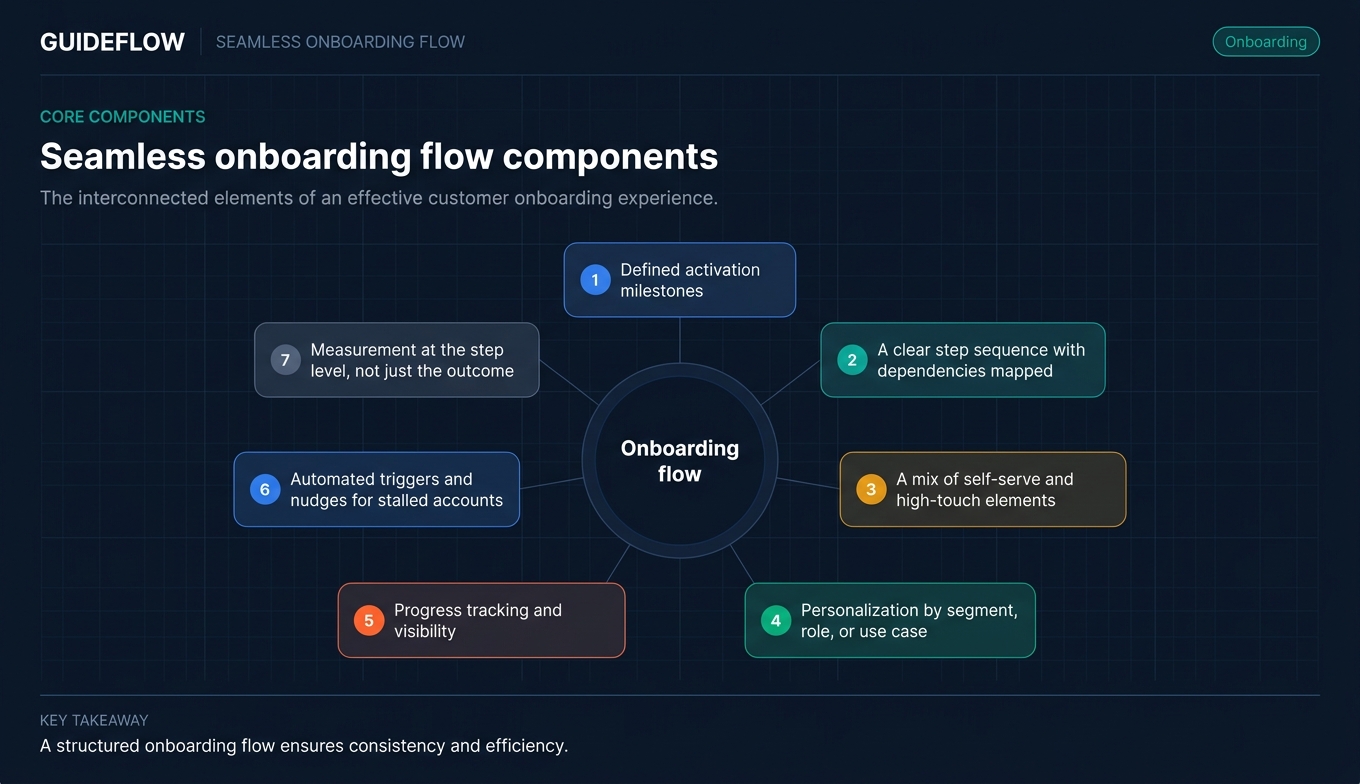
Every effective onboarding flow includes these core components:
- Defined activation milestones: What "success" looks like for the customer, stated in specific, measurable terms
- A clear step sequence with dependencies mapped: Step 3 cannot start until step 2 is complete
- A mix of self-serve and high-touch elements: Interactive product tours and guides for repeatable education, live calls for strategic conversations
- Personalization by segment, role, or use case: Enterprise accounts get a different path than SMB accounts
- Progress tracking and visibility: Both the CSM and the customer can see where they are in the process
- Automated triggers and nudges for stalled accounts: Behavior-based, not just time-based
- Measurement at the step level, not just the outcome: You know exactly where customers drop off
Key principles behind onboarding flows that actually work
1. Define the activation milestone before you design the flow
Most onboarding flows fail because they are organized around tasks (complete profile, watch video, attend call) instead of outcomes. The activation milestone is the moment the customer gets enough value to stay. Everything in the flow should point toward that moment.
Without it, onboarding becomes an open-ended series of "check-in" calls with no clear endpoint. The CSM does not know when onboarding is done. The customer does not know what they are working toward. Both sides lose momentum.
For a project management SaaS, the activation milestone might be "team completes their first project." For an analytics tool, it might be "user builds their first dashboard with live data." For a CRM, it might be "rep logs their first 10 activities." Define yours before writing a single onboarding email. Then validate it with data: correlate early product actions with long-term retention to find the real activation events, not the ones you assume.
2. Design for the 80%, personalize for the 20%
Build one core flow that covers the most common path, then create branches for specific segments. Trying to build a unique flow for every customer type is how onboarding projects stall for months and never ship.
The segmentation principle is straightforward: identify the 2 to 3 variables that most affect the onboarding path (company size, primary use case, technical complexity) and build branches only where those variables change the steps.
A SaaS platform with both marketing and sales users might have one shared kickoff flow (account setup, team invites, data import) and then branch into persona-specific activation paths after step 3. The marketing user gets guided toward campaign creation. The sales user gets guided toward pipeline setup. The first three steps are identical.
3. Replace live walkthroughs with self-serve product experiences where possible
The biggest bottleneck in onboarding at scale is the CSM's calendar. Every live walkthrough that could be an interactive guide is a scheduling dependency that adds days to time-to-value. Self-serve content (interactive product tours, guided walkthroughs, video tutorials) lets customers learn on their own schedule and frees CSM time for strategic conversations.
Interactive product walkthroughs perform best when customers need to understand a specific workflow or feature set at their own pace. Customers click through real product screens, which delivers a fundamentally different engagement model compared to static PDFs or recorded videos. The customer acts instead of watches, and retention of information is higher because the learning is hands-on.
Instead of scheduling a 30-minute "feature overview" call for every new account, create an interactive product tour that customers can click through in 5 minutes. Reserve live time for accounts that need custom configuration or strategic alignment.
4. Build feedback loops into every stage
Onboarding flows decay. The product changes, customer needs shift, and what worked 6 months ago may not work today. Build in mechanisms to detect when the flow is breaking: step-level completion data, customer feedback surveys at key milestones, and regular review cadences.
If completion drops below 60% at a specific step, that is a signal. Investigate whether the step is unclear, too complex, or no longer relevant. Fix it before it becomes a churn pattern.
The best onboarding flows are living systems, not static documents. Schedule a monthly review cadence (more on this in Step 7 below) and assign a single owner for onboarding content maintenance.
How to build a seamless onboarding flow step by step
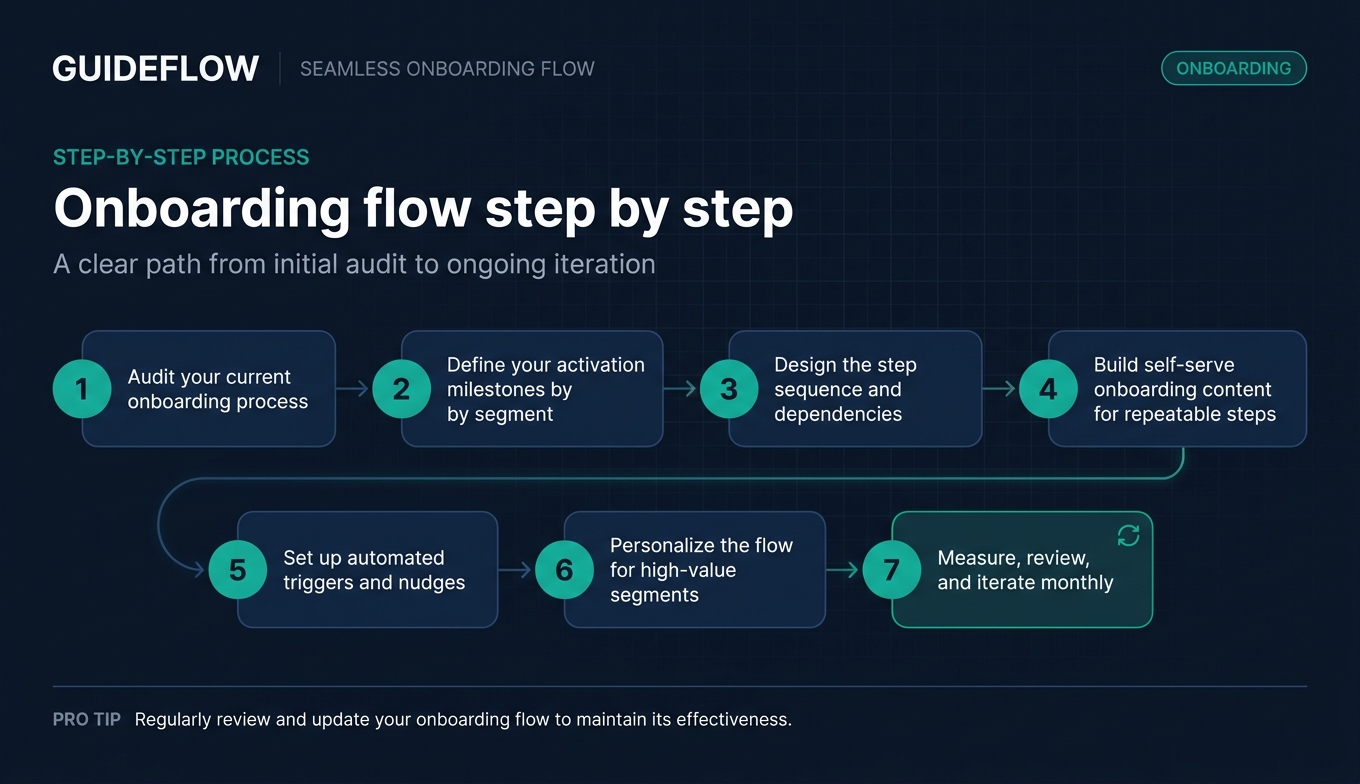
Step 1. Audit your current onboarding process
Map every touchpoint a new customer experiences from contract signature to activation. Include emails, calls, help docs, in-app messages, and any manual steps the CSM performs. Time each step. Identify where customers drop off or go dark.
You cannot improve what you have not documented. Most CSMs discover their "process" is actually 4 different processes depending on which CSM ran the account. That inconsistency is invisible until you map it.
Output: A documented onboarding map (spreadsheet or flowchart) showing every step, the owner, the average duration, and the drop-off rate at each stage.
Step 2. Define your activation milestones by segment
For each customer segment (by size, use case, or persona), define the specific product action or outcome that signals the customer has received first value. Validate this with data: correlate early actions with 6-month retention to find the real activation events.
Without a clear activation milestone, onboarding has no finish line. CSMs end up running indefinite "check-in" cycles with no clear endpoint, and customers never feel the moment of "this is why I bought this."
Output: A segment-by-activation matrix. Example: SMB accounts activate when they complete their first workflow. Enterprise accounts activate when 3+ users complete a specific action within the first 30 days.
Step 3. Design the step sequence and dependencies
Build the flow as a sequence of steps with clear dependencies (step 3 cannot start until step 2 is complete). For each step, define: what the customer does, what the CSM does (if anything), what content or tools are needed, and how long it should take.
Dependencies prevent customers from getting stuck or skipping critical setup steps. They also give you a framework for automated nudges ("You completed step 2. Here is what to do next."). This becomes your onboarding checklist and playbook.
Output: A step-by-step onboarding template with dependencies, owners, and estimated durations.
Step 4. Build self-serve onboarding content for repeatable steps
Identify every step in the flow where the CSM currently delivers the same information manually (product walkthroughs, feature explanations, setup guides). Replace these with self-serve content: interactive product tours, guided walkthroughs, video tutorials, and in-app checklists.
This is the step that makes onboarding scalable. A CSM managing 50 accounts cannot run 50 live walkthroughs. But 50 customers can click through an interactive product tour in the same week, on their own schedules. Interactive walkthroughs perform best here because customers engage with real product screens and build muscle memory for the actual workflows they will use daily.
Tools like Guideflow let CS teams capture product flows in minutes, personalize them per segment, and track which steps customers complete, giving you both scale and visibility without sacrificing the hands-on feel.
Output: A content library mapped to each onboarding step. For each step, identify whether it requires live interaction, self-serve content, or a combination.
Step 5. Set up automated triggers and nudges
Configure automated messages (email, in-app, or Slack) that fire based on customer behavior, not just time. Examples: "Customer completed step 2 but has not started step 3 in 48 hours" triggers a nudge. "Customer has not logged in for 7 days during onboarding" triggers a CSM alert.
Behavior-based triggers catch stalled accounts before they go dark. Time-based sequences (send email on day 3, day 7, day 14) miss the customers who are ahead and annoy the ones who are behind. Onboarding automation should respond to what the customer is doing, not just what day it is.
Output: A trigger map showing: the condition, the action, the owner (automated vs. CSM), and the message content.
Step 6. Personalize the flow for high-value segments
For your top 1 to 2 segments (typically enterprise or strategic accounts), layer personalized elements on top of the core flow. This might include: a custom kickoff agenda, account-specific interactive demos with their branding and data, a dedicated Slack channel, or executive alignment calls.
Personalization at scale does not mean unique flows for every account. It means a shared core with targeted customization for accounts where the effort pays off in retention and expansion. Interactive demos personalized with a customer's own branding and data perform best when the customer needs to see their specific use case reflected in the product experience, helping them connect the product to their daily reality immediately.
Output: A personalization checklist for high-value accounts, specifying which onboarding elements get customized and which stay standard.
Step 7. Measure, review, and iterate monthly
Track onboarding metrics at the step level (not just the outcome). Review monthly. Identify the step with the highest drop-off. Fix it. Then move to the next bottleneck.
Onboarding flows decay as the product evolves. A monthly review cadence catches problems before they become churn patterns. Assign a single owner for this review, and make it a standing calendar item, not something that happens "when we have time."
Output: A monthly onboarding review dashboard showing: completion rate by step, median time-to-value by segment, drop-off points, and the specific fix applied.
Best practices for onboarding flows that reduce time-to-value
Start with the customer's first win, not your product tour
The most effective onboarding flows front-load the moment of value. If the customer can see a result (even a small one) in the first session, completion rates for the rest of the flow increase significantly. Structure the first 3 steps to deliver a quick win, then expand from there.
For a reporting tool, that might mean helping the customer generate their first report in 10 minutes, even if it uses sample data. The win creates momentum. The full setup can come later.
Use progress indicators to keep customers moving
Visible progress (checklists, progress bars, step counters) creates commitment and momentum. Customers who can see they are 60% done are more likely to finish than customers who have no idea how much is left. This is basic behavioral psychology of progress indicators, and it works consistently in onboarding contexts.
Build progress visibility into both the customer-facing experience and your internal tracking. The customer sees their checklist. You see the dashboard.
Segment your content by role, not just by account
In multi-stakeholder accounts, the admin who sets up the product and the end user who uses it daily need different onboarding paths. Sending the same walkthrough to both wastes time and creates confusion. Build role-specific branches after the shared setup steps.
The admin needs configuration guidance. The end user needs workflow-specific training. The executive sponsor needs a 2-minute overview of the value their team is getting. Three audiences, three content paths, one onboarding flow.
Replace "check-in" calls with data-driven touchpoints
Scheduling a "check-in call" every two weeks is not a strategy. It is a habit. Use onboarding data (step completion, login frequency, feature usage) to trigger CSM outreach only when it adds value: when a customer is stuck, when they have completed a milestone (congratulate and guide to the next phase), or when they have gone silent.
This approach respects the customer's time and focuses your time on accounts that need attention, not accounts that are progressing fine on their own.
Build an onboarding content library you can reuse and update
The biggest time savings come from building onboarding content once and reusing it across accounts. Interactive product tours, setup guides, and FAQ documents should live in a central library that any CSM can access, share, and update.
A demo center lets you organize interactive walkthroughs by use case, persona, or onboarding stage, so every CSM shares the same high-quality content instead of rebuilding it from scratch. When the product updates, you update the content in one place, and every account gets the current version.
Test your flow with real customers before scaling it
Before rolling out a new onboarding flow to all accounts, run it with 5 to 10 customers and collect qualitative feedback. Ask: "Was anything confusing? Where did you get stuck? What would you skip?" This prevents scaling a broken process. The 30 minutes you spend on each feedback conversation saves you weeks of fixing a flow that does not work at scale.
Common mistakes that break onboarding flows
Treating onboarding as a one-size-fits-all sequence
The mistake: Sending every customer through the same 14-day email drip regardless of their size, use case, or technical readiness. An enterprise account with 50 users needs a different path than a 3-person startup.
What works instead: Build a core flow with segment-specific branches. The shared steps (account setup, initial configuration) stay the same. The activation path diverges based on the 2 to 3 variables that matter most for your product.
Front-loading information instead of action
The mistake: Sending a 45-minute recorded product tour on day 1 and hoping the customer watches it. Completion rates for long-form passive video content during onboarding are low, often below 30%, because customers do not have the context or motivation to sit through a comprehensive overview before they have done anything in the product.
What works instead: Replace passive content with interactive, action-oriented steps. Customers who click through a guided walkthrough retain more than customers who watch a recording, because the learning is active learning outperforms passive content consumption. Start with the smallest action that delivers value, then layer in complexity.
No clear ownership of onboarding steps
The mistake: The customer does not know who to contact. The CSM does not know which steps the customer has completed. Sales, CS, and Product all think someone else is handling the handoff. The result: 5 to 10 days of dead time between contract signature and first interaction.
What works instead: Assign a single owner for each onboarding step. Make ownership visible to the customer. A simple "Your CSM is [name]. Here is your onboarding plan with next steps and dates." email on day 1 prevents most handoff confusion.
Measuring onboarding by completion, not by activation
The mistake: Tracking "onboarding complete" as a binary checkbox instead of measuring whether the customer actually reached the activation milestone. A customer can "complete" onboarding (attend all calls, finish all steps) without ever getting value from the product.
What works instead: Tie onboarding success to the activation metric, not the task list. "Onboarding complete" should mean "customer reached their activation milestone," not "customer attended all scheduled calls."
Letting the flow decay without review
The mistake: Building an onboarding flow once and not updating it for 6 months. The product ships new features, the UI changes, and the onboarding content references screens that no longer exist. Customers hit dead ends and lose confidence.
What works instead: Schedule a monthly review. Check step-level completion data, look for new drop-off patterns, and update content that references outdated product screens or workflows. Assign a single owner for onboarding content maintenance to prevent decay.
What to do next
In the next 24 hours
- Map your current onboarding process end to end (use a spreadsheet or whiteboard). Time each step. Identify the step where the most customers stall or go dark.
- Define your activation milestone for your top 2 customer segments. If you do not know it, pull 6-month retention data and correlate it with early product actions.
- Identify the 3 onboarding steps where you currently deliver the same information manually to every account. These are your first candidates for self-serve content.
In the next week
- Build one interactive walkthrough for the highest-volume manual step. Test it with 3 to 5 accounts and collect feedback before scaling.
- Set up one behavior-based trigger for stalled accounts (e.g., "customer has not completed step 3 within 72 hours" triggers a personalized nudge with a direct link to the relevant guide).
In the next month
- Run your full onboarding flow with 10 accounts. Track step-level completion. Identify the bottleneck. Fix it. Repeat. This is how you build a system that serves 50 accounts the way you used to serve 15.
How to measure your onboarding flow's performance
The metrics below give you a complete picture of onboarding health. Track all five, but focus your improvement efforts on step-level drop-off, because it tells you exactly where to act.
| Metric | What it measures | Benchmark (SaaS mid-market) | Signal if below |
|---|---|---|---|
| Onboarding completion rate | % of customers who finish all onboarding steps | 65 to 80% | Flow is too long, too complex, or has a broken step |
| Time-to-value (TTV) | Days from signup to activation milestone | 14 to 30 days | Friction in early steps, unclear activation path |
| Step-level drop-off rate | % of customers who stall at each step | Below 20% per step | Specific step needs redesign or better content |
| 90-day retention (post-onboarding) | % of customers active 90 days after onboarding | 85 to 95% | Onboarding is not delivering real value |
| Support ticket volume (onboarding-related) | Tickets filed during onboarding period | Declining quarter over quarter | Self-serve content is reducing confusion |
How to interpret these numbers: Onboarding completion rate tells you whether customers finish the process. TTV tells you whether they finish it fast enough. Step-level drop-off tells you where they get stuck. 90-day retention tells you whether the onboarding actually worked. Support ticket volume tells you whether your self-serve content is doing its job.
The most actionable metric is step-level drop-off, because it shows you exactly where to focus. If 40% of customers stall at step 4, that is your next improvement project. Fix it, measure the impact, then move to the next bottleneck.
Secondary metrics worth tracking: CSAT at onboarding completion, CSM time per account during onboarding, and number of live calls required per account. These help you measure efficiency and customer satisfaction alongside the outcome metrics. If you want to go deeper on product analytics tools that can help you track these metrics, there are several purpose-built options worth evaluating.
Conclusion
A well-built onboarding flow is not about removing all human contact. It is about removing unnecessary friction, dead time, and repetitive manual work so that CSMs can focus their time where it matters most: on strategic conversations and complex accounts. Self-serve content handles the repeatable steps. Automated triggers catch stalled accounts. Step-level measurement tells you where to improve.
The CSM who builds this system once serves 50 accounts the way they used to serve 15. The quality stays consistent. The time-to-value stays predictable. And the customers who go through the flow actually reach the activation milestone that keeps them around.
Explore the best onboarding flow software to find the right tools for your stack, or start your journey with Guideflow today.
FAQs about seamless onboarding flows
A seamless onboarding flow is a structured sequence of steps that guides new customers from signup to their first meaningful product outcome with minimal friction or manual intervention. It combines self-serve content (interactive walkthroughs, checklists, guides) with targeted live touchpoints to deliver consistent time-to-value across all accounts.
Most SaaS onboarding flows run 14 to 30 days for mid-market accounts and 30 to 90 days for enterprise. The right duration depends on your product's complexity and the activation milestone. Focus on reducing time-to-value rather than compressing the calendar arbitrarily.
Onboarding is the process. Activation is the outcome. A customer can complete every onboarding step without activating if the steps do not lead to a real product outcome. Measure both, but optimize for activation.
Replace repetitive manual steps (product walkthroughs, feature explanations, setup guides) with self-serve interactive content that customers can complete on their own schedule. Reserve CSM time for high-value accounts and complex configurations. Use behavior-based triggers instead of scheduled check-in calls. Platforms that help you build self-service experiences can accelerate this transition significantly.
Track onboarding completion rate, time-to-value, step-level drop-off rate, 90-day post-onboarding retention, and onboarding-related support ticket volume. Step-level drop-off is the most actionable metric because it shows exactly where customers stall.
Interactive product tours let customers learn by doing instead of reading or watching. They deliver a fundamentally different engagement model compared to static documentation: customers click through real product screens, which drives higher completion rates and better retention of information. Analytics show which steps customers complete and where they get stuck, giving CSMs precise data for improving the flow.
Review your onboarding flow monthly. Check step-level completion data, look for new drop-off patterns, and update content that references outdated product screens or workflows. Assign a single owner for onboarding content maintenance to prevent decay.
Common onboarding tools include CRM software (Salesforce, HubSpot), CS platforms (Gainsight, ChurnZero), project management tools (Asana, Monday), and interactive demo platforms like Guideflow for building self-serve product walkthroughs and organizing onboarding content. The best stack depends on your team size, account volume, and the complexity of your product.