Your support queue keeps growing, but your team size doesn't. Every "how do I..." ticket that lands in the inbox is time your agents spend answering questions your product or help center could have handled.
This guide covers the root causes behind preventable ticket volume and nine approaches to deflect tickets before they're submitted. It also explains how to measure whether your changes are working.
TL;DR
- Most ticket volume comes from preventable causes: users who can't find answers, onboarding gaps, and confusing product interfaces.
- Self-service works when it's contextual. Embedding help inside your product (tooltips, interactive guides, in-app walkthroughs) deflects tickets before users think to submit them.
- AI chatbots handle high-volume, low-complexity questions well. They create frustration when forced on complex issues.
- Fixing the product itself is upstream of every deflection tactic. Confusing UI and unclear error messages generate tickets that reflect product problems, not support problems.
- Measure deflection rate before and after changes. You cannot improve what you do not track.
Why support tickets keep piling up
To reduce support tickets, start with self-service options, AI automation for repetitive questions, and fixing product friction at the source. The most effective teams combine a searchable knowledge base, contextual in-app help, and proactive communication about known issues.
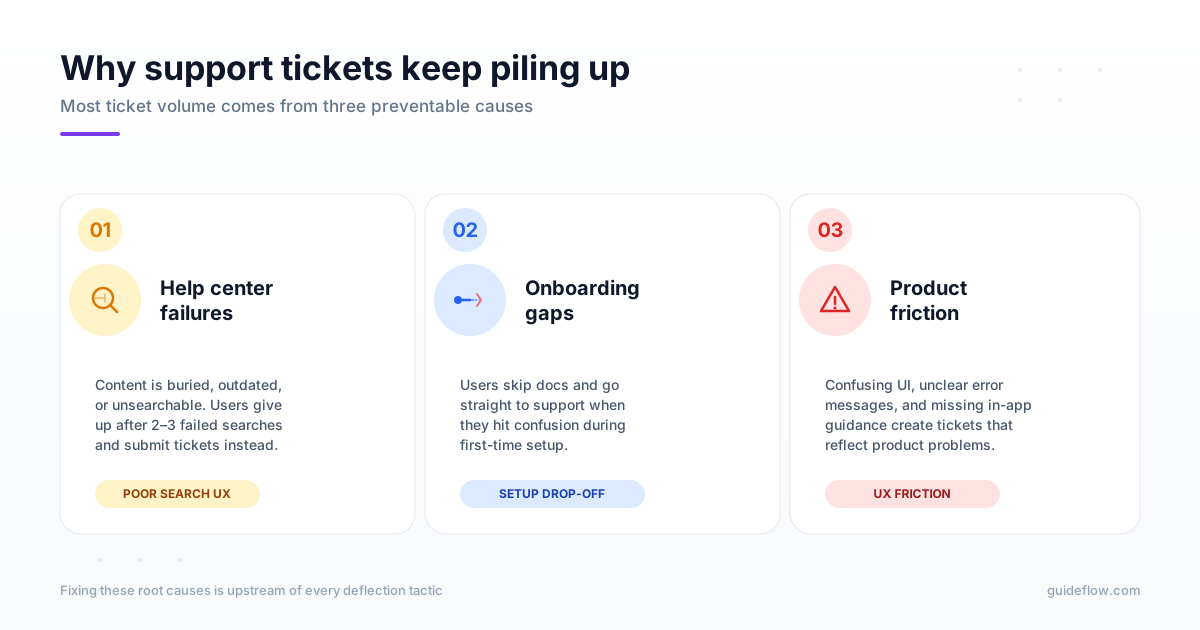
But before implementing any of that, you want to understand why tickets pile up in the first place. Most ticket volume comes from three preventable causes.
Users can't find answers in your help center
Help centers fail when content is buried, outdated, or unsearchable. Users give up after two or three failed searches and submit tickets instead.
Poor search functionality is usually the culprit. If your help center can't handle typos, synonyms, or natural language queries, users won't find articles that exist.
Lack of contextual help compounds the problem. Users searching from inside your product often want answers specific to the screen they're on, not a generic FAQ.
Onboarding leaves gaps that become tickets
Incomplete or generic onboarding creates "how do I..." tickets. Users skip documentation and go straight to support when they hit confusion during setup.
The pattern is predictable. A user signs up, clicks around, gets stuck on a configuration step, and submits a ticket asking something your onboarding flow could have explained. Interactive product walkthroughs close onboarding gaps before tickets happen by guiding users through first-time setup at their own pace.
Product friction creates avoidable questions
Confusing UI, unclear error messages, and missing in-app guidance generate tickets that reflect product problems, not support problems.
When users see "Error 403" with no explanation, they contact support. When a button label is ambiguous, they ask what it does. Fixing the product is upstream of every deflection tactic.
How to measure your ticket backlog baseline
Before implementing any approach to reduce support tickets, establish your starting point. You cannot reduce what you do not measure.
Categorize tickets by root cause
Tag and group tickets by type to understand where volume comes from:
- Onboarding/setup: "How do I get started?" questions
- Feature discovery: "Can your product do X?" questions
- Workflow confusion: "I tried X but it didn't work" questions
- Bug/error reports: Actual product issues requiring engineering
- Account/billing: Password resets, subscription questions
Categorization reveals which ticket types have the highest deflection potential. Onboarding and feature discovery questions are usually deflectable. Bug reports and billing disputes typically require human judgment.
Calculate your current deflection rate
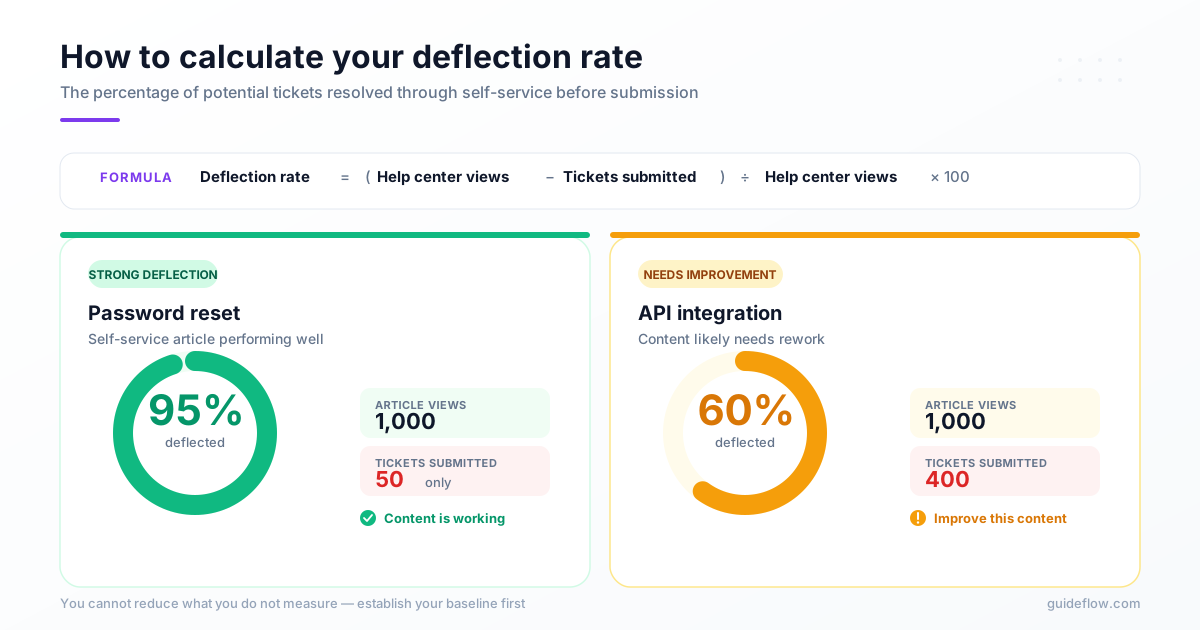
Deflection rate is the percentage of potential tickets resolved through self-service before submission. Calculate it by comparing help center views on a topic to tickets submitted on the same topic.
If 1,000 users view your "password reset" article and only 50 submit password reset tickets, your deflection rate for that topic is 95%. If 1,000 users view your "API integration" article and 400 submit integration tickets, your deflection rate is 60%, and that content likely wants improvement.
Benchmark time to self-serve vs time to resolution
Compare how long it takes users to find answers themselves versus waiting for agent response. This comparison establishes the business case for self-service investment because $1.84 per self-service contact is far below assisted support.
If your average ticket resolution time is 4 hours but users can self-serve in 3 minutes, every deflected ticket saves agent time. It also reduces user frustration.
9 ways to reduce support tickets and deflect volume
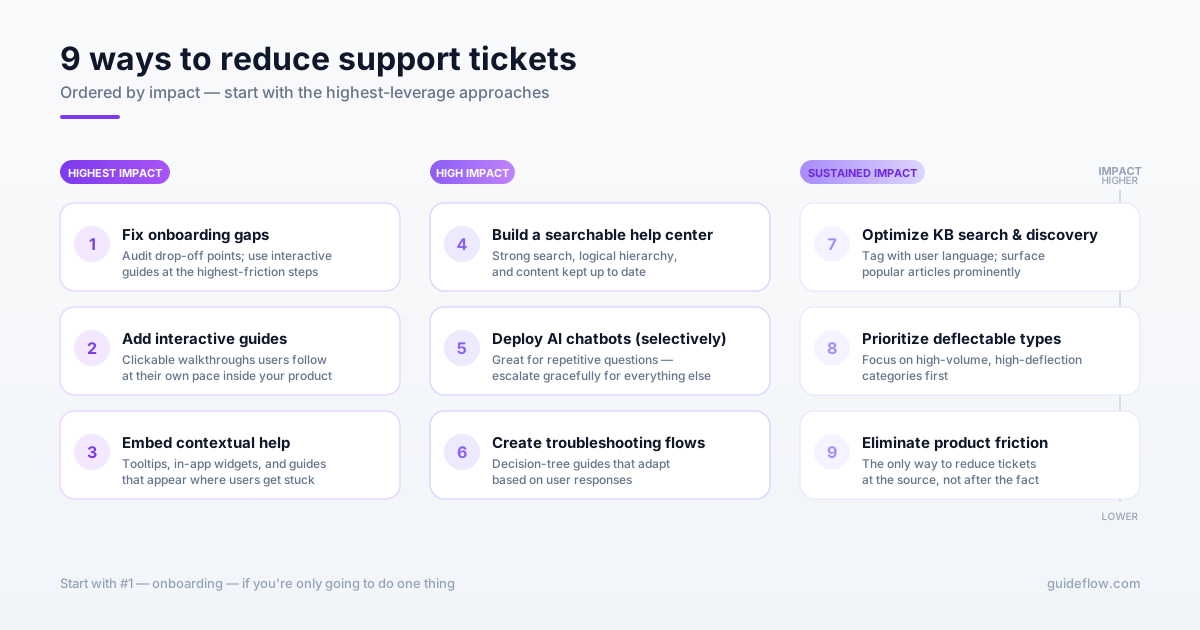
The following approaches are ordered by impact. Start with the ones that address your highest-volume, most-deflectable ticket categories.
1. Fix onboarding gaps that generate confusion tickets
Audit your onboarding flow for drop-off points. Where do users abandon setup? Where do they submit their first tickets? Interactive guides can boost onboarding completion rates by providing contextual guidance at each step.
Customer success teams can identify common onboarding friction points from ticket patterns. If 30% of new users submit tickets about the same configuration step, that step wants an interactive guide, not more documentation.
Embedding interactive guides in onboarding reduces "how do I..." tickets by showing users exactly what to click, in context, as they complete setup.
2. Add interactive guides for complex workflows
Interactive guides are clickable, step-by-step walkthroughs users follow at their own pace. Unlike static documentation or video tutorials, interactive guides let users learn by doing inside the actual product interface.
Users retain more when they click through a workflow themselves than when they read about it or watch someone else do it. For complex features with multiple steps, interactive guides outperform every other self-service format.
You can create interactive guides without engineering using tools like Guideflow. Capture any workflow in a few clicks, then embed the guide where users get stuck.
3. Embed contextual self-service help inside your product
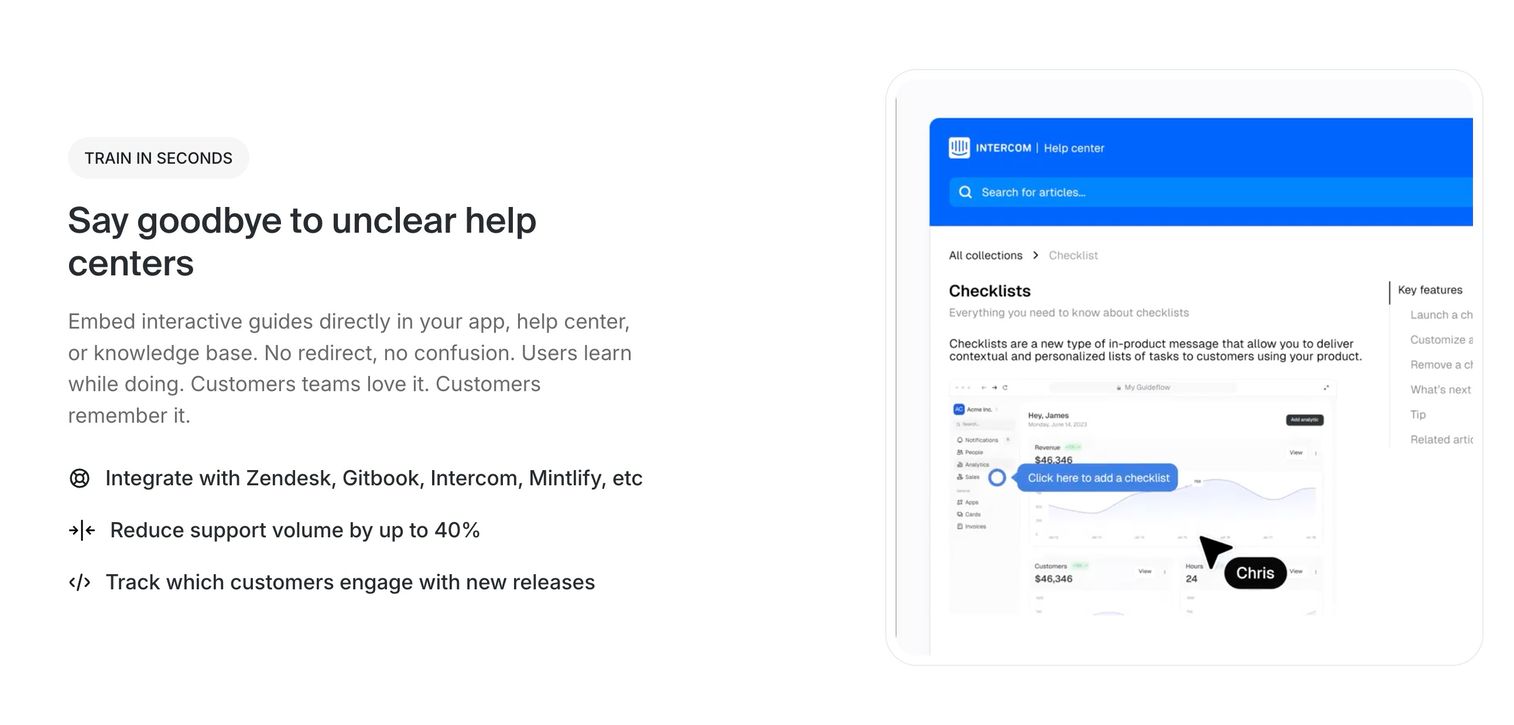
In-app help widgets, tooltips, and embedded guides appear where users get stuck. They eliminate the context-switching required to visit an external help center.
Placement options include:
- Tooltips on complex form fields: Explain what each field does without requiring users to leave the page.
- Guided walkthroughs triggered by user behavior: Surface help when users hesitate or click repeatedly.
- Embedded help panels in settings screens: Put documentation where users actually look for it.
- Interactive demos accessible from error states: Show users how to fix problems, not just what went wrong.
Contextual help deflects tickets because users never have to decide whether to search for help. The help finds them.
4. Build a help center that users actually search
Most help centers fail because of poor information architecture, not missing content. Adding more articles without organizing existing content makes the problem worse. Consider implementing a demo center for customer support as a complementary self-service resource.
What makes help centers effective:
- Strong search functionality: Predictive search, synonym handling, typo tolerance
- Logical content hierarchy: Organized by user task, not internal product structure
- Up-to-date content: Immediately updated when features change
- Multiple content formats: Text, screenshots, and interactive guides for different learning styles
Before creating new content, audit what exists. Delete outdated articles, consolidate duplicates, and restructure navigation around user tasks. Embedding interactive guides into your knowledge base can further improve self-service success rates.
5. Deploy AI chatbots for repetitive questions
AI chatbots handle high-volume, low-complexity tickets well. Password resets, pricing questions, and feature availability checks are ideal use cases.
Chatbots work best when they escalate gracefully to human agents. Forcing users through chatbot loops for issues requiring human judgment creates frustration because 68% had bad chatbot experiences.
Use chatbots as a first filter, not a wall. Let users bypass them when their issue is complex.
6. Create self-service troubleshooting flows
Decision-tree style troubleshooting guides walk users through diagnostic steps. They work best for known issues with predictable resolution paths.
Unlike static FAQ pages, troubleshooting flows adapt based on user responses. "Is your device connected to WiFi? Yes/No" leads to different next steps.
This guided approach resolves issues that would otherwise require back-and-forth with an agent.
7. Optimize knowledge base search and discovery
Users abandon help centers when search returns irrelevant results. Focus on search UX specifically. Tag content with user language, not internal jargon. If users search for "change password" but your article is titled "credential management," they won't find it. Track zero-result searches to identify content gaps. Surface popular articles prominently.
Search optimization is often the highest-leverage improvement for existing help centers.
8. Identify and prioritize deflectable ticket types
Analyze ticket data to find which categories have the highest volume AND highest deflection potential.
| Ticket type | Deflection potential | Recommended approach |
|---|---|---|
| Password resets | High | Automated self-service flow |
| Feature "how-to" questions | High | Interactive guides, contextual help |
| Bug reports | Low | Requires agent triage |
| Complex configuration | Medium | Guided troubleshooting + escalation path |
| Billing disputes | Low | Requires human judgment |
Focus resources on high-volume, high-deflection categories first. Bug reports and billing disputes require human judgment regardless of how good your self-service is.
9. Eliminate product friction that causes tickets
The best way to reduce support tickets happens upstream in the product itself. Use ticket data to identify UX problems: confusing flows, unclear labels, missing feedback. Share ticket patterns with product teams. If 200 users per month submit tickets about the same error message, that's a product bug, not a support problem. Fixing the error message eliminates those tickets permanently.
This approach requires cross-functional collaboration, but it's the only way to reduce tickets at the source rather than deflecting them after they're created.
Common mistakes that increase ticket volume
Avoiding the following patterns is as important as implementing the reduction approaches above.
Hiding contact options to force self-service
Burying the "contact support" button frustrates users and increases ticket anger when they do get through. Counterintuitively, visible support options can reduce tickets because users trust that help is available if they want it.
When users feel trapped in self-service, they submit tickets out of frustration rather than genuine need.
Publishing more documentation without strategy
Adding more articles without organizing or updating existing content makes help centers harder to navigate. Content volume is not content quality. Audit existing content before creating new. Delete what's outdated, consolidate duplicates, and restructure navigation. A smaller, well-organized help center outperforms a sprawling one.
Over-relying on chatbots for complex issues
Forcing users through chatbot loops for issues requiring human judgment creates frustration. Users who finally reach an agent after fighting a chatbot are angrier than users who reached an agent directly.
Chatbots handle simple queries well. Let them escalate gracefully for everything else.
How to track efforts to reduce support tickets and prove ROI
Measurement justifies investment in efforts to reduce support tickets and identifies what's working.
Essential metrics for ticket reduction
- Ticket volume by category: Track trends over time after implementing changes
- Deflection rate: Percentage of help center visitors who do not submit tickets
- Self-service success rate: Users who viewed help content and did not return to support
- First contact resolution: Tickets resolved without follow-up (indicates quality, not just volume)
- Time to resolution: Average handle time for remaining tickets
Realistic benchmarks for self-service deflection
Deflection rates vary by product complexity and user base because 40 to 60% of queries can be deflected by well-designed self-service portals.
"How-to" and setup questions have the highest deflection opportunity. Bug reports and billing disputes have the lowest. Your achievable deflection rate depends on which categories dominate your backlog.
Make self-service your primary ticket deflector
The most effective ticket reduction comes from helping users succeed before they contact support because 81% of customers attempt self-service first. Interactive product guides, contextual help, and well-structured knowledge bases work together to deflect tickets at every stage of the user journey.
Start by measuring your current baseline. Categorize tickets by root cause, calculate deflection rates by topic, and identify which categories have the highest volume and highest deflection potential. Then implement approaches in order of impact.
For teams looking to add interactive guides without engineering resources, Guideflow lets you capture workflows directly from your browser. Embed them where users get stuck.
FAQs about how to reduce support tickets effectively
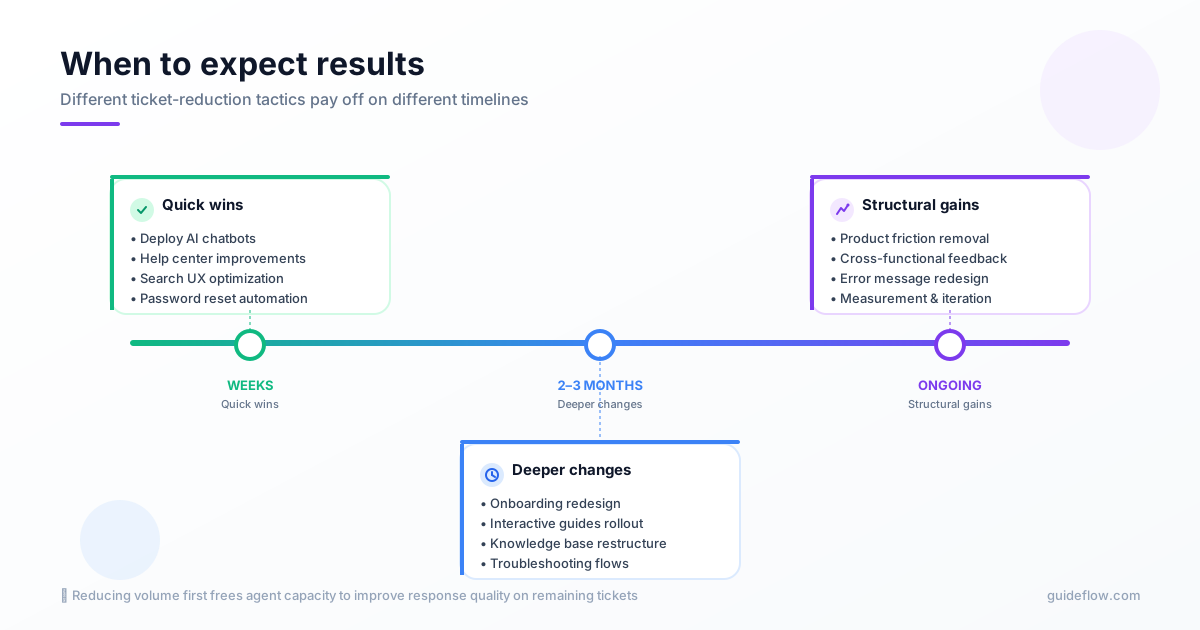
Quick wins like chatbots and help center improvements show results within weeks. Deeper changes like onboarding redesign take 2-3 months to impact ticket trends, since you're waiting for new users to move through the improved flow.
Deflection potential depends on ticket mix. Most teams find that "how-to" and setup questions have higher deflection opportunity than bug reports or billing disputes. Those categories typically require human judgment regardless of self-service quality.
Reducing volume frees agent capacity to improve response quality on remaining tickets. Start with deflection for sustainable improvement. Faster responses without volume reduction just means agents burn out faster.
Interactive guides let users learn by doing within the actual product interface. Videos require users to switch context and remember steps. Interactive formats typically show higher completion rates because users practice the workflow as they learn it.
Deflection redirects users to self-service when they seek help. Avoidance prevents the need for help in the first place through better UX and onboarding. Both reduce ticket volume, but avoidance is more sustainable because it improves the product itself.
Frame self-service investment as reducing cost per ticket. Calculate current cost (agent salary ÷ tickets handled) and project savings from deflection. Include customer satisfaction benefits: users who self-serve in 3 minutes are happier than users who wait 4 hours for a response.