
Your demo broke ten minutes before the VP of Engineering joined the call. The staging environment updated overnight. Sample data vanished. Your SE was triple-booked and couldn't fix it in time.
You've been there. Most AEs have.
The standard response is to scramble: screen-share a slide deck, talk through screenshots, promise a follow-up. But the prospect already made a judgment. They saw friction where they expected confidence. And the deal lost momentum before it started.
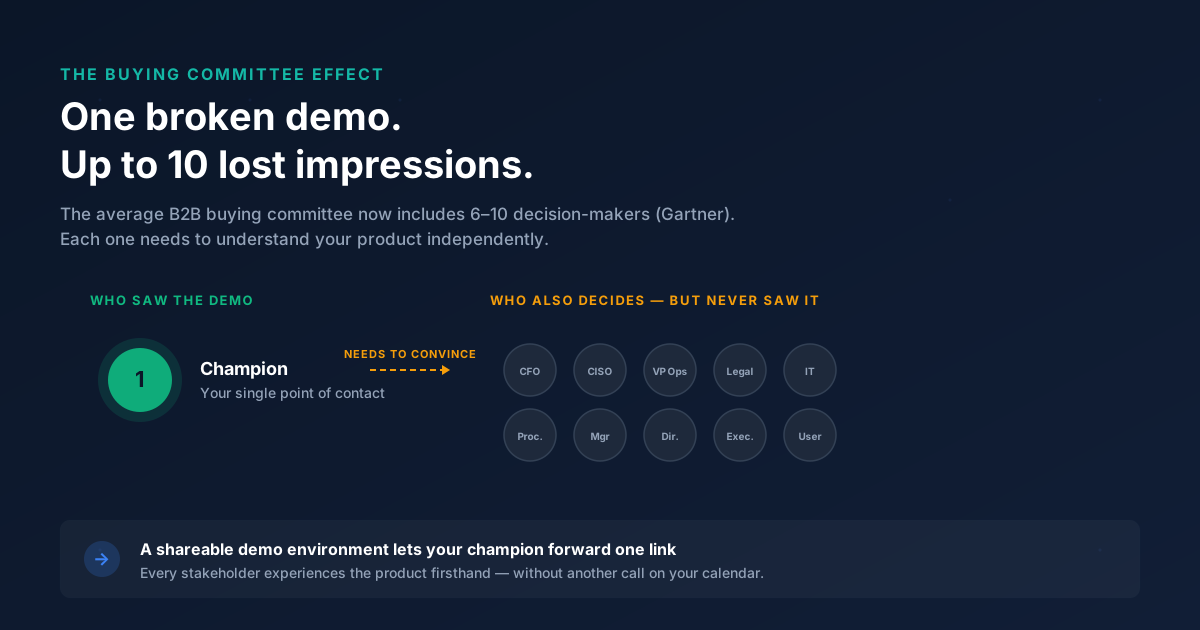
According to Gartner, the average B2B buying committee now includes 6 to 10 decision-makers. Each one needs to understand your product independently. A broken demo doesn't just cost you one impression. It costs you the six others who never got one.
This guide is built for AEs and revenue teams who want demo environments that help close deals, not create anxiety. It covers what works, what doesn't, and how to measure whether your setup is actually moving pipeline.
What you'll learn
- What a demo environment actually is (and what it isn't)
- How demo environments differ from sandboxes, staging, and production
- The 6 use cases where demo environments have the biggest impact on deals
- Common mistakes that turn demo environments into a liability
- A step-by-step process to build or upgrade your demo setup
- How to measure whether your demo environment is helping you close
TL;DR
- A demo environment is a controlled replica of your product built for showing, not shipping. Its job is to make prospects say "I get it" without risking production data or requiring a live login.
- Traditional demo environments break at the worst moments. Modern interactive demo platforms reduce that fragility by capturing the product experience without provisioning infrastructure.
- The biggest ROI from demo environments comes from enabling champions to share the experience internally with their buying committee, not just from the live call itself.
- Measurement matters: track completion rates, stakeholder shares, and time-to-next-step, not just "demos given."
- If your team needs to create and share demos quickly without SE dependency, Guideflow is built for that workflow.
What is a demo environment
A demo environment is a controlled, isolated copy of a software product designed specifically for showing how the product works to prospects, customers, or internal teams, without affecting live data or production systems. You'll also hear it called a demonstration environment, demo instance, demo tenant, or sales demo environment. They all refer to the same core idea.
Here's what a demo environment typically includes:
- Sample data configured to mirror real customer workflows
- Pre-built scenarios that illustrate specific use cases
- User roles and permissions set up for the audience
- Configured integrations (or simulated ones) that show how the product fits a stack
And here's what it does NOT include:
- Real customer data
- Production integrations processing live transactions
- Billing or payment systems connected to actual accounts
- Unfinished features or experimental branches
The purpose is straightforward: Reduce risk, increase consistency, and let prospects experience value before buying. A well-built demo environment gives every stakeholder on the buying committee the same clear picture of what the product does, regardless of who ran the demo or when they saw it.
One common misconception: a demo environment is not the same as a free trial. A trial gives the user a real (but limited) product instance they configure themselves. A demo environment is curated and controlled by the selling team. You decide what the prospect sees, in what order, and with what data.
Demo environments exist on a spectrum. On one end, you have a simple staging instance with sample data. On the other, you have a fully interactive, self-serve product experience that prospects can explore on their own time without scheduling a call.
| Demo environment | Free trial | Staging environment | |
|---|---|---|---|
| Purpose | Show product value in a controlled setting | Let users test the real product with limits | Test new features before production release |
| Data | Curated sample data | User’s own data (or empty) | Test data, often messy |
| Controlled by | Selling team | The prospect | Engineering team |
| Risk level | Low (isolated) | Medium (real instance) | Medium (may expose bugs) |
Demo environment vs. sandbox vs. production vs. interactive demo
The terms get used interchangeably, which creates confusion. Here's what each actually means and when each approach fits.
Demo environment vs. sandbox
A demo sandbox is a type of demo environment, but with a key difference. Sandboxes allow free exploration: the prospect clicks anywhere, tests workflows, and navigates without a guided path. Traditional demo environments are often more scripted, with specific scenarios designed to highlight particular features or outcomes.
In practice, many teams use "sandbox" and "demo environment" as synonyms. The distinction matters when you're deciding how much control you want over the prospect's experience. Guided demos work well for early-stage evaluation. Sandboxes work better for technical buyers who want to poke around.
Demo environment vs. production
Production is the live system with real customer data. Demoing in production is common at early-stage companies, but it carries real risk: data exposure, performance issues, compliance risk, and the prospect seeing unfinished features or another customer's information.
One AE at a Series B infrastructure company described showing a prospect their dashboard, only to realize a real customer's API keys were visible on screen. The deal didn't close. The security review killed it.
Demo environment vs. interactive demo
This is the comparison most competitors miss. Interactive demos are a modern evolution of demo environments. Instead of provisioning a full backend copy of your product, interactive demo platforms capture the product experience (via screenshot, HTML, or video) and let prospects click through a guided or self-serve version.
The benefits: no infrastructure maintenance, faster to create (minutes instead of days), easier to personalize at scale, and built-in analytics that show exactly how prospects engage.
| Approach | What it is | Best for | Key strength | Setup time |
|---|---|---|---|---|
| Demo environment | Isolated product copy with curated data | Structured presales demos, SE-led calls | Full control over the narrative, data, and scenarios you show | Days to weeks |
| Sandbox | Open-exploration product copy | Technical evaluations, hands-on testing | Real product depth with freedom for prospects to explore end-to-end workflows | Seconds |
| Production | Live system with real data | Informal internal walkthroughs and reference checks | Always reflects the latest product version | Already built |
| Interactive demo | Captured product experience, clickable | Pre-call previews, champion leave-behinds, events, async sharing | Fast to create, easy to share anywhere, built-in engagement analytics | Seconds |
Choose sandboxes when prospects need hands-on testing with real product functionality. Choose interactive demos when you need speed, scale, and analytics without infrastructure overhead.
Why demo environments matter for sales teams
Every AE pain point around demos connects to a specific revenue outcome. Here's how a sales demo environment directly affects your numbers.
Reduce SE dependency and increase deal velocity
You know the bottleneck. Your SE is covering 8 to 12 active deals. Every demo requires them to provision the environment, load data, and run the call. Deals wait in queue. Prospects lose interest.
Teams that move from SE-dependent demos to self-serve demo environments tend to report 30 to 40% reductions in time from first meeting to technical validation. The reason is simple: when an AE can send a demo link without waiting for SE bandwidth, the deal doesn't stall between meetings. The right presales software tools can make this shift possible.
Enable champions to sell internally
This is the single highest-leverage use case for AEs, and almost no one talks about it.
Your champion loved the demo. Now they need to convince their CFO, CISO, and VP of Ops. All they have is a PDF and their memory of what you showed them last Tuesday.
A shareable demo environment gives your champion something concrete to circulate. Each stakeholder experiences the product firsthand. The champion looks prepared. Internal alignment accelerates instead of stalling in email threads.
Improve competitive win rate
When a prospect is comparing two vendors, the one that makes evaluation easier tends to win. A demo environment that prospects can revisit on their own time, without scheduling another call, reduces friction in the evaluation phase.
The pattern is consistent: prospects who can self-serve their evaluation share the experience with more internal stakeholders and move to next steps faster than those who have to wait for a scheduled follow-up.
Protect pipeline from "no decision"
Deals die when momentum stalls. "Internal alignment" is the polite way of saying nobody looked at your product since the last call.
A demo environment that prospects can return to keeps the product visible during internal review cycles. When the CFO finally asks "what does this thing actually do?", your champion has a link, not a memory.
6 high-impact use cases for demo environments
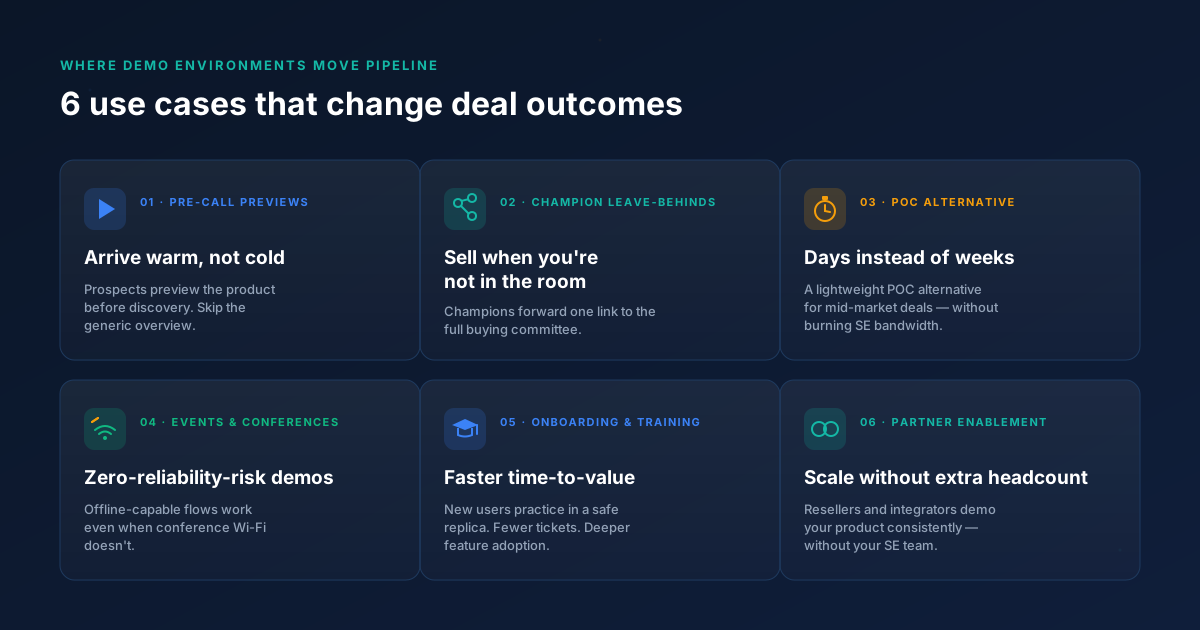
1. Pre-call product previews
Challenge: Prospects show up to discovery calls with zero context. The first 15 minutes are wasted on "let me show you what we do."
How it works: Send an interactive demo link before the call. Prospects arrive having already seen the product.
- Higher-quality discovery conversations
- Shorter sales cycles
- Fewer no-shows (prospects who preview tend to show up)
When to use: After an SDR qualifies the meeting, before the first AE call.
Pro tip: Track which steps the prospect completed before the call. Use that data to skip the generic overview and go straight to what they care about.
2. Champion leave-behinds for buying committees
Challenge: Your champion loved the presales demo. Now they need to convince 6 to 10 stakeholders who weren't on the call.
How it works: Send a shareable demo environment link the champion can forward to every stakeholder. No login required.
- Each stakeholder experiences the product firsthand
- The champion looks prepared and credible
- Internal alignment accelerates without additional AE time
When to use: After any demo where the champion is not the sole decision-maker. (That's most deals.)
Interactive demo platforms like Guideflow make this workflow possible without provisioning a full backend environment. You capture the flow, personalize it for the account, and share a link.
3. Competitive evaluations and POC alternatives
Challenge: Prospects want a proof of concept, but full POCs take weeks and require SE time you don't have.
How it works: A demo environment configured for the prospect's use case serves as a lightweight POC alternative.
- Faster evaluation (days instead of weeks)
- Lower resource cost for your team
- Controlled narrative around what the prospect sees
When to use: When the prospect requests a POC but the deal size doesn't justify a full technical evaluation. For many mid-market deals in the $25K to $80K range, this approach works well.
4. Event and conference demos
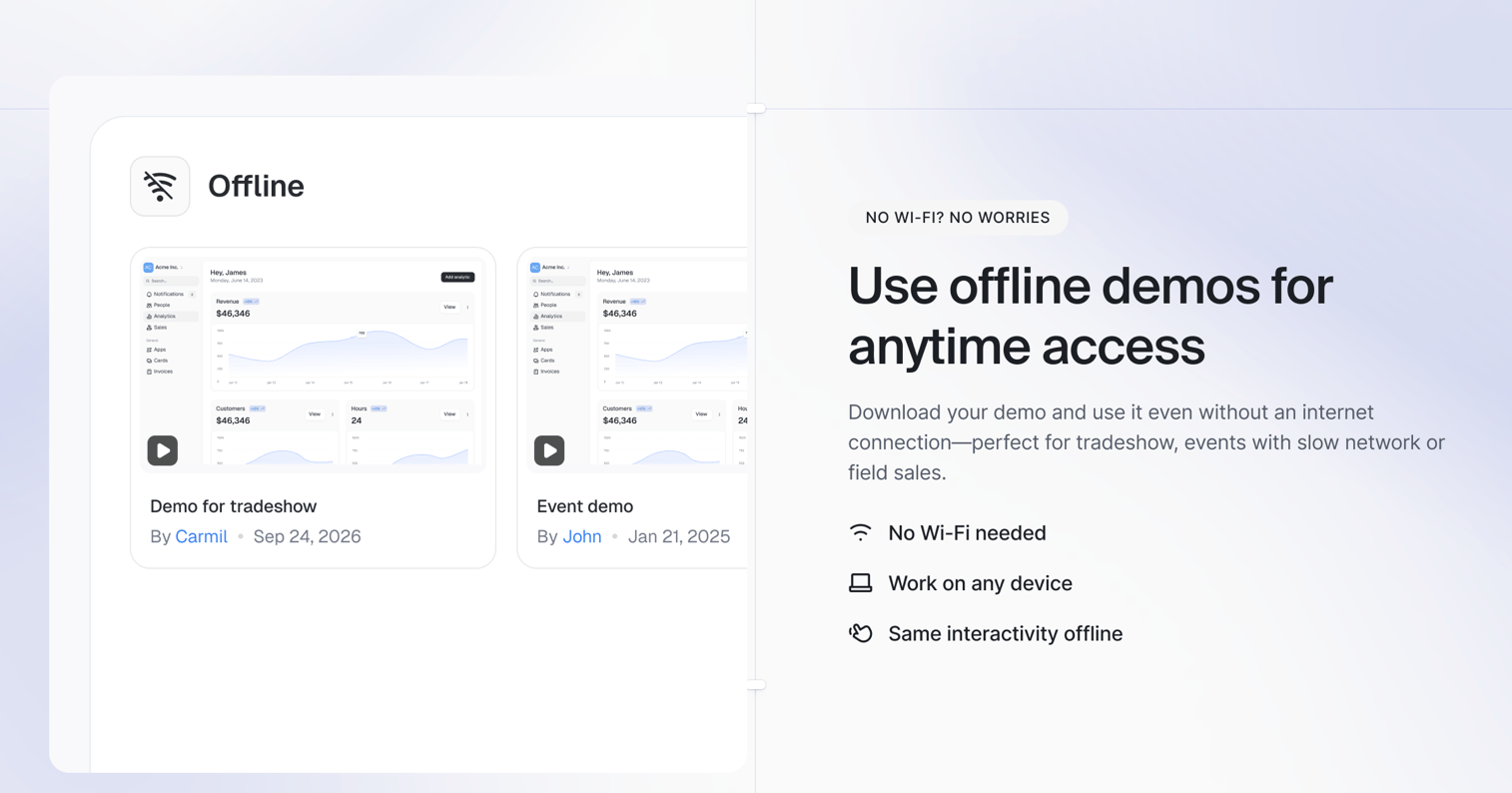
Challenge: Wi-Fi at conferences is unreliable. Live product demos crash in front of crowds.
How it works: An offline-capable demo environment (or pre-captured interactive demo) runs without internet dependency.
- Consistent experience regardless of connectivity
- No live data risk at a public event
- Booth staff can run demos without SE support
When to use: Trade shows, conferences, field events, partner meetings.
5. Onboarding and post-sale training
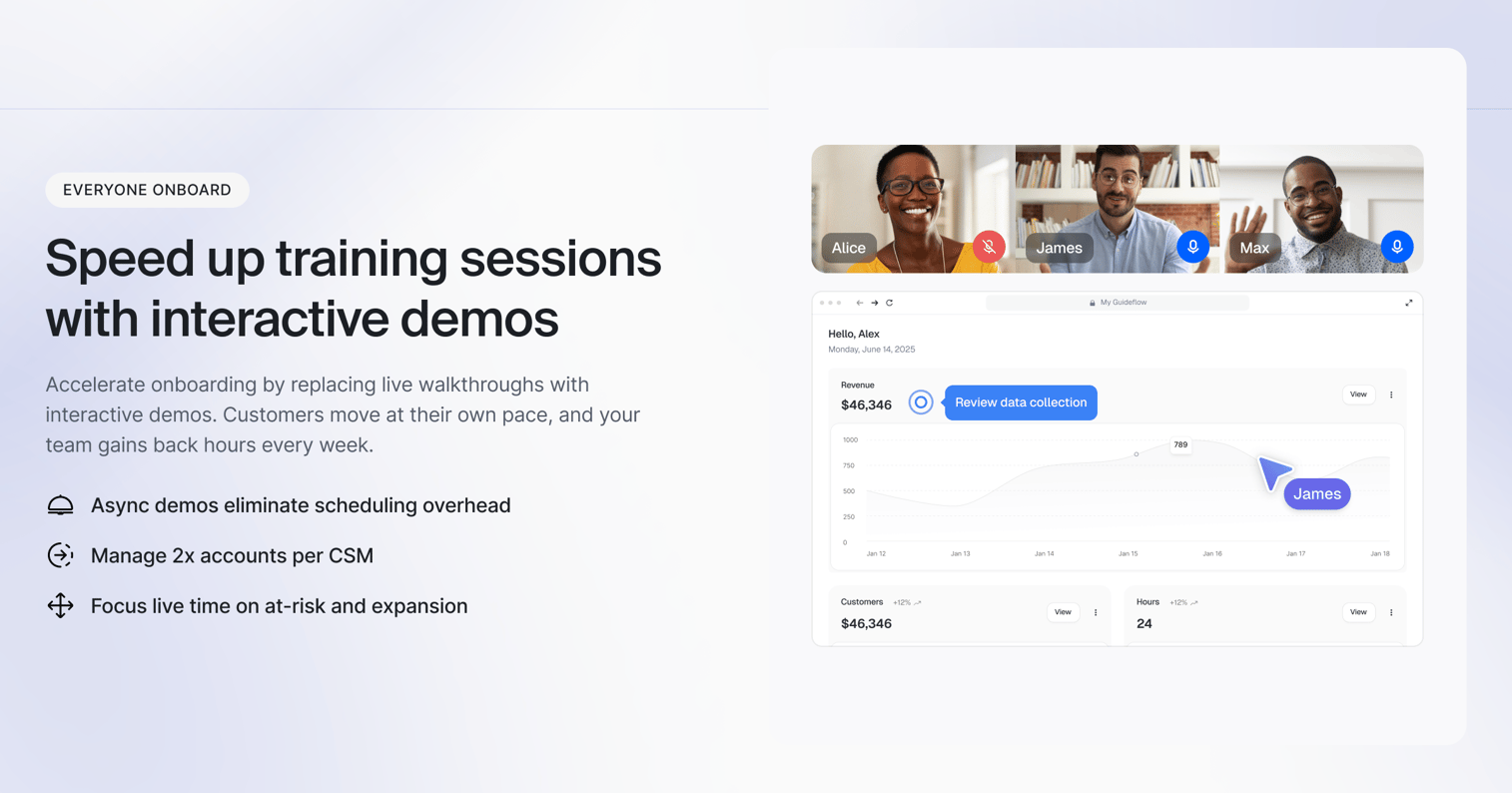
Challenge: New customers struggle to adopt the product because onboarding walkthroughs are inconsistent.
How it works: A demo environment configured with training scenarios lets new users practice without affecting their real instance. Dedicated user onboarding software can streamline this process further.
- Fewer support tickets during the first 30 days
- More confident users who adopt deeper features
When to use: During implementation, at feature launches, for new user onboarding.
6. Partner and channel enablement
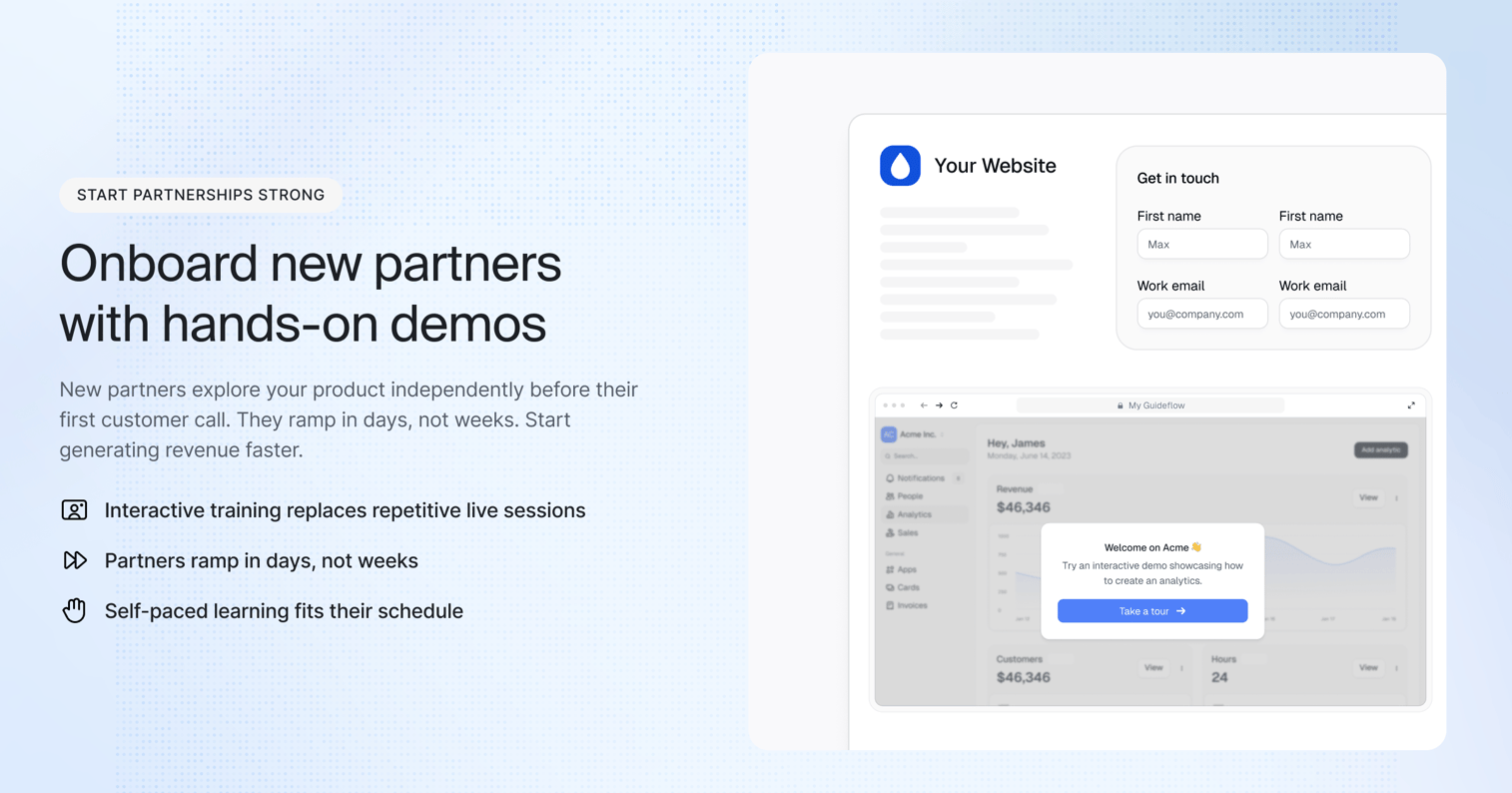
Challenge: Partners need to demo your product but don't have the technical depth to run a live instance.
How it works: A branded demo environment gives partners a reliable, pre-configured experience they can show to their prospects.
- Consistent messaging across your partner network
- No partner dependency on your SE team
- Scalable channel motion without headcount
When to use: When scaling through resellers, integrators, or technology partners. Learn more about how to boost the autonomy of your partners by sharing interactive demos in your partner portal.
Common mistakes with demo environments
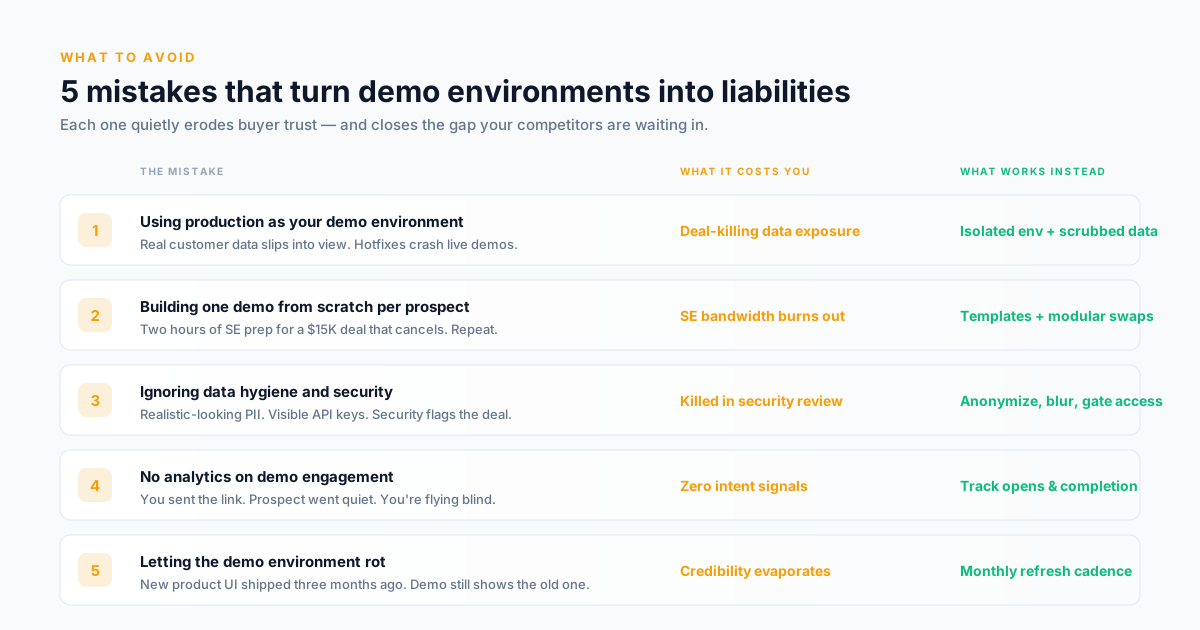
1. Using production as your demo environment
What it looks like: A prospect sees a real customer's name. Or the demo crashes because someone deployed a hotfix during the call.
Why it happens: At early-stage companies, production is the only environment that's always up to date. Building a separate demo instance feels like overhead.
What works instead: Isolated environments with anonymized data, decoupled from production deployments. Even a basic staging copy with scrubbed data is better than showing production.
2. Building one demo for every prospect
What it looks like: The SE spends 2 hours customizing a demo environment for a $15K deal. The prospect cancels. Repeat.
Why it happens: Teams want every demo to feel personalized. But personalization without templatization means every demo is built from scratch.
What works instead: Templatized demo environments with modular demo personalization. Swap logos, data sets, and use-case flows without rebuilding from scratch. Prep time drops from 2 hours to 15 minutes per deal.
3. Ignoring data hygiene and security
What it looks like: Demo data includes realistic-looking PII, or the environment exposes API keys. A security-conscious prospect flags it during evaluation.
Why it happens: Teams copy production data into the demo environment and forget to scrub it. Or they use obviously fake data ("John Doe at Acme Corp") that signals zero effort.
What works instead: Anonymized sample data that mirrors the prospect's industry. Blurred sensitive fields. Access controls on shared links. Good demo data management is a competitive advantage in enterprise deals. Review Guideflow's security and compliance approach for reference.
4. No analytics on demo engagement
What it looks like: You sent the demo link. The prospect went quiet. You have no idea if they opened it, how far they got, or who else viewed it.
Why it happens: Traditional provisioned environments don't have built-in tracking. The demo link is a black box.
What works instead: Demo environments with built-in tracking: views, completion rates, time spent, stakeholder shares. This data should inform your follow-up strategy, not just your activity log.
5. Letting demo environments rot
What it looks like: The product shipped a new UI three months ago. The demo environment still shows the old version. Prospects notice.
Why it happens: Nobody owns demo environment maintenance. Engineering updates production. The demo gets left behind.
What works instead: A monthly maintenance cadence, or a capture-based approach (interactive demos) that can be refreshed in minutes instead of days.
Key features of an effective demo environment
Realistic sample data
Prospects need to see themselves in the demo. Generic placeholder data ("Acme Corp," "John Doe") signals that the demo wasn't built for them. Realistic, anonymized data that mirrors the prospect's industry or workflow increases engagement and reduces "but how does this work for us?" objections.
- Higher prospect engagement during evaluation
- Fewer objections about relevance to their use case
- Stronger emotional connection to the product
Personalization controls
The ability to swap logos, company names, data sets, and workflow scenarios without rebuilding the environment. This is what separates a demo that feels custom from one that feels canned.
- Scale personalization across 20+ deals per quarter
- Reduce SE prep time from hours to minutes
- mprove prospect experience without increasing headcount
Sharing and access management
If the champion can't easily share the self-serve demo with their buying committee, the environment's value drops. Public links, gated access, embed options, and stakeholder-specific permissions matter.
- Multi-stakeholder reach without additional calls
- Controlled distribution with link expiration
- Reduced friction for internal selling
Engagement analytics
Knowing that a prospect opened the demo is table stakes. Knowing which features they explored, where they dropped off, and whether they shared it with others is what changes follow-up strategy.
- Intent signals for prioritizing follow-up
- Deal risk identification (no engagement = trouble)
- Data for more accurate forecasting
Security and data protection
Enterprise buyers will flag any demo that exposes sensitive data or lacks access controls. Blurring, hiding, and deleting sensitive information should be default capabilities, not afterthoughts.
- Pass security reviews faster
- Reduce deal risk from compliance concerns
- Build buyer trust before the formal evaluation starts
Maintenance and update workflows
A demo environment that takes a week to update after a product release is a liability. The best setups allow non-technical users to refresh demos in minutes.
- Always-current product representation
- Lower operational overhead for the SE team
- Reduced dependency on engineering for updates
Offline and presentation modes
Conference Wi-Fi, customer site visits, and unreliable VPNs are real. Demo environments need to work without a stable internet connection.
- Consistent performance at events and on-site meetings
- Reliable demos regardless of network conditions
- Less presentation anxiety for AEs and SEs
How to build or upgrade your demo environment: a step-by-step process
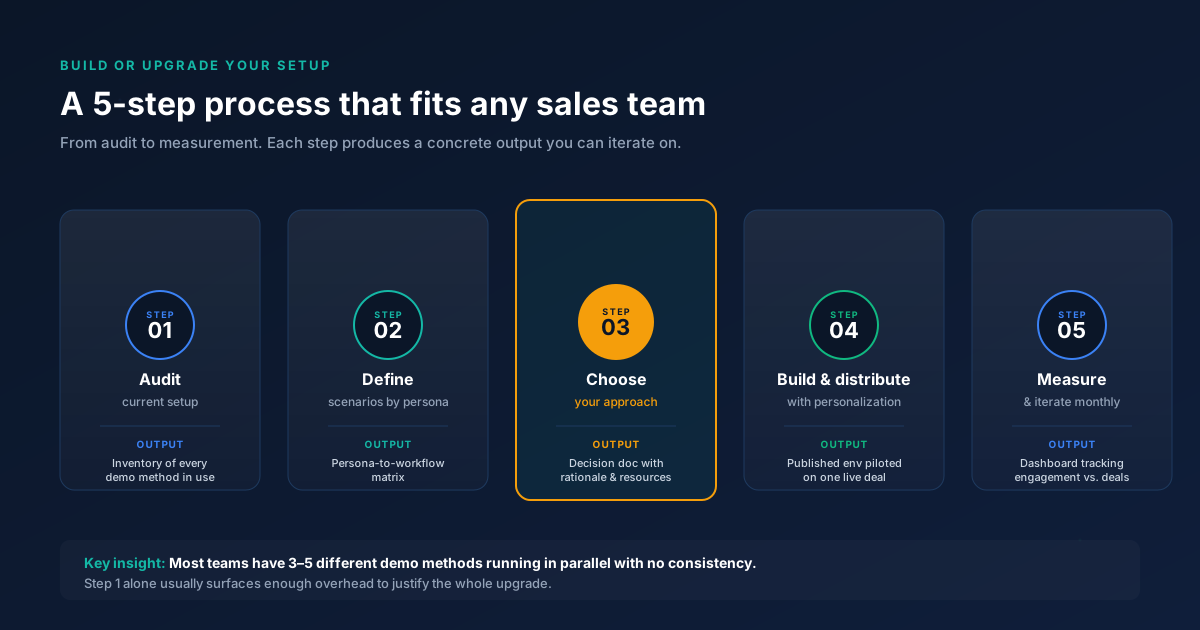
Step 1: Audit your current demo setup
List every way your team currently demos the product. Include live demos, recorded walkthroughs, staging instances, and any ad-hoc setups. Note who owns each, how often they break, and how long they take to prepare.
Output: A simple inventory document with columns for demo type, owner, prep time, reliability score (1 to 5), and last updated date.
This audit usually reveals that teams have 3 to 5 different demo methods running in parallel, with no consistency between them.
Step 2: Define your demo scenarios by buyer persona
Map your top 3 to 5 buyer personas to the specific product workflows they care about. An operations VP cares about different features than a security analyst. Each persona needs a distinct demo path.
Output: A persona-to-workflow matrix showing which features, data sets, and scenarios each persona should see.
Step 3: Choose your approach
Based on your team size, deal volume, and technical resources, decide between a traditional provisioned environment, a sandbox, or an interactive demo platform. Reference the comparison table from earlier in this guide.
If your team needs to create and share demo experiences quickly without provisioning infrastructure, interactive demo platforms like Guideflow let you capture your product in a few clicks and share it as a guided, clickable experience. If you need full backend functionality for deep technical evaluations, a provisioned sandbox is the better fit.
Output: A decision document with your chosen approach, rationale, and required resources.
Step 4: Build, personalize, and distribute
Create your demo environment using the approach from Step 3. Configure sample data, personalize for your top accounts, and set up distribution (links, embeds, email integration). Test with an internal team member who hasn't seen the product recently. Their confusion points are your prospect's confusion points. You can also centralize all your demos in a demo center for easy access and management.
Output: A published demo environment with at least one persona-specific variant, distributed to one active deal as a pilot.
Step 5: Measure and iterate
Track engagement metrics from your first 10 to 20 demo sends. Look at completion rates, stakeholder shares, time-to-next-step after demo send, and qualitative feedback from prospects. Adjust scenarios, data, and flow based on what the data shows.
Output: A measurement dashboard or spreadsheet tracking demo engagement against deal progression. Review monthly.
Demo environment best practices
Keep demo data realistic but anonymized
Use industry-specific sample data that mirrors your prospect's world. Never use real customer data. Anonymize names, numbers, and identifiers. The goal: the prospect sees themselves in the demo without you exposing anyone else.
Templatize, then personalize
Build 3 to 5 base templates by persona or use case. Personalize per account by swapping logos, company names, and relevant metrics. This keeps prep time under 15 minutes per deal instead of 2 hours.
Track engagement, not just sends
Sending a demo link is not the same as the prospect engaging with it. Use analytics to see who opened, how far they got, and whether they shared it. This data should inform your follow-up, not just your activity log.
Refresh on a cadence, not when it breaks
Set a monthly review to check that demo environments match the current product UI. If you wait until a prospect notices the discrepancy, you've already lost credibility.
Make sharing easy for champions
If your champion has to ask you for a new link every time they want to show the product to a colleague, you've added friction to your own deal. Give them a shareable link with no login required.
Test on bad Wi-Fi
Before any event or on-site meeting, test your demo environment on a throttled connection. If it doesn't work on conference Wi-Fi, it doesn't work.
How to measure demo environment effectiveness
Metrics to track
| Metric | What it tells you | Benchmark range |
|---|---|---|
| Completion rate | Are prospects finishing the demo? | 40 to 65% for guided demos, 20 to 35% for free-explore sandboxes |
| Stakeholder shares | Is the champion circulating the demo internally? | 1.5 to 3 unique viewers per demo sent |
| Time to next step | Does the demo accelerate deal progression? | Compare days-to-next-meeting before and after demo send |
| Drop-off points | Where do prospects lose interest? | Identify the step with the steepest drop and redesign |
| Return visits | Are prospects coming back to review? | 15 to 25% return rate signals active evaluation |
How to interpret the data
If completion rates are below 30%, the demo is too long or the first few steps aren't compelling. Shorten the flow and lead with your strongest value proposition.
If stakeholder shares are near zero, the champion doesn't find the demo valuable enough to forward, or the sharing mechanism is too difficult. Ask your champion directly: "Would you share this with your team?" Their answer tells you more than any dashboard.
If time-to-next-step doesn't improve after introducing demo environments, the demo may not be addressing the right buyer concerns. Revisit your persona-to-workflow matrix from Step 2 and validate with recent win/loss data.
Closing
A demo environment is not an IT project. It's a revenue tool. The teams that treat it as infrastructure for deal velocity, not just a staging instance, close faster and lose fewer deals to "no decision."
Start this week: audit your current demo setup using the inventory framework from Step 1. If you want to skip the infrastructure overhead and start creating shareable, interactive demo experiences in minutes, Guideflow is built for exactly that.
Start your journey with Guideflow today!
FAQs about demo environment
A demo environment is a controlled, isolated copy of a software product used to show prospects, customers, or internal teams how the product works without affecting live data or production systems. It typically includes sample data, pre-configured workflows, and user roles designed to illustrate specific use cases.
A sandbox is a type of demo environment that allows free exploration, meaning the user can click anywhere and test workflows without a guided path. A traditional demo environment is often more scripted, with specific scenarios and guided flows designed to highlight particular features or outcomes.
Interactive demo platforms let you capture your product’s interface directly from a browser and turn it into a clickable, shareable experience without provisioning servers or writing code. You record the flow, edit the steps, add personalization, and share a link. The entire process can take minutes, not weeks.
For many mid-market deals, yes. A well-configured demo environment can show the prospect how the product handles their specific use case without the time and resource cost of a full POC. For enterprise deals with deep technical requirements, a demo environment often serves as a first step that reduces the scope and duration of the subsequent POC.
Set a monthly review cadence to check that demo environments reflect the current product UI and feature set. If you use an interactive demo platform, refreshing a demo typically takes minutes: re-capture the updated flow and publish. If you maintain a provisioned instance, coordinate with engineering to sync after each major release.
Use realistic but anonymized sample data that mirrors your prospect’s industry and workflows. Never use real customer data. Include industry-specific terminology, realistic metrics, and plausible company names. The goal is for the prospect to see their own situation reflected without exposing anyone’s actual information.
Track completion rates, stakeholder shares, time-to-next-step after sending the demo, and deal win rates for opportunities where a demo environment was used versus those where it wasn’t. The clearest signal is whether demo sends correlate with faster stage progression and higher close rates.
It depends on how it’s built. Enterprise-grade demo environments should include access controls, data anonymization, link expiration, and audit logging. If you’re selling to security-conscious buyers, your demo environment’s security posture is part of the evaluation. Choose platforms that support SSO, role-based access, and SOC 2 compliance.