
A webhook fires. Somewhere. You think.
The integration was supposed to be done yesterday. The provider swears the event went out. Your endpoint logged nothing. So now you are guessing whether the payload malformed, the signature failed, the retry never happened, or the whole thing hit a firewall. This is the part of integration work nobody demos on the sales call, and it is exactly where deals, launches, and onboarding timelines quietly stall.
The stakes are not small. Across enterprise integration stacks, 84% of organizations use webhooks for at least one critical integration, with typical webhook failure rates of 5 to 10%, according to AMWorldGroup's Webhook & Integration Statistics 2026. Webhook adoption among leading API companies rose from 83% in 2023 to 85% in 2024, per Svix's State of Webhooks (2024). More events, more surface area, more silent failures. A good webhook tester turns that guessing game into a visible, testable surface where you can see headers, bodies, and timing in one place.
This matters beyond engineering. Presales and solutions engineers run into the same wall during technical validation, where a buyer wants proof that an integration actually fires before they sign. If you build interactive product walkthroughs to support those evaluations, the same visibility discipline applies. Our roundup of tools that help teams show and validate technical fit leans on the same principle: make the invisible visible, fast. This guide focuses on the webhook layer specifically, judging each tool on request capture, inspection depth, forwarding or replay, developer ergonomics, and fit for local or production workflows.
What's inside
This guide covers seven tools for capturing webhook requests, inspecting payloads, forwarding events, and debugging integrations. Some are pure webhook testers. Others handle infrastructure, local tunneling, or a narrow specialty like Discord messaging or TypeScript type generation.
We chose tools based on four things: how quickly you get a visible endpoint, how deep the payload inspection goes, whether the tool supports forwarding or replay, and how well it fits real developer workflows across local and production environments. Every tool here solves a specific webhook debugging job. The differences show up in where each one shines.
TL;DR
- Best for instant request capture: Webhook.site gives you a unique webhook URL and instant logging in seconds, plus forwarding, replay, and automation workflows.
- Best for typed payloads: TypedWebhook.tools inspects headers and bodies, then generates TypeScript types, CUE, and JSON schema straight from the payload.
- Best for webhook infrastructure: Hookdeck Webhooks Tools covers receiving, forwarding, queuing, retries, and routing for teams building reliable delivery.
- Best for Discord workflows: Discohook composes and previews Discord webhook messages and embeds, free.
- Best for local development: ngrok exposes localhost endpoints over secure tunnels so external providers can reach your machine.
- Best for mocking endpoints: Beeceptor simulates API and webhook endpoints with request matching and fault injection.
- Best for a minimal tester: webhook-tester spins up a unique URL for quick inspection with almost no setup.
What are webhook tools?
Webhook tools are developer utilities that capture, inspect, debug, transform, replay, and route incoming webhook requests so teams can validate event-driven integrations. Instead of blindly trusting that an event fired, you point the provider at a visible endpoint and watch exactly what arrives.
Most webhook debugging comes down to a small set of jobs. The tools in this category help you with:
- Unique webhook URLs: a disposable or persistent endpoint you can hand to any provider in seconds.
- Instant logging: every incoming request captured the moment it lands, with no code deployed.
- Headers and body inspection: full visibility into method, headers, query strings, and raw or parsed payloads.
- Payload inspection: parsed JSON, form data, and file uploads rendered in a readable view.
- Real-time inspection: requests appear live as they arrive, so you can trigger an event and watch it hit.
- Forwarding and replay: push captured requests to another endpoint, or re-fire a stored request to test your handler again.
- Notifications: alerts when a request arrives or a delivery fails.
Some tools stop at capture and inspection. Others, acting as a full webhook receiver, add queuing, retry logic, deduplication, and routing so events survive real production traffic.
Why webhook tools matter
Webhooks are hard to debug for one reason: they happen somewhere you cannot see. A local function call throws a stack trace at you. A webhook fails on someone else's server, or arrives with a payload shape that changed last Tuesday, or gets retried three times while your handler was down. Without a visible capture surface, you are debugging with a blindfold on.
That opacity gets expensive during a launch or a customer integration. When payloads drift or deliveries fail outside your local environment, the fastest path back to sanity is a tool that shows you the raw request as the provider actually sent it.
For presales and solutions engineers, this is validation infrastructure. When a buyer asks "does your product actually receive our events," a webhook tester lets you prove it live, with the payload on screen, no production system required. When comparing tools, look for depth of inspection, whether forwarding and replay are first-class, and how the tool behaves in both local and production contexts.
When to use webhook tools
Debug a failing integration
Events arrive late, malformed, or not at all. Start by pointing the provider at a unique webhook URL from a tester and trigger the event manually. If the request shows up there but not in your app, the problem is downstream of delivery, in your handler, routing, or auth. If it never shows up at all, the problem is upstream, in the provider config or network path. That single split saves hours of blind poking. From there, inspect the headers and body to confirm signature, content type, and payload shape match what your code expects.
Validate payload shape during development
Before you write a line of production parsing code, capture a real payload. Providers document their webhook schemas, but documentation drifts and edge cases hide in optional fields. Developers and SEs use webhook testers to inspect the actual headers and JSON body a provider sends, then build against reality instead of the docs. Tools that generate schemas or TypeScript types from a captured payload compress this step even further.
Support demos, POCs, and test environments
Presales teams use webhook tools to prove integration behavior without touching production. During a proof of concept, you can capture the buyer's events on a shared endpoint, show the payload live, and confirm the two systems talk before anyone commits engineering time. It is a low-friction way to move technical validation forward and keep a deal's momentum intact when the buying committee wants proof, not promises.
Comparison table
Here is the quick-scan version. Pricing and ratings reflect verified first-party and G2 sources as of mid-2026. Where a tool does not publish pricing or hold a G2 listing, the cell is left open rather than guessed.
| # | Product | Intent | Key use case | Pricing | G2 rating |
|---|---|---|---|---|---|
| 1 | Webhook.site | Test and automate | Instant request capture, forwarding, replay, and workflow automation | Free; paid from $9/mo | Not listed |
| 2 | TypedWebhook.tools | Inspect and type | Payload inspection plus TypeScript, CUE, and JSON schema generation | Free | Not listed |
| 3 | Hookdeck Webhooks Tools | Receive and deliver | Reliable webhook ingestion, queuing, retries, and routing | Free tier; team plans | 4.8/5 |
| 4 | Discohook | Compose messages | Discord webhook message and embed creation | Free | Not listed |
| 5 | ngrok | Expose locally | Secure tunnels to reach localhost endpoints | Free; Hobbyist from $8/mo | Not listed |
| 6 | Beeceptor | Mock and inspect | API and webhook mocking with live request inspection | Free; paid from $10/mo | 4.8/5 |
| 7 | webhook-tester | Inspect quickly | Minimal unique URL for fast request inspection | Free | Not listed |
1. Webhook.site
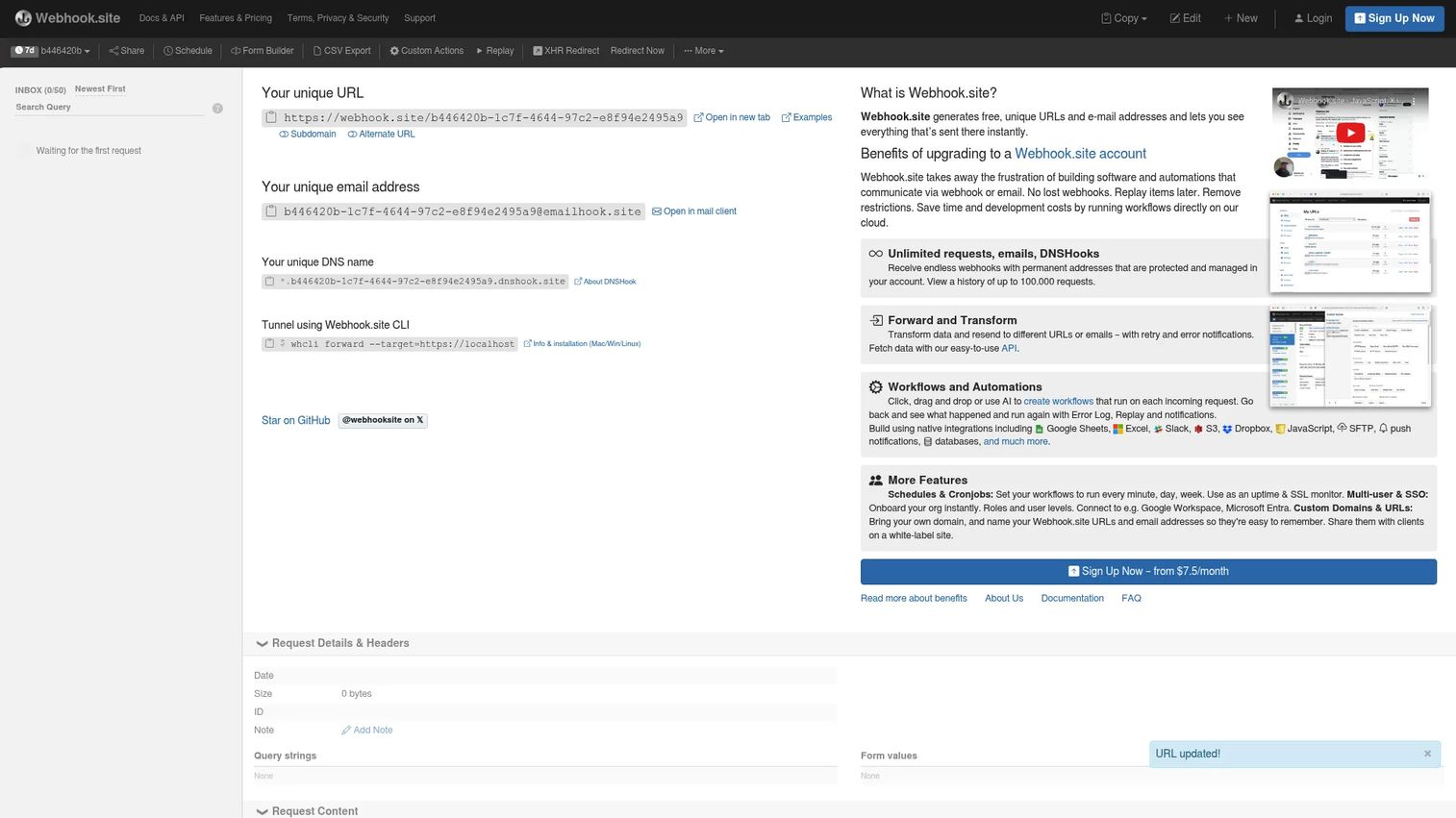
Webhook.site is the tool most developers reach for first when they need to see a webhook right now. Load the page and it hands you a unique URL and email address instantly, then logs every incoming request the moment it lands. No signup wall for basic use, no code, no waiting. You paste the URL into a provider, fire the event, and watch it appear.
The depth is what keeps people coming back. Beyond instant logging, Webhook.site handles Custom Actions workflows, forwarding, request replay, and API access, so it moves from a passive inspector into an active automation surface.
Best for: Developers testing, debugging, and automating webhooks and related HTTP or email workflows.
Key strengths
- Instant unique webhook URL: A fresh endpoint and email address in seconds, with no account required to start inspecting.
- Custom Actions and forwarding: Build workflow automation, forward captured requests to another endpoint, and replay stored requests to re-test your handler.
- Schedules, export, and custom domains: CSV export, scheduled requests, custom domains, and databases for teams who outgrow the free surface.
Why choose Webhook.site: When your job is "get this webhook visible in the next thirty seconds and then do something with it," this is the fastest path. The forwarding and replay features mean it doubles as a lightweight integration relay during development, not just a viewer. For presales teams, it is an easy shared endpoint to demo event flow live.
Webhook.site pricing: The Free plan costs $0 and covers instant inspection. Paid tiers are billed monthly: Basic at $9/month, Pro at $18/month, and Enterprise at $69/month, which add capacity, retention, custom domains, and API access. Pricing is in USD and verified from the Webhook.site pricing page.
2. TypedWebhook.tools
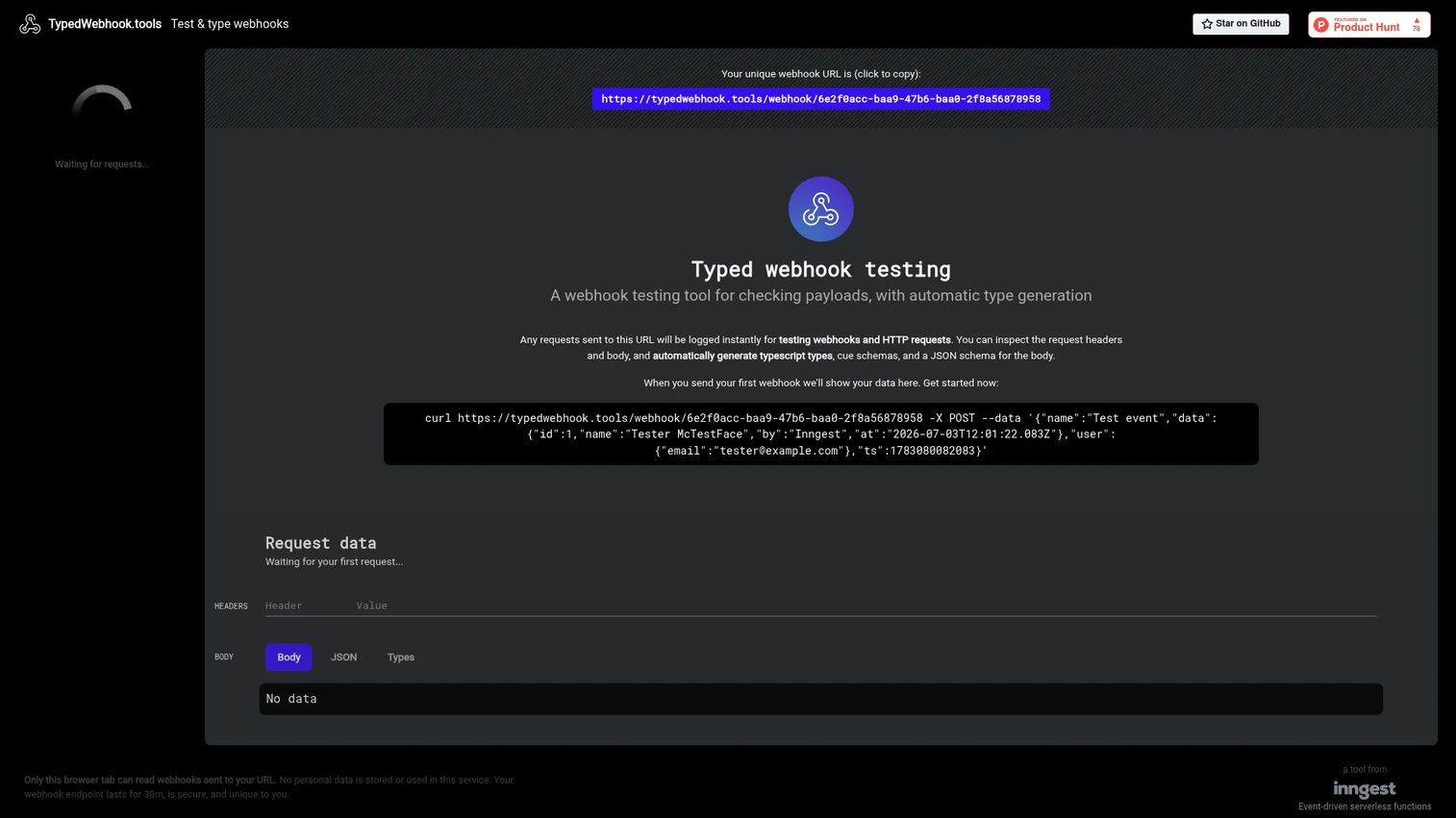
TypedWebhook.tools does one thing that most testers do not: it turns a captured payload into code. It logs webhook and HTTP request payloads instantly, gives you a clean payload viewer for headers and body, then generates TypeScript types, CUE schemas, and JSON schema directly from what arrived.
That closes the loop between inspection and implementation. Instead of eyeballing a JSON body and hand-writing an interface, you capture the real payload and let the tool emit the types.
Best for: Developers testing webhooks and deriving types from incoming payloads.
Key strengths
- Instant payload logging: Captures webhook and HTTP request payloads the moment they land, with full headers and body inspection.
- TypeScript type generation: Emits TypeScript types straight from the captured payload, so your handler is typed against reality.
- JSON schema generation: Also produces CUE schemas and JSON Schema for validation and contract testing downstream.
Why choose TypedWebhook.tools: If you write TypeScript and you are tired of manually modeling every provider's payload, this removes the tedious middle step. Capture once, generate the types, paste them in. It is a narrow tool by design, and that focus is exactly why it fits teams who want to move from webhook inspection to typed code faster.
TypedWebhook.tools pricing: The tool is free to use. No paid tiers or public pricing page were found on the site, so treat it as a free utility for payload inspection and type generation.
3. Hookdeck Webhooks Tools
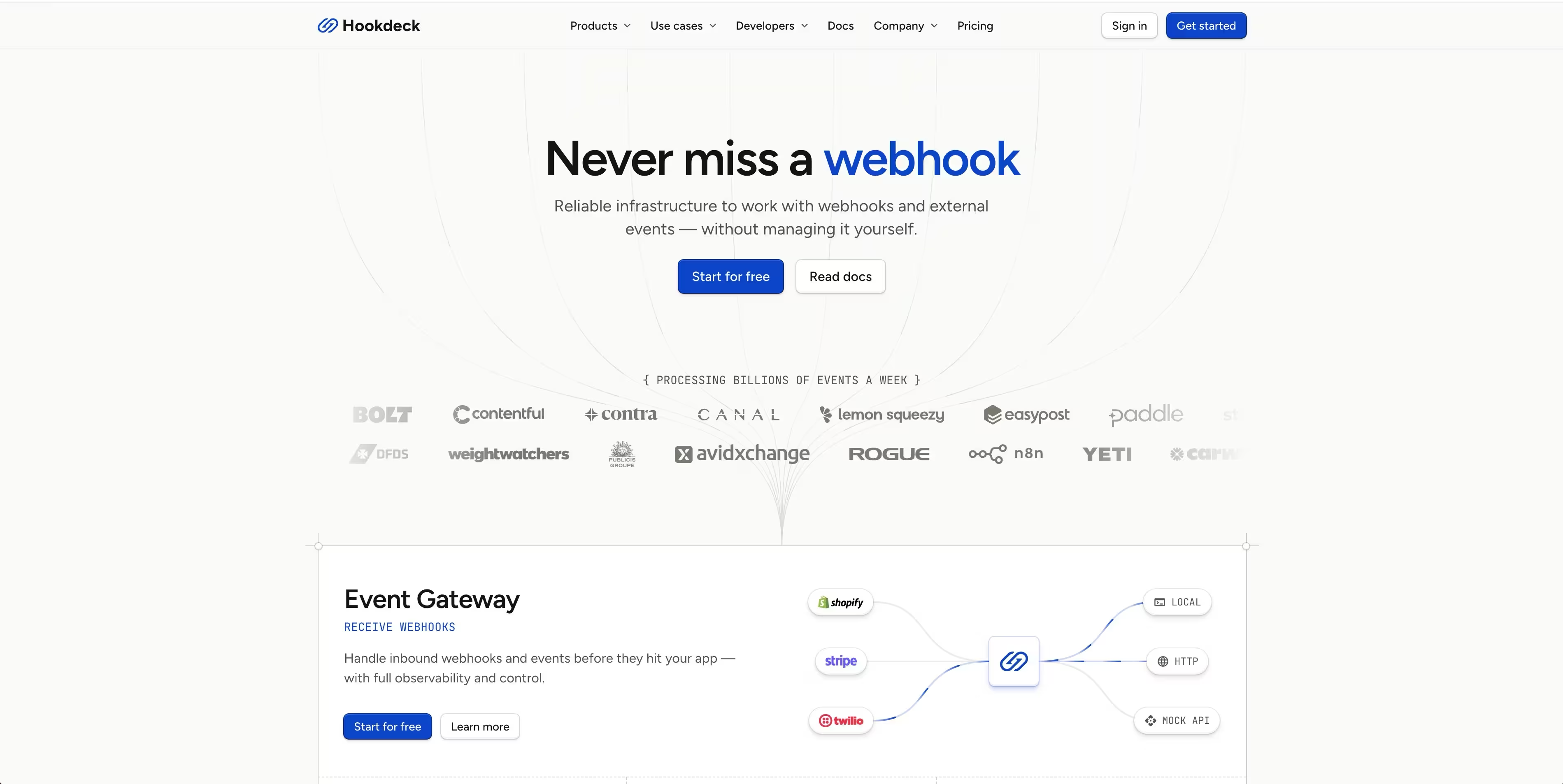
Hookdeck Webhooks Tools is the option for teams that have moved past one-off testing and need webhooks to survive production. It is webhook infrastructure: receiving, managing, testing, and delivering webhooks and event-driven messages at scale. Where a tester shows you a single request, Hookdeck manages the whole delivery pipeline.
The platform lets you filter, transform, and route webhooks, queue them with rate control and automatic retries, and debug locally through its CLI, Console, and Radar monitoring. That covers the failure modes a simple tester never sees: a provider hammering your endpoint, a handler that was briefly down, a duplicate delivery.
Best for: Engineering teams that need reliable webhook ingestion, replay, and delivery tooling.
Key strengths
- Filter, transform, and route: Reshape and direct incoming webhooks before they hit your services, so each consumer gets exactly what it expects.
- Queue with retries: Rate control and automatic retry logic keep events flowing when your handler is slow or briefly offline.
- Local testing and monitoring: CLI, Console, and Radar give you local webhook debugging and production monitoring in one toolchain.
Why choose Hookdeck Webhooks Tools: This is the pick when the question shifts from "what did this request look like" to "how do I never lose an event again." The forward and transform capabilities plus request replay make it a genuine reliability layer, useful for teams comparing webhook infrastructure patterns rather than just poking at a payload. It holds a 4.8/5 rating on G2.
Hookdeck Webhooks Tools pricing: Hookdeck offers a free plan and team plans. Public numeric pricing was not verified from the site during research, so check the Hookdeck pricing page for current tier amounts before committing.
4. Discohook
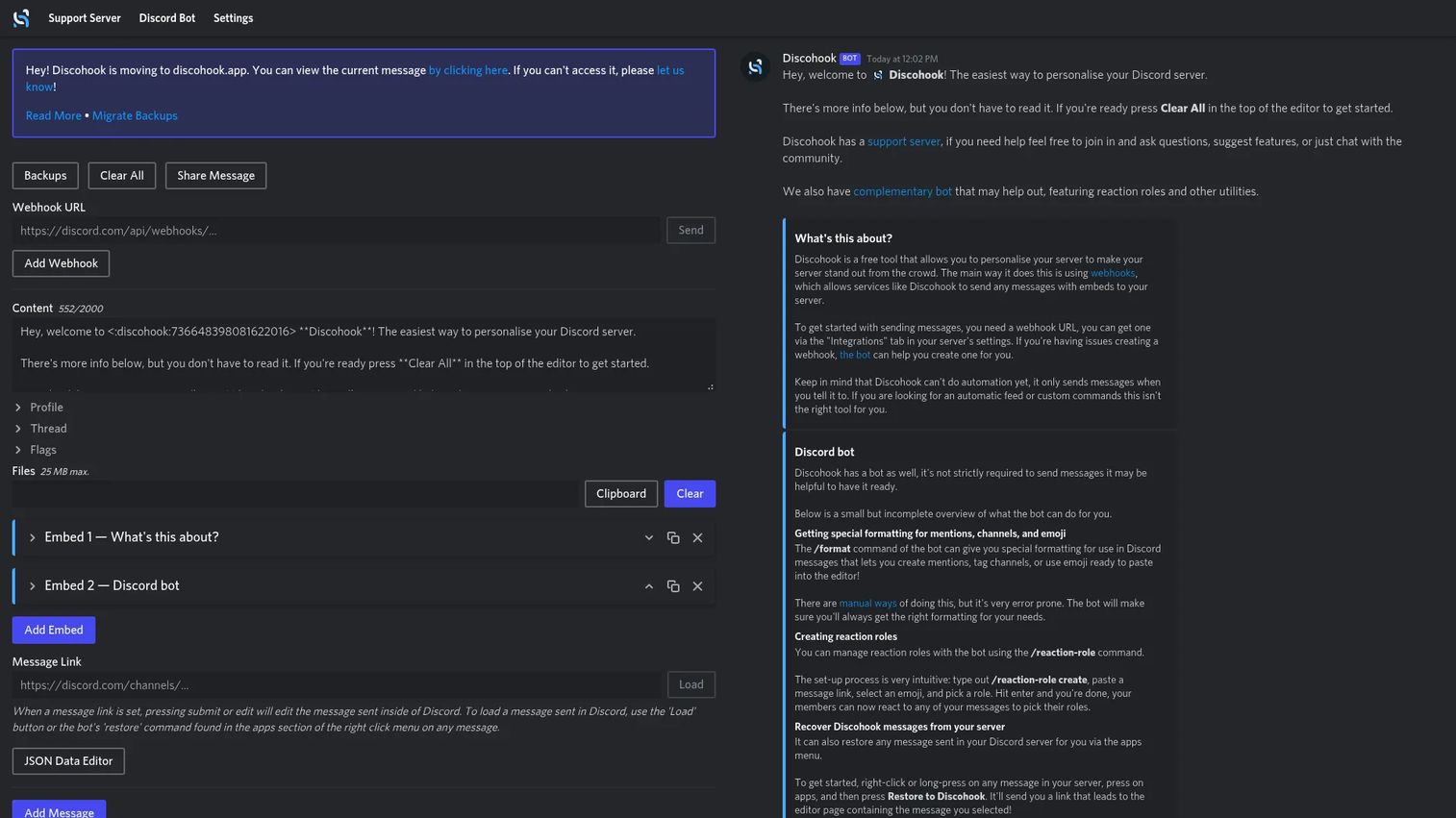
Discohook is the specialist in this list. It is a free Discord webhook message editor for building and previewing custom embeds and messages before they go out to a server. If your webhook workflow ends in a Discord channel, this is the tool that makes those messages look intentional instead of raw JSON.
You compose the message visually, preview the embed exactly as it will render, and send it through your Discord webhook. It also bundles bot utilities like reaction roles and message recovery.
Best for: Discord server admins and community managers who need to draft and send polished webhook messages.
Key strengths
- Webhook-based Discord messaging: Create and send richly formatted messages straight through a Discord webhook, no bot code required.
- Live embed preview: See exactly how embeds and formatting render before you send, so nothing ships broken.
- Bot companion utilities: Reaction roles and message recovery extend it beyond one-off messages into light community tooling.
Why choose Discohook: This is not a general webhook tester, and it does not pretend to be. If your job is Discord notifications, alerts, or community messages, it is purpose-built and free. For anything outside the Discord ecosystem, pick one of the general tools above.
Discohook pricing: Discohook is free. No paid plans are advertised on the site.
5. ngrok
ngrok solves a different half of the problem. A webhook provider on the public internet cannot reach the server running on your laptop. ngrok fixes that by creating a secure tunnel from a public URL to your local service, so external providers can deliver webhooks straight to the handler you are actively editing.
That makes it the standard tool for local development against real webhook traffic. You run your app on localhost, start a tunnel, hand the public URL to the provider, and debug your handler with live requests instead of mocked ones.
Best for: Developers and teams exposing local services, APIs, or private apps securely over the internet.
Key strengths
- Secure tunnels to localhost: Expose a local or private service over a public URL so real providers can hit your dev machine.
- Custom and branded domains: Use custom or ngrok-branded domains for stable endpoints across sessions.
- Traffic policy and observability: Inspect traffic, apply access controls, and enforce policy on the tunnel itself.
Why choose ngrok: When you need to receive real webhooks on code you are still writing, this is the connective tissue. It is less about inspecting a payload after the fact and more about getting the request to your handler in the first place, which pairs well with a dedicated tester for the inspection step.
ngrok pricing: The Free plan is $0. Hobbyist runs $8/month billed annually or $10/month billed monthly. Pay-as-you-go starts at $20/month plus usage, with add-ons for advanced security, support, and compliance. Pricing is in USD and verified from the ngrok pricing page.
6. Beeceptor
Beeceptor sits between mocking and inspection. It is an API mocking and virtualization platform for building, testing, and debugging HTTP and API integrations, and that scope makes it useful when you need controlled request behavior rather than just a passive endpoint. Spin up a mock endpoint, define how it responds, and inspect every request that hits it.
The control is the point. You can shape responses with flexible request matching, inject faults and latency to test how your code handles failures, and watch live request inspection as traffic arrives.
Best for: Teams needing mock APIs, service virtualization, and API traffic inspection.
Key strengths
- Flexible request matching: Route and respond to requests based on path, method, headers, or body content.
- Fault and latency injection: Simulate timeouts, errors, and slow responses to harden your webhook handling.
- Live request inspection: Watch incoming requests in real time with full payload visibility.
Why choose Beeceptor: When testing means "I need this endpoint to behave a specific way," not just "show me what arrived," Beeceptor gives you that control. It is a strong fit for building and validating integrations against simulated services before the real one is ready.
Beeceptor pricing: The Free plan is $0/month. Paid plans are Individual at $10/month, Team at $25/month, and Scale at $99/month, with annual billing offering 20% off and an Enterprise plan available on request. Free-plan endpoint retention runs 7 days for unclaimed endpoints and 90 days for claimed ones. Beeceptor holds a 4.8/5 rating on G2. Pricing is in USD and verified from the Beeceptor pricing page.
Considerations before you choose
The right pick depends less on features and more on which webhook job you hit most often. A quick checklist before committing.
Inspection depth
Do you need to see raw bytes, parsed JSON, headers, and query strings, or just confirm a request arrived? Deeper payload inspection matters when providers send signed payloads or nested structures you have to validate against. A minimal tester is fine for a smoke test; typed generation or full parsing matters when you are building the handler.
Forwarding and replay
If you are debugging a handler, request replay saves you from re-triggering the source event every time. If you are relaying events during development, forwarding turns a tester into a lightweight proxy. Confirm both are first-class, not bolted on.
Local versus production
Local development against real webhooks needs a tunnel like ngrok. Production reliability, where you cannot afford a dropped event, needs infrastructure like Hookdeck with retry logic and queuing. A pure tester covers neither of those extremes, so match the tool to where the webhook actually runs.
Specialty fit and integrations
Some jobs are narrow. Discord messaging wants Discohook. TypeScript-heavy codebases benefit from TypedWebhook.tools. Mocking and service virtualization point to Beeceptor. Check that the tool plugs into your CI/CD and API integrations workflow rather than becoming another isolated tab.
Conclusion
There is no single best webhook tool, only the best fit for the job in front of you. For instant capture and automation, Webhook.site is the default reach-for. For turning payloads into typed code, TypedWebhook.tools removes a whole manual step. For production-grade delivery with retries and routing, Hookdeck Webhooks Tools is the infrastructure play. Discohook owns Discord messaging, ngrok owns local tunneling, Beeceptor owns mocking and controlled behavior, and webhook-tester owns the two-minute sanity check.
The practical next step: pick the tool that matches your most common webhook workflow, not the one with the longest feature list. If you spend your days debugging failed deliveries, start with a tester that has strong replay. If you are validating integrations for buyers during a POC, a shared inspection endpoint you can put on screen is worth more than any dashboard. Match the tool to the moment, and webhook debugging stops being a guessing game.
FAQs
For pure debugging, a tester with instant capture and request replay is the fastest route, and Webhook.site is the common default because it shows the raw request immediately and lets you re-fire it. For failures happening in production at scale, Hookdeck Webhooks Tools adds retry logic and delivery monitoring so you can see why an event dropped, not just that it did.
webhook-tester and Webhook.site both hand you a usable endpoint with no account and no configuration, which makes them the gentlest starting points. You paste the unique URL into a provider, trigger an event, and see it land. That immediate feedback loop is what makes webhook testing click for people new to it.
Yes. Full headers and body inspection is the core feature of any real webhook tester. Tools like Webhook.site, Beeceptor, and TypedWebhook.tools render the method, headers, query string, and parsed JSON body in a readable view, so you can confirm signatures, content types, and payload shape against what your code expects.
A webhook tester is a temporary inspection surface: you point a provider at a unique URL, watch requests arrive, and read them. A webhook receiver is production infrastructure that ingests events reliably, with queuing, retries, deduplication, and routing. Testers are for endpoint testing and development; receivers like Hookdeck keep events flowing in live systems.
Many do. Webhook.site supports both forwarding captured requests to another endpoint and replaying stored requests to re-test your handler. Hookdeck adds forward and transform plus request replay as part of its delivery pipeline. Replay is especially useful because it lets you debug a handler without re-triggering the source event each time.
For local development, ngrok is the standard because it creates a secure tunnel from a public URL to the service running on your machine, letting real providers reach localhost. Pair it with a tester for the inspection step, or use webhook-tester for a quick check when you just need to confirm a request arrived.
Yes, and this is where presales and solutions engineers get real value. During a webhook test in a POC, a shared inspection endpoint lets you show a buyer that events actually fire, with the payload live on screen, before anyone commits engineering time. It turns "trust us, the integration works" into visible proof and keeps technical validation moving.
TypedWebhook.tools is purpose-built for this. It captures a real payload, then generates TypeScript types, CUE schemas, and JSON Schema directly from what arrived. For TypeScript codebases, that removes the manual step of hand-modeling every provider's payload and lets you type your handler against the actual request.