You ran a demo last week that felt solid. The prospect nodded along, asked a few questions, said they would "circle back with the team." Then silence. No follow-up, no next steps, no deal.
The problem usually is not your product. It is the gap between showing features and creating the kind of engagement that moves prospects to act. This guide covers twelve strategies that turn passive viewers into active buyers, plus how to measure whether your demos are actually working.
TL;DR
- Sales demo engagement measures how actively prospects participate during your product demonstration, not just whether they showed up.
- High engagement looks like questions asked, features explored, stakeholders involved, and follow-up actions taken.
- Demos that close deals share common traits: discovery before presenting, personalization that matches buyer context, hands-on interactivity, and clear next steps.
- Passive demos where prospects watch silently correlate with stalled deals and "no decision" outcomes.
- Track engagement through live signals (questions, stakeholder count) and post-demo behavior (link opens, time spent, shares to colleagues).
What is sales demo engagement and why it matters
Sales demo engagement refers to how actively prospects participate, interact, and respond during a product demonstration. Attendance alone does not count. A prospect who joins a call but checks email the entire time is not engaged.
High engagement looks like questions asked mid-demo, requests to see specific features, colleagues invited to join, and follow-up messages referencing what they saw. Low engagement looks like cameras off, monosyllabic responses, and "looks good, we'll be in touch" with no concrete next step.
Why does engagement matter? Prospects who engage deeply are mentally mapping your product to their workflow. They are evaluating, not just observing.
Deals with high demo engagement close faster. Deals closed within 50 days have a 47% win rate. The prospect already understands the value before internal discussions begin.
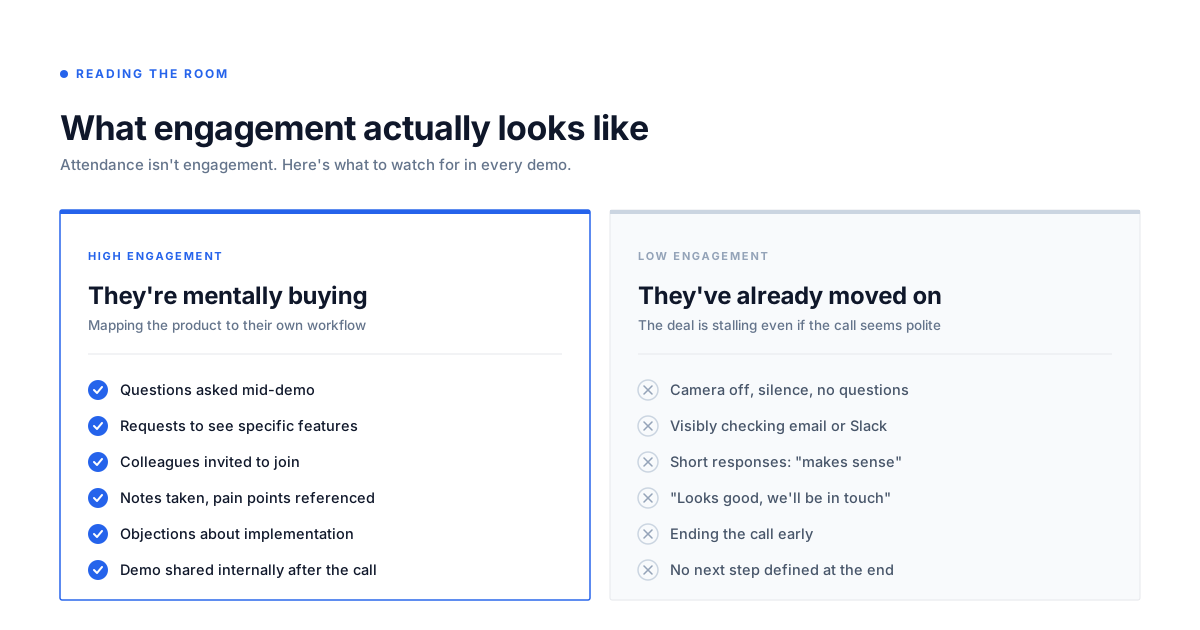
- High engagement signals: Questions asked, requests to see specific features, colleagues invited, notes taken, references to current pain points
- Low engagement signals: Camera off, no questions, checking email, short responses like "makes sense," ending the call early
Types of sales demos and when each works best
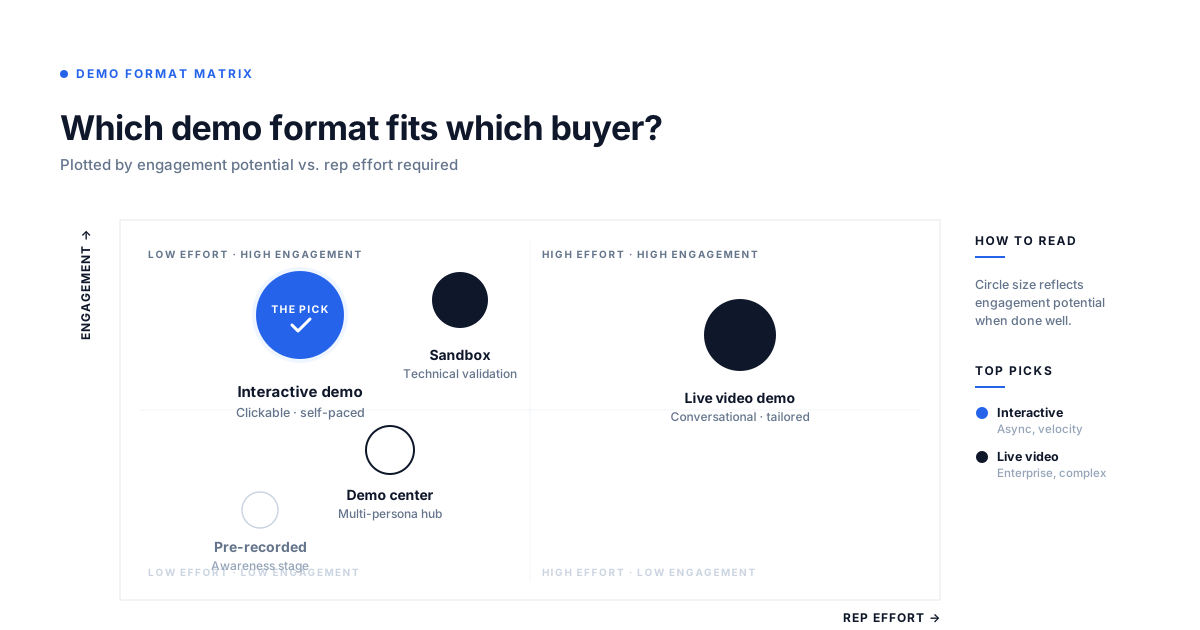
Not all demos serve the same purpose. Understanding sales demo engagement starts with choosing the right format. The format you choose affects how much engagement you can generate and what kind of buyer it suits.
Live video demos
A synchronous demo over video call with a rep presenting in real time. Best for mid-funnel prospects who have specific questions and want a conversation. High-touch but time-intensive.
Engagement depends heavily on rep skill, preparation, and the prospect's willingness to participate. Live demos shift B2B sales when executed properly with authentic experiences.
Pre-recorded video demos
Asynchronous recordings that prospects watch on their own schedule. Useful for early awareness or when live scheduling proves difficult. Lower engagement potential because prospects cannot interact or ask questions in the moment.
Interactive product demos
Clickable, guided experiences where prospects navigate the product themselves without needing a live demo or login. Combines the convenience of async with the engagement of hands-on exploration. Prospects control the pace and focus on what matters to them.
Sandbox environments
Full product environments where prospects can explore freely without guidance. Best for technical evaluators who want to test workflows and edge cases. Higher friction to set up but valuable for complex products.
Sandbox demos for sales teams particularly excel at letting prospects experience your value firsthand. A sandbox environment lets prospects go deep without risking production data.
Demo centers for self-serve buyers
Centralized hubs where prospects choose which demos to explore based on their role or use case. Organizes multiple demos in one branded destination. A demo center works well when you have multiple products or personas to address.
| Demo type | Best for | Engagement level | Rep involvement |
|---|---|---|---|
| Live video | Mid-funnel, complex questions | High (if done well) | High |
| Pre-recorded | Early awareness, scheduling constraints | Low to medium | None |
| Interactive demo | Self-serve evaluation, async buying | High | None |
| Sandbox | Technical validation, hands-on testing | High | Low |
| Demo center | Buying committees, multiple stakeholders | Medium to high | None |
Sales demo best practices that increase engagement
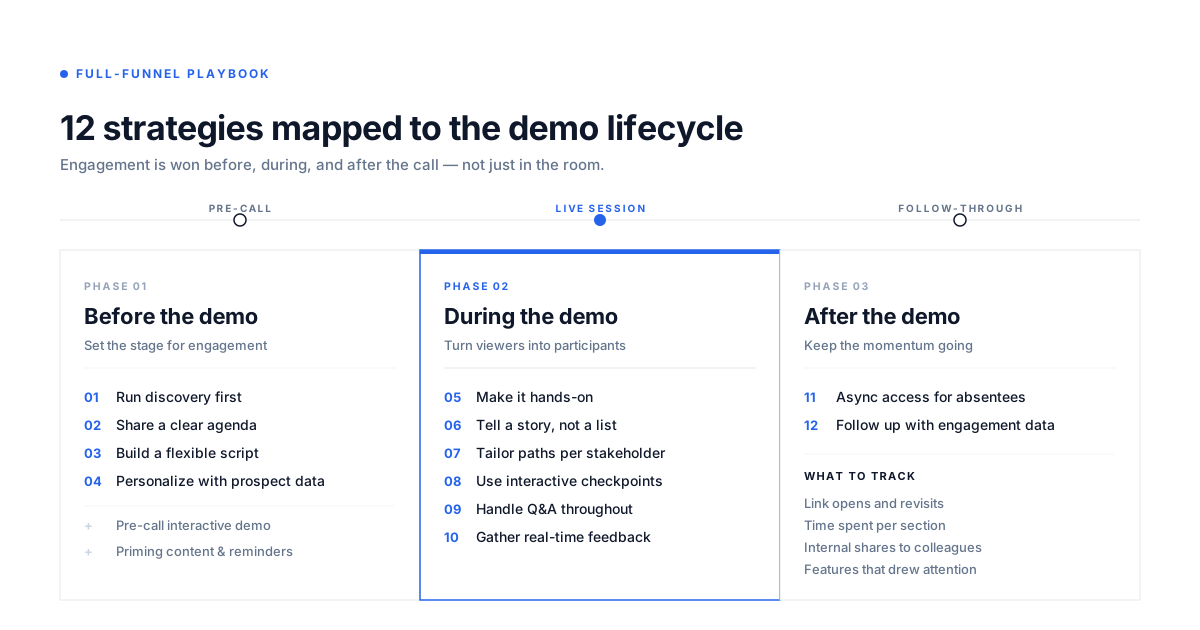
The following twelve practices address the core question: how do you run demos that keep prospects engaged and move deals forward?
1. Run discovery before every demo
Never demo blind. Use discovery calls or intake forms to understand the prospect's pain points, current tools, and success criteria before presenting. Demos without discovery become generic feature tours that lose attention fast.
Think of discovery as diagnosing before prescribing. When you know the specific challenge, you can show exactly how your product addresses it rather than hoping something sticks.
Effective discovery uncovers three critical elements: what is broken in their current process, what they have already tried to fix it, and what success looks like three months after implementation. Ask questions like "Walk me through how you handle this today" and "What would need to happen for this project to be considered a win?" The answers shape which features you emphasize and which workflows you demonstrate first.
2. Set a clear demo agenda with the prospect
Share an agenda before the call and confirm it at the start. Let the prospect add or remove topics. Agendas create accountability and signal you respect their time.
If they only care about reporting and integrations, skip the user management walkthrough entirely.
Send the agenda 24 hours before the demo with time allocations for each section. Start the call by reviewing it together and asking "Does this still match what you want to cover, or should we adjust?" This collaborative approach surfaces hidden priorities and prevents the demo from drifting into irrelevant territory. When prospects help build the agenda, they feel ownership over the session and stay more engaged throughout.
3. Build a flexible demo script
Have a structure but do not read from a rigid script. Prepare key talking points and transitions, then adapt based on prospect reactions. Flexibility allows you to go deeper on what interests them and skip what does not.
Building an interactive demos library empowers sales teams to adapt their approach based on prospect needs. The best demos feel like conversations, not presentations.
Create a modular demo structure with core sections you always cover and optional branches based on prospect signals. If someone leans forward when you mention automation, pause and ask "Want to see how that works in detail?" Then jump to that module even if it comes later in your standard flow. Watch for verbal cues ("That's interesting") and non-verbal signals (note-taking, nodding) that indicate where to spend more time.
4. Personalize your sales demo with prospect data
Use the prospect's company name, industry, logo, or real data in the demo. Personalization signals effort and helps prospects envision the product in their context. You can personalize demos for every prospect using dynamic variables that pull from your CRM, so each viewer sees a tailored experience without manual rebuilding.
Go beyond surface-level personalization. If you are demoing to a healthcare company, populate the demo with patient data examples instead of generic customer records. Reference their specific tech stack by name when showing integrations. Use their actual KPIs and metrics in dashboard examples. This level of detail makes the demo feel less like a pitch and more like a preview of their future workflow.
5. Make the demo hands-on and clickable
Passive demos lose attention. Give prospects something to click, explore, or control. Interactive demos let prospects engage directly with the product rather than watching a screen share.
When someone clicks through a workflow themselves, they understand it faster than when they watch you do it.
In live demos, offer to hand over screen control so prospects can navigate themselves. For async demos, build clickable hotspots that let prospects choose their own path through features. The act of clicking creates muscle memory and ownership. Prospects who interact with the product during the demo are more likely to remember specific capabilities and advocate for the solution internally.
6. Tell a story instead of listing features
Structure the demo around a problem-solution narrative, not a feature checklist. Start with the pain they shared in discovery, show how your product addresses it, end with the outcome. Stories create emotional engagement that feature lists cannot.
Frame the demo as a before-and-after journey. Begin by describing their current state using their own words from discovery: "You mentioned your team spends four hours a week manually compiling reports." Then demonstrate the solution: "Here's how you'd do that same task in under ten minutes." End with the impact: "That's 15 hours back per month your team can spend on analysis instead of data entry." This narrative structure makes the value concrete and memorable.
7. Engage multiple stakeholders with tailored paths
B2B deals often involve 13 stakeholders with different priorities. Provide separate demo paths or sections for each role. Do not force the CFO to watch the same demo as the end user.
Branching paths in interactive demos let each stakeholder explore what matters to them while you track which sections they viewed.
Create role-specific entry points in your demo. The IT director needs to see security and compliance features. The end user cares about daily workflow efficiency. The executive wants ROI and reporting. When multiple stakeholders join a live demo, acknowledge each person's priorities upfront: "Sarah, I know you're focused on implementation timeline. Mike, you mentioned reporting capabilities. I'll make sure we cover both." Then address each concern in dedicated segments rather than trying to blend everything together.
8. Use interactive checkpoints to hold attention
Build in moments where you pause and check in. Ask: "Does this match what you were hoping to see?" or "Do you want me to go deeper here or move on?" Checkpoints keep prospects engaged and surface objections early. A question they are forming silently will come up later anyway, often in an internal meeting where you are not present.
Schedule checkpoints every five to seven minutes during live demos. Use them to gauge understanding, adjust pacing, and invite participation. Effective checkpoint questions include "How would this fit into your current process?" and "Is there anything here that wouldn't work for your team?" These pauses prevent monologuing and transform the demo from a presentation into a dialogue. They also give prospects permission to redirect you before you spend ten minutes on something irrelevant.
9. Handle Q&A throughout the demo
Do not save all questions for the end. Encourage questions during the demo and answer them in context.When a prospect asks about integrations while you are showing the dashboard, address it immediately rather than deferring to a Q&A section they might forget about.
Questions are engagement signalsthat reveal what prospects actually care about. Invite them early by pausing after each major section and asking "Any questions on this before we move forward?" or "Does this workflow make sense for your team?" The more questions they ask, the more actively they are evaluating fit.
When a prospect asks a question, treat it as a buying signal and explore it fully. If they ask "Can this integrate with Salesforce?" don't just say yes and move on. Show the integration in action, explain what data syncs, and ask "What specific data would you want flowing between the two systems?" This turns a simple question into a deeper conversation about their workflow and requirements. Questions also reveal gaps in your discovery, so use them to learn what you missed.
10. Provide async demo access for absent stakeholders
Not everyone can attend the live call. Always provide async access because buying groups that reach consensus are 2.5 times more likely to report a high quality deal. You can share demos via link or embed so anyone on the buying committee can explore on their own time.
Send the async demo link within an hour of the live session while the conversation is still fresh. Include a brief note explaining what you covered and which sections might interest specific stakeholders who could not attend. For example: "I'm sharing the full interactive demo. The security section starting at 3:15 would be particularly relevant for your IT team." This makes it easy for your champion to forward the demo internally with context, and you can track which stakeholders engage with which sections.
11. Gather feedback during the demo
Ask for reactions in real time: "Is this what you expected?" or "How does this compare to what you use today?" Feedback questions reveal where you are landing and where you need to adjust. They also keep the prospect actively thinking rather than passively watching.
Use comparison questions to understand competitive context and positioning. "How does this approach differ from what you're doing now?" and "What would make this better than your current solution?" give you insight into their evaluation criteria and potential objections. When prospects articulate the differences themselves, they are processing fit more deeply than if you simply tell them why you are better. Feedback also helps you course-correct mid-demo if something is not resonating.
12. Follow up using engagement data, not generic recaps
After the demo, reference what the prospect actually explored or asked about. "You spent time on the reporting section, here is more detail" beats "Thanks for your time, let me know if you have questions." When you analyze demo engagement, you can see which features prospects explored, how long they spent, and where they dropped off.
Use engagement data to personalize every follow-up. If analytics show a prospect revisited the integrations section three times, lead your follow-up email with integration details and offer to connect them with a solutions engineer for a technical deep-dive. If multiple stakeholders viewed different sections, send targeted follow-ups to each person addressing their specific area of interest. Data-driven follow-ups prove you are paying attention and make it easier for prospects to take the next step because you are addressing their actual concerns, not guessing.
Pre-sales demo tactics that improve engagement
What happens before the live demo sets up success. Prospects who arrive prepared ask better questions, engage more actively, and move faster through the sales cycle.
Self-serve demos before the live call
Send an interactive demo before the scheduled meeting so prospects arrive with context. Pre-call demos let prospects explore at their own pace and come to the live session with better questions. The live demo becomes shorter and more focused because they are not starting from zero.
Send the interactive demo 48 hours before the scheduled call with a note like "I put together a quick walkthrough of the features we'll discuss. Feel free to explore beforehand so we can focus our time on what matters most to you." Track which sections they view so you know what caught their attention. If they spent time on integrations but skipped reporting, adjust your live demo accordingly. This approach cuts average demo time by 15-20 minutes while increasing engagement quality.
Pre-demo content that primes the conversation
Send relevant content (case study, product overview, or short video) before the demo. Priming helps prospects understand the basics so the live demo can focus on their specific questions. One or two assets work better than a content dump.
Choose content that matches their industry or use case. If you are demoing to a marketing team, send a case study showing how another marketing team solved a similar problem. Include a two-minute product overview video that explains the core concept without diving into features. The goal is context, not education. When prospects understand what problem you solve before the demo starts, they spend less time asking "what is this?" and more time asking "how would this work for us?"
Confirmation sequences that reduce no-shows
Send reminders with the agenda, a link to reschedule, and a pre-demo interactive demo. Confirmation emails that provide value (not just "see you tomorrow") reduce no-show rates and keep the prospect engaged before they even join.
Build a three-touch sequence: one week before (calendar invite with agenda), 24 hours before (reminder with interactive demo link and agenda confirmation), and one hour before (quick reminder with meeting link). Each message should offer an easy reschedule option to prevent last-minute no-shows. The 24-hour email is your highest-value touchpoint. Include the agenda with time allocations, ask if they want to add topics, and attach the interactive demo. This gives them a chance to explore beforehand and signals that you respect their time enough to prepare thoroughly.
Common sales demo mistakes that kill engagement
Knowing what to avoid matters as much as knowing what to do. These mistakes appear in deals that stall, prospects who ghost, and opportunities that end in "no decision."
Talking at prospects instead of with them
Monologuing for long stretches without pausing for input. Prospects check out when they feel talked at. Signs include no questions from the prospect, camera off, and short responses like "makes sense."
If you talk for more than three minutes without pausing for a question or reaction, you have lost them. Break up your presentation with checkpoints: "Does this match how you handle it today?" or "Want to see how this works in more detail?" Watch for engagement signals. If someone has not spoken in ten minutes, stop and ask a direct question: "Sarah, how would this fit into your current workflow?" The goal is dialogue, not broadcast. When prospects contribute to the conversation, they stay mentally present and process information more deeply.
Showing everything instead of what matters
Feature dumping without prioritization. Trying to cover the entire product instead of focusing on the prospect's specific pain. Less is more.
Showing 15 features when the prospect cares about three creates confusion, not confidence. They forget what matters and remember nothing clearly. Prioritize ruthlessly based on discovery. If they need better reporting and faster approvals, show those two capabilities in depth rather than surface-level tours of eight features. When prospects ask "Can it do X?" resist the urge to launch into a full walkthrough unless X directly relates to their core need. Instead, acknowledge the capability briefly and offer to show it in detail if it becomes relevant. Focused demos feel tailored. Comprehensive demos feel generic.
Ignoring stakeholders who did not attend
Only following up with the person who joined the demo while ignoring the rest of the buying committee. Deals stall when key stakeholders do not see the product. Always provide async access.
The person on your demo call rarely makes the final decision alone. If the CFO, IT director, or end users did not attend, they will need to see the product before approving the purchase. Ask at the end of every demo: "Who else needs to see this before you can move forward?" Then send an interactive demo link specifically for those stakeholders with a note explaining which sections matter to their role. Make it easy for your champion to forward the demo internally by including context: "Here's the demo we walked through. The security section starting at 4:20 would be relevant for your IT team." Track who views what so you know when the buying committee has actually engaged.
Using the same demo for every prospect
Running an identical demo regardless of industry, role, or pain point. Generic demos signal low effort and fail to connect to the prospect's specific situation.
When you show a healthcare company the same demo you showed a fintech startup, neither sees how the product fits their world. Personalization does not require rebuilding the demo from scratch. Swap out example data to match their industry. Reference their tech stack by name when showing integrations. Adjust which features you emphasize based on their role. A generic demo says "Here's what we do." A personalized demo says "Here's how we solve your specific problem." The difference shows up in engagement, follow-up questions, and close rates.
Ending without a clear next step
Finishing the demo with "let me know if you have questions" instead of scheduling a follow-up or defining the next action. Always end with a concrete next step: a follow-up call, a trial, or a proposal review.
Deals lose momentum in the gap between demo and next action. Do not end the call without scheduling what comes next. If they need to discuss internally, schedule a follow-up call for after that discussion. If they are ready to move forward, define the next milestone: "I'll send over the proposal by Thursday, and let's schedule 20 minutes Friday to review it together." If they need technical validation, set up a sandbox or trial with a specific check-in date. Vague next steps like "we'll be in touch" or "circle back next week" kill deals. Concrete commitments with dates keep deals moving.
How to measure sales demo engagement
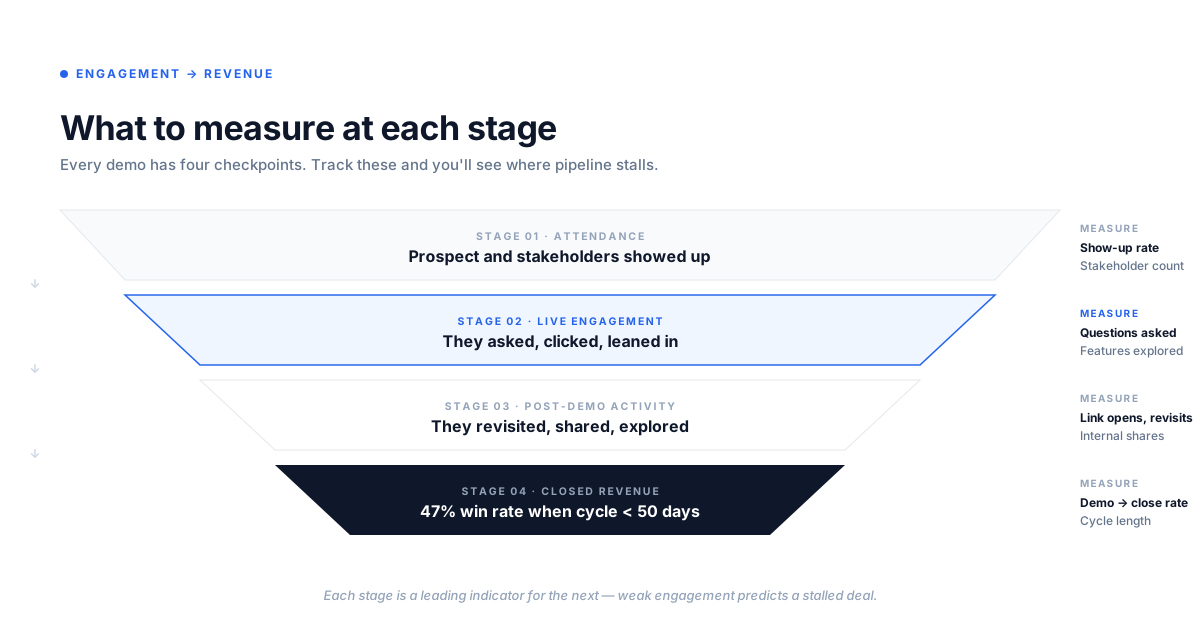
Improving sales demo engagement requires moving from qualitative impressions to quantifiable signals.
Engagement signals during live demos
What to watch for in real time:
- Questions asked: More questions typically means higher engagement
- Stakeholder count: Multiple attendees signals internal momentum
- Feature requests: Asking to see specific features shows serious evaluation
- Objections raised: Objections mean they are thinking about implementation, not dismissing
Post-demo engagement tracking
What to track after the demo:
- Demo link opens: Did they revisit the demo after the call?
- Time spent: How long did they explore?
- Sections viewed: Which features got attention?
- Shares: Did they forward the demo to colleagues?
Conversion metrics that connect engagement to revenue
MetricWhat it measuresWhy it mattersDemo to opportunity rateHow many demos convert to pipelineSignals demo quality and targetingDemo to close rateHow many demos eventually closeConnects demo engagement to revenueSales cycle lengthTime from demo to closeEngaged prospects often close fasterAsync demo viewsHow many stakeholders viewed after the callPredicts multi-threading success
Benchmarks for sales demo engagement rates
Benchmarks for sales demo engagement vary by product complexity, deal size, and sales cycle. Rather than chasing industry averages, establish your own baseline by tracking current engagement and improving from there.
Compare deals with high engagement against deals with low engagement. The pattern will show you what "good" looks like for your specific motion.
Turn demo engagement into pipeline velocity
Strong sales demo engagement means prospects buy faster because they understand the product and build internal consensus before you ask for the close. The shift from passive demos to interactive, personalized experiences changes the math. Instead of hoping prospects remember what you showed them, you give them something they can revisit, share, and explore on their own terms.
Get started now and see how interactive demos increase engagement without adding more live calls to your calendar.
FAQs about sales demo engagement
Most effective demos run between 15 and 30 minutes for initial presentations, with time for Q&A. Shorter works better when the prospect has already explored an async demo beforehand.
Aim for at least two to three stakeholders from the buying committee on initial demos. More attendees signals internal momentum, but ensure you can address each person’s priorities.
Demo first in most cases, especially for complex products where value needs context. If the prospect already understands the product and is price-comparing, pricing before demo can qualify fit faster.
Send an interactive demo link they can explore on their own, reference a specific moment from the original demo, and offer a different stakeholder a separate session. Persistence with value beats generic follow-ups.
Mid-week (Tuesday through Thursday) and mid-morning or early afternoon tend to see lower no-show rates. Always confirm based on the prospect’s timezone and preferences.
Ask what information they need to move forward and offer an async interactive demo instead. Some prospects prefer to evaluate on their own and 61% of B2B buyers say they would rather buy without a sales rep, which still counts as engagement if you can track it.