How to turn off MFA in Salesforce
Here is how to turn off mfa in salesforce
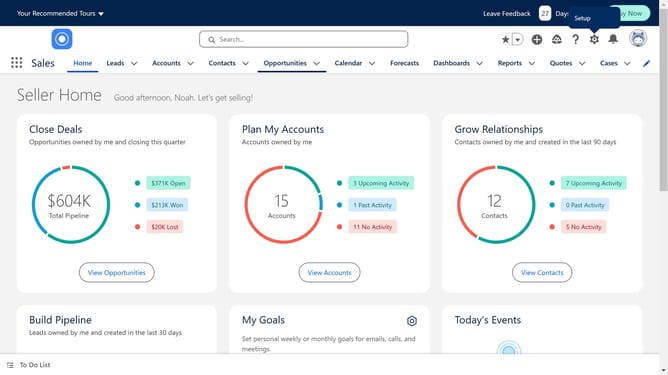
- First click on the gear icon in the top right corner of the main toolbar
- Then click on the "Setup" option in the settings dropdown menu
- Next click on the "Identity" option in the left sidebar menu
- Then click on "Identity Verification" in the expanded Identity submenu
- Disable "Require multi-factor authentication (MFA) for all direct UI logins to your Salesforce org"
- Finally click the "Save" button at the bottom of the Identity Verification page
Why should you turn off MFA in Salesforce
Salesforce is a powerful customer relationship management platform designed to streamline business processes and improve customer interactions.
Despite its advantages in bolstering security, knowing how to turn off Multi-Factor Authentication (MFA) in Salesforce can be beneficial in certain business scenarios.
Understanding the features for disabling MFA helps maintain workflow flexibility while ensuring users manage access efficiently.
Employing this feature prudently can optimize user experience, balancing security needs with operational pragmatism.
Last update