How to copy a campaign in Constant Contact
Here is how to copy a campaign in constant contact
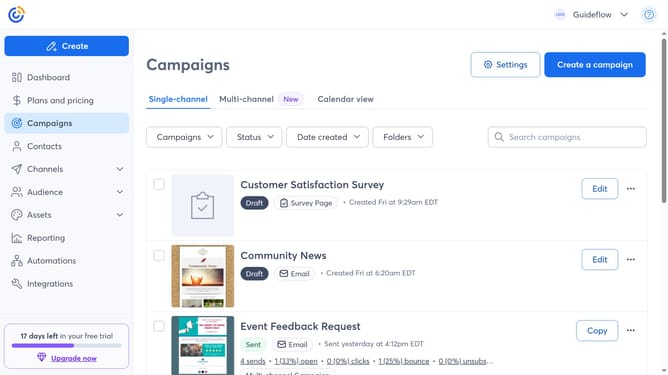
- First, click on the "Campaigns" in the left sidebar
- Find the campaign you want to copy from the campaign list
- Next click the "Copy" button next to the campaign
- Enter a name for the copied campaign
- You’ll be taken to the campaign editor, where you can update the content and design before sending
- Next click the "Continue" button in the top right corner
- Finally select the audience and choose to send now, schedule for later or save as draft
- You’ve successfully created a copy of your campaign
Why should you copy a campaign in Constant Contact
Constant Contact is a dynamic tool designed to streamline and enhance email marketing efforts.
One of its standout features is the ability to effortlessly copy a campaign, saving users valuable time and effort. This function allows marketers to replicate successful emails, ensuring consistency and quality in their messaging.
By using the campaign copy feature, users can maintain brand integrity and quickly adapt previous content for new audiences or promotions. This not only boosts productivity but also enhances the overall effectiveness of marketing strategies.
Last update