How to duplicate a campaign in Constant Contact
Here is how to duplicate a campaign in constant contact
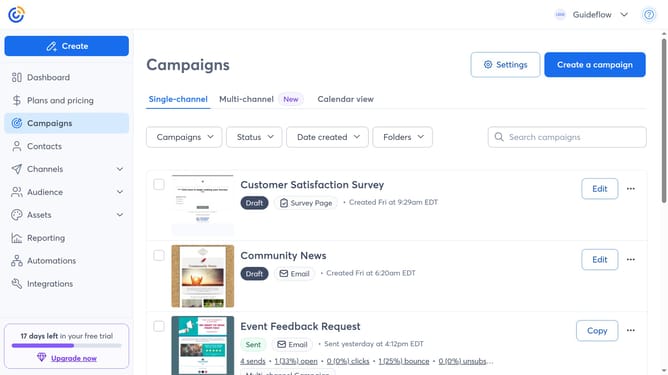
- First, click on the "Campaigns" in the left sidebar
- Find the campaign you want to duplicate from the list
- Next click the "Copy" button next to the campaign
- Enter a name for the copied campaign
- You’ll be taken to the campaign editor, where you can update the content and design before sending
- Next click the "Continue" button in the top right corner
- Finally select the audience and choose to send now, schedule for later or save as draft
- You’ve successfully created a duplicate of your campaign
Why should you duplicate a campaign in Constant Contact
Constant Contact is a comprehensive tool designed for seamless email marketing and audience engagement.
Duplicating a campaign in Constant Contact is a feature that streamlines the email creation process by allowing users to effortlessly replicate successful campaigns.
This feature saves time and ensures consistency, enabling marketers to maintain branding while adjusting content to fit new messaging or audiences.
By duplicating rather than starting from scratch, efficiency is enhanced, and marketers can focus more on connecting with their audience.
Last update