How to add a search bar in WordPress?
Here is how to add a search bar in wordpress
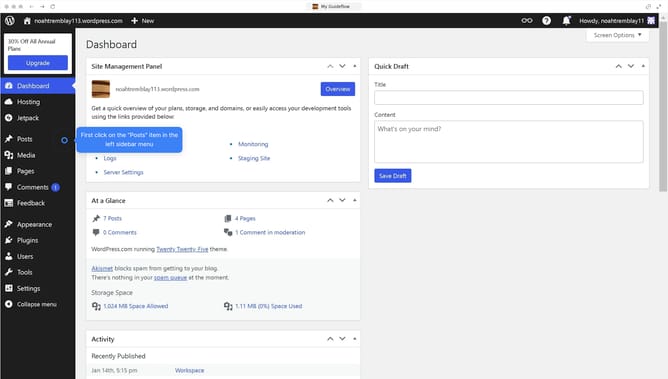
- First click on "Posts" in the left sidebar menu
- Then click on the post you want to edit in the posts list
- Next click on the "+" button in the top toolbar of the editor
- Then click on the search bar and type "Search"
- After that, click on the "Search" icon in the blocks panel
- Finally click on the "Save" button to update your changes
Why should you add a search bar in WordPress?
WordPress is an immensely versatile platform designed to empower users to build customizable websites with ease.
Adding a search bar in WordPress enhances the user experience by allowing visitors to effortlessly find specific content. This feature is crucial for websites with a large volume of articles, products, or posts, streamlining navigation and accessibility.
Incorporating a search bar not only boosts user engagement but also helps retain visitors, encouraging them to explore more of the site's content. It's a straightforward, effective way to improve website functionality and visitor satisfaction.
Last update