Your weekly product planning session starts. Someone's laptop won't connect. The camera frames an empty whiteboard instead of the people at the table. A remote engineer asks, for the third time, if anyone can hear them. Ten minutes gone before a single roadmap decision gets made.
This is not a webcam problem. A room system is an operating model: Camera coverage, microphone reach, join workflow, platform licensing, and a controller people can actually use without calling IT. According to Mordor Intelligence (2026), the global conference room hardware market is valued at $11.25 billion, which signals just how many organizations are now treating reliable hybrid meetings as infrastructure rather than a nice-to-have. The right conference room system lets remote participants in a sprint review or design critique feel present, and it reduces the support tickets that follow every failed meeting start. The wrong one creates the exact friction it was supposed to eliminate.
This guide compares seven room systems across room size, architecture, platform compatibility, and total deployment cost, so you can make a shortlist before you talk to a reseller.
What's inside
This guide is for product managers, IT leads, and workplace operations teams evaluating conference room solutions for hybrid product rituals, cross-functional planning sessions, and customer-facing rooms.
Systems were selected based on:
- Platform certification for Microsoft Teams Rooms or Zoom Rooms (or both)
- Room-size coverage from huddle through larger conference spaces
- Camera and audio design verified against manufacturer documentation
- Deployment architecture: Appliance, interactive board, or BYOD-capable
TL;DR
- Best overall for adaptable small and medium rooms: Logitech Rally Bar, with AI-based framing, broad platform support, and an expansion accessory ecosystem
- Best for native Android deployments: Poly Studio X52, purpose-built for Teams Rooms and Zoom Rooms with DirectorAI framing
- Best for workshop and whiteboarding rooms: Yealink MeetingBoard Pro, an all-in-one interactive display with a triple-camera system
- Best for configurable medium and larger rooms: Cisco Room Bar Pro, with a dual 96MP camera system and modular room-system options
- Best for premium Teams and Zoom spaces: Neat Bar Pro, with a 100MP dual-camera system and a 16-microphone beamforming array
- Best for inclusive 360-degree room views: Owl Labs Meeting Owl 5 Pro, a portable tabletop device with an 18-foot audio pickup radius
- Best for intelligent small-room framing: Jabra PanaCast 50 Video Bar System, a 180-degree panoramic bar with Virtual Director and one-touch join
What are conference room systems?
Conference room systems are integrated combinations of video, audio, computing, control, and meeting-platform software that let a shared room join and run hybrid meetings reliably.
A complete room system typically includes most or all of the following components:
- Video bar or modular camera: Captures participants and frames them for remote attendees
- Microphones and speakers: Integrated or expansion, depending on room size and table depth
- Room compute or Android appliance: Runs the meeting platform natively without a laptop
- Touch controller and optional scheduling panel: Enables one-touch join and room booking
- Displays or interactive meeting board: One or more screens for content and remote participants
- Meeting platform software: Microsoft Teams Rooms, Zoom Rooms, or Google Meet licensing
- Cables, mounts, network access, and device management: The operational layer that determines real-world reliability
Four room-system architectures
| Architecture | What it includes | Best fit | Watch for |
|---|---|---|---|
| All-in-one video bar | Camera, microphones, speakers, room appliance | Huddle and small rooms | Audio reach limits, camera angle at short distances |
| Windows-based room kit | Compute, controller, camera, audio peripherals | Standardized enterprise rooms | Licensing, support model, and cable management |
| Interactive meeting board | Display, camera, speakers, whiteboarding | Ideation rooms and product workshops | Display placement, ambient light, and room layout |
| BYOD/BYOM kit | Shared camera and audio connected to a laptop | Mixed-platform offices | User behavior variance and cable reliability |
Platform certification is not universal across modes. A device may support Teams Rooms in native appliance mode and Zoom Rooms in a different configuration. Confirm the intended operating mode before ordering.
When to use a conference room system
Standardize recurring hybrid product meetings
Roadmap reviews, sprint planning, and design critiques suffer when each room behaves differently. Audio routing works in one room and fails in another, so participants stop trusting the experience. A standardized appliance or room kit removes that variation, letting your team focus on the meeting rather than the setup.
Equip rooms where laptops create meeting friction
XY Sense (2025) found that meetings with one or two people account for 68% of meeting-room sessions, but the rooms generating the most IT tickets tend to be the four- to eight-person spaces where cable-connection workflows break repeatedly. If your team is spending the first three minutes of every product call selecting audio devices, a native room system with a dedicated controller removes that step entirely.
Support workshops that need whiteboarding or flexible sharing
Product discovery sessions and design reviews need a different setup than a routine status call. An interactive meeting board or BYOD-capable system earns its place here. The workflow requirement, annotating a journey map or co-editing a prototype, determines the architecture more than room size alone.
Conference room systems comparison
The table below compares systems and system families rather than individual accessories. Use it to narrow your shortlist, then validate room dimensions, platform certification, licensing, and installer requirements before committing.
| # | Product | Best for | Key differentiator | Pricing | G2 rating |
|---|---|---|---|---|---|
| 1 | Logitech Rally Bar | Flexible small and medium rooms | AI-based video intelligence with broad platform support | $4,299 (one-time) | N/A |
| 2 | Poly Studio X52 | Native Android collaboration rooms | DirectorAI framing with certified Teams and Zoom support | Contact reseller | N/A |
| 3 | Yealink MeetingBoard Pro | Workshop and whiteboard rooms | Triple-camera interactive board for Teams and Zoom | Contact reseller | N/A |
| 4 | Cisco Room Bar Pro | Configurable medium and larger rooms | Dual 96MP cameras with modular room-system architecture | Contact reseller | N/A |
| 5 | Neat Bar Pro | Premium Teams and Zoom spaces | 100MP dual-camera, 16-mic beamforming array | $6,790 (one-time) | N/A |
| 6 | Jabra PanaCast 50 Video Bar System | Small rooms needing intelligent framing | 180-degree panoramic video with Virtual Director | Contact reseller | N/A |
| 7 | Owl Labs Meeting Owl 5 Pro | Inclusive hybrid discussions | 360-degree tabletop device with 18-foot audio radius | $2,599 (one-time) | N/A |
The 7 best conference room systems for 2026
1. Logitech Rally Bar
Logitech Rally Bar is an all-in-one video conferencing bar designed for small to medium meeting rooms. It combines a 4K camera with motorized pan, tilt, and 15x HD zoom alongside a beamforming microphone array and AI-based noise suppression. The system runs on an Android appliance and supports Microsoft Teams Rooms, Zoom Rooms, and Google Meet, with platform mode confirmed at configuration time. Expansion accessories, including microphone pods and room controllers, extend coverage for longer tables and more demanding acoustic environments.
Best for: PM and workplace teams standardizing hybrid meeting rooms across multiple office locations without redesigning each space from scratch.
Key features
- AI-based RightSight framing and AI Viewfinder camera intelligence
- 4K camera with motorized pan, tilt, and 15x HD zoom
- Beamforming microphone array with AI noise suppression
- Expansion microphone pod support for longer tables
- Microsoft Teams Rooms, Zoom Rooms, and Google Meet support
Why choose Logitech Rally Bar: It works best when you want one repeatable room design across many spaces. The accessory ecosystem means you can adapt the base system to different table lengths without buying an entirely different product family.
Logitech Rally Bar pricing: The Rally Bar retails at $4,299 as a one-time hardware purchase per Logitech's official U.S. store. Add controllers, mounting hardware, display costs, and platform licensing separately. Total room cost rises meaningfully once you include those components.
2. Poly Studio X52
Poly Studio X52 is a premium all-in-one video bar built for medium conference rooms. Its 20MP 4K camera delivers a 95-degree field of view, and Poly DirectorAI automatically switches between group framing, speaker tracking, and people framing modes. NoiseBlockAI and Acoustic Fence reduce background sound without manual adjustment. The device runs natively on Android and supports built-in cloud video applications, making it a strong choice for rooms where laptop dependency creates recurring friction.
Best for: Teams wanting a certified native appliance for Microsoft Teams Rooms or Zoom Rooms in rooms seating six to ten people.
Key features
- 20MP 4K UltraHD camera with 95-degree field of view
- Poly DirectorAI with group, speaker, and people framing modes
- NoiseBlockAI and Acoustic Fence audio processing
- Native Android with built-in cloud video application support
- Certified for Microsoft Teams Rooms, Zoom Rooms, and Google Meet
Why choose Poly Studio X52: It removes the laptop from the room equation. Participants walk in, tap join, and the camera frames correctly from the first second. Product teams running biweekly customer calls or remote discovery sessions benefit directly from that consistency.
Poly Studio X52 pricing: HP's official store page does not display a retail price. Contact an authorized HP Poly reseller for current U.S. device and controller bundle pricing. Factor in platform licensing and wireless microphone options if the room spans beyond the bar's native pickup.
3. Yealink MeetingBoard Pro
Yealink MeetingBoard Pro is a full-room collaboration device that combines an interactive touchscreen display with an integrated triple-camera system, electronic whiteboarding, and wireless content sharing. Three 50MP cameras provide AI-driven auto framing, speaker tracking, IntelliFocus, and video fence controls. Available in 65-inch, 75-inch, and 86-inch configurations, it runs native Microsoft Teams Rooms and Zoom Rooms. For product teams that spend significant time on roadmap workshops and design reviews, it removes the separate whiteboard, display, and video bar from the room entirely.
Best for: Product teams running recurring hybrid workshops that require shared visual collaboration alongside video conferencing.
Key features
- Triple 50MP camera system with auto framing and speaker tracking
- AI camera features including IntelliFocus and video fence
- Integrated electronic whiteboard and wireless content sharing
- Native Microsoft Teams Rooms and Zoom Rooms support
- Available in 65-inch, 75-inch, and 86-inch display sizes
Why choose Yealink MeetingBoard Pro: If your room is primarily a design critique or planning space, this consolidates the display, whiteboard, and video system into one device. Buyers need to confirm wall placement, ambient light, and the collaboration-platform workflow before standardizing at scale.
Yealink MeetingBoard Pro pricing: Yealink sells through business-to-business distribution. Contact a regional Yealink partner for current per-size pricing. Installation and wall-mounting requirements can materially affect the total rollout budget, so get an installed-cost quote rather than a device-only figure.
4. Cisco Room Bar Pro
Cisco Room Bar Pro is an AI-enhanced video conferencing bar with a dual 96MP camera system combining a 112-degree wide-angle lens and a 70-degree telephoto lens. AI-powered framing, speaker tracking, noise removal, and virtual lens zoom work together to cover medium and larger rooms where a single-lens system would miss participants at table ends. The device supports up to three screens, wireless sharing, USB-C passthrough, and third-party meeting platforms. Cisco offers Device Subscription licensing with monthly or multi-year terms, adding operational flexibility for enterprise procurement cycles.
Best for: Medium and larger conference rooms where camera coverage and room architecture deserve deliberate planning rather than an off-the-shelf bar.
Key features
- Dual 96MP camera system: 112-degree wide-angle and 70-degree telephoto
- AI framing, speaker tracking, noise removal, and virtual lens zoom
- Support for up to three simultaneous screens
- Wireless sharing and USB-C passthrough
- Cisco Device Subscription licensing with monthly or multi-year options
Why choose Cisco Room Bar Pro: It fits high-stakes meetings where remote participants need clear sightlines across a longer table. Evaluate it alongside room dimensions, acoustic conditions, and display count. Total system cost depends on screen hardware, mounting, support tier, and subscription model.
Cisco Room Bar Pro pricing: Cisco does not display a retail price. Request current hardware and licensing quotes through authorized Cisco resellers. Clarify whether mounting, display hardware, and support services are included in the quoted deployment.
5. Neat Bar Pro
Neat Bar Pro is an all-in-one video bar designed for larger meeting rooms. Its 100MP dual-camera system provides up to 16x hybrid zoom, and a 16-microphone beamforming array with three full-range speakers delivers audio coverage across longer tables. Automatic people framing adjusts the view as participants move, and triple-screen support accommodates complex display layouts. The device runs in either Zoom Rooms or Microsoft Teams Rooms mode and is available as a one-time purchase or an annual device subscription.
Best for: Teams with polished customer-facing rooms or executive spaces that need strong participant framing and high-quality audio without acoustic tuning.
Key features
- 100MP dual-camera system with up to 16x hybrid zoom
- 16-microphone beamforming array for extended table coverage
- Three full-range integrated speakers
- Automatic people framing with triple-screen support
- Zoom Rooms and Microsoft Teams Rooms mode support
Why choose Neat Bar Pro: Its 16-microphone array addresses the most common failure point in larger rooms: Participants at the far end of the table going unheard. Validate the supported platform mode, device-management approach, and room dimensions before standardizing across an office portfolio.
Neat Bar Pro pricing: The Neat Bar Pro is priced at $6,790 as a one-time hardware purchase on Neat's U.S. product page. An annual subscription plan is also available; contact Neat directly for subscription pricing. Platform licensing for Zoom Rooms or Teams Rooms is purchased separately.
6. Jabra PanaCast 50 Video Bar System
Jabra PanaCast 50 Video Bar System is an Android-based all-in-one bar built for small-to-medium conference rooms. Three 13-megapixel cameras combine to produce a 180-degree panoramic field of view, with Dynamic Composition, Intelligent Zoom, and Virtual Director managing how the room gets framed for remote participants. The PanaCast Control touchscreen provides one-touch meeting join. Anonymous People Count and environmental sensing add usage data for facilities teams. The system supports Microsoft Teams Rooms and Zoom Rooms natively.
Best for: Smaller meeting rooms where a conventional front-facing camera would miss participants seated at the sides of the table.
Key features
- 180-degree field of view with three 13-megapixel cameras
- Dynamic Composition, Intelligent Zoom, and Virtual Director
- PanaCast Control touchscreen with one-touch meeting join
- Anonymous People Count and environmental sensing
- Native Microsoft Teams Rooms and Zoom Rooms support
Why choose Jabra PanaCast 50 Video Bar System: The panoramic approach solves a real small-room problem: Participants who sit close to the camera at off-angles and get cropped out of the frame. Test actual seating arrangements, monitor height, and backlighting before rolling it out to multiple rooms.
Jabra PanaCast 50 Video Bar System pricing: Jabra's official buy page does not display a retail price. Contact a Jabra business reseller for current U.S. device and room-compute bundle pricing. Room platform licensing and installation are separate cost items.
7. Owl Labs Meeting Owl 5 Pro
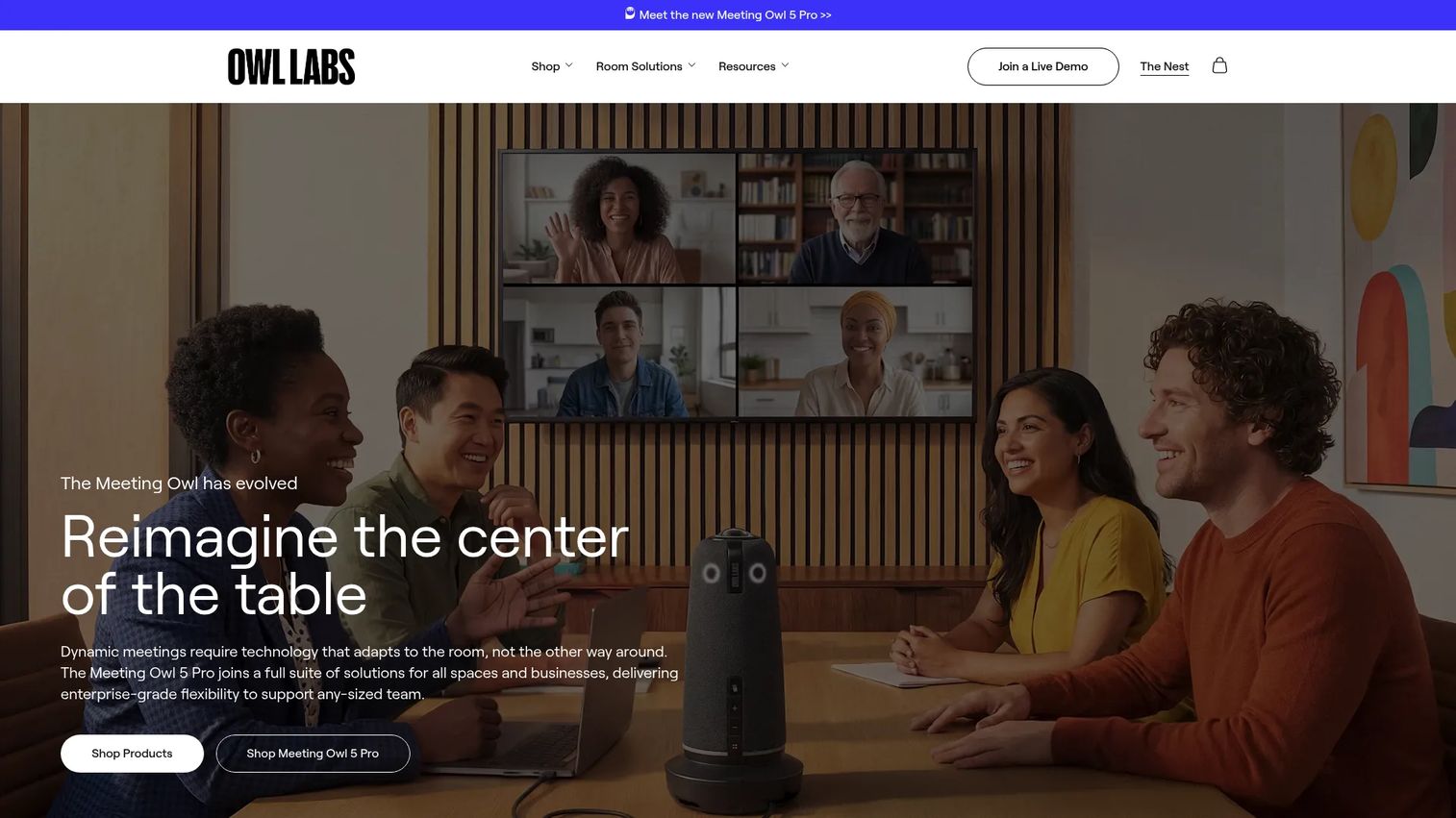
Owl Labs Meeting Owl 5 Pro takes a fundamentally different form factor from a front-of-room video bar. The device sits at the center of the conference table and uses a 64MP panoramic fisheye camera to capture a 4K UHD 360-degree room view. Eight smart microphones provide an 18-foot audio pickup radius. Speaker-focused video switching automatically highlights the active speaker for remote participants. A single cable handles BYOD connectivity via HDMI passthrough and native Ethernet, and two Meeting Owl 5 Pro units can be paired wirelessly or wired for larger spaces.
Best for: Teams that need a portable, inclusive view of everyone seated around a table, particularly in rooms where wall-mounted hardware is impractical.
Key features
- 4K UHD 360-degree video with 64MP panoramic fisheye camera
- Eight smart microphones with 18-foot audio pickup radius
- Speaker-focused video switching for active participant highlighting
- Single-cable BYOD setup with HDMI passthrough and Ethernet
- Compatible with Microsoft Teams, Zoom, Google Meet, Webex, and more
Why choose Owl Labs Meeting Owl 5 Pro: It works where a fixed AV installation cannot: Temporary offices, flexible floorplans, or rooms where cabling is cost-prohibitive. For large rooms with long, narrow tables or formal boardroom layouts, a modular front-of-room system will still deliver better camera coverage.
Owl Labs Meeting Owl 5 Pro pricing: The Meeting Owl 5 Pro is listed at $2,599 on Owl Labs' official product page as a one-time hardware purchase. No recurring subscription tiers were listed. External display and room controller accessories are sold separately.
Considerations when choosing conference room systems
Match the system to room geometry
Participant count and table depth drive camera and microphone selection more than product marketing does. A room with eight seats around a two-meter table has different audio reach requirements than the same participant count around a longer boardroom table. Confirm ceiling height, display position, natural light sources, and whether glass walls create acoustic reflections before finalizing a system.
Choose the meeting platform before the hardware
Microsoft Teams Rooms, Zoom Rooms, and Google Meet all require different licensing, management, and room-account configurations. A device may support multiple platforms, but not always in the same operating mode. Decide on the platform standard first, then confirm which shortlisted devices support it natively in that mode. Mixing platforms across an office portfolio creates a support burden that compounds at scale.
Budget for the complete deployment
Hardware alone is rarely the majority of total cost. A realistic deployment budget includes:
- Hardware device and controller
- Display or interactive meeting board
- Room scheduling panel
- Platform licenses (per-room, annually)
- Network and power infrastructure work
- Mounting, cabling, and installation labor
- Ongoing support and remote device management
Futuresource Consulting (2026) reports that 58% of organizations refresh meeting room technology every two to three years, so build replacement cycles into the operational cost model.
Pilot one room before standardizing
Run a 30-day pilot with your actual product rituals: Sprint planning, customer calls, design reviews, and async standup catchups. Track five measures before deciding on a standard:
| Pilot metric | What it tells you |
|---|---|
| Average meeting-start delay | Whether one-touch join actually works |
| Audio complaints per week | Whether pickup coverage matches the room |
| Remote-participant satisfaction | Whether framing looks credible on the other side |
| IT support tickets per room | Whether the system generates ongoing overhead |
| Successful one-touch joins | Whether the control workflow holds under daily use |
Conclusion
The right conference room solution depends on room geometry, meeting platform, and the types of product work your team runs daily.
Logitech Rally Bar is the adaptable baseline for most organizations standardizing across huddle and medium rooms. Poly Studio X52 and Neat Bar Pro suit dedicated appliance deployments where audio quality and camera precision justify the higher per-room investment. Yealink MeetingBoard Pro earns its place in workshop-heavy spaces where an interactive display changes the meeting format rather than just improving the video quality. Cisco Room Bar Pro belongs in rooms where camera coverage and modular architecture need deliberate planning. Jabra PanaCast 50 handles small rooms where off-angle participants get missed by conventional cameras, and Owl Labs Meeting Owl 5 Pro solves for inclusive hybrid discussions without a fixed AV installation.
The practical next step: Measure a representative room in your office, confirm the meeting-platform standard with IT, then pilot two systems with real users across a full sprint cycle before standardizing.
For teams that need to explain a complex room-management workflow, device platform, or collaboration product before a sales call, an interactive product demo can show the experience more clearly than static screenshots.
Start your journey with Guideflow today!
FAQs
A complete conference room system typically bundles a camera, microphone array, speakers, room compute or Android appliance, touch controller, display, and meeting-platform software. Cables, mounts, scheduling hardware, and device management are additional components that vary by room size and architecture. The exact bundle changes significantly between a single-bar huddle room and a modular larger-room deployment.
A video bar integrates the camera, microphones, and speakers into one unit. A complete room system adds room compute, licensed meeting software, a touch controller, displays, a scheduling panel, mounting, and remote management. Many all-in-one video bars include the compute and platform software, so the distinction is increasingly about the accessories and operational layer around the bar rather than the bar itself.
Choose the platform that matches your organization's calendar system, identity provider, IT management standards, and the meeting habits your teams have already established. Both platforms support a broad range of certified hardware, but the licensing model, admin tools, and room-account setup differ. Confirm that each device on your shortlist supports the chosen platform in the intended operating mode before procurement.
Expansion microphones become relevant when participants sit beyond the video bar's rated pickup zone, the table is longer than roughly three meters, or the room has acoustic challenges like hard surfaces or glass walls. Product-sheet pickup distances describe ideal conditions. An in-room pilot with your actual seating layout will reveal whether the built-in array covers everyone or whether a pod or table microphone is needed.
BYOD setups work well in flexible or mixed-platform offices where different teams use different meeting applications. Dedicated appliance systems perform better when consistent one-touch joins, standardized room behavior, and lower IT overhead matter more than laptop flexibility. According to Futuresource Consulting (2026), 49% of organizations increased meeting room capacity since January 2025, and many of those expansions favor appliance systems for their operational predictability.
There is no single figure. A small-room deployment starting with a single video bar may run $2,500 to $5,000 for hardware alone, while a modular larger-room setup with multiple screens, table microphones, compute, controllers, installation labor, and annual platform licensing can reach $20,000 or more per room. Get line-item quotes covering hardware, display, controller, platform licenses, installation, cabling, and ongoing management before finalizing a budget.
Some devices support more than one platform, but support varies by model, firmware version, and operating mode. Native room-system support and laptop-based BYOD access are different capabilities. A device certified for Teams Rooms in native mode may require a laptop to run Zoom. Check current certification documentation for the exact model before assuming multi-platform support.
Run a pilot in a room that represents your most common meeting format, whether that is a six-person sprint review or a twelve-person customer advisory call. Track meeting-start reliability, audio complaints, remote-participant satisfaction scores, and IT support tickets across at least four weeks of real use. Pilot scorecard data from a representative room gives you the evidence to standardize with confidence, rather than relying on product-sheet specifications alone. For broader context on audio conferencing software that complements room hardware, see the Guideflow guide covering that category.