
Your prospect watched your demo video. All three minutes of it. Then they forwarded a summary to their buying committee, got half the details wrong, and the deal stalled before anyone else saw the product.
The format you choose for product demos shapes whether buyers actually engage or just observe. This guide breaks down seven factors in the interactive demos vs recorded demos debate, so you can match the right format to each stage of your sales and marketing motion.
TL;DR
- Interactive demos let buyers click through your product at their own pace. Engagement runs 2-3x higher than video because prospects actively participate rather than passively watch.
- Recorded demos deliver polished, linear viewing experiences. Video works best for top-of-funnel awareness and brand storytelling where you control the narrative.
- Production effort differs significantly. Interactive demos take minutes to create with capture tools. Recorded demos require scripting, recording, editing, and voiceover.
- Maintenance separates the formats over time. Interactive demos allow screen-by-screen updates. Recorded demos require re-shooting entire sections when your UI changes.
- Many teams use both formats strategically. Video captures attention at the top of funnel while interactive demos convert serious evaluators in the middle and bottom of funnel.
What is a recorded demo
A recorded demo is a pre-recorded walkthrough that viewers watch passively. Someone on your team records their screen while navigating through the product, typically adding voiceover narration to explain what they're showing.
The viewer presses play and watches. They can pause, rewind, or skip ahead, but they cannot interact with the product itself.
Common formats include screen recordings with voiceover, polished marketing videos with animations and music, and webinar recordings repurposed as on-demand content.
Key characteristics
- Linear viewing experience: The viewer watches from start to finish with standard video controls like play, pause, and scrub.
- One-way communication: No input or interaction from the viewer. They observe but do not participate.
- Fixed narrative: Every viewer sees the exact same content in the exact same order.
- Audio and visual storytelling: The format relies on voiceover pacing, music, and visual editing to convey value.
Common limitations
Recorded demos show the product but never let viewers touch it. Prospects cannot explore features that interest them or skip sections that do not apply.
Analytics show views, play rate, and watch time. You cannot see which specific features interested the viewer or where they wanted to dig deeper.
Any UI change requires re-recording affected sections. Voiceover has to be re-done. Many teams let videos go stale rather than invest in updates. And you cannot tailor the content per prospect, persona, or use case without creating entirely separate videos.
What is an interactive demo
An interactive demo is a self-guided experience where prospects click through a simulated or captured version of your product. The viewer controls the pace and path. They decide what to explore and in what order.
Unlike a video, the prospect actively participates. They click buttons, navigate screens, and experience the product workflow firsthand, all without needing a login, staging environment, or live call.
Key characteristics
- Self-directed exploration: The buyer clicks through at their own pace, spending extra time on features that matter and skipping what does not.
- Clickable product simulation: The demo mimics your real product without requiring backend access or login credentials.
- Guided or freeform paths: Some interactive demos include tooltips and hotspots that guide viewers through a specific flow. Others allow open exploration.
- Embeddable anywhere: Interactive demos work on websites, landing pages, emails, sales follow-ups, and help centers.
Common limitations
Someone on your team captures and configures the demo flows. This takes less time than video production but is not zero effort.
Interactive demos cannot replicate every product feature or backend behavior. They work best for showcasing specific workflows and use cases rather than full product functionality.
Video excels at controlling pacing, music, and emotional arc. Interactive demos are better suited for practical evaluation than brand narrative.
Interactive demos vs recorded demos: comparison table
Before diving into each factor, here is a side-by-side view of how the two formats compare.
Factor 1: Engagement and buyer control
The core difference between recorded and interactive demos comes down to passive versus active engagement. Recorded demos tell. Interactive demos show.
How recorded demos engage buyers
Recorded demos deliver a sit-back-and-watch experience. The viewer has no control over pacing beyond play, pause, and scrub. They cannot skip to the feature they care about most or spend extra time on a workflow that interests them.
This format works when you want complete control over the narrative. You decide what to show, in what order, and for how long. The viewer follows your script.
The tradeoff is lower engagement. Viewers multitask during videos.
They check email, glance at Slack, or mentally drift. Without active participation, attention fades.
How interactive demos engage buyers
Interactive demos flip the dynamic. The buyer chooses what to see, when, and in what order. This creates deeper cognitive engagement because the viewer is doing something, not just observing.
When prospects click through your product themselves, they form mental models of how they would use it. They imagine their data in your interface. They test whether the workflow matches their expectations.
Platforms like Guideflow let you capture any workflow directly from your browser and turn it into a clickable experience in minutes.
Factor 2: Production time and team resources
How much effort does it take to create each format? This matters especially for teams with limited bandwidth or frequent product updates.
Creating recorded demos
The typical workflow for a recorded demo looks like this:
- Script: Write the narrative and plan which features to show.
- Record: Capture your screen while walking through the product.
- Edit: Cut mistakes, add transitions, and polish the footage.
- Voiceover: Record narration, often requiring multiple takes.
- Export: Render the final video and upload to your hosting platform.
This process requires video editing skills or tools. A quick screen recording takes 15 minutes. A polished marketing video takes days or weeks.
Creating interactive demos
Interactive demos follow a capture-based workflow. Click through your product while a browser extension records your actions.
Then adjust screens, add tooltips, and configure the flow in a no-code builder. Finally, share via link or embed on your website.
No video editing skills required. No voiceover recording. No rendering time.
With Guideflow, teams create demos in minutes without engineering involvement. The browser extension captures your product as you use it, then generates an editable interactive experience automatically.
Factor 3: Maintenance and product updates
Products change. Features get updated. UI gets redesigned.
Your demos have to keep up. This is where the two formats diverge significantly over time.
Updating recorded demos
Any UI change requires re-shooting affected sections. If your navigation moved, your buttons changed color, or your dashboard got a redesign, the video is now outdated.
Voiceover has to be re-done to match the new visuals. Version control becomes messy. Which video is current?
Which one has the old pricing page?
Many teams let videos go stale rather than invest in updates. The result is demos that show features that no longer exist or interfaces that look nothing like the current product.
Updating interactive demos
Interactive demos allow modular editing. Update individual screens, text, or images without re-capturing entire flows.
If your button label changed, edit that element. If you added a new feature, capture just that section and insert it. The rest of the demo stays intact.
Guideflow's plug and play editor makes updates quick. Teams can keep demos current without starting from scratch every time the product evolves.
Factor 4: Analytics and buyer intent signals
What can you measure with each format? Analytics determine how well you can qualify leads, prioritize follow-up, and improve your content over time.
What recorded demos tell you
Video platforms provide standard metrics: views (how many people pressed play), play rate (what percentage of page visitors started the video), watch time (how long viewers watched before leaving), and drop-off points (where in the video viewers stopped watching).
These metrics tell you whether people watched. They do not tell you what interested them. A viewer who watched 80% of your video might have been engaged, or they might have been multitasking with the video playing in the background.
What interactive demos tell you
Interactive demos provide interaction-level analytics:
- Screens viewed: Which specific screens the prospect explored.
- Clicks: Which buttons and elements they interacted with.
- Time per step: How long they spent on each screen.
- Completion paths: Which route they took through the demo.
- Drop-off points: Where they stopped engaging.
A prospect who spent three minutes on your reporting dashboard and clicked through every filter option is telling you something. A prospect who skipped straight to integrations has different priorities.
You can analyze engagement patterns to prioritize follow-up and tailor your next conversation to the features they explored most.
Factor 5: Use cases across the sales funnel
Where does each format work best in the interactive demos vs recorded demos decision? The answer depends on where your prospect is in their buying journey.
Top of funnel
Both formats work at the awareness stage, but they serve different purposes.
Recorded demos suit brand storytelling and emotional narrative. A polished video with music and motion graphics captures attention on your homepage or in social feeds. It communicates your value proposition quickly and memorably.
Interactive demos suit website visitors because 61% of B2B buyers prefer a rep-free buying experience. Instead of watching a video about your product, they can experience it immediately.
Middle of funnel
This is where interactive demos shine. Prospects in active evaluation want to explore before committing to a live call. They want to see how your product handles their specific use case.
Sales teams send interactive leave-behinds after discovery calls. Champions share them with buying committee members who missed the meeting. The demo keeps working because buyers give suppliers 17% of buying time.
Pre-sales teams use interactive demos to scale their reach. Instead of running the same live demo repeatedly, they send prospects a self-serve experience and reserve live time for complex questions.
Bottom of funnel
Late-stage evaluation often involves technical stakeholders validating fit. Interactive demos and sandbox environments let technical buyers explore without requiring a full trial setup.
Recorded demos play a smaller role here. Technical evaluators want hands-on proof, not another video to watch.
Factor 6: Scalability across teams and campaigns
How well does each format scale when multiple teams need demos or when you run many campaigns simultaneously?
Scaling recorded demos
Each new use case typically requires a new video. Want to show your product to healthcare buyers? Record a healthcare-focused video.
Want to target enterprise versus SMB? Record separate versions.
Personalization is difficult. You cannot edit text or visuals in a finished video without re-recording. Version proliferation becomes a management burden because 72% of B2B purchases involve high-complexity buying groups.
Scaling interactive demos
Interactive demos support a template-based approach. Create one base demo, then personalize for different segments using dynamic variables.
Swap company names, adjust use case framing, hide irrelevant features. One demo serves multiple campaigns with minor edits.
Marketing teams embed personalized demos across landing pages, email campaigns, and ABM programs. Sales reps customize the same base demo for individual accounts. The underlying asset stays consistent while the surface-level content adapts.
Factor 7: Personalization for different audiences
Can you tailor content per prospect, persona, or account? This capability increasingly separates high-performing demos from generic ones.
Personalizing recorded demos
The practical limit is clear: you cannot edit text or visuals in a finished video without re-recording.
Some teams create multiple versions per persona. A version for end users. A version for IT buyers.
A version for executives. But this multiplies production effort. Three personas times four industries equals twelve videos to create and maintain.
Most teams settle for one or two generic videos and accept the relevance tradeoff.
Personalizing interactive demos
Interactive demos support dynamic variables and editable elements:
- Swap company names: Show "Acme Corp" data to Acme Corp prospects.
- Adjust use case framing: Emphasize reporting for analytics buyers, integrations for IT buyers.
- Hide irrelevant features: Remove enterprise features when demoing to SMB prospects.
- Customize visuals: Update screenshots, graphs, and sample data to match the prospect's context.
One base demo serves many accounts with light customization.
When recorded demos are the better choice
Interactive demos are not always the answer. Recorded video wins in specific situations.
Brand storytelling and emotional narrative
Video excels at controlling pacing, music, and emotional arc. Product launches and brand campaigns benefit from cinematic treatment. You want viewers to feel something, not just understand something.
Complex concepts requiring voiceover
Some ideas benefit from a narrator guiding interpretation. Highly technical or abstract concepts may work better with expert voiceover that explains what the viewer is seeing and why it matters.
Social media and paid advertising
Platform constraints favor video formats. LinkedIn, Twitter, and ad networks are built for video content.
Video thumbnails drive clicks in feeds. Autoplay captures attention during scroll.
Interactive demos require a click to engage. In feed-based environments where attention is fleeting, video often performs better for initial capture.
One-time or event-specific content
Recordings of webinars, keynotes, or live events are inherently video-based. There is no reason to make them interactive. The value is in capturing what happened, not in simulating a product experience.
When interactive demos are the better choice
Interactive demos outperform video in situations where hands-on experience drives conversion.
Self-serve evaluation on websites and landing pages
Embedding an interactive demo replaces passive explainer videos. Visitors engage with the product immediately instead of watching someone else use it.
Sales follow-up and leave-behind assets
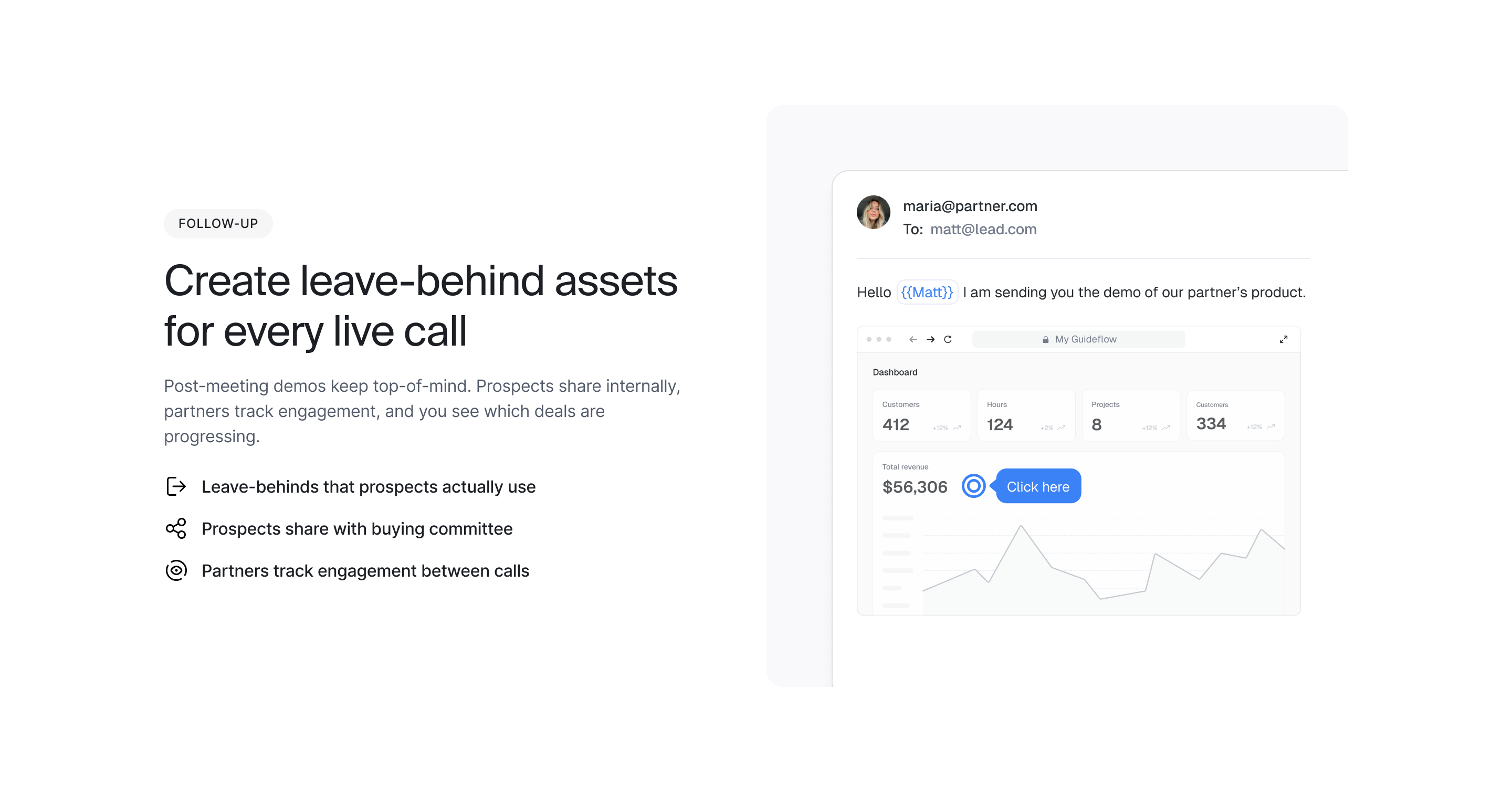
AEs and SDRs send interactive demos instead of static decks or screen recordings. Prospects engage more because they control the experience. Sellers see what they explored and can tailor follow-up accordingly.
Multi-stakeholder buying committees
B2B deals involve 13 stakeholders. Champions share interactive demos internally so stakeholders self-educate without scheduling additional calls. Each stakeholder explores the features relevant to their role.
Product-led growth and trial alternatives
Interactive demos give prospects hands-on experience without requiring a full trial environment. This is useful when free trials are not practical due to implementation complexity, data requirements, or security constraints. Demo centers for sales teams provide a structured alternative in these situations.
Why combining both formats often wins
When weighing interactive demos vs recorded demos, you do not have to choose one format exclusively. Many high-performing teams use both strategically.
Use video for awareness and storytelling. A polished 90-second video on your homepage captures attention and communicates your value proposition quickly.
Use interactive demos for evaluation and sales enablement. Below the video, embed an interactive demo for visitors who want to go deeper. In sales follow-ups, send the interactive version so prospects can explore on their own.
A demo center can house both formats in one branded destination. Visitors choose their preferred experience.
Some watch the video first, then explore interactively. Others skip straight to hands-on evaluation.
How to choose your demo format
1. Define your primary use case and funnel stage
Ask: Is this for awareness, consideration, or decision? Top-funnel storytelling favors video. Mid- and bottom-funnel evaluation favors interactive.
2. Assess your production and maintenance resources
Ask: Do you have video production skills in-house? How often does your product UI change? Frequent updates favor interactive demos.
3. Evaluate analytics and intent signal requirements
Ask: Do you need granular engagement data to qualify leads or inform sales follow-up? Interactive demos provide deeper signals.
4. Match format to buyer expectations
Ask: Do your buyers expect self-serve evaluation, or do they prefer guided video content? Technical buyers often want to click around themselves. Executive buyers may prefer a concise video.
5. Start with one format and expand strategically
Start with the format that addresses your most urgent gap. Add the second format once the first proves value.
Start creating interactive demos today
The interactive demos vs recorded demos comparison shows clear tradeoffs: interactive demos address maintenance burden, limited personalization, and shallow analytics. With Guideflow, teams capture, edit, personalize, and share interactive demos in minutes.
Start your journey with Guideflow today!