You picked a database for your analytics workload. Queries that should take two seconds take forty. Dashboards time out. Your data team keeps adding indexes and it barely moves the needle.
The problem usually isn't the query. It's the storage layout underneath it.
Most transactional databases store data row by row. That's fine when you're fetching a single customer record. It falls apart when you're scanning millions of rows to compute one aggregate across three columns. A columnar database flips that layout: it stores values by column, not by row. When you run an analytical query that touches a few columns out of fifty, the engine reads only those columns off disk. Less I/O, better compression, faster scans.
The numbers back the shift. The global columnar database market was valued at USD 3.8 billion in 2025 and is projected to reach USD 15.2 billion by 2034 at a 17.2% CAGR, with cloud deployments already holding a 58.2% share, according to MarketIntelo (2025). Analytics teams are moving to columnar storage because the workload demands it.
This guide compares the leading options by workload fit, not marketing copy. If you're a product manager weighing an analytics stack, an engineer building internal tooling, or a data lead comparing warehouses, the goal is the same: match the tool to the job.
What's inside
This guide covers seven of the best columnar database tools for analytics-heavy workloads, how their storage models differ, and how to choose between them. It's written for both readers new to columnar databases and technical teams building an analytics stack.
Selection came down to four criteria:
- Query performance on large scans and aggregations
- Workload fit across BI, real-time analytics, and warehousing
- Storage and execution model, including compression and columnar layout
- Operational practicality: deployment options, ecosystem, and maintainability
We excluded tools that are primarily row-oriented or transactional. Every option here uses columnar storage as its core architecture.
TL;DR
- Most versatile default for analytics teams: ClickHouse. Open-source, fast on huge datasets, and equally strong for real-time analytics, observability, and warehousing.
- Best managed cloud warehouse: Snowflake. Separates storage and compute, scales concurrency, and fits cross-team access at enterprise scale.
- Best serverless option: Google BigQuery. No infrastructure to manage, strong for ad hoc SQL and Google Cloud-centric stacks.
- Best AWS-native warehouse: Amazon Redshift. The default when your data already lives in the AWS ecosystem.
- Best for local, self-serve analysis: DuckDB. In-process, open-source, ideal for notebooks, prototyping, and analyst workflows.
- Best for real-time event and time-series analytics: Apache Druid and Apache Pinot. Sub-second queries over streaming data.
What is a columnar database?
A columnar database (also called a column-oriented database or column store database) stores table data by column rather than by row, so analytical queries scan only the columns they need instead of reading entire records. This storage model is the foundation of most OLAP (online analytical processing) systems.
Here's why the layout matters. In a row store, all the values for one record sit together on disk. That's efficient for transactional workloads: insert a row, update a row, fetch a row. But an analytics query rarely wants whole rows. It wants SUM(revenue) grouped by region across ten million records. A row store has to read every row to get at two columns. Columnar storage reads only those two columns.
Three things follow from that layout:
- Lower I/O on scans: The engine reads only the columns a query touches, not the full table width.
- Better compression: Values in a single column share a data type and often repeat. Compression algorithms exploit that, shrinking storage and speeding reads. Many columnar systems hit far higher compression ratios than row stores.
- Vectorized execution: Because values of the same type sit contiguously, engines process them in batches using CPU-efficient operations, which lifts query performance on aggregations.
Row vs column at a glance
| Trait | Row-oriented | Column-oriented |
|---|---|---|
| Storage layout | Values grouped by record | Values grouped by column |
| Best workload | Transactional (OLTP) | Analytical (OLAP) |
| Frequent single-row writes | Strong | Better suited to batch loads |
| Wide scans and aggregations | Slower | Fast |
| Compression | Moderate | High |
Columnar storage also shows up outside databases, in file formats. Parquet, ORC, and Arrow all use columnar layouts. Parquet and ORC are on-disk formats common in data lakes; Arrow is an in-memory format for fast data interchange. Many of the tools below read and write these formats natively, which is why the columnar database vs relational database distinction increasingly blurs at the storage layer.
One clarification worth making: "columnar" is not the same as "wide-column." A wide-column database (like Cassandra) is a NoSQL model that groups columns into families for flexible, sparse schemas. A columnar analytics database stores dense tabular data by column for scan speed. Same word, different job.
When to use a columnar database
Columnar systems aren't the right default for everything. Here's where they earn their place, and where a row store still wins.
Powering analytics and BI dashboards
When your workload is read-heavy, aggregation-heavy, and touches wide tables, columnar storage is the natural fit. BI dashboards that slice revenue by region, cohort, and month run far faster on a column store because the engine skips columns the query never references. If your product manager team is trying to measure activation across segments, this is the pattern you want underneath the dashboard. Row stores struggle here because they read full records to answer narrow column questions.
Querying and aggregating real-time events
Event data (clickstreams, logs, telemetry, product usage) arrives fast and gets queried by aggregate. Columnar engines built for real-time analytics ingest streaming data and answer sub-second queries over billions of rows. This is where systems like Druid and Pinot shine: user-facing dashboards, anomaly detection, and live metrics. A columnar layout keeps the scans cheap even as data volume grows.
Serving reads in hybrid architectures
Many teams don't choose columnar over relational. They run both. A row-oriented database handles transactional writes (orders, accounts, updates), while a columnar engine serves the analytical reads. These hybrid architectures use change data capture or ETL to move data from the write side to the read side. The row store handles frequent updates the columnar side isn't optimized for; the columnar side handles the heavy scans the row store can't. When you have both frequent updates and heavy analytics, this split is usually the right answer.
Comparison table
The table below ranks the seven tools by relevance to analytics-heavy columnar workloads. Pricing models vary widely, from open-source (free) to consumption-based cloud billing, so read the per-tool sections for detail. G2 ratings reflect current listings where available.
| # | Product | Intent | Key use case | Pricing | G2 rating |
|---|---|---|---|---|---|
| 1 | ClickHouse | Open-source real-time OLAP | Real-time analytics, observability, warehousing | $300 cloud trial credits; contact sales | 4.5/5 |
| 2 | Snowflake | Managed cloud warehouse | Cross-team analytics and data sharing at scale | From $2.00 per credit (consumption) | 4.6/5 |
| 3 | Google BigQuery | Serverless warehouse | Ad hoc SQL analytics on large datasets | From $6.25 per TiB queried; free tier | 4.5/5 |
| 4 | Amazon Redshift | AWS-native warehouse | Central analytics inside the AWS stack | From $0.543/hour provisioned | 4.3/5 |
| 5 | DuckDB | In-process OLAP | Local analysis, notebooks, prototyping | Free (open source) | Not listed |
| 6 | Apache Druid | Real-time analytics DB | Streaming and time-series dashboards | Free (open source) | 4.3/5 |
| 7 | Apache Pinot | Real-time OLAP engine | Low-latency, user-facing analytics | Free (open source) | Not listed |
1. ClickHouse
ClickHouse is an open-source column-oriented analytics database and managed cloud platform built for real-time analytics, observability, and AI workloads. It's the tool most teams reach for first when they need serious analytical performance without warehouse-scale bills. The architecture pairs columnar storage with vectorized query execution, so scans over billions of rows stay fast and cheap. If you want one tool that flexes across use cases, this is the versatile default.
Best for: Engineering and analytics teams that need a high-performance analytical database for large-scale, low-latency queries.
Key strengths
- Fast SQL analytics on columnar storage: Reads only the columns a query touches, keeping I/O low on wide tables.
- Broad workload coverage: One engine handles real-time analytics, observability, and data warehousing.
- Managed cloud option: ClickHouse Cloud adds autoscaling, managed ingestion, and a built-in SQL console.
Why choose ClickHouse: It gives you column-store speed with SQL familiarity and an open-source core, so you can start self-hosted and move to the managed cloud when operational overhead matters more than control. The compression and vectorized execution mean you get strong query performance without over-provisioning hardware. For teams that want analytics power without committing to a single cloud vendor, it's hard to beat.
ClickHouse pricing: ClickHouse is open source and free to self-host. ClickHouse Cloud starts new users with $300 in trial credits. The public pricing page directs teams to contact sales for detailed cloud plan pricing, and billing is consumption-based on compute and storage.
2. Snowflake
Snowflake is a cloud data platform for storage, analytics, data sharing, and AI. It's the managed warehouse teams pick when they want analytics at scale without running infrastructure. Snowflake's defining architectural choice is the separation of storage and compute: you scale query compute independently of the data volume, spinning up separate virtual warehouses for different teams so a heavy dashboard query never starves an ETL job. Under the hood it uses a columnar storage format optimized for analytical scans.
Best for: Teams that need a managed cloud data platform for analytics and cross-team data sharing.
Key strengths
- Separated storage and compute: Scale compute up or down without touching stored data, and isolate workloads per team.
- Consumption-based pricing: Pay for the compute you actually run rather than a fixed cluster.
- Data sharing and AI features: Share governed datasets across accounts and layer on built-in ML capabilities.
Why choose Snowflake: If concurrency and governance matter more than raw infrastructure control, Snowflake removes most of the operational load. Multiple teams query the same data without contention, and enterprise governance features make it a common choice for regulated organizations. The tradeoff is a consumption model that rewards careful monitoring: costs track usage, so teams that don't watch credit burn can be surprised.
Snowflake pricing: Pricing is consumption-based and billed per credit. The Standard edition starts at $2.00 per credit, Enterprise at $3.00, Business Critical at $4.00, and Virtual Private Snowflake at $6.00, with rates varying by cloud and region. Snowflake offers a free trial to start.
3. Google BigQuery
Google BigQuery is Google Cloud's serverless data warehouse for querying, storing, and analyzing large datasets. Serverless is the headline: there's no cluster to size, no nodes to manage. You load data, write SQL, and BigQuery handles the compute behind the scenes. Its columnar storage and distributed execution make it strong for ad hoc exploration and large-scale ELT workflows, especially for teams already invested in the Google Cloud ecosystem.
Best for: Teams that need scalable, serverless analytics and AI on very large datasets.
Key strengths
- Serverless SQL analytics: No infrastructure to provision; query on demand or reserve capacity by slot.
- Built-in AI and ML features: BigQuery AI and AI functions let you run models directly in SQL.
- Generous free tier: 10 GiB of storage and 1 TiB of query data processed per month at no cost.
Why choose BigQuery: For teams that want zero infrastructure management and elastic scale, BigQuery removes the sizing guesswork entirely. It fits ad hoc analysis and BI dashboards where query volume is unpredictable, and the deep integration with the rest of Google Cloud is a real advantage for stacks already living there. The on-demand model rewards teams that write efficient, partition-aware queries.
BigQuery pricing: BigQuery separates compute and storage costs. On-demand queries run at $6.25 per tebibyte after the first 1 TiB free each month, with capacity pricing available per slot-hour. The free tier includes 10 GiB of storage and 1 TiB of queries monthly.
4. Amazon Redshift
Amazon Redshift is a fully managed cloud data warehouse for analytics on AWS. If your data already lives in S3, RDS, or other AWS services, Redshift is the natural columnar warehouse to consolidate it. It uses columnar storage and massively parallel processing to run analytical queries across large datasets, and its zero-ETL integrations pull data from AWS databases and streaming services without building separate pipelines.
Best for: Teams needing a managed AWS-native data warehouse for large-scale analytics.
Key strengths
- Provisioned and serverless options: Run a fixed cluster or let Redshift Serverless scale compute automatically.
- Zero-ETL integrations: Pull from AWS databases and streaming sources without hand-built pipelines.
- Data sharing and governance: Share live data across clusters with built-in security controls.
Why choose Redshift: The case for Redshift is ecosystem gravity. If your stack is AWS-native, keeping analytics inside the same account simplifies security, billing, and data movement. Query performance depends heavily on good design of sort keys and distribution keys, so teams willing to tune the schema get strong results. It's a solid choice for warehouse modernization when the rest of the estate is on AWS.
Redshift pricing: Redshift offers two deployment models. Provisioned clusters start at $0.543 per hour, and Redshift Serverless bills active compute at $1.50 per hour. AWS provides a free entry point to get started and a quote option for larger commitments.
5. DuckDB
DuckDB is an open-source in-process SQL OLAP database. Think of it as SQLite for analytics: it runs inside your application or notebook with zero external dependencies, no server to stand up, no cluster to manage. For a product manager or analyst who wants to run fast columnar queries over a few gigabytes of Parquet files on a laptop, DuckDB is the lightweight but genuinely powerful option that skips the warehouse entirely.
Best for: Embedded analytics and fast local OLAP workloads, including prototyping and notebook analysis.
Key strengths
- In-process deployment: Runs embedded with zero external dependencies, so there's nothing to provision.
- Fast columnar queries: Parallel execution and spill-to-disk support handle datasets larger than memory.
- Broad format support: Reads Parquet, JSON, and data from S3 and HTTPS directly, plus core and community extensions.
Why choose DuckDB: When your dataset fits on a machine and you want answers now, DuckDB beats spinning up a warehouse. It's ideal for prototyping an analysis, validating a metric before you build the pipeline, or running local exploration in a notebook. Because it reads Parquet and Arrow natively, it slots neatly into a data lake workflow without moving data into a separate system first.
DuckDB pricing: DuckDB is fully open source under the MIT license and free to use. The project states there is no enterprise version and no paid tier. Support comes from the open-source community and the surrounding ecosystem.
6. Apache Druid
Apache Druid is a high-performance, real-time analytics database built for sub-second queries on streaming and batch data. Where warehouses batch-load data and answer queries in seconds, Druid ingests events as they arrive and serves aggregations in milliseconds. That makes it a fit for operational dashboards, time-series analytics, and any interface where users expect live numbers over huge event volumes.
Best for: Teams needing open-source real-time analytics on large streaming or batch datasets.
Key strengths
- Sub-second OLAP queries at scale: Purpose-built columnar storage keeps aggregations fast over billions of rows.
- Native streaming ingestion: Connects directly to Kafka and Amazon Kinesis for real-time data.
- SQL support with flexible joins: Query with familiar SQL rather than a proprietary language.
Why choose Druid: Druid earns its place when latency is the requirement. If you're building a user-facing analytics dashboard where every query needs to return in under a second, a general-purpose warehouse won't keep up the way a purpose-built real-time engine will. It performs best in streaming-heavy architectures where fresh event data and low-latency reads are non-negotiable.
Druid pricing: Apache Druid is open source and free to download and use for unlimited workloads. The project site does not publish a paid pricing table. Managed hosting is available through third-party vendors, but the core engine carries no license cost.
7. Apache Pinot
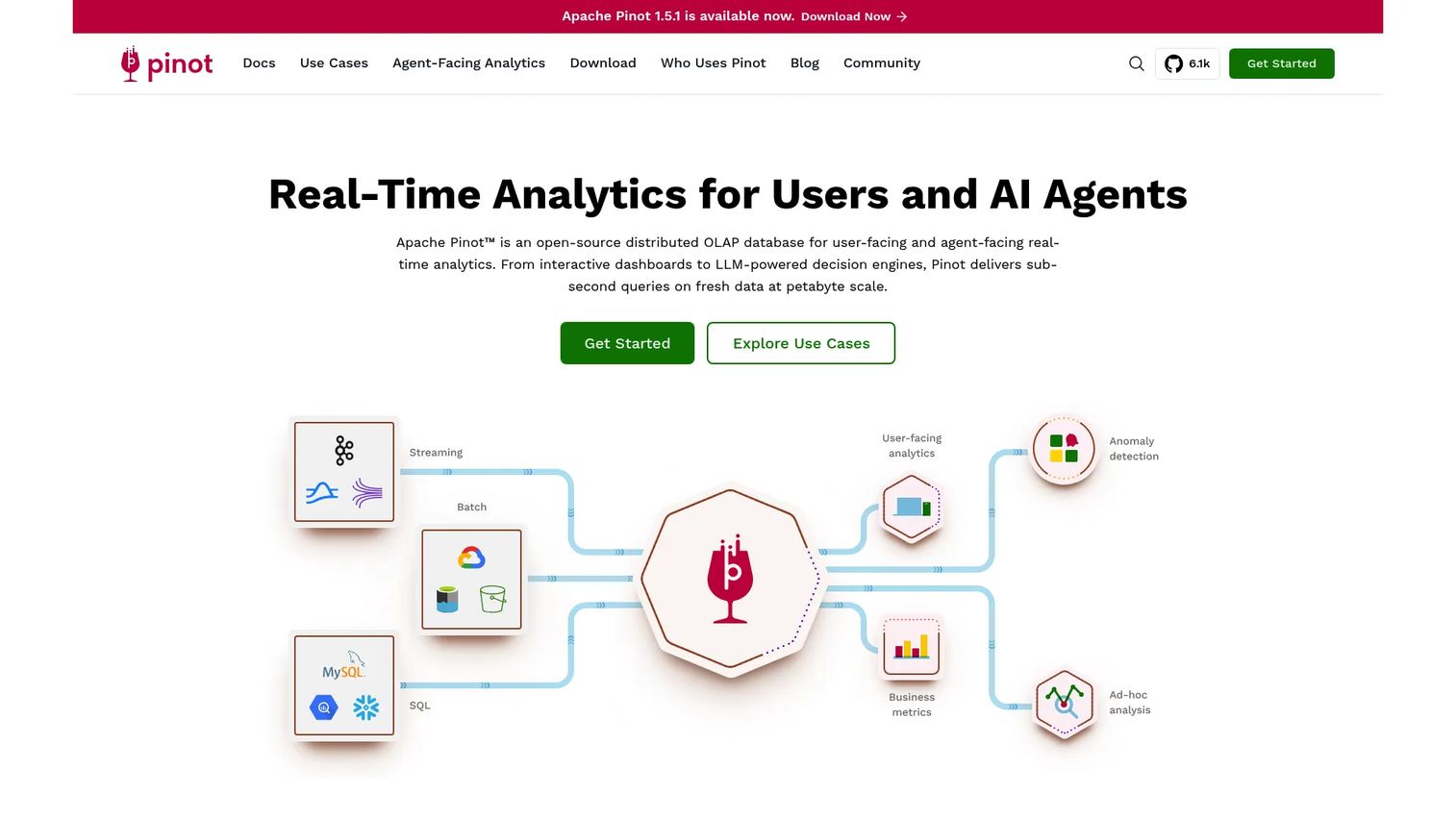
Apache Pinot is an open-source distributed OLAP database built for real-time analytics on fresh data. Its sweet spot is user-facing analytics at scale: think engagement dashboards inside a product, served to thousands of concurrent users, each expecting instant results. Pinot ingests streaming data and answers low-latency queries, which is why it powers real-time analytics features at high-traffic consumer platforms.
Best for: Teams needing low-latency, user-facing real-time analytics at scale.
Key strengths
- Sub-second query latency: Optimized indexing and columnar storage keep responses fast under heavy concurrency.
- Real-time streaming ingestion: Consumes fresh events and makes them queryable almost immediately.
- SQL query interface: Query with standard SQL for accessibility across teams.
Why choose Pinot: Choose Pinot over a warehouse when you need to serve analytics directly to end users at high concurrency. Compared to Druid, the two overlap heavily on real-time and streaming workloads; the practical decision usually comes down to your existing infrastructure, team familiarity, and the specific concurrency and indexing patterns your application needs, rather than any ideological difference. Pinot performs best when user-facing latency at scale is the primary constraint.
Pinot pricing: Apache Pinot is open source and free to run. The project does not publish public plan pricing. As with Druid, managed offerings exist through third-party providers, while the core engine remains free under its open-source license.
Considerations before you choose
Raw query speed is the headline, but the right choice for analytics-heavy teams usually comes down to operational fit. Here's the checklist to run before you commit.
Update and write patterns
Columnar systems are optimized for reads and batch loads, not frequent single-row updates. If your workload includes heavy transactional writes, plan for a hybrid setup where a row store handles writes and the columnar engine serves reads. Match the tool to how your data actually changes, not just how you query it.
Deployment and operational model
Decide whether you want to run infrastructure or offload it. Serverless (BigQuery) and managed (Snowflake) options trade control for lower operational overhead. Self-hosted open-source options (ClickHouse, Druid, Pinot, DuckDB) give you control and no license cost, but you own the operations. Weigh engineering time against convenience.
Partitioning and sort keys
Query performance on large tables depends on how you organize data. Partitioning limits how much data a query scans, and sort keys (or clustering) speed up range and filter queries. Whatever tool you pick, budget time to design these correctly, because a poorly partitioned columnar table can underperform a well-tuned row store.
Ecosystem and integration fit
The best database is often the one that fits your existing stack. If you're on AWS, Redshift reduces friction. On Google Cloud, BigQuery does. Check that your BI tools, ETL pipelines, and analytics stack integrate cleanly before you decide.
Conclusion
The right columnar database depends less on benchmarks and more on your workload shape.
Three takeaways to anchor the decision:
- For a versatile, high-performance default, ClickHouse covers the most ground: real-time analytics, observability, and warehousing in one open-source engine.
- For managed cloud warehousing, match the tool to your cloud: Snowflake for cross-team scale and governance, BigQuery for serverless simplicity, Redshift when you're AWS-native.
- For everything else, size to the job: DuckDB for fast local analysis without a warehouse, and Druid or Pinot when you need sub-second queries over real-time event data.
Start by classifying your workload. Is it local exploration, managed cloud warehousing, or real-time event serving? That single question narrows the field faster than any feature comparison. Then validate the shortlisted option against your real query patterns, update frequency, and existing stack before you migrate anything.
FAQs
A columnar database stores table data by column instead of by row, so analytical queries read only the columns they need. This layout lowers I/O on wide scans, improves compression because similar values sit together, and speeds up aggregations. It's the standard architecture for OLAP and analytics workloads.
Use one when your workload is read-heavy and aggregation-heavy: BI dashboards, real-time analytics, large-scale reporting, and event querying. If you're scanning millions of rows to compute metrics across a few columns, columnar storage delivers materially faster query performance than a row store.
Columnar systems are less suited to transactional workloads with frequent single-row inserts, updates, and deletes. If your primary need is fetching or modifying individual records quickly (an application backend, for example), a row-oriented relational database is the better fit. Many teams run both.
Row-oriented databases store all values of a record together, which is efficient for transactional operations on single rows. Column-oriented databases store all values of a column together, which is efficient for analytical scans and aggregations. The row vs column choice comes down to whether your workload is transactional or analytical.
No. Parquet is a columnar file format, not a database. It stores data on disk in a column-oriented layout, which is why analytical engines read it efficiently. Along with ORC (on-disk) and Arrow (in-memory), Parquet is often used alongside columnar databases rather than being one itself.
A columnar (column-oriented) analytics database stores dense tabular data by column for fast scans and aggregations. A wide-column database, like Cassandra, is a NoSQL model that groups columns into families for flexible, sparse schemas at scale. They share a name but solve different problems: analytics versus flexible distributed storage.
Yes, and many teams do. Hybrid architectures use a row-oriented database for transactional writes and a columnar engine for analytical reads, moving data between them with change data capture or ETL. This lets each system handle the workload it's built for: frequent updates on one side, heavy scans on the other.