How to search people by current company in a job search Apollo
Here is how to search people by current company in a job search apollo
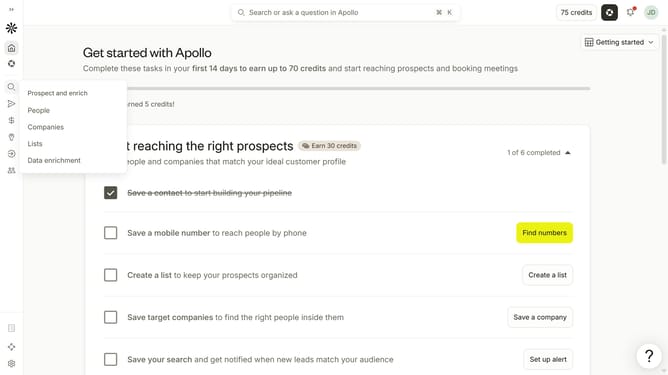
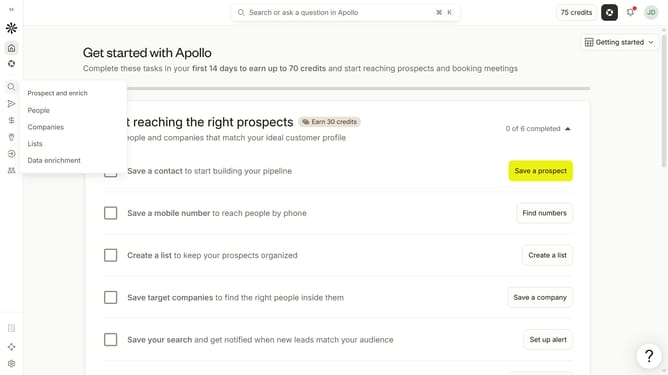
- First click on the magnifying glass icon in the left sidebar
- Then click on "People" in the opened menu
- Next click on the dropdown arrow next to "Company" in the left panel
- Then click on the dropdown for "Enter companies" under "Current company"
- Finally, select a company from the dropdown list
Why should you How to search people by current company in a job search Apollo
Apollo is an innovative platform designed to streamline and enhance the job search process by connecting professionals efficiently.
Among its array of powerful features, Apollo offers the ability to search for people by their current company. This feature allows users to identify potential connections, enabling more targeted networking and personalized outreach.
By using Apollo's company-specific search, users can gain valuable insights into an organization's culture and structure, facilitating informed career decisions and uncovering hidden opportunities.
This approach ensures that users can connect with the right individuals, paving the way for meaningful professional relationships and career advancements.
Last update