How to add a Heading 1 in a tab in help center in Gitbook
Here is how to add a heading 1 in a tab in help center in gitbook
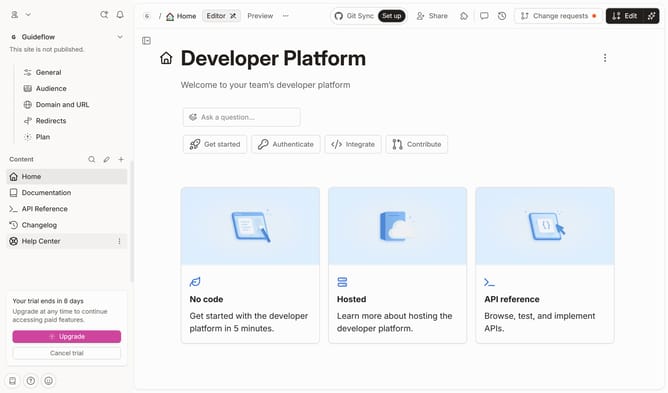
- First click on "Help Center" in the sidebar
- Then click on the "Edit" button in the header
- Next click on the dots icon inside the tab to show block option
- Then select "Heading 1" from the dropdown menu in the sidebar
- Click on the text input field to edit it
- Finally click on the "Merge" button in the header
Why should you add a Heading 1 in a tab in help center in Gitbook
GitBook is a powerful platform designed to streamline the process of creating, managing, and distributing documentation.
One of the standout features is the ability to add a Heading 1 in a tab within the help center, providing a structured and clear pathway for users to navigate documentation.
Implementing a Heading 1 ensures that your content is easily accessible, enhancing usability and improving the user's experience by allowing for quick identification of key sections.
Utilizing this feature can significantly enhance clarity, making information retrieval more intuitive and efficient.
Last update