
A sandbox environment is an isolated, controlled digital space where you can test code, run software, or demonstrate products. It operates without affecting live systems or exposing real data. It's the digital equivalent of a playground where experimentation carries no real-world consequences.
In go-to-market, a sandbox environment is a secure, interactive copy of your product experience that buyers can explore freely - without logins, fragile staging environments, or production data. It stays stable through the sales cycle, supports fast per-account personalization, and captures intent signals (what prospects explored and engaged with) to help teams qualify and progress deals. The term applies also across cybersecurity, and software development workflows. Security analysts use sandboxes to detonate suspicious files. Engineers use them to test features before production. Sales teams use them to deliver product demos without broken environments or engineering dependencies.
This guide covers how sandboxes work, the different types you'll encounter, and how to set one up for your specific use case.
What is sandbox environment: definition and overview
Understanding what is sandbox environment means recognizing it as an isolated virtual space. You can safely execute code or test software changes without affecting your network resources. It also lets you run potentially risky files without touching production systems or customer data.
Think of it as a contained digital playground where experimentation carries no real-world consequences.
The concept applies across multiple domains. In cybersecurity, analysts use sandboxes to "detonate" suspicious email attachments and observe malware behavior. In software development, engineers test new features before deploying to production.
And in go-to-market contexts, sales and marketing teams use sandbox environments to deliver realistic product demos without touching live infrastructure.
What makes a sandbox a sandbox? A few defining characteristics set it apart:
- Isolation: Fully separated from production systems, so intelligence inside can affect anything outside
- Safety: Run untested code or suspicious files without risk to your main environment
- Reset capabilities: Restore to a clean state for repeatable tests
- Data separation: Use synthetic or anonymized data instead of real customer information
The term "sandbox" comes from the children's play area concept. Just as kids can build, destroy, and rebuild in a sandbox without affecting the real world, software sandboxes let teams experiment freely within safe boundaries.
How a sandbox environment works
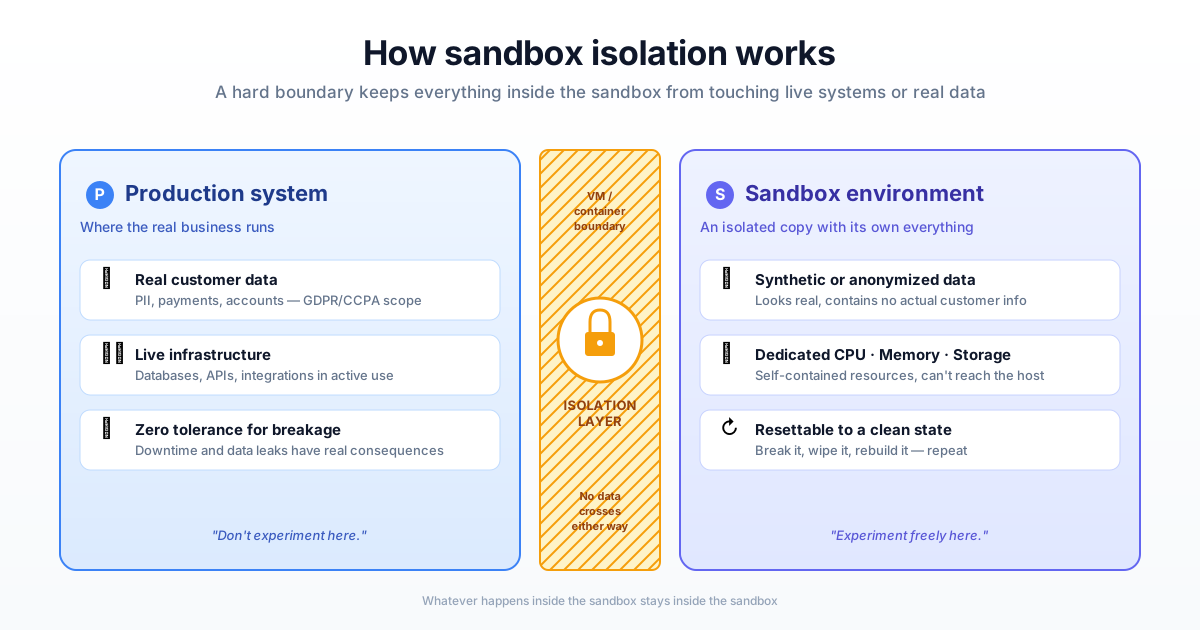
Sandboxes create strict boundaries between the test space and live production systems. Everything that happens inside the sandbox stays inside the sandbox. Here's how that isolation actually works in practice.
Isolation and resource allocation
Sandboxes typically run in separate virtual machines or containers with their own dedicated resources: CPU, memory, and storage. Because the sandbox operates as a self-contained space, it cannot access, read, or modify files or processes on the host system.
This isolation happens at the infrastructure level. Whether you're running a development sandbox on your local machine or a cloud-based demo environment, the underlying technology creates hard boundaries that prevent cross-contamination.
Data separation from production systems
Protecting sensitive information is a core sandbox principle. Sandboxes never use live customer data. Instead, they rely on copies of data, anonymized subsets, or entirely synthetic data that mimics the structure of real information.
This separation matters for compliance as much as security. Regulations like GDPR, with €5.88 billion in cumulative fines according to DLA Piper, and CCPA require careful handling of personal data. By keeping real data out of test environments entirely, sandboxes help organizations meet regulatory requirements without slowing down development or demo workflows.
Access controls and user permissions
Teams maintain control over sandbox environments through role-based permissions. Administrators define who can access the sandbox, what actions they can perform, and how changes get tracked or logged.
For demo sandboxes specifically, access control often includes features like password protection, link expiration, and viewer tracking. You want prospects to explore freely, but you also want visibility into who's engaging and how.
Types of sandbox environments
Different teams use sandboxes for different purposes. Understanding the main categories helps you choose the right approach for your specific use case.
Development sandboxes
Engineering teams use development sandboxes to write, test, and debug code before merging it into the main codebase. Development sandboxes mirror production settings closely enough to catch integration issues early, but remain isolated enough that bugs don't affect real users.
Most modern development workflows include some form of sandbox or staging environment. The goal is catching problems before they reach production, not after.
Testing and QA sandboxes
Quality assurance teams use dedicated sandboxes to validate new features, run regression tests, and catch bugs before release. QA sandboxes often include automated testing frameworks that run hundreds or thousands of test cases against new code.
The key difference from development sandboxes: QA environments typically mirror production more exactly, including data structures, integrations, and performance characteristics.
Security and malware analysis sandboxes
Cybersecurity professionals use sandboxes to safely execute suspicious files, links, or attachments. By "detonating" potential malware in an isolated environment, analysts can observe behavior and assess threats without exposing the corporate network.
This is where the sandbox concept originated in computing. Security sandboxes remain critical for threat detection and incident response, with ANY.RUN's 2025 report showing sandbox sessions up 72% year over year.
Demo and sales enablement sandboxes
Go-to-market teams use sandbox demos to showcase products to prospects in realistic, interactive environments. Unlike the other sandbox types, demo sandboxes prioritize user experience and engagement over technical testing.
The challenge with traditional demo approaches: live environments break, staging data looks fake, and engineering teams get pulled into demo prep instead of product work. Demo sandboxes solve this by creating stable, customizable product replicas that sales and marketing teams can manage independently.
Benefits of using a sandbox environment
The practical value of sandboxes extends across entire organizations. Here's what teams actually gain from implementing sandbox workflows.
Protect production systems and customer data
Sandboxes prevent accidental changes, data exposure, or system crashes that could affect real users. When something goes wrong in a sandbox, the blast radius is zero. Your production environment stays untouched.
This protection matters most when testing risky changes: major feature releases, infrastructure migrations, or third-party integrations.
Accelerate testing and development cycles
Teams can test new ideas in parallel, fail fast, and iterate without waiting for access to shared environments. Multiple developers can work simultaneously in their own sandboxes without stepping on each other's work.
For demo workflows specifically, sales reps can customize presentations for specific prospects. They no longer need to wait for marketing or engineering to build new assets through demo centers.
Reduce engineering dependencies
Non-technical teams can use sandboxes for demos, training, and testing without pulling engineers away from core product development. This is particularly valuable for pre-sales teams who customize demos for specific prospects.
The math is simple: every hour an engineer spends on demo prep is an hour not spent on product development. Sandboxes shift that work to the teams who actually use the demos.
Sandbox environment use cases
Sandboxes add value in many specific scenarios. Here's how different teams apply them to solve common challenges.
Software development and code testing
Developers use sandboxes to test new features, apply patches, and verify integrations before deploying to production. The standard workflow: write code locally, test in a sandbox, validate in staging, then deploy to production.
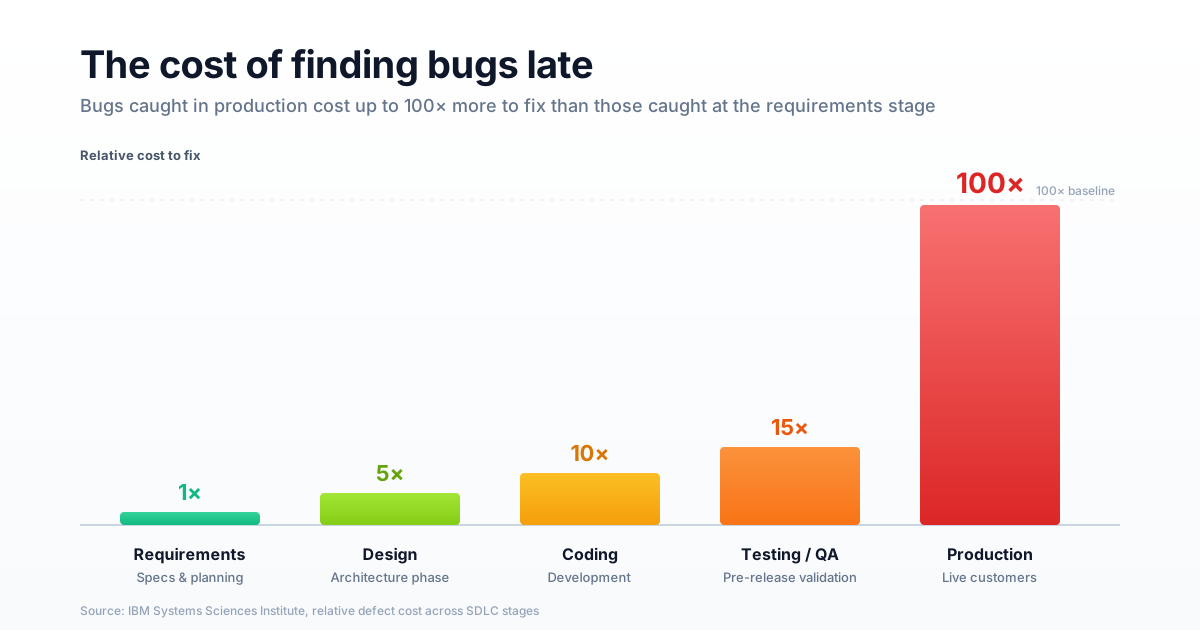
This layered approach catches bugs early, when they are up to 100x cheaper to fix according to IBM research. Finding bugs late is expensive and embarrassing.
Cybersecurity research and threat detection
Security teams use sandboxes to open suspicious email attachments, click unknown links, or analyze downloaded files. By observing behavior in a contained space, analysts can identify threats without risking network-wide infections.
Modern security sandboxes often include automated analysis that flags suspicious behavior patterns, reducing the manual work required for threat assessment.
Product demos and pre-sales enablement
Sales teams use sandbox environments to provide prospects with realistic, hands-on product experiences. Unlike live demos that can break or show irrelevant data, sandbox demos stay consistent and can be customized for specific use cases.
Customer onboarding and training
Customer success teams use sandboxes to train new users on product features in safe environments where mistakes have no consequences. New users can click around, try different workflows, and learn by doing rather than watching.
This hands-on approach accelerates time-to-value. Users who learn in sandboxes typically reach proficiency faster than users who rely on documentation alone.
Partner and channel enablement
Partners can learn, practice, and demo products independently using sandbox environments that mirror the real product. This self-service approach scales partner enablement without requiring constant support from your internal teams.
How to set up a sandbox environment
Creating a sandbox environment involves several key decisions. Here's a practical framework for getting started.
1. Define your requirements and goals
Start by identifying what you want to test, who will use the sandbox, and what success looks like. A development sandbox has different requirements than a demo sandbox. A security sandbox requires different capabilities than a training sandbox.
Key questions to answer: What workflows will users perform? What data do they require? How realistic does the environment need to be?
Who requires access, and what permissions do they require?
2. Choose the right sandbox type
Match your use case to the appropriate sandbox category. Development sandboxes typically require infrastructure access and technical setup. Demo sandboxes prioritize ease of use and visual fidelity.
Security sandboxes require robust isolation and monitoring capabilities.
For go-to-market use cases, no-code platforms can create realistic product sandboxes without engineering involvement.
3. Configure environment settings
Set up access controls, user permissions, and environment variables. Where appropriate, mirror production settings to ensure tests remain relevant. For demo sandboxes, configure branding, default data, and sharing options.
Pay attention to integration points. If your sandbox connects with CRM systems or analytics platforms, configure those connections during setup rather than retrofitting them later.
4. Populate with realistic data
Use synthetic data generators, anonymized production data, or representative subsets. Never use real, sensitive customer data in test environments. The data looks realistic enough to be useful without creating compliance or security risks.
For demo sandboxes, consider creating multiple data sets for different personas or industries. A prospect in healthcare wants to see healthcare-relevant examples, not generic placeholder data.
5. Test, measure, and iterate
Run your tests, track results, and refine the sandbox configuration based on what you learn. For demo sandboxes, monitor engagement metrics like completion rates, time spent, and conversion to next steps.
Sandboxes aren't set-and-forget. Plan for regular updates to keep environments aligned with your production product as it evolves.
Sandbox environment vs staging and UAT
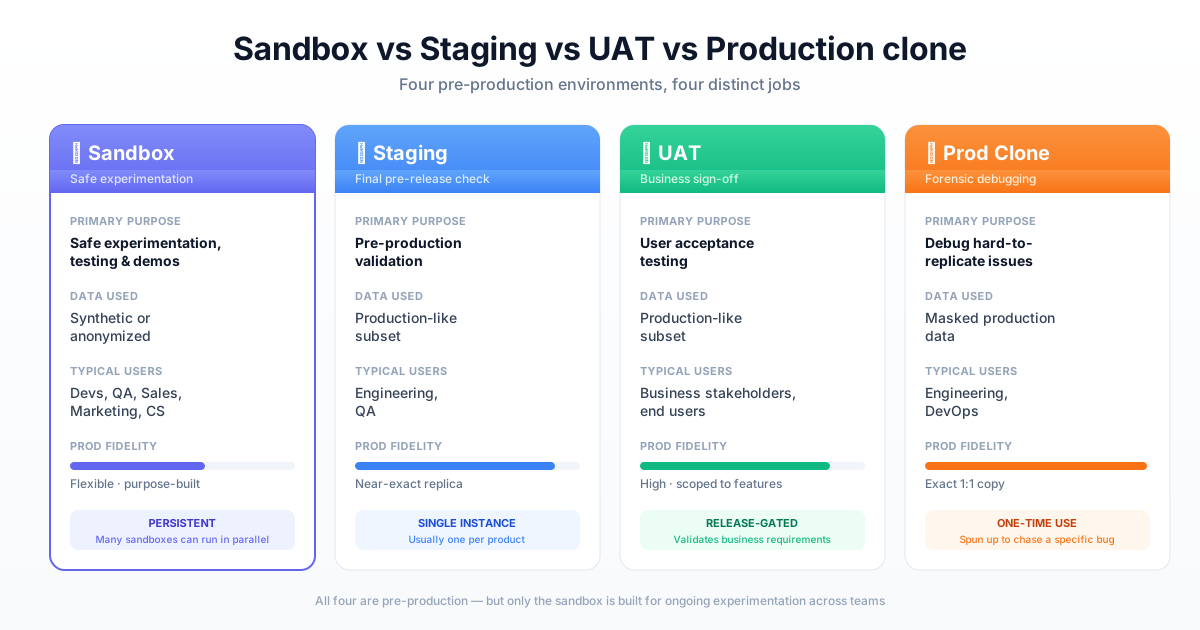
People often confuse sandboxes with other pre-production environments. If you're asking what is sandbox environment versus staging or UAT, here's how they differ:
| Environment | Primary purpose | Data used | Typical users |
|---|---|---|---|
| Sandbox | Safe experimentation and testing | Synthetic or anonymized | Developers, QA, sales, marketing |
| Staging | Pre-production validation | Production-like subset | Engineering, QA |
| UAT | User acceptance testing | Production-like subset | Business stakeholders, end users |
| Production clone | Exact replica for debugging | Masked production data | Engineering, DevOps |
Sandbox vs staging environment
A staging environment is a near-exact replica of production, used for final validation just before release. Sandboxes are more flexible, used earlier in workflows for broader experimentation. You might have many sandboxes but typically only one staging environment.
Sandbox vs UAT environment
UAT (User Acceptance Testing) environments are specifically for end-users or business stakeholders to validate that new functionality meets business requirements. Sandboxes serve a wider range of internal teams for more varied purposes, including demos and training.
Sandbox vs production clone
A production clone is an exact copy of the live environment, typically created to debug specific, hard-to-replicate issues. Sandboxes are purpose-built, persistent spaces for ongoing testing and demos rather than one-time debugging sessions.
How GTM teams use sandbox environments for demos
Go-to-market teams face a specific challenge: how do you show prospects a realistic product experience without the risks of live environments? Sandbox demos solve this problem.
Pre-sales demo environments
Sales teams use sandboxes to deliver personalized, realistic demos that resonate with specific prospect requirements. Unlike live demos that can break or show irrelevant data, sandbox demos stay consistent and can be tailored for each conversation.
Marketing and website experiences
Marketing teams embed sandbox experiences directly on websites and landing pages. This lets prospects explore the product on their own terms before speaking with sales, generating more qualified leads who already understand the product's value.
Self-serve demos also capture engagement data that helps prioritize follow-up. A prospect who completes an entire demo flow signals higher intent than one who bounces after 30 seconds.
Customer success and onboarding flows
Onboarding teams use sandboxes to create guided tours and interactive demos. New users learn product workflows in safe, controlled environments where mistakes don't matter.
Create sandbox experiences without engineering
For teams that require sandbox environments without developer involvement, platforms like Guideflow provide a no-code solution. Using HTML-based capture, you can create realistic, interactive sandboxes of your product in minutes rather than weeks.
The workflow is straightforward: capture your product directly from your browser, customize the experience with a drag-and-drop editor, then share via links or embeds. Built-in analytics show who's engaging and how, while CRM integrations sync engagement data to your existing tools.
FAQs about sandbox environments
Setup time varies significantly by type. Traditional developer-centric sandboxes can take days or weeks to configure, especially if they require infrastructure provisioning and data migration. No-code demo sandbox platforms can create interactive environments in minutes using browser-based capture.
Yes, for use cases like product demos, training, and marketing. Platforms designed for non-technical teams allow building sandbox experiences using browser-based capture and no-code editors. Development and security sandboxes typically still require technical setup.
Sandboxes ensure security through synthetic data, data anonymization, and strict access controls. The core principle: real, sensitive production data never enters a sandbox environment. Additional measures like password protection and link expiration add layers of access control.
A common example: a SaaS company embeds an interactive demo of its platform on its website. Prospects click through the product and explore key features before booking a demo with sales. The sandbox looks and feels like the real product but uses synthetic data and runs independently of production infrastructure.
Yes, sandboxes typically require periodic updates to stay aligned with production features and UI. As your product evolves, sandbox environments can drift out of sync. Some modern platforms automate this refresh process, while others require manual updates when significant product changes occur.
A free trial gives users limited-time or limited-feature access to the actual, live product. A sandbox is a controlled, isolated replica used for testing, demos, or training without affecting real systems or data. Free trials require account creation and often involve real data; sandboxes typically don't.