How to view the Domain Rating (DR) of a website in Ahrefs
Here is how to view the domain rating (dr) of a website in ahrefs
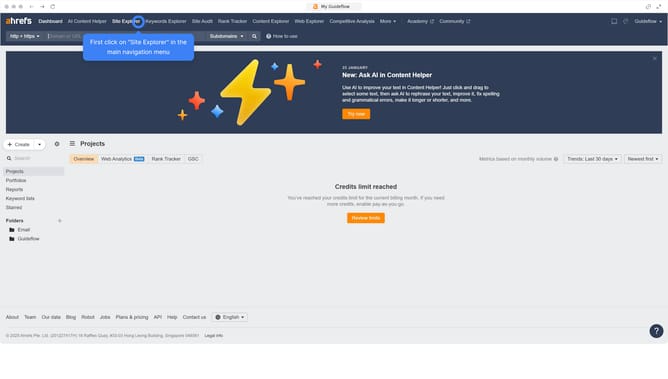
- First click on "Site Explorer" in the top navigation menu
- Then, enter your website's domain or URL in the search bar
- Next click the search button to analyze the domain
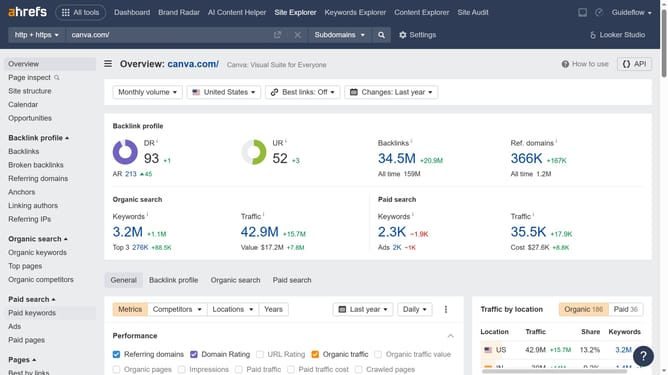
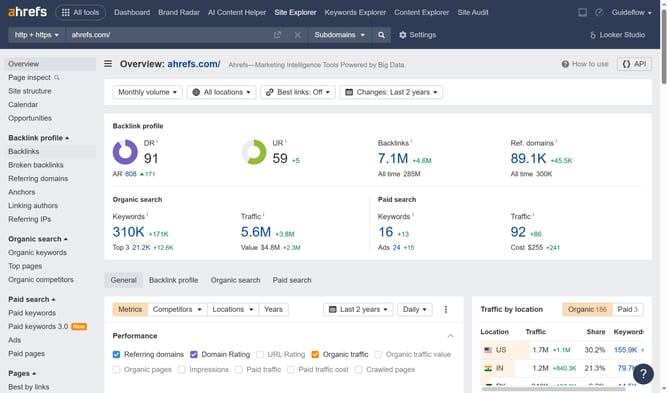
- Finally, in the Overview report, locate the "Domain Rating (DR)" metric displayed prominently at the top
Why should you view the Domain Rating (DR) of a website in Ahrefs
Ahrefs is a powerful tool designed to boost your website's visibility with comprehensive SEO insights.
One of its standout features is the ability to view the Domain Rating (DR) of any website.
Checking a site’s DR with Ahrefs offers insight into its overall authority and backlink strength.
Utilizing this metric helps compare your website against competitors and strategize improvement paths, leading to better search engine rankings.
Last update