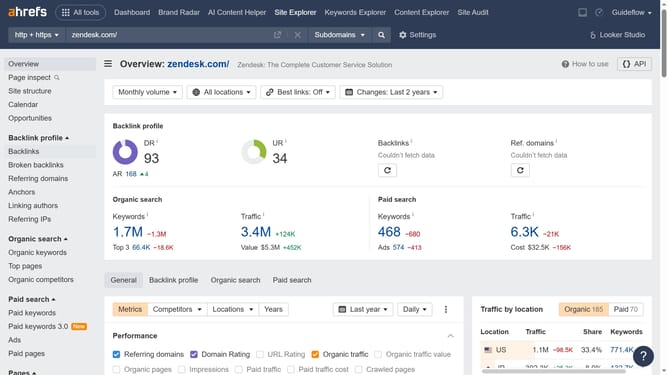
How to view organic pages in Ahrefs
Here is how to view organic pages in ahrefs
- First click on "Site Explorer" in the top navigation menu
- Then click on the main search input field labeled "Domain or URL"
- Next enter website's name in the search input field
- Then click the orange search button to perform the search
- In the left sidebar menu, click on "Top pages" under the "Organic search" section
- Finally click the "Organic pages" checkbox in the graph filters area
Why should you view organic pages in Ahrefs
Ahrefs is a comprehensive SEO tool designed to enhance website visibility and performance.
Among its powerful features is the ability to view organic pages, which allows users to identify which pages on their website are attracting the most organic traffic.
This feature is invaluable because it offers insights into content performance, helping marketers understand what resonates with their audience.
By knowing which pages drive the most traffic, you can optimize content strategies to improve SEO efforts and increase overall site engagement.
Last update