How to show hidden fields in a grid view in Airtable
Here is how to show hidden fields in a grid view in airtable
- First navigate to a base and open the table where the Grid view is located
- Next open the view sidebar and select the Grid view you want to update
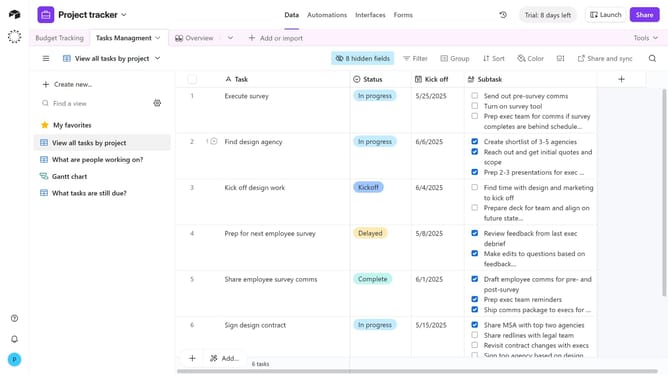
- Then click on the "Hidden fields” button in the view toolbar
- In the panel that appears, scroll through the list of fields
- Finally toggle on the switches next to the fields you want to make visible again
- The selected fields will now reappear as columns in the Grid view
Why should you show hidden fields in a grid view in Airtable
Airtable is an innovative platform designed to enhance organization and collaboration by combining the versatility of a spreadsheet with the power of a database.
One of its standout features is the ability to show hidden fields in a grid view. This allows users to temporarily hide and reveal fields to create a more personalized and clutter-free workspace while maintaining access to all essential data.
By showing hidden fields, users can efficiently tailor their views to focus on specific information needed for particular tasks, thereby improving productivity and data management.
Last update