How to see the inbound links for your site in Ahrefs
Here is how to see the inbound links for your site in ahrefs
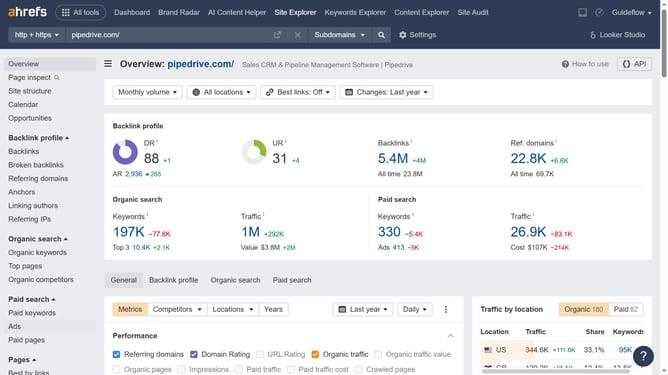
- First click on "Site Explorer" in the top navigation menu
- Then enter your website's domain or URL input field in the search bar
- Click the "Search" button to begin the analysis
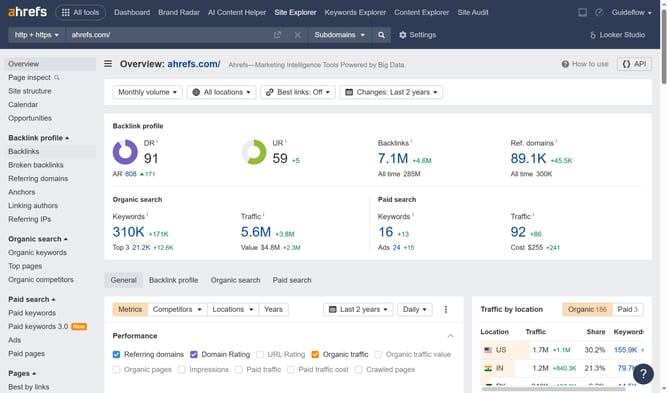
- In the left sidebar, click on the "Backlinks" option under the Backlink profile section
- You can find all pages from external websites that link to your website or URL; these are referred to as inbound links
Why should you see the inbound links for your site in Ahrefs
Ahrefs is a powerful tool designed to boost your site's search engine performance with its comprehensive SEO capabilities.
One standout feature is the ability to see the inbound links for your site. This feature provides a detailed overview of which sites are linking back to yours, offering essential insights into your site's online presence.
Understanding these links helps you evaluate the quality and relevance of your inbound links, essential for enhancing your site's credibility and authority.
By using Ahrefs to track these links, you can refine your SEO strategy, focusing on building high-quality connections that amplify your site's strength and visibility online.
Last update