How to schedule a meeting in Microsoft Teams
Here is how to schedule a meeting in microsoft teams
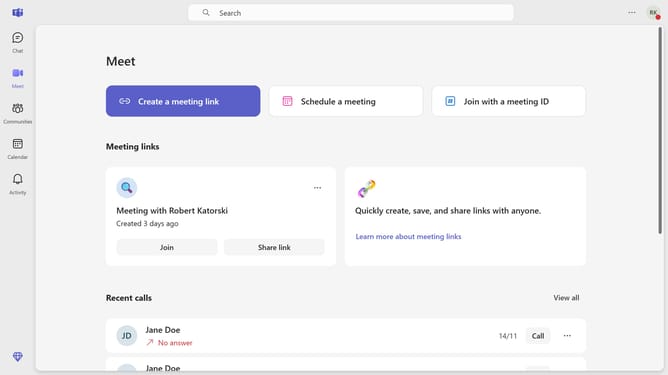
- First click on the "Meet" icon in the left sidebar
- Then click on "Schedule a meeting" button in the main content area
- Click on the "Add title" field at the top of the meeting form then type in your desired title for the meeting
- Click on the "Enter name or e-mail" field and type in the name or email you want to include in the meeting
- Click on the date and time field and edit it based on your preference
- Click on the "Does not repeat" dropdown menu
- Click on your preferred recurrence from the dropdown menu
- Adjust the recurrence settings in the menu based on your preference
- Click the "Day" dropdown in the recurrence settings
- Then edit the location and details in the meeting details menu
- Finally click the "Send" button in the top right to schedule the meeting
Why should you schedule a meeting in Microsoft Teams
Microsoft Teams is a versatile collaboration platform designed to streamline communication and teamwork.
Scheduling a meeting in Microsoft Teams is a powerful feature that brings your team together effortlessly.
This feature enhances productivity by allowing you to organize and coordinate meetings seamlessly, ensuring that all team members are on the same page.
With the ability to schedule meetings, you can effectively manage time, prioritize tasks, and ensure a coherent and efficient workflow.
Last update