How to disable apps in a Confluence space
Here is how to disable apps in a confluence space
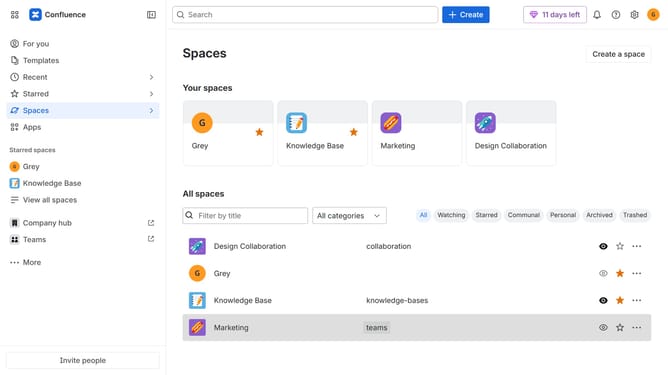
- First click on "Spaces" in the left sidebar
- Next click on the "View all spaces" option
- From the list of spaces, select the space you want to manage features for
- Then click on the "three dots" button next to the space name in the sidebar
- From the dropdown menu, select the "Space settings" option
- Next click the "General" menu in the left sidebar
- Select "Features" from the submenu
- Then, locate the “Apps” feature
- Finally, turn off the toggle next to "Apps" to disable it
Why should you disable apps in a Confluence space
Confluence is a collaborative workspace that brings teams together to share knowledge and ideas effortlessly.
Disabling apps within a Confluence space allows for a streamlined environment, helping teams stay focused on the content that matters most.
This feature enhances performance by removing unnecessary clutter, optimizing the workspace for better concentration and efficiency.
Ultimately, it empowers administrators to tailor the space according to their specific needs, ensuring the team operates smoothly and cohesively.
Last update