How to allow all users to view an email conversation in Zendesk Sell
Here is how to allow all users to view an email conversation in zendesk sell
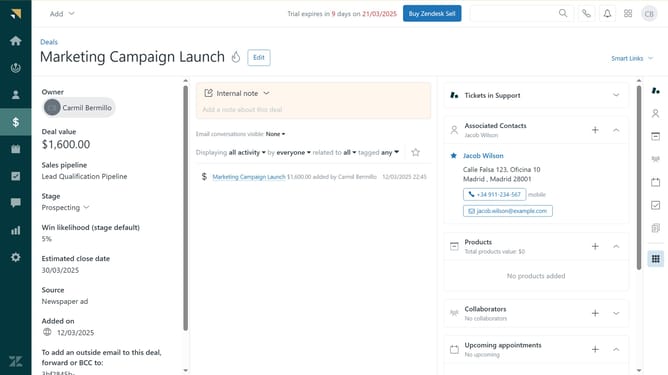
- First in Zendesk sell, navigate to Leads, Contacts or Deals in the left sidebar
- Then, click on the item that contains the email conversation you want to share
- Next click on "None" in the email conversations visibility dropdown under Internal note
- In the visibility settings popup, select the checkbox next to the lead, deal or contact’s name
- Finally, click on the "Save" button to apply the changes
- Email messages to and from this email address is now visible to the other Sell users who have access to the lead, contact, or deal
Why should you allow all users to view an email conversation in Zendesk Sell
Zendesk is a robust customer service and sales platform designed to streamline communication and boost team efficiency.
Enabling all users to view an email conversation in Zendesk Sell ensures transparency within the sales team, fostering seamless collaboration. By allowing access to these communications, team members can stay informed about client interactions and maintain consistent messaging.
This feature enhances coordination, reducing the likelihood of miscommunication and ensuring that everyone is on the same page, ultimately leading to improved customer relationships.
Last update