How to add a campaign to the archive in Constant Contact
Here is how to add a campaign to the archive in constant contact
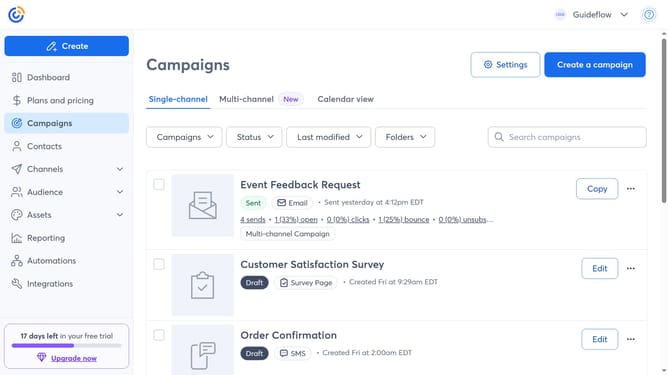
- First click on the "Campaigns" in the left sidebar menu
- Then find the sent campaign you want to archive from the campaign list
- Next click on the "More options" button (three dots menu) next to the campaign
- Finally click on "Add to archive" option from the dropdown menu
Why should you add a campaign to the archive in Constant Contact
Constant Contact is a dynamic tool designed to simplify and enhance your email marketing efforts.
One standout feature of Constant Contact is the ability to archive campaigns, allowing users to store their past marketing efforts securely.
Archiving a campaign offers several benefits, including easy access for future reference and analysis, ensuring you can efficiently manage your campaign history.
This feature not only supports organization but also enhances your marketing strategy by allowing for thoughtful evaluation and easy retrieval of successes past and lessons learned.
Last update