How to summarize text in a Workdoc using AI in Monday.com
Here is how to summarize text in a workdoc using ai in monday.com
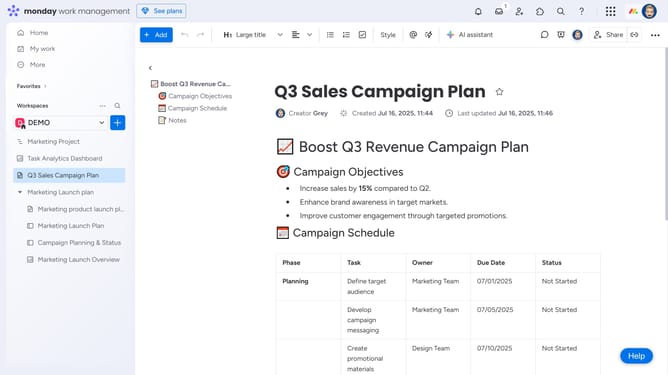
- First open the Workdoc containing the text you want to summarize
- Next highlight the section of text you want to summarize
- Click on the "AI assistant" icon in the top toolbar that appears
- Then the AI will automatically generate a summary into a shortened paragraph
- Finally choose to copy the text to your clipboard, or click on the "+Add to doc" button to add the summary directly to your workdoc
Why should you summarize text in a Workdoc using AI in Monday.com
Monday.com is a dynamic work operating system designed to streamline teamwork and enhance productivity.
In the ever-evolving digital landscape, efficiently managing information is crucial. Summarizing text in a Workdoc using AI in Monday.com empowers users to distill complex content into concise insights. This feature aids in grasping essential points quickly, ensuring a more organized workflow.
Ultimately, leveraging AI for text summarization saves time, enhances understanding, and facilitates better decision-making, making collaboration more effective and seamless.
Last update