How to rename an extension on a base in Airtable
Here is how to rename an extension on a base in airtable
- First, open the base where the extension is located
- Next click on the "Tools" dropdown menu in the top toolbar of the base
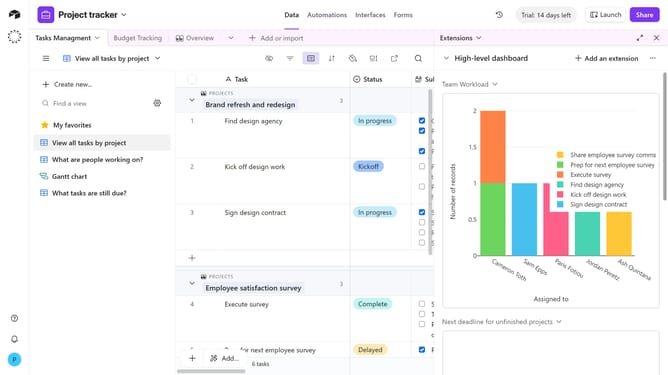
- Click on "Extensions" item from the tools menu
- In the extensions panel, locate the extension you want to rename
- Click on the dropdown next to the extension name
- Then select "Rename extension" option from the extension menu
- Finally enter the new name for the extension and press "Enter"
Why should you rename an extension on a base in Airtable
Airtable is an innovative tool that combines the functionality of a database with the versatility of a spreadsheet, designed to streamline and enhance data management.
Renaming an extension on a base in Airtable allows for greater organizational clarity, ensuring that your workspace remains intuitive and accessible. This small but impactful feature facilitates clearer communication among team members by aligning extension titles with their specific functions or projects.
By customizing extension names, users can efficiently navigate their projects, making data retrieval faster and reducing the risk of misinterpretation. It's a simple way to maintain efficiency and teamwork synergy.
Last update