How to enable Smart Links in a Confluence space
Here is how to enable smart links in a confluence space
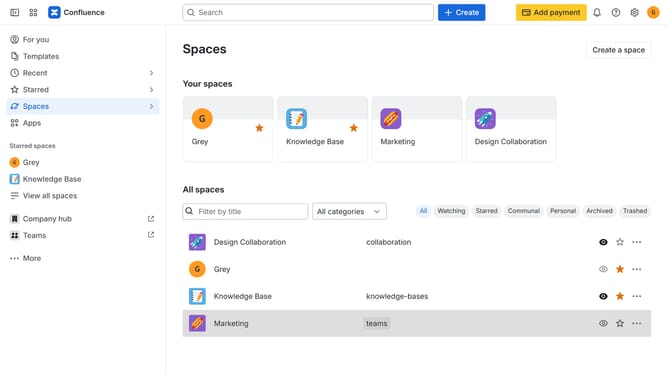
- First click on "Spaces" in the left sidebar
- Next click on the "View all spaces" option
- From the list of spaces, select the space you want to manage features for
- Then click on the "three dots" button next to the space name in the sidebar
- From the dropdown menu, select the "Space settings" option
- Next click the "General" menu in the left sidebar
- Select "Features" from the submenu
- Then, locate the “Smart Links” feature in the Content section
- Finally, turn on the toggle next to "Smart Links" to enable it
Why should you enable Smart Links in a Confluence space
Confluence is a versatile platform designed to help teams collaborate and share knowledge effortlessly.
Enabling Smart Links in a Confluence space allows for seamless integration of external content, such as documents or videos, directly into pages, enhancing accessibility and engagement.
This feature streamlines the sharing of critical information, saving time and reducing complexity by eliminating the need for constant switching between tools.
Using Smart Links fosters a more interactive and informative workspace, improving team productivity and cohesion.
Last update