How to enable or disable Auto refresh in a dashboard in ClickUp
Here is how to enable or disable auto refresh in a dashboard in clickup
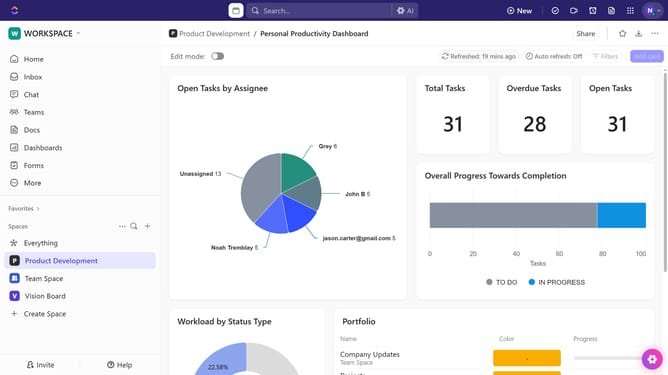
- First open your dashboard and locate the "Auto refresh" in the top toolbar
- Next click on it to enable or disable the option based on your preference
- Alternatively, click the "More options" menu (three dots) button in the top-right corner
- In the dropdown menu that appears, locate the "Auto refresh" option
- Finally you can enable or disable the option as needed
Why should you enable or disable Auto refresh in a dashboard in ClickUp
ClickUp is an all-in-one productivity platform designed to streamline project management and team collaboration.
One efficient feature of ClickUp is the ability to enable or disable Auto Refresh in dashboards, keeping data fresh and up-to-date automatically or manually as per your preference.
Enabling Auto Refresh in dashboards ensures that the latest information is always at your fingertips without needing manual intervention, enhancing productivity by allowing you to focus on decision-making.
On the other hand, disabling Auto Refresh can be beneficial in stable environments where unnecessary data refresh may be distracting or when you want more control over what information gets updated, and when.
Last update