How to duplicate a base in Airtable
Here is how to duplicate a base in airtable
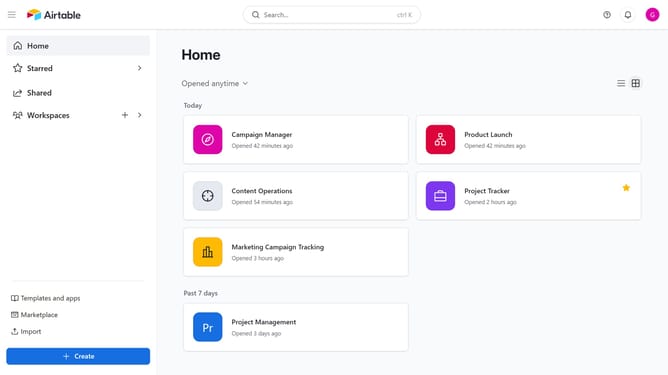
- First, navigate to your Airtable home screen
- Next, find the base you want to duplicate
- Hover over the base name and click on the menu icon (three dots)
- Then select "Duplicate" option from the dropdown menu
- In the pop-up window that appears, enter a name for the duplicated base
- Next, choose whether to include records and comments when duplicating the base
- Finally click the "Duplicate app" button
Why should you duplicate a base in Airtable
Airtable is a versatile platform designed to streamline team collaboration and data organization in a simple, intuitive way.
The ability to duplicate a base in Airtable offers immense convenience, allowing users to efficiently replicate existing setups for new projects or scenarios without starting from scratch. This feature is beneficial for maintaining consistency across similar projects and ensuring that successful workflows can be effortlessly reused.
By duplicating a base, teams can save valuable time and focus their efforts on creative and strategic tasks, rather than getting bogged down in repetitive setups. Preserving customized structures and data connections becomes seamless, enhancing productivity and allowing for rapid scaling of proven methodologies.