How to compare Share of Traffic Value (SoTV) between competitors in Ahrefs
Here is how to compare share of traffic value (sotv) between competitors in ahrefs
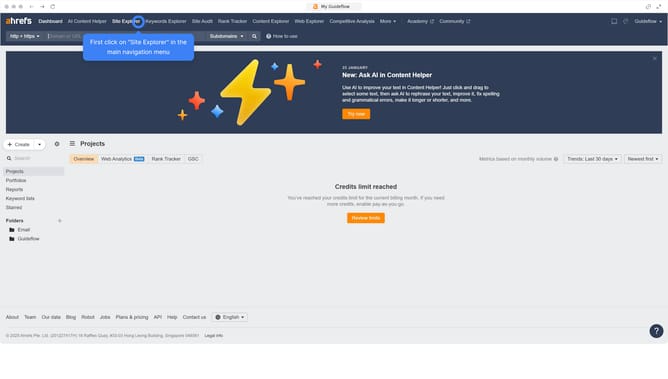
- First click on "Site Explorer" in the top navigation menu
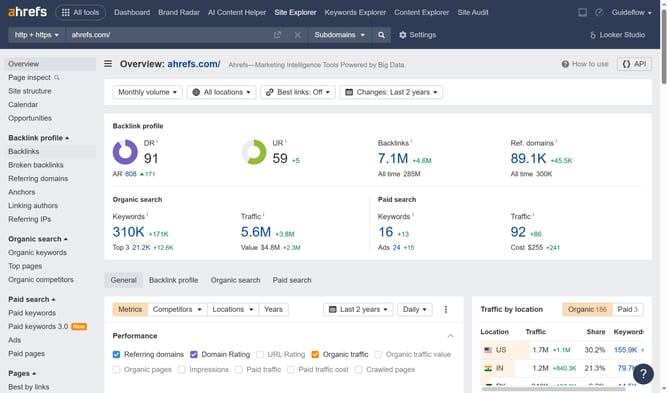
- Then enter your website domain or URL input field in the search bar
- Next click the search button
- Click the "General" tab in the report navigation bar
- Click the "Competitors" dropdown menu in the metrics toolbar
- Then add competitors in the competitors popup
- Then click on "Apply" button to add the selected competitors
- Click on the "Performance" metrics dropdown menu
- Finally, click on "Share of Traffic Value" in the dropdown to view comparative traffic value data
Why should you compare Share of Traffic Value (SoTV) between competitors in Ahrefs
Ahrefs is a powerful tool designed to enhance your SEO strategy by providing comprehensive data insights.
The Share of Traffic Value (SoTV) metric in Ahrefs allows you to efficiently compare your website’s traffic value against competitors. By evaluating this feature, businesses can ascertain where they stand in terms of online presence and identify growth opportunities.
This comparison is essential for understanding competitive dynamics and tailoring strategies to boost traffic value. Insights from SoTV can lead to more informed decisions, ultimately optimizing marketing efforts and enhancing site performance.
Last update