How to change your password when logged in to HubSpot
Here is how to change your password when logged in to hubspot
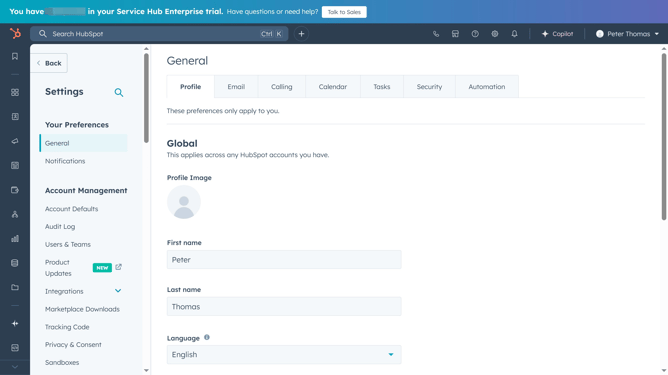
- First navigate to Settings and click on "General" in the left sidebar under Your Preferences
- Then click on the "Security" tab in the navigation menu
- Next locate the Password section and click on the "Reset password"
- In the dialog box, enter your "Current password" and your "New password"
- Finally click on the "Reset password" button to confirm the password reset
Why should you change your password when logged in to HubSpot
HubSpot is a comprehensive platform designed to enhance inbound marketing, sales, and customer service efforts seamlessly.
Changing your password while logged into HubSpot is straightforward and essential for maintaining account security. Swift password updates reduce the risk of unauthorized access, ensuring your data remains protected.
This feature not only boosts your peace of mind but also exemplifies HubSpot’s commitment to providing a secure user experience. Regular updates keep security intact, allowing you to focus on your core tasks using the platform.
Last update