
You built a custom demo for a mid-market prospect. Spent 90 minutes tailoring the environment. The AE confirmed the call. The prospect rescheduled. Twice. When they finally showed up, they brought two colleagues who hadn't seen any of the prep work, and you spent 20 minutes re-covering ground.
The problem isn't the interactive demo itself. It's that most SEs build interactive demos the same way they'd build a live demo: one audience, one moment, one shot. Interactive product demos work differently. They're asynchronous. They're shareable. They're measurable. And the interactive demo best practices for building them are not the same as the best practices for running a live call.
Teams that apply these practices consistently see demo completion rates above 60% and measurable deal acceleration. The data from analyzing hundreds of B2B SaaS presales teams backs this up: the gap between a good interactive demo and a great one is structural, not cosmetic.
What's inside
This guide covers 12 interactive demo best practices written specifically for sales engineers and presales teams. You'll find tactical guidance on demo structure, demo personalization by stakeholder, analytics-driven follow-up, and scaling demo quality across your team. Each practice includes what to do, why it matters, and how to implement it on your next deal.
These practices come from patterns observed across hundreds of B2B SaaS presales teams, not generic marketing advice.
TL;DR
- Interactive demos perform best when built around the buyer's evaluation criteria, not your feature list. Start with their top 3 questions.
- Personalization by stakeholder role (not just by company) is what separates high-completion demos from ones that get abandoned at step 4.
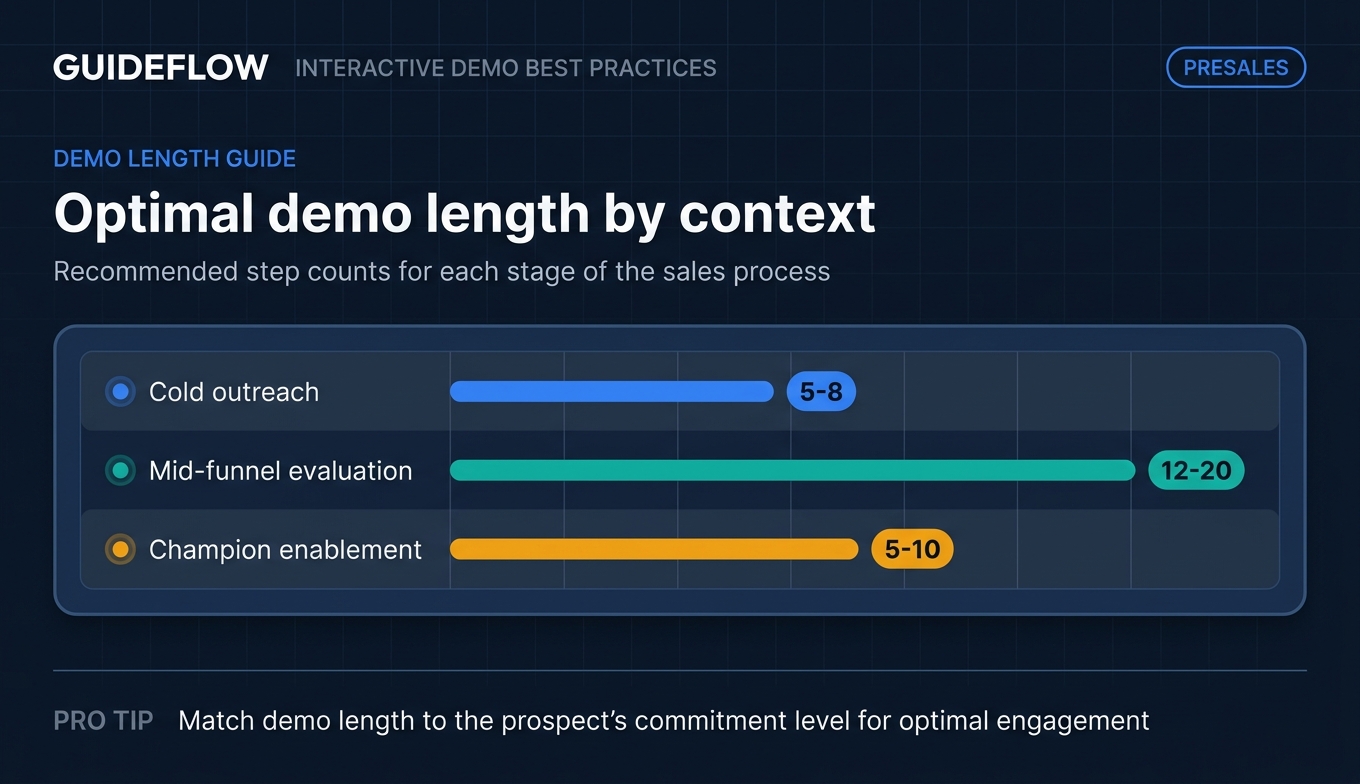
- Shorter, focused flows (5 to 8 steps) drive the highest completion for cold outreach. Longer branching paths (12 to 20 steps) excel at mid-funnel technical evaluation.
- Demo analytics tell you what the prospect cares about before your next call. Use step-level engagement data to prioritize follow-up.
- Scaling demo quality across an SE team starts with a shared template library and a Guideflow demo center, not individual heroics.
What is an interactive demo (and why SEs should care)
An interactive demonstration is a clickable, self-guided replica of your product that prospects can explore without a live call, a login, or a sandbox environment. It's a step-by-step walkthrough where each click advances through a curated product flow, complete with tooltips, callouts, and CTAs that guide the viewer through the experience you designed.
That definition sounds simple. The implications for your day-to-day are not.
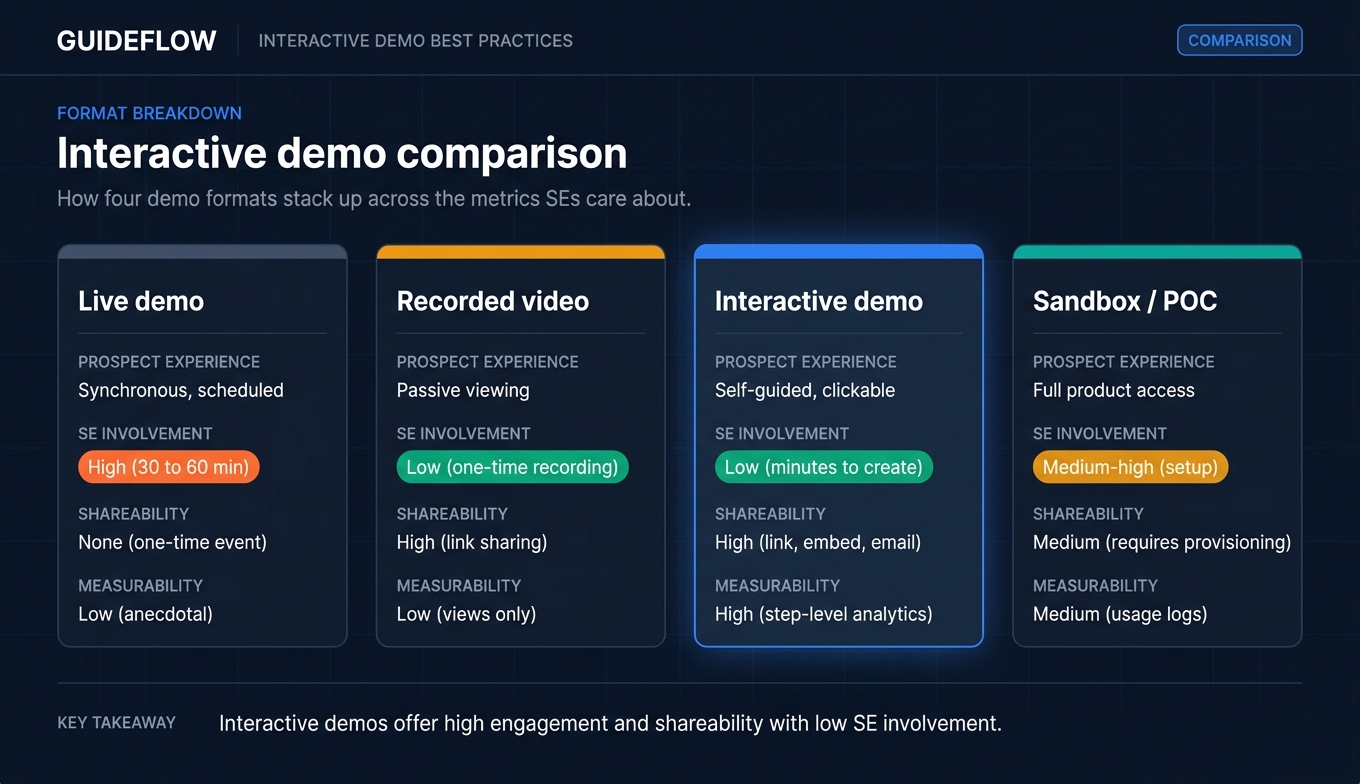
Here's how interactive demos compare to the other formats you're probably already using:
| Format | Prospect experience | SE involvement | Shareability | Measurability |
|---|---|---|---|---|
| Live demo | Synchronous, scheduled | High (30 to 60 min per session) | None (one-time event) | Low (anecdotal notes) |
| Recorded video | Passive viewing | Low (one-time recording) | High (link sharing) | Low (views only) |
| Interactive demo | Self-guided, clickable | Low (minutes to create) | High (link, embed, email) | High (step-level analytics) |
| Sandbox / POC | Full product access | Medium-high (setup, support) | Medium (requires provisioning) | Medium (usage logs) |
Why does this matter specifically for you? You're covering 8 to 15 active deals. You can't run a live demo for every stakeholder on every opportunity. Interactive demos let the product do the talking when you're not in the room.
The engagement difference is material. Interactive demos deliver fundamentally higher engagement than static formats like PDFs or slide decks. Research shows that top-performing interactive demos achieve engagement rates above 98% for users who start the first step, with the best demos averaging over 3.5 minutes of active engagement. Compare that to the average video watch-through rate, and you're looking at a completely different engagement model.
This isn't a marginal improvement over sending a PDF. It's a different category of buyer experience.
When to use interactive demos in the sales process
Interactive demos fit specific moments in your deal cycle. Here's where they create the most impact.
Pre-discovery. Share an interactive demo before the first call so the prospect arrives with context. This reduces "tell me about your product" time and lets you start discovery at a deeper level. You know this is working when the prospect references specific screens from the demo during your first conversation.
Post-discovery follow-up. After discovery, send a personalized demo that addresses the specific pain points discussed. This replaces the generic "here's a recording of our demo" email with something the prospect can actually interact with. You know this is working when the prospect replies with specific questions about the workflow you showed, not general "looks interesting" responses.
Champion enablement. Give your champion a shareable demo they can forward to the buying committee. The product speaks for itself when you're not in the room. You know this is working when the prospect's colleague views the demo before you've even been introduced to them.
Multi-stakeholder evaluation. Since B2B buying committees now average 6 to 10 stakeholders, different stakeholders explore different flows on their own schedule. The CISO sees the security configuration. The end user sees the daily workflow. The CFO sees the ROI dashboard. You know this is working when demo analytics show 3 or more unique viewers from the same account within a week.
Late-stage deal acceleration. When a new stakeholder joins late (and they always do), send them a targeted demo instead of scheduling another live call. You know this is working when a late-arriving stakeholder gets up to speed without adding two weeks to the timeline.
12 interactive demo best practices for presales teams
1. Start with the buyer's top 3 questions, not your feature list
The most common interactive demo mistake is building a product tour that follows the navigation menu. Dashboard, then Settings, then Reports, then Integrations. That's your product's architecture. It's not your buyer's evaluation criteria.
Instead, structure the demo around the 3 questions the prospect asked during discovery (or the 3 questions buyers in this segment always ask).
If you're selling to a fintech compliance team, their top questions are probably: (1) How does audit logging work? (2) Can we set role-based permissions? (3) What does the reporting dashboard look like? Build a 3-chapter demo that answers those questions in that order.
This approach increases completion rates because the prospect sees relevance immediately. They're not clicking through 5 screens of setup to get to the thing they care about. They're seeing their answer in step 1.
Here's the framework: after every discovery call, write down the prospect's top 3 concerns. Those become your demo's 3 chapters. If you didn't run discovery (cold outreach), use the top 3 questions your segment always asks. Your CRM notes and win/loss analysis data will tell you what those are.
SaaS demo best practices all point to the same pattern: buyer-centric structure outperforms product-centric structure every time. The demos that move deals are the ones that answer the buyer's question, not the ones that show your feature set.
2. Keep cold outreach demos under 8 steps
Context determines length. For cold outreach, where the prospect has no prior relationship with you, shorter is better. Five to 8 steps. One clear value proposition. One CTA.
The data supports this. Research on top-performing interactive demos shows the highest completion rates occur in demos between 1 and 6 steps, with optimal performance in the 5 to 13 step range depending on context. For cold outreach specifically, keeping demos concise drives completion rates well above 60%.
The reason is simple: a cold prospect hasn't committed attention yet. They're giving you 60 to 90 seconds to prove relevance. A 20-step demo asks for a commitment they haven't made.
Contrast this with mid-funnel evaluation demos. When the prospect has already had a discovery call, expressed specific pain, and agreed to evaluate your product, 12 to 20 steps with branching paths are appropriate. They've committed attention. They want depth. Give it to them.
The rule: match demo length to the prospect's commitment level. Cold outreach gets a focused highlight reel. Technical evaluation gets the full guided walkthrough.
3. Personalize by stakeholder role, not just by company
This is the highest-impact practice and the one most teams overlook. Company-level personalization (logo swap, company name in the header) is table stakes. The real engagement driver is role-level demo personalization.
Here's what that looks like in practice:
- For the technical evaluator: Show the integration settings, API documentation flow, and admin configuration. Lead with the architecture, not the UI.
- For the economic buyer: Show the ROI dashboard, usage analytics, and billing management. Lead with outcomes and cost visibility.
- For the end user: Show the daily workflow they'll actually use, with realistic sample data. Lead with "this is your Tuesday morning."
- For the CISO or security lead: Show the security settings, SSO configuration, and compliance certifications page. Lead with role-based access control best practices and audit trails.
You don't build 4 separate demos from scratch. You build one base demo and create role-specific variants by showing or hiding steps and adjusting the narrative in each tooltip.
Tools like Guideflow let you personalize text, images, and graphs per variant, and hide or blur elements with a no-code editor, so creating a role-specific version takes minutes. Dynamic variables from your CRM can auto-populate the prospect's company name, logo, and relevant data points.
The impact is measurable. Demos personalized by stakeholder role consistently achieve higher completion rates because each viewer sees content that matches their evaluation criteria. A CISO who opens a demo and sees security settings in step 1 keeps clicking. A CISO who opens a demo and sees a marketing dashboard in step 1 closes the tab.
4. Use chapter breaks to let prospects self-navigate
Long linear demos feel like a forced march. Chapter breaks (or branching paths) let the prospect choose what to explore first. This matters because different stakeholders care about different things, and a prospect who can skip to the section that matters to them is more likely to complete the demo.
Research confirms this: intro chapters that let users choose their path increase play rates by 72%.
Think of your demo like a table of contents, not a slideshow. Three to four chapters, each covering a distinct use case or capability, with clear labels like "Reporting & Analytics," "Team Collaboration," or "Security & Compliance."
This structure also gives you better analytics. When a prospect skips straight to "Integrations" and spends 80% of their time there, you know exactly what to lead with on your next call.
5. Write tooltips like you talk, not like documentation
SEs know their product deeply. The temptation is to write tooltip text that reads like a help article. Resist it.
Instead of this: "This module enables administrators to configure role-based access control parameters for organizational units."
Write this: "This is where you set who can see what. Most teams start with three roles: admin, manager, and viewer."
Conversational tooltip text increases engagement because it feels like a guided conversation, not a manual. Keep each tooltip under 25 words. Use second person ("you"). End with a micro-CTA or curiosity hook where appropriate ("Click the settings icon to see how permissions work").
Here's a quick test: read your tooltip out loud. If it sounds like something you'd say on a call, keep it. If it sounds like something from a product wiki, rewrite it.
The best tooltips do three things in under 25 words: tell the prospect what they're looking at, why it matters to them, and what to click next. That's it.
6. Show the "aha moment" in the first 3 steps
The first 3 steps determine whether the prospect continues or abandons. Front-load the value. Don't start with login screens, onboarding wizards, or navigation menus.
Here's the framework: identify the single screen or workflow that makes prospects say "oh, that's exactly what I need." That screen is step 1 or 2, not step 8.
If your product's aha moment is the automated report builder, open the demo on a pre-built report with realistic data. Let the prospect see the output before showing them how to build it. If it's the real-time collaboration feature, start with two users editing the same document simultaneously.
Research on top-performing demos shows that 71.9% start with modals that immediately frame the value proposition. Demos that reach the core value within the first 3 steps see materially higher completion than demos that spend the opening steps on setup and navigation.
The principle: show the destination before the journey. A prospect who sees the outcome they want in step 2 will happily click through 10 more steps to understand how to get there.
7. Build a template library your whole team can use
This practice targets the presales manager's biggest concern: consistency. When every SE builds demos from scratch, quality varies across the team. Junior SEs spend time recreating what senior SEs already built. Knowledge walks out the door when people leave.
The fix: build a shared template library organized by use case, persona, and vertical. Senior SEs create the templates. Junior SEs customize them per deal.
Suggested structure:
- By use case: "Reporting demo," "Integration demo," "Admin setup demo"
- By persona: "CTO version," "End user version," "Security version"
- By vertical: "Healthcare," "Fintech," "E-commerce"
A template library cuts demo prep from hours to minutes. More importantly, it ensures every prospect gets a consistent, high-quality experience regardless of which SE is assigned to the deal.
Guideflow's Demo Center lets teams organize demos into curated playlists grouped by product line, buyer persona, or use case, with version control and collaboration built in. New SEs can start customizing proven templates on their first day instead of building from zero.
8. Use realistic data, not "Acme Corp" placeholders
Placeholder data (lorem ipsum, "John Doe," "Acme Corp") signals that the demo is generic. Realistic data signals that the product is real and that the SE understands the prospect's world.
Here's the spectrum:
- Minimum viable: Industry-appropriate sample data. Real-looking company names, realistic metrics, plausible user names. If you're selling to logistics companies, show shipment tracking data, not marketing campaign metrics.
- Better: Data that mirrors the prospect's industry and use case. If they're in healthcare, show healthcare terminology, patient workflow language, and compliance-relevant screens.
- Best: CRM-driven dynamic variables that auto-populate the prospect's company name, logo, and relevant metrics. When a VP of Engineering opens a demo and sees their company's logo in the header and their team size reflected in the usage dashboard, it stops feeling like a demo and starts feeling like their product.
One important note: blur or hide any sensitive information. Showing real customer data in a demo is a security risk. Use realistic synthetic data instead. Most interactive demo software includes tools to blur, hide, or mask specific elements for exactly this reason.
9. Add a clear CTA at the end (and only at the end)
Every interactive demo should end with one clear next step. Not three. Not a menu of options. One.
Examples of effective demo CTAs by context:
- "Book a technical deep-dive with our team" (for mid-funnel evaluation)
- "Start your free trial" (for product-led motions)
- "Share this demo with your team" (for champion enablement)
- A lead capture form that collects name and email (for top-of-funnel)
Research shows top-performing demos average 5 CTAs, appearing after every 1 to 2 steps. But for presales-specific demos sent to known prospects, a single strong CTA at the final step works best because you've already established the relationship and the CTA should match the specific next step in your deal.
The most common CTA language among top demos: 21% use "Try for free" and 18% use "Book a demo." For SE-built demos, match the CTA to the deal stage, not to a generic template.
10. Read the analytics before your next call
This is the practice that separates good SEs from great ones. Demo analytics tell you exactly what the prospect cared about before you get on the phone.
Here's what to look for:
- Which steps they spent the most time on. This is what they care about. Lead with it on the next call.
- Where they dropped off. This is where they got confused or lost interest. Address it proactively.
- Whether they shared it. If 3 people from the same company viewed the demo, you're using a multi-threaded selling approach. If only your champion viewed it, you're single-threaded.
- Completion rate. A completed demo signals strong intent. A demo where the viewer left at step 2 signals misalignment between what they expected and what they saw.
Here's a concrete follow-up example. Instead of "Hey, did you get a chance to look at the demo?" try "I noticed you spent the most time on the reporting section. Want to do a deeper dive on custom report builders on our next call?"
That second message tells the prospect you're paying attention. It also saves 10 minutes of re-discovery on the call because you already know their priority.
Guideflow's session-level analytics track steps viewed, time per step, and drop-off points, and sync to your CRM and Slack so you see engagement signals without opening another dashboard. When the CISO spends 8 minutes on the security configuration flow, your Slack channel lights up before you've finished your coffee.
11. Version your demos and retire the stale ones
Products change. Features ship. UI gets redesigned. A demo built 6 months ago may show screens that no longer exist.
Set a review cadence. Every 30 days, check your top 5 most-shared demos against the current product. Update screenshots, tooltip text, and flow paths. Archive anything that's outdated.
A prospect who clicks through a demo and then sees a different UI on their first login loses confidence in your team's attention to detail. That's a trust hit you don't recover from easily.
With the right interactive product demo software, keeping demos current is lightweight. Guideflow's version control and collaboration features let teams update demos in minutes and track which version each prospect received, so you always know what the buyer saw.
12. Test your demo on mobile before sharing
A surprising number of prospects view demos on mobile, especially executives reviewing links from email on their phone during a commute or between meetings.
Before sharing any demo, open the link on your phone. Check that tooltips are readable, buttons are tappable, and the flow makes sense on a small screen. If the experience doesn't translate well to mobile, add a note recommending desktop viewing.
Guideflow supports responsive design and mobile demos as a dedicated product line, so your demos render correctly across devices out of the box. But always verify with your own eyes. The 30 seconds it takes to check on your phone can save you from losing an executive's attention.
How to build an interactive demo step by step
Here's the operational process for SEs who want to implement the best practices above. Five steps, each with a specific output.
Step 1. Define the demo's job
Before opening any tool, answer three questions: Who is this demo for? What question does it answer? What action should the viewer take after watching?
Write these three answers down. This is your demo brief. It takes 2 minutes and prevents the most common mistake: building a demo that shows everything and answers nothing.
Output: A one-line brief. Example: "For the VP of Engineering at Acme Corp. Answers: how does our API integration work? Action: book a technical deep-dive."
Step 2. Capture the product flow
Walk through the product flow you want to demonstrate. Capture it using your demo tool's browser extension or screen capture. Follow the exact path a prospect would take.
With Guideflow, you capture your product flow directly from your browser in a few clicks. Follow the flow, hit Finish, and the step-by-step interactive guide is generated automatically.
Output: A raw demo capture with all the screens in sequence.
Step 3. Edit for clarity and focus
Remove unnecessary steps. Rewrite tooltips in conversational language (Best Practice #5). Add chapter breaks (Best Practice #4). Hide or blur sensitive data. Adjust branding (colors, logos). This is where the best practices above get applied.
Guideflow's AI features can auto-adjust steps, generate tooltips, and even translate your demo for international prospects, so polishing happens in minutes, not hours.
Output: A clean, focused demo with conversational tooltips, chapter breaks, and branded visuals.
Step 4. Personalize and distribute
Create role-specific or account-specific variants (Best Practice #3). Set up a lead capture form or CTA (Best Practice #9). Generate a sharing link. Embed in your follow-up email, Notion doc, or sales sequence.
Output: A shareable link (or multiple role-specific links) ready for distribution.
Step 5. Measure and iterate
After sharing, review analytics (Best Practice #10). Check completion rates, step-level engagement, and sharing patterns. Use these insights to refine the demo for the next prospect or to inform your follow-up conversation.
Output: A set of engagement insights that inform your next call and improve the next version of the demo.
Interactive demo metrics that matter
Here's how to know if your demos are working. These benchmarks come from analyzing patterns across B2B SaaS presales teams.
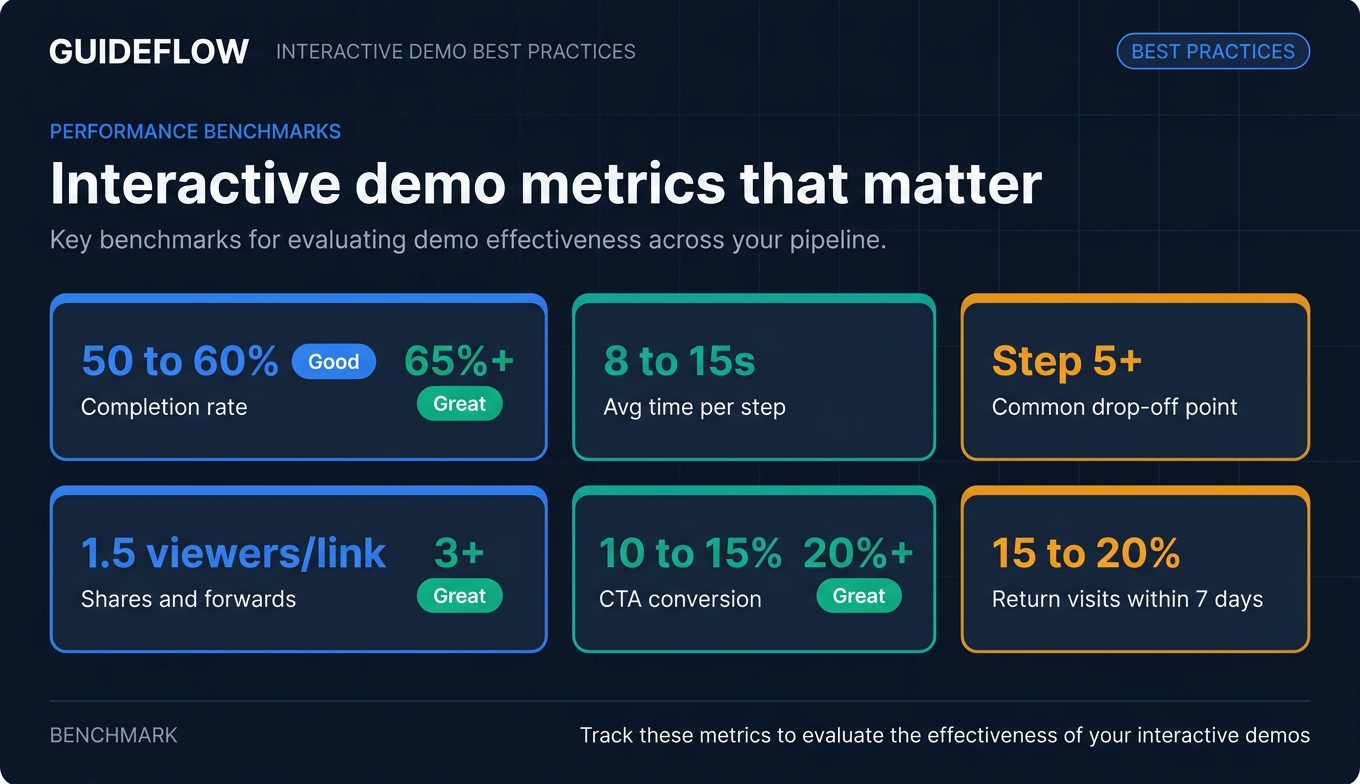
| Metric | What it measures | Benchmark (good) | Benchmark (great) |
|---|---|---|---|
| Completion rate | % of viewers who reach the final step | 50 to 60% | 65%+ |
| Average time per step | Engagement depth per screen | 8 to 15 seconds | Varies by complexity |
| Drop-off point | Where viewers abandon | After step 5+ | No single-step drop above 20% |
| Shares / forwards | Multi-stakeholder reach | 1.5 viewers per link | 3+ viewers per link |
| CTA conversion | % who take the next action | 10 to 15% | 20%+ |
| Return visits | Repeated engagement | 15 to 20% return within 7 days | 25%+ |
How to interpret the numbers:
A high demo completion rate with low CTA conversion means the demo is engaging but the next step isn't compelling enough. Revisit your CTA copy and make sure it matches the deal stage.
A low completion rate with a sharp drop-off at a specific step means that step is confusing or irrelevant. Check the tooltip language and whether the step matches the viewer's role.
High shares (3+ viewers per link) with high completion means your champion is actively selling internally and the demo is resonating with the broader buying committee. This is the strongest buying signal you can get from an async interaction.
Use these metrics in pipeline reviews. "The prospect's team viewed the demo 4 times, with the highest engagement on the integration section" is a stronger pipeline signal than "the prospect said they're interested."
Common interactive demo mistakes (and how to fix them)
These patterns show up in nearly every presales team's demo library. They're easy to spot once you know what to look for.
1. Building a product tour instead of answering a question. The demo follows the nav menu (Dashboard, Settings, Reports, Integrations) instead of answering a specific buyer question. The prospect sees your product's architecture, not their answer. Fix: start with the buyer's top 3 questions (Best Practice #1).
2. Sending the same demo to every stakeholder. The CISO and the end user get identical flows. One of them sees irrelevant content for the first 8 steps and closes the tab. Fix: create role-specific variants from a single base demo (Best Practice #3). With a no-code editor, creating a variant takes minutes.
3. Burying the value behind setup screens. The first 5 steps show login, onboarding wizard, and empty states. The prospect never reaches the feature that matters. One version of a demo had 23% completion with its original step count. After moving the core value proposition to step 2 and simplifying to three decision points, completion jumped to 61%. Fix: front-load the aha moment (Best Practice #6).
4. Ignoring the analytics after sharing. The demo is sent and the SE moves on. No one checks whether the prospect viewed it, where they spent time, or whether they shared it. The next call starts with "so, did you get a chance to look at the demo?" instead of a targeted conversation about the prospect's actual interests. Fix: read the analytics before your next call (Best Practice #10).
5. Sharing demos that show old UI. A demo built 4 months ago shows a settings page that was redesigned last sprint. The prospect clicks through the demo, likes what they see, and then encounters a completely different interface on their first login. That disconnect erodes trust. Fix: version your demos on a 30-day review cadence and archive anything outdated (Best Practice #11).
Conclusion
Interactive demo best practices for SEs come down to one principle: build for the buyer's evaluation process, not your product's feature list.
The practices that move deals are personalization by stakeholder role, analytics-driven follow-up, and a shared template library that scales quality across the team. These aren't theoretical. They're the patterns that separate presales teams with 65%+ completion rates and measurable deal acceleration from teams that send generic demos and hope for the best.
Here's your next step: pick one deal in your pipeline this week. Build a personalized interactive demo for the next stakeholder who needs to see the product. Track the analytics. Adjust from there.
Start your journey with Guideflow today!
FAQs
It depends on context. For cold outreach, keep it under 8 steps (60 to 90 seconds). For mid-funnel technical evaluation, 12 to 20 steps with branching paths work well. For champion enablement, aim for 5 to 10 steps focused on the value story the champion needs to tell internally. Research shows the highest completion rates occur in demos between 1 and 6 steps for top-of-funnel use cases.
An interactive demo is a guided, step-by-step walkthrough where the prospect follows a curated path through your product. A sandbox is an open, explorable replica where the prospect clicks anywhere and navigates freely. Interactive demos perform best for early-stage evaluation and async sharing, where you want to control the narrative. Sandboxes excel at deep technical validation and hands-on testing, where the buyer wants to explore on their own terms.
Start with a base demo that covers your core product flow. Then create variants by showing or hiding steps, adjusting tooltip text, and swapping data to match each stakeholder's role. For example, the security lead sees compliance settings while the end user sees daily workflows. No-code editors like Guideflow let you create these variants in minutes without rebuilding the demo from scratch, and CRM-driven dynamic variables auto-populate prospect-specific details.
Focus on completion rate, step-level drop-off, time per step, shares and forwards, and CTA conversion. Completion rate tells you if the demo is engaging. Drop-off points tell you where to improve. Shares tell you whether you're reaching the buying committee. CTA conversion tells you whether the demo is moving deals forward. Track these per demo and per deal to build a picture of what's working.
Interactive demos and live demos work best together. Interactive demos support asynchronous selling in B2B by handling the 60 to 70% of stakeholders who need to understand the product's value and workflow on their own schedule, without requiring a live call for every person. Complex technical deep-dives and executive presentations benefit from a live SE conversation where you can read the room and adjust in real time. The combination of both covers the full buying committee more efficiently than either alone.
Review your top 5 most-shared demos every 30 days. Check them against the current product UI. Update screenshots, tooltip text, and flow paths for any screens that have changed. Archive demos that reference deprecated features or old layouts. With the right interactive demo software, these updates take minutes and keep your demo library current without adding overhead.
The best software demo tool depends on your workflow. Look for browser-based capture (so you can build demos without engineering), no-code editing, personalization at the stakeholder level, session-level analytics that sync to your CRM, and responsive mobile support. Guideflow is built for this use case, with capture in a few clicks, AI-assisted editing, and analytics that route to Salesforce, HubSpot, and Slack. You can also explore the best presales software tools to see how Guideflow compares alongside other platforms in the presales stack.
Context matters more than the link. Don't send a generic "check out our demo" email. Reference the specific pain point from your last conversation and explain what the demo shows: "You mentioned reporting was a priority. This 3-minute walkthrough shows how custom reports work, including the export to PDF feature you asked about." Personalized context increases open-to-click rates by 2 to 3x compared to generic sends. The more specific your framing, the more likely the prospect is to click.