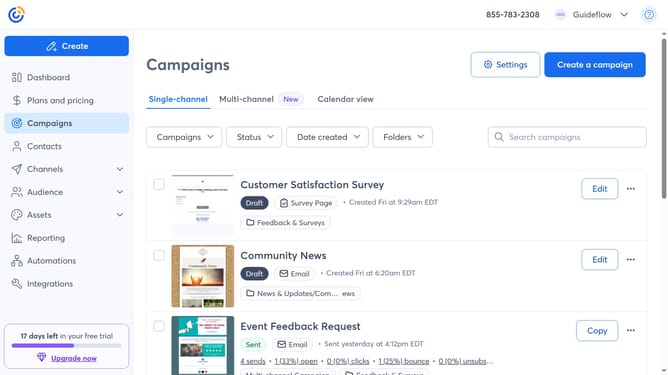
How to restore a deleted campaign in Constant Contact
Here is how to restore a deleted campaign in constant contact
- First click on "Campaigns" in the left sidebar menu
- Next click on the "Status" dropdown filter in the campaigns list header
- Select the "Deleted" option from the status dropdown menu
- Then locate the campaign you want to restore from the list of deleted campaigns
- Finally click the "Restore" button next to the selected campaign
- The campaign will now be moved back to your main campaign list
Why should you restore a deleted campaign in Constant Contact
Constant Contact is a versatile tool for email marketing and online campaign management.
The ability to restore a deleted campaign in Constant Contact ensures that accidental mistakes don't impact your marketing strategy.
By easily recovering deleted campaigns, you maintain momentum and continuity in your communication efforts, saving time and preventing data loss.
This feature not only offers peace of mind but also fosters a more flexible and efficient content management experience.
Last update