How to delete a dashboard in HubSpot
Here is how to delete a dashboard in hubspot
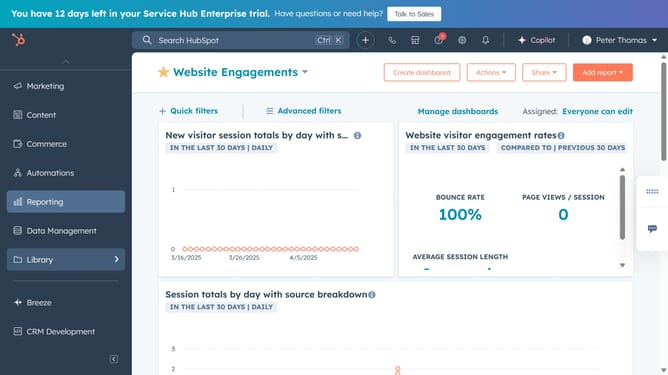
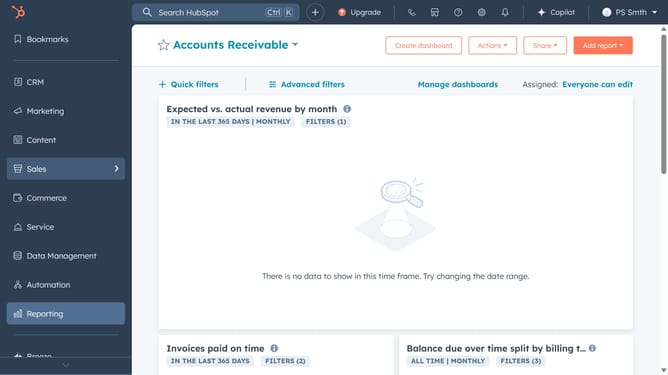
- First click on the "Reports" icon in the left sidebar menu
- Next click on "Dashboards" in the expanded Reports submenu
- Then click "Manage dashboards" button in the top menu bar
- Next hover over the document you want to delete and click on "Actions" dropdown button
- Select "Delete" from the Actions dropdown menu
- In the confirmation dialog, check "Also delete all reports" to remove the reports with the dashboard
- Finally click the "Delete dashboard" button to confirm the deletion
Why should you delete a dashboard in HubSpot
HubSpot is a comprehensive platform designed to enhance your marketing, sales, service, and CRM efforts.
Deleting a dashboard in HubSpot helps keep your workspace organized and clutter-free, allowing for more effective data management.
By removing outdated or unnecessary dashboards, you ensure that only the most relevant and useful information is accessible, enhancing productivity and focus.
This feature ultimately streamlines your workflows, making it easier to concentrate on actionable data that drives business success.
Last update