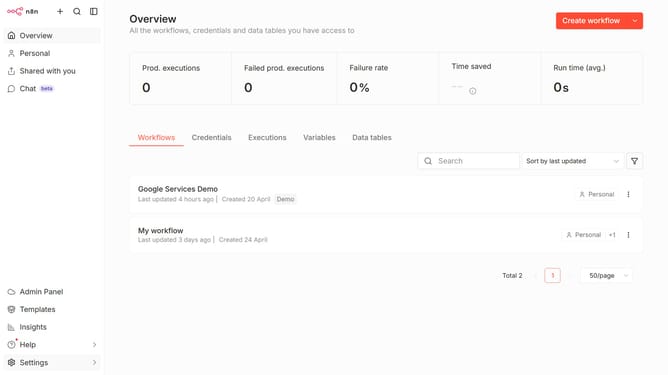
How to create n8n API credential in n8n
Here is how to create n8n api credential in n8n
- First click on the dropdown arrow next to "Create workflow" button in the header.
- Then click on "Create credential" button.
- Next, in the modal window, click on the "Search for app..." input field.
- Then type "n8n" in the search input and click on "n8n API" option.
- After that, click on the "Continue" button.
- Then fill in the credential details.
- Finally click on the "Save" button.
Why should you create n8n API credential in n8n
n8n is a versatile workflow automation tool designed to seamlessly connect various apps and services, enhancing operational efficiency.
Creating an API credential in n8n is a pivotal feature that empowers you to authenticate easily and securely while integrating different platforms.
By streamlining the connection processes, n8n removes technical barriers, enabling even those with limited programming knowledge to automate complex workflows.
This feature ensures secure data flows, optimizing business processes, and enhancing productivity with minimal effort.
Last update