How to view a weekly financial summary as a client Upwork
Here is how to view a weekly financial summary as a client upwork
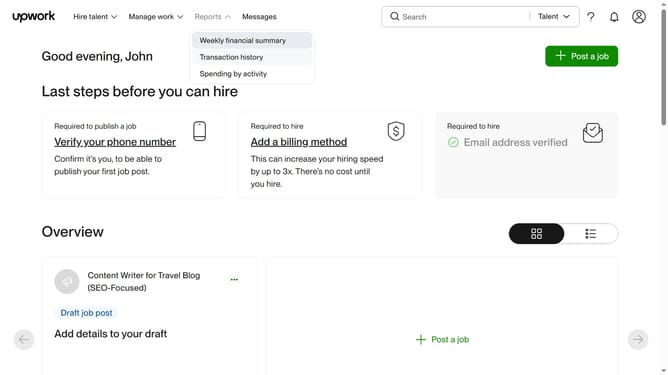
- First click on "Weekly financial summary" option in the Reports dropdown menu
- Then click on the date selector bar in the Select week section
- Finally select your preferred week range to view
Why should you view a weekly financial summary as a client Upwork
Upwork is a global freelancing platform designed to connect businesses with skilled professionals for projects of any size.
Viewing a weekly financial summary as a client on Upwork offers a comprehensive glimpse into your spending patterns and budget allocation. This feature allows clients to stay on top of their project expenses, ensuring that financial resources align with project goals and timelines.
By providing detailed insights into weekly spending, clients can make informed decisions about upcoming projects and adjustments, fostering a more strategic and efficient approach to managing freelance engagements.
Last update