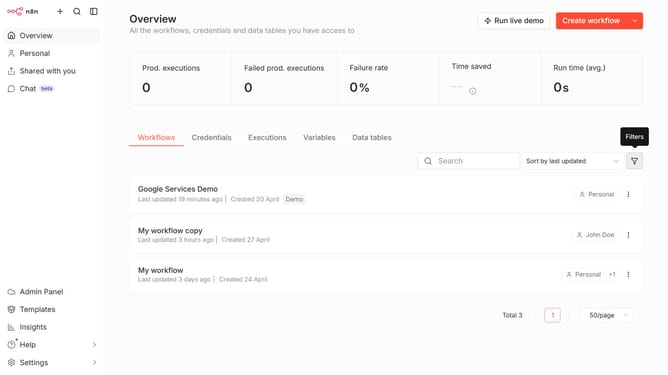
How to sort workflows by name Z–A in n8n
Here is how to sort workflows by name z–a in n8n
- First click on "Workflows" tab in the top menu
- Then click on "Sort" dropdown in the top menu
- Finally select "Sort by name (Z-A)" option from the dropdown menu
Why should you sort workflows by name Z–A in n8n
n8n is an innovative, open-source workflow automation tool that empowers users to seamlessly connect different applications and automate repetitive tasks.
Sorting workflows by name from Z–A in n8n assists in organizing and prioritizing tasks efficiently. This feature allows users to quickly locate specific workflows that may be closer to the bottom of an alphabetical list, enhancing user productivity.
The ability to sort in reverse alphabetical order also helps in decluttering the workspace, providing a clear view of recent or frequently accessed workflows. This efficiency ensures users can maintain a streamlined workflow management process.
Last update