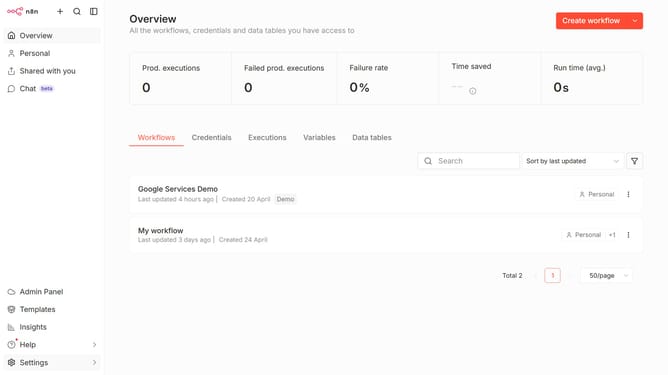
How to create Microsoft Outlook OAuth2 API credential in n8n
Here is how to create microsoft outlook oauth2 api credential in n8n
- First click on the dropdown arrow next to "Create workflow" button
- Then click on "Create credential" button
- Then type "Microsoft Outlook" in the search bar
- Then click on "Microsoft Outlook OAuth2 API" option
- Then click on the "Continue" button
- Finally click on the "Connect to Microsoft Outlook" button
Why should you create Microsoft Outlook OAuth2 API credential in n8n
n8n is a versatile workflow automation tool designed to seamlessly integrate and automate a variety of tasks across different applications.
Creating Microsoft Outlook OAuth2 API credentials in n8n allows users to securely connect their Outlook accounts for tailored automation workflows. This feature eliminates repetitive email tasks, saving time and increasing productivity.
Utilizing OAuth2 ensures enhanced security in authenticating connections, providing peace of mind while enhancing the functionality and integration capabilities within n8n's ecosystem.
Last update