How to mark tasks complete in Asana
Here is how to mark tasks complete in asana
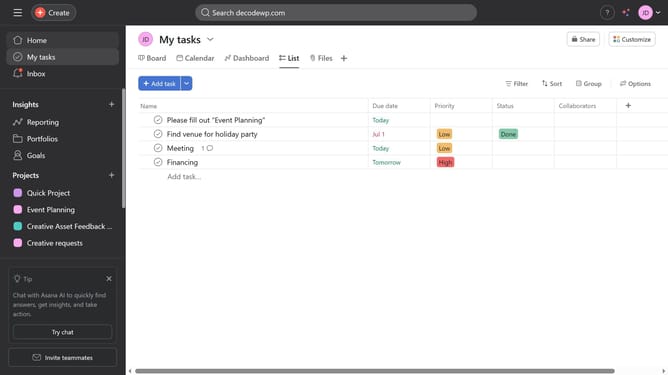
- First click on the "My tasks" option in the left sidebar menu
- Then click on the task you want to mark as complete
- Next click on the "Filter" button in the top toolbar
- Then select the "Completed tasks" option from the quick filters menu to filter out completed tasks
- Then select the "Completed tasks" option from the Quick Filters menu to view completed tasks
Why should you mark tasks complete in Asana
Asana is a dynamic project management platform designed to help teams organize, track, and manage their work efficiently.
One of its core features is marking tasks complete, a simple action with powerful implications. This feature enables users to effortlessly track progress, providing a gratifying sense of accomplishment and clarity on what’s been achieved.
By marking tasks complete, teams can maintain focus on remaining priorities, boosting productivity and ensuring important deadlines are met. This clear visual indicator helps everyone stay aligned and informed, fostering an environment of transparency and collaboration.
Last update