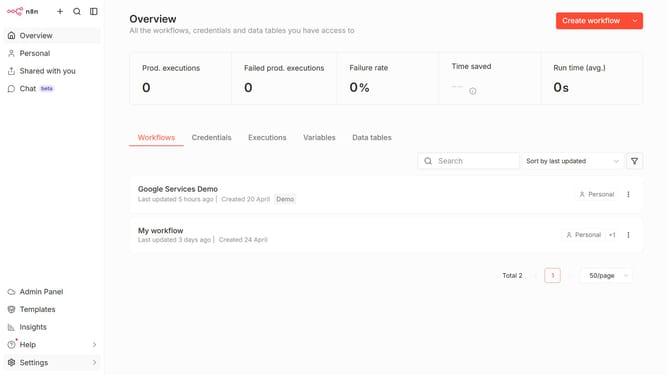
How to create Microsoft SQL credential in n8n
Here is how to create microsoft sql credential in n8n
- First click on the dropdown arrow next to "Create workflow" button
- Then click on "Create credential" option
- Next click on the search bar and enter "SQL"
- Then click on "Microsoft SQL" option
- Next click on the "Continue" button
- Finally click on the "Save" button
Why should you create Microsoft SQL credential in n8n
n8n is an automation tool empowering seamless integration between various applications.
Creating Microsoft SQL credentials within n8n is straightforward, facilitating secure and efficient database management. This feature allows you to effortlessly connect and interact with your Microsoft SQL databases, enhancing workflow automation.
Utilizing Microsoft SQL credentials in n8n streamlines data processing, boosts productivity, and supports complex integrations, ensuring your systems run smoothly and effectively.
Last update