How to export a Confluence space as HTML
Here is how to export a confluence space as html
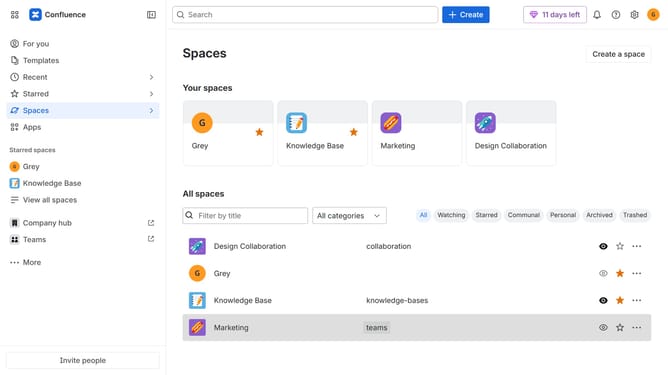
- First click on "Spaces" in the left sidebar
- Next click on the "View all spaces" option from the pop-up menu
- Click on the space you want to export to open it
- In the left sidebar, click on the three dots menu next to the space name
- After that, click on "Space settings" in the dropdown menu
- In the left panel, click on "General"
- Then, click on "Export space" in the submenu
- Next, click on the "Advanced Options" button in the "File format" section
- Then, select the “HTML” export format under Advanced options
- After that, click on the "Next" button
- Now, select the content you want to include in the export
- Then click on the "Export" button
- Finally, click on the "Download here" link to download the HTML export file
Why should you export a Confluence space as HTML
Confluence is a powerful collaboration tool designed to help teams manage and organize their work effectively.
Exporting a Confluence space as HTML is a feature that allows users to create a static, portable version of their space’s content.
This can be extremely beneficial for sharing information outside of the Confluence platform, ensuring access during system downtime, or preserving a snapshot of content at a particular time.
By exporting as HTML, you maintain readability and access to your documents without requiring users to log into Confluence directly.
Last update