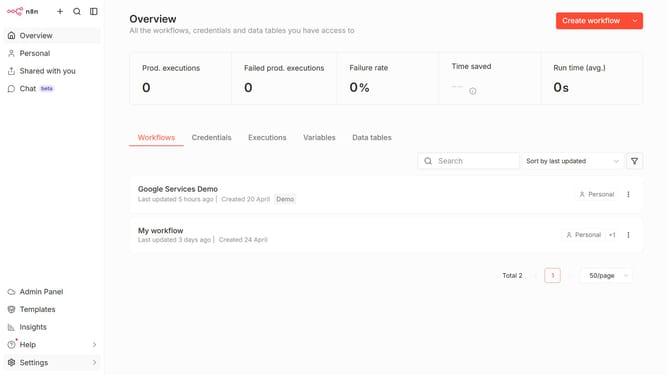
How to create Google Tasks OAuth2 API credential in n8n
Here is how to create google tasks oauth2 api credential in n8n
- First click on the dropdown arrow next to "Create workflow" button
- Then click on the "Create credential" button
- After that click on the "Search for app..." input field and enter "google tasks"
- Next, select "Google Tasks OAuth2 API" item
- Then click on the "Continue" button
- Finally click on the "Sign in with Google" button
Why should you create Google Tasks OAuth2 API credential in n8n
n8n is a powerful workflow automation tool that connects different services and applications with ease.
By creating Google Tasks OAuth2 API credentials in n8n, users can seamlessly enhance their task management processes. This feature allows for secure authentication, ensuring that all your actions with Google Tasks are smooth and safe, without manual interference.
Integrating Google Tasks with n8n maximizes productivity by automating repetitive tasks. It empowers users to efficiently organize their to-do list, prioritize tasks, and streamline their workflow, ultimately enhancing decision-making processes through automation.
Last update