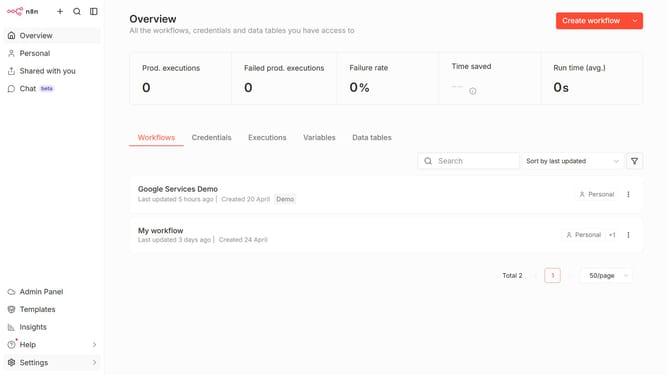
How to create Google Firebase Realtime Database OAuth2 API credential in n8n
Here is how to create google firebase realtime database oauth2 api credential in n8n
- First click on the dropdown arrow next to "Create workflow" button.
- Then click on "Create credential" button.
- Then click on the "Search for app..." input field and enter "google firebase".
- Then click on "Google Firebase Realtime Database OAuth2 API" option.
- Then click on the "Continue" button.
- Then fill in the important input fields.
- Finally click on the "Sign in with Google" button.
Why should you create Google Firebase Realtime Database OAuth2 API credential in n8n
n8n is a powerful automation tool designed to connect various applications in a seamless and efficient workflow.
Creating Google Firebase Realtime Database OAuth2 API credentials in n8n allows users to seamlessly integrate and automate their database processes. This feature simplifies the authentication process, ensuring you access Firebase’s real-time capabilities efficiently and securely.
By tapping into Google Firebase’s robust infrastructure, n8n users can enhance their data management strategies, ensuring real-time data synchronization that supports dynamic and responsive application behavior. This integration enhances workflow efficiency, allowing for a greater focus on innovation and productivity.
Last update